
빈티지 사진 복원
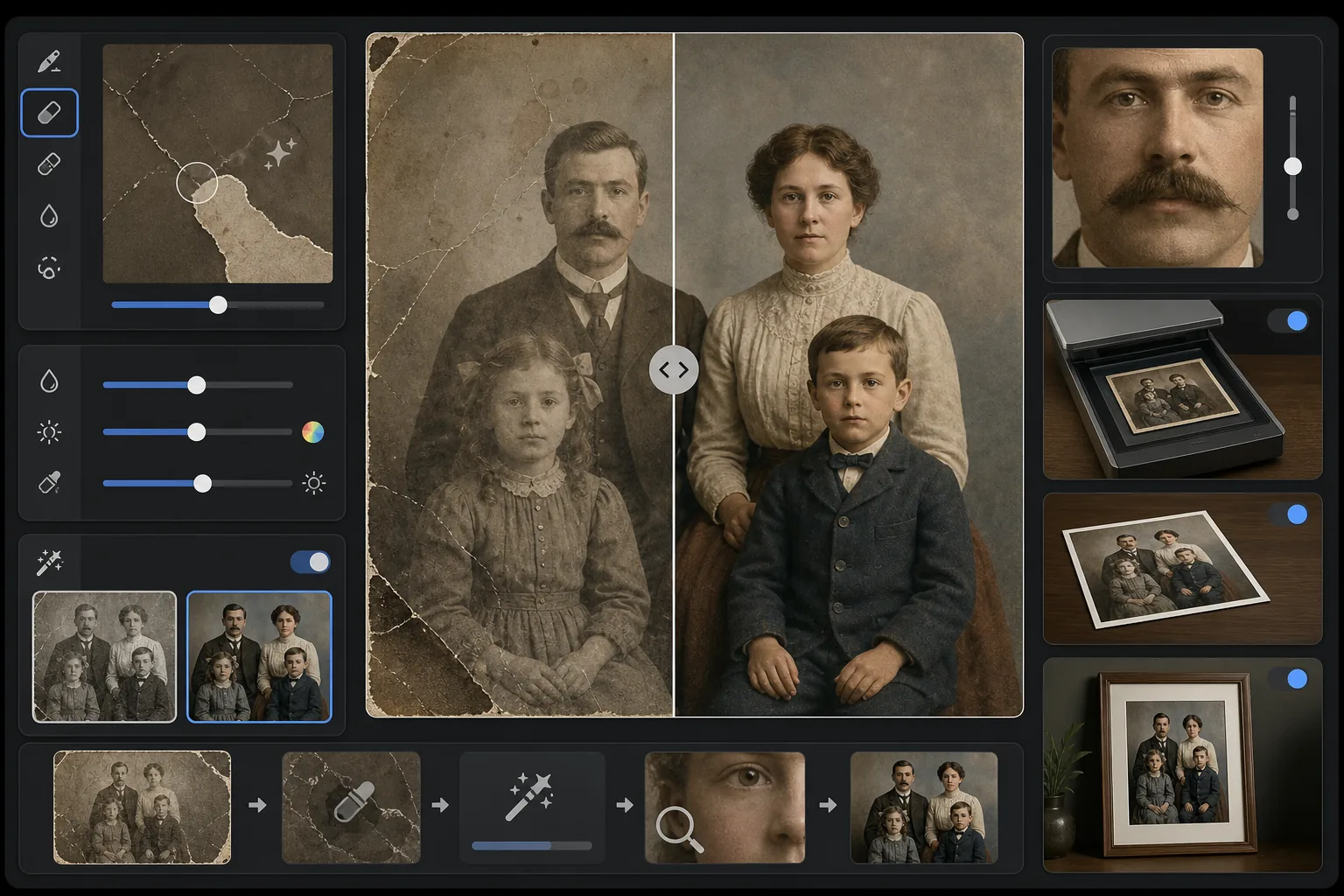
소중한 오래된 사진을 되살리세요. 이 템플릿은 수십 년이 인화된 사진에 남긴 손상을 복구합니다. 스크래치, 주름, 얼룩을 제거하고, 바랜 인화물에서 색상을 복구하며, 세피아나 흑백 원본까지도 이미지의 시대적 특성을 보존하면서 사실적인 풀 컬러로 변환합니다.
이 템플릿 무료로 사용해보기Restoration template preview
이 템플릿의 기능
스캔한 빈티지 사진의 물리적 손상과 노화 효과를 복구합니다. Magic Eraser는 주변 맥락에서 누락된 이미지 콘텐츠를 재구성하여 스크래치, 주름, 물 얼룩, 곰팡이 반점, 찢어진 가장자리를 제거합니다. AI Enhance는 수십 년에 걸쳐 변색되거나 바랜 색상을 복구하고, 세월로 흐려진 디테일을 선명하게 하며, 흑백 또는 세피아 사진을 원본 이미지의 시대를 존중하는 시대에 정확한 색상으로 채색할 수 있습니다.
템플릿 설정
| 손상 복구 | 강력 — 스크래치, 주름, 얼룩, 찢어진 가장자리를 제거 |
| 색상 복구 | 전체 스펙트럼 — 바랜 색소를 원래의 생동감으로 복원 |
| 채색 모드 | 끄기, 은은하게 또는 완전 (흑백 및 세피아 원본용) |
| 디테일 복구 | 세월과 낮은 스캔 해상도로 흐려진 얼굴과 미세한 디테일을 재구성 |
| 출력 크기 | 원본 스캔 크기에 맞추며 선택적 2× 업스케일 가능 |
| 시대 보존 | 시대에 맞는 그레인 질감과 톤 품질을 유지 |
이 템플릿 사용 방법
원본을 스캔하거나 촬영하세요
가장 복구 가능한 디테일을 얻으려면 빈티지 사진을 600 DPI 이상으로 스캔하세요. 스캔이 불가능한 경우, 평평한 표면에서 고르고 확산된 빛 아래 인화물을 촬영하세요 — 광택 인화물에 반사 얼룩을 만드는 플래시는 피하세요.
물리적 손상을 복구하세요
Magic Eraser는 스크래치, 주름, 물 손상, 곰팡이 반점, 테이프 잔여물을 식별하고 제거합니다. AI는 주변 이미지 콘텐츠를 분석하여 누락된 영역을 재구성합니다 — 찢어진 모서리를 채우고, 얼굴을 가로지르는 균열을 이어주며, 얼룩 변색을 제거합니다.
색상을 복구하거나 추가하세요
바랜 컬러 인화물의 경우, AI Enhance는 서로 다른 염료 층이 시간이 지나며 열화되는 특정 방식을 역으로 되돌려 원래의 색상 팔레트를 복원합니다. 흑백 또는 세피아 원본의 경우, 선택적 채색이 피부 톤, 나뭇잎, 하늘, 직물 패턴과 같은 맥락 단서를 기반으로 사실적인 색상을 추가합니다.
선명하게 하고 내보내세요
디테일 복구는 수십 년의 노화로 흐려진 얼굴 특징, 텍스트, 미세한 디테일을 선명하게 합니다. 원본 스캔 해상도로 내보내거나 원본보다 큰 크기로 인쇄하기 위해 2×로 업스케일하세요.
최상의 결과를 위한 전문가 팁
- ✓스캐너가 지원하는 가장 높은 해상도로 스캔하세요 — 최소 600 DPI, 가능하면 1200 DPI. 캡처된 디테일이 많을수록 AI가 손상된 영역을 재구성할 때 활용할 자료가 많아집니다.
- ✓사진이 액자나 앨범에 끼어 있다면 찢어질 위험을 감수하기보다 그 자리에서 촬영하세요 — 템플릿이 액자 가장자리와 앨범 페이지 아티팩트를 제거할 수 있습니다.
- ✓역사적 사진의 채색에는 가능하면 시대(연대)와 장소에 대한 맥락을 제공하세요 — 의복 색상, 자동차 색상, 건축 자재는 시대와 지역에 따라 크게 달랐습니다.
- ✓전체 복원을 실행하기 전에 사진에서 가장 손상된 영역을 먼저 테스트로 처리하세요 — 이를 통해 재구성 품질이 기대에 부합하는지 확인할 수 있습니다.
자주 묻는 질문
찢어진 모서리처럼 누락된 부분이 있는 사진도 복구할 수 있나요?
+
예. AI는 주변 이미지의 맥락을 사용하여 누락된 영역을 재구성합니다. 하늘, 벽, 나뭇잎과 같은 배경의 경우 결과가 매끄럽습니다. 얼굴이나 중요한 디테일의 누락된 부분의 경우 재구성은 인상적이지만 중요한 특징에는 약간의 수동 조정이 필요할 수 있습니다.
흑백 사진의 채색은 얼마나 정확한가요?
+
채색은 맥락 분석을 사용하여 사실적인 색상을 할당합니다 — 피부 톤, 하늘 파랑, 나뭇잎 녹색, 일반적인 직물 색상은 매우 정확합니다. AI가 맥락에서 판단할 수 없는 사물의 특정 색상(예: 드레스의 정확한 색조)은 보장된 정확함이라기보다 그럴듯한 수준입니다.
복원하면 사진의 빈티지 특성이 사라지나요?
+
아니요. 시대 보존 설정은 빈티지 사진에 그 특성을 부여하는 시대에 맞는 그레인 질감과 톤 품질을 유지합니다. 스크래치와 얼룩 같은 물리적 손상은 제거되지만 원본 시대의 사진적 품질은 존중됩니다 — 1940년대 사진은 손상이 없을 뿐 여전히 1940년대 사진처럼 보입니다.
가족의 추억을 구하세요
손상되거나 바래거나 오래된 사진의 스캔을 업로드하고 수십 년의 마모가 사라지는 것을 지켜보세요. 스크래치는 사라지고, 색상은 복원되고, 추억은 보존됩니다.
무료로 사용해보기