
여행 블로그 사진
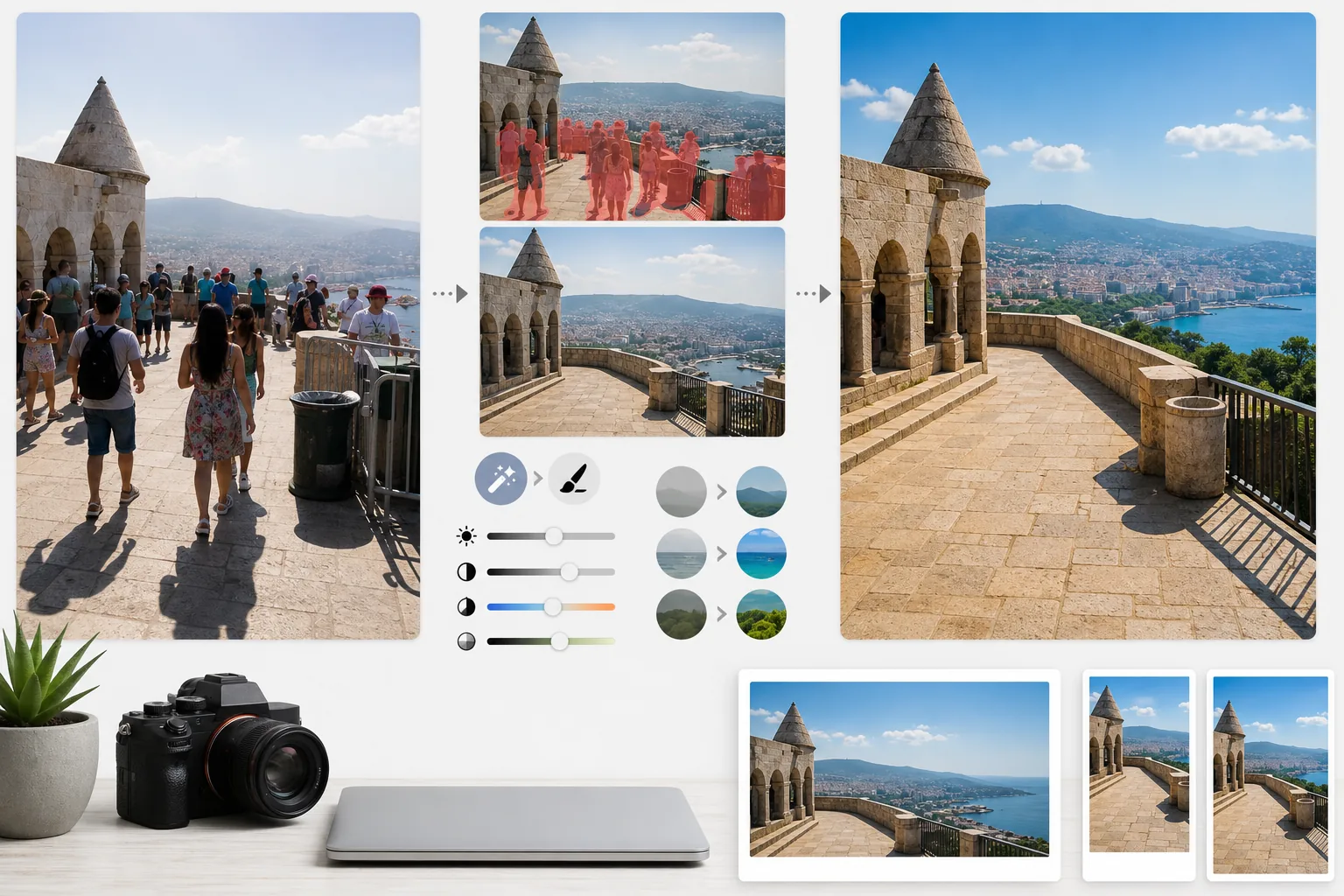
붐비는 여행 스냅 사진을 출판 품질의 여행지 사진으로 바꿔 보세요. 이 템플릿은 Magic Eraser로 랜드마크와 풍경 사진에서 관광객, 사진에 끼어든 사람, 시각적 잡동사니를 제거한 다음, AI Enhance를 적용해 여행 사진에서 흔히 겪는 까다로운 노출 조건 — 강한 한낮의 햇빛, 어두운 사원 내부, 역광의 일몰 — 을 보정하고 자연스러운 색감을 강화하여 독자가 당장 여행을 예약하고 싶어지는 이미지를 만들어 줍니다.
이 템플릿 무료로 사용해보기Personal template preview
이 템플릿의 기능
여행 사진의 가장 큰 두 가지 문제, 즉 인파와 나쁜 조명을 해결합니다. Magic Eraser는 기념물 앞에 서 있는 관광객, 화면을 가로지르는 사진 방해꾼, 그리고 장소의 분위기를 망치는 쓰레기통, 공사용 가림막, 임시 표지판 같은 시각적 잡동사니를 제거합니다. AI는 주변 맥락을 활용해 제거된 사람과 사물 뒤의 건축물, 포장도로, 풍경을 재구성합니다. 이어서 AI Enhance는 여행에 특유한 노출 과제를 처리합니다 — 창문이 하얗게 날아가고 그림자가 새까만 대성당과 사원 내부, 열대 여행지에서 색을 밋밋하게 만드는 강한 한낮의 햇빛, 전경이 실루엣으로 변하는 역광의 일몰 장면 등입니다. 색상은 카메라가 다이내믹 레인지에서 늘 부족하게 표현하는, 사람 눈에 실제로 보이는 여행지의 모습을 반영하도록 강화됩니다.
템플릿 설정
| 관광객 제거 | 랜드마크와 풍경 사진에서 사람을 자동 감지하여 제거 |
| 노출 보정 | 까다로운 조명을 위한 HDR 방식의 하이라이트 및 그림자 복원 |
| 색상 강화 | 인위적이지 않게 자연스러운 채도(하늘, 물, 초목)를 강화 |
| 안개 제거 | 대기 중의 안개를 걷어내 멀리 있는 풍경을 더 선명하게 |
| 출력 해상도 | 긴 변 4000px(레티나 품질의 블로그 헤더 이미지) |
이 템플릿 사용 방법
여행 사진 업로드
붐비는 랜드마크, 광활한 풍경, 거리 풍경, 실내 건축물 등 어떤 여행 사진이든 업로드하세요. 이 템플릿은 스마트폰, 미러리스 카메라, 액션 카메라의 JPEG를 지원합니다. 최대한의 편집 유연성을 위해 RAW 파일도 받습니다.
인파와 잡동사니 제거
Magic Eraser가 화면 속 사람을 감지하여 제거합니다. 모든 사람을 제거하거나, 특정 인물(본인이나 동행자)을 남기거나, 주요 건축물이나 풍경 요소를 가리는 사람만 선택적으로 제거할 수 있습니다. AI는 비어 있는 영역을 재구성한 지면, 벽, 풍경으로 채웁니다.
빛과 색상 향상
AI Enhance는 HDR 방식의 처리를 적용해 하얗게 날아간 하늘을 복원하고 깊은 그림자를 끌어올립니다 — 사원 내부와 유럽의 좁은 골목에서 흔히 발생하는 문제입니다. 색상은 여행지에서 당신의 눈에 보인 그대로에 맞춰 강화되며, 특히 하늘의 파랑, 바다의 청록, 초목의 초록이 살아납니다. 대기 중의 안개도 줄여 산과 도시 풍경을 더 선명하게 만듭니다.
블로그 및 소셜용으로 내보내기
레티나 품질의 블로그 헤더 이미지를 위해 긴 변 4000px로, 또는 Instagram, Pinterest, Facebook용 플랫폼별 크기로 다운로드하세요. 파일에는 작품에 위치 정보를 태그하는 사진가를 위해 최적화된 EXIF 데이터 보존 기능이 포함됩니다.
최상의 결과를 위한 전문가 팁
- ✓같은 장면을 몇 초 간격으로 여러 장 촬영하세요. 관광객이 프레임 사이에서 움직이면 AI가 그들 뒤의 지면과 벽에 대한 참조 정보를 확보해, 한 장만 있을 때보다 더 깔끔하게 재구성할 수 있습니다.
- ✓교회, 사원, 박물관의 실내 사진은 촬영 시 약간 과다 노출로 찍으세요. AI는 극도로 어두운 그림자를 끌어올리는 것보다 밝은 하이라이트를 복원하는 것이 더 쉬우며, 실내 사진은 기본적으로 노출 부족이 되기 쉽습니다.
- ✓가능하면 풍경은 골든아워나 블루아워에 촬영하세요. AI Enhance는 한낮의 밋밋한 빛에서도 색을 강화할 수 있지만, 골든아워의 방향성 있는 따뜻한 빛이 풍경에 만들어내는 그림자와 입체감은 어떤 색 보정으로도 재현할 수 없습니다.
자주 묻는 질문
사진 속 저는 남기고 다른 관광객만 제거할 수 있나요?
+
네. 본인이나 동행자를 보호 대상으로 표시할 수 있습니다. AI는 보호된 인물을 원래의 위치, 조명, 그림자 그대로 유지하면서 장면에서 나머지 사람들을 모두 제거합니다.
매우 붐비는 장면에서는 얼마나 잘 작동하나요?
+
인파가 프레임의 약 40% 미만을 차지할 때 가장 효과적입니다. 사람들 사이로 바닥이 보이지 않을 만큼 사람이 빽빽한 광장처럼 극도로 붐비는 장면은 깔끔한 재구성에 필요한 배경 참조 정보가 너무 적습니다. 그런 경우에는 앞쪽 줄만 부분적으로 제거하면 설득력 있는 결과가 나오는 경우가 많습니다.
안개 제거를 하면 사진이 부자연스러워 보이나요?
+
안개 감소 기능은 자연스러운 결과가 나오도록 보정되어 있습니다. 멀리 있는 산과 건물을 흐리게 하는 청회색 대기 산란을 제거하면서도, 풍경 사진에 깊이를 더하는 미묘한 대기 원근감은 그대로 유지합니다. 결과물은 필터를 씌우거나 과도하게 보정한 이미지가 아니라, 맑고 청명한 날에 촬영한 듯한 모습입니다.
Related templates
More personal templates for your workflow.
적절한 배경색, 머리 크기 및 얼굴 표정 요구 사항을 사용하여 비자, 운전 면허증 및 국가 신분증에 대한 규정을 준수하는 신분증 사진을 만듭니다.
배경 정리, 모자 및 가운 Color correction, 흠집 제거, 인쇄용 프레임 및 공지 사항 선명화 기능을 사용하여 졸업 사진을 더욱 멋지게 만드세요.
저조도 소음 감소, 무대 조명 색상 보정, 군중 방해 요소 제거, 어두운 장소 촬영의 디테일 복구를 통해 콘서트 및 이벤트 사진을 향상하세요.
부드러운 배경, 부드러운 색상 그레이딩, 병원의 불필요한 요소 제거, 인쇄 가능한 우편 크기로 아름다운 신생아 알림 카드 사진을 만드세요.
축제 배경, 따뜻한 색상 그레이딩, 눈 효과 및 인쇄용 표준 카드 크기를 사용하여 명절 연하장용 가족 및 인물 사진을 준비합니다.
부드러운 리터칭, 배경 단순화, 따뜻하고 정중한 색상 그레이딩, 인쇄 가능한 서비스 크기를 통해 추모 사진을 복원하고 향상시킵니다.