
반려동물 입양 사진
콘크리트 우리 대신 동물의 개성을 보여주는 사진으로 보호소 동물이 영원한 가정을 찾도록 도와주세요. 이 템플릿은 케이지 창살, 우리 바닥, 보호소 배경을 제거하고 따뜻한 가정 같은 환경이나 깔끔한 단색 배경으로 바꿔줍니다. 조명 보정은 어두운 보호소 사진을 밝게 하고, 모피 디테일 향상은 각 동물 털의 진짜 색과 질감을 보여줍니다.
이 템플릿 무료로 사용해보기Personal template preview
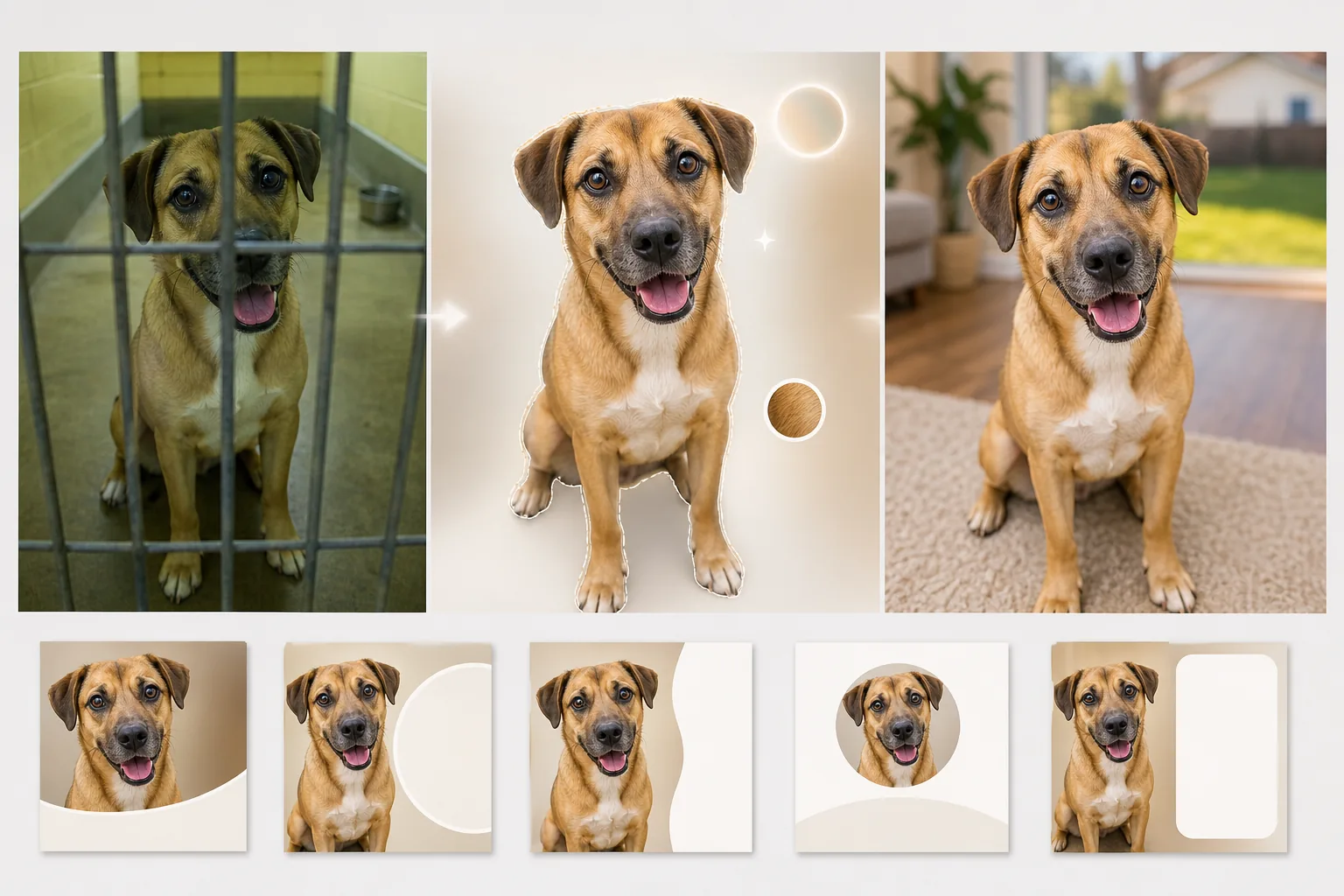
이 템플릿의 기능
조명이 나쁘고 배경이 시설 같으며 동물이 종종 케이지 창살 너머나 좁은 콘크리트 통로에서 촬영되는 보호소 사진 특유의 어려움을 해결합니다. Background Eraser는 우리 창살, 철망 울타리, 보호소 환경을 제거하고 따뜻하고 매력적인 배경 — 풀밭 마당, 아늑한 거실 바닥, 또는 동물에게 모든 시선을 집중시키는 깔끔한 단색 — 으로 바꿔줍니다. AI Enhance는 보호소 사진에서 흔한 노출 부족(천장 형광등, 창문 없음)을 보정하고, 그늘에 가려지기 쉬운 눈을 밝게 하며, 털, 깃털, 비늘의 진짜 색과 질감을 살려내 입양 희망자가 자연광 아래에서 동물이 실제로 어떻게 보이는지 알 수 있게 합니다.
템플릿 설정
| 배경 | 풀밭 마당, 거실 바닥, 단색 파스텔, 또는 투명 |
| 케이지 창살 제거 | 우리 창살, 철망, 철사 울타리를 자동 감지하여 제거 |
| 조명 보정 | 노출 부족한 보호소 사진을 자연광 수준으로 밝게 보정 |
| 눈 향상 | 개성과 또렷함을 보여주도록 눈을 밝게 하고 선명하게 |
| 모피 디테일 | 털 질감을 향상하고 형광등으로 인한 색조 왜곡 보정 |
| 출력 해상도 | 2000×2000px (Petfinder, Adopt-a-Pet, 소셜 미디어용 정사각형) |
이 템플릿 사용 방법
보호소 사진 업로드
보호소, 임시 보호 가정, 야외 행사에서 촬영한 동물 사진을 업로드하세요. 케이지 창살 너머, 어두운 우리 안, 콘크리트 바닥 위에서 찍은 사진 모두 처리됩니다. 이 템플릿은 개, 고양이, 토끼, 새 및 기타 보호소 동물에 사용할 수 있습니다.
보호소 환경 제거
Background Eraser는 우리, 케이지 창살, 콘크리트 바닥, 시설 같은 보호소 배경을 제거합니다. 동물은 가장자리 감지로 분리되어 털, 수염, 귀의 자연스러운 윤곽 — 장모종의 가느다란 털끝까지 — 을 보존합니다.
조명과 디테일 향상
AI Enhance는 자연광을 모사하도록 이미지를 밝게 하고, 보호소 형광등으로 인한 녹황색 색조 왜곡을 보정하며, 털 질감과 눈 디테일을 선명하게 합니다. 동물의 진짜 털색과 무늬가 드러나고, 눈은 입양자를 끌어들이는 밝고 또렷한 모습을 갖게 됩니다.
입양 게시용으로 내보내기
Petfinder, Adopt-a-Pet, 구조 단체 웹사이트에 최적화된 정사각형 2000×2000px로 다운로드하세요. 이 형식은 추가 자르기 없이 Instagram과 Facebook 입양 게시물에도 바로 사용할 수 있습니다.
최상의 결과를 위한 전문가 팁
- ✓촬영할 때는 동물의 눈높이까지 몸을 낮추세요. 위에서 내려다보며 찍은 사진은 동물을 더 작고 덜 매력적으로 보이게 합니다. 눈높이 사진은 보는 사람과 동물 사이에 유대감을 만들어 입양 문의를 유도합니다.
- ✓간식이나 장난감을 카메라 바로 위에 들어 귀를 앞으로 세운 또렷한 표정을 포착하세요. AI는 흐릿한 눈을 밝게 하고 털을 향상할 수 있지만, 무관심한 표정을 호기심 어린 표정으로 바꾸지는 못합니다.
- ✓보호소 사진에서 특징이 사라지기 쉬운 검은 개와 고양이의 경우, 얼굴 정면에 약간의 빛이 비치도록 하세요. 휴대폰 손전등을 옆에서 비추기만 해도 AI가 얼굴 디테일과 눈 윤곽을 복원하기에 충분한 입체감이 생깁니다.
자주 묻는 질문
동물 앞에 있는 케이지 창살을 제거할 수 있나요?
+
네. AI는 동물을 덮고 있는 우리 창살과 철망 울타리의 규칙적인 패턴을 감지해 제거하고, 창살 뒤의 털 무늬와 얼굴 특징을 재구성합니다. 얼굴의 많은 부분을 가리는 두꺼운 창살은 약간의 흔적을 남길 수 있어 소소한 수동 보정이 필요할 수 있습니다.
사진이 동물의 외모에 대해 오해를 불러일으키지는 않나요?
+
아니요. 이 템플릿은 열악한 보호소 조명을 보정하고 시설 같은 환경을 제거하지만, 동물의 신체적 특징, 털 무늬, 크기, 색을 바꾸지 않습니다. 목표는 좋은 빛과 평범한 환경에서 동물이 실제로 어떻게 보이는지 보여주는 것입니다.
보호소가 무료로 사용할 수 있나요?
+
무료 등급에는 개별 임시 보호 자원봉사자와 소규모 구조 단체에 충분한 처리량이 포함됩니다. 처리량이 많은 보호소는 일괄 처리에 대한 비영리 가격을 문의하실 수 있습니다.
Related templates
More personal templates for your workflow.
적절한 배경색, 머리 크기 및 얼굴 표정 요구 사항을 사용하여 비자, 운전 면허증 및 국가 신분증에 대한 규정을 준수하는 신분증 사진을 만듭니다.
배경 정리, 모자 및 가운 Color correction, 흠집 제거, 인쇄용 프레임 및 공지 사항 선명화 기능을 사용하여 졸업 사진을 더욱 멋지게 만드세요.
저조도 소음 감소, 무대 조명 색상 보정, 군중 방해 요소 제거, 어두운 장소 촬영의 디테일 복구를 통해 콘서트 및 이벤트 사진을 향상하세요.
부드러운 배경, 부드러운 색상 그레이딩, 병원의 불필요한 요소 제거, 인쇄 가능한 우편 크기로 아름다운 신생아 알림 카드 사진을 만드세요.
축제 배경, 따뜻한 색상 그레이딩, 눈 효과 및 인쇄용 표준 카드 크기를 사용하여 명절 연하장용 가족 및 인물 사진을 준비합니다.
부드러운 리터칭, 배경 단순화, 따뜻하고 정중한 색상 그레이딩, 인쇄 가능한 서비스 크기를 통해 추모 사진을 복원하고 향상시킵니다.