
메뉴 보드 디자인
직접 촬영한 음식 사진으로 전문적인 메뉴 보드 그래픽을 만드세요. 이 템플릿은 식탁 세팅과 어수선한 배경에서 개별 요리를 분리하고, 모든 항목의 외관을 통일하여 일관된 메뉴를 완성하며, 디지털 메뉴 보드, 인쇄 메뉴, DoorDash·Uber Eats·Grubhub 같은 배달 플랫폼 등록에 최적화된 레이아웃 준비 이미지를 내보냅니다.
이 템플릿 무료로 사용해 보기Food template preview
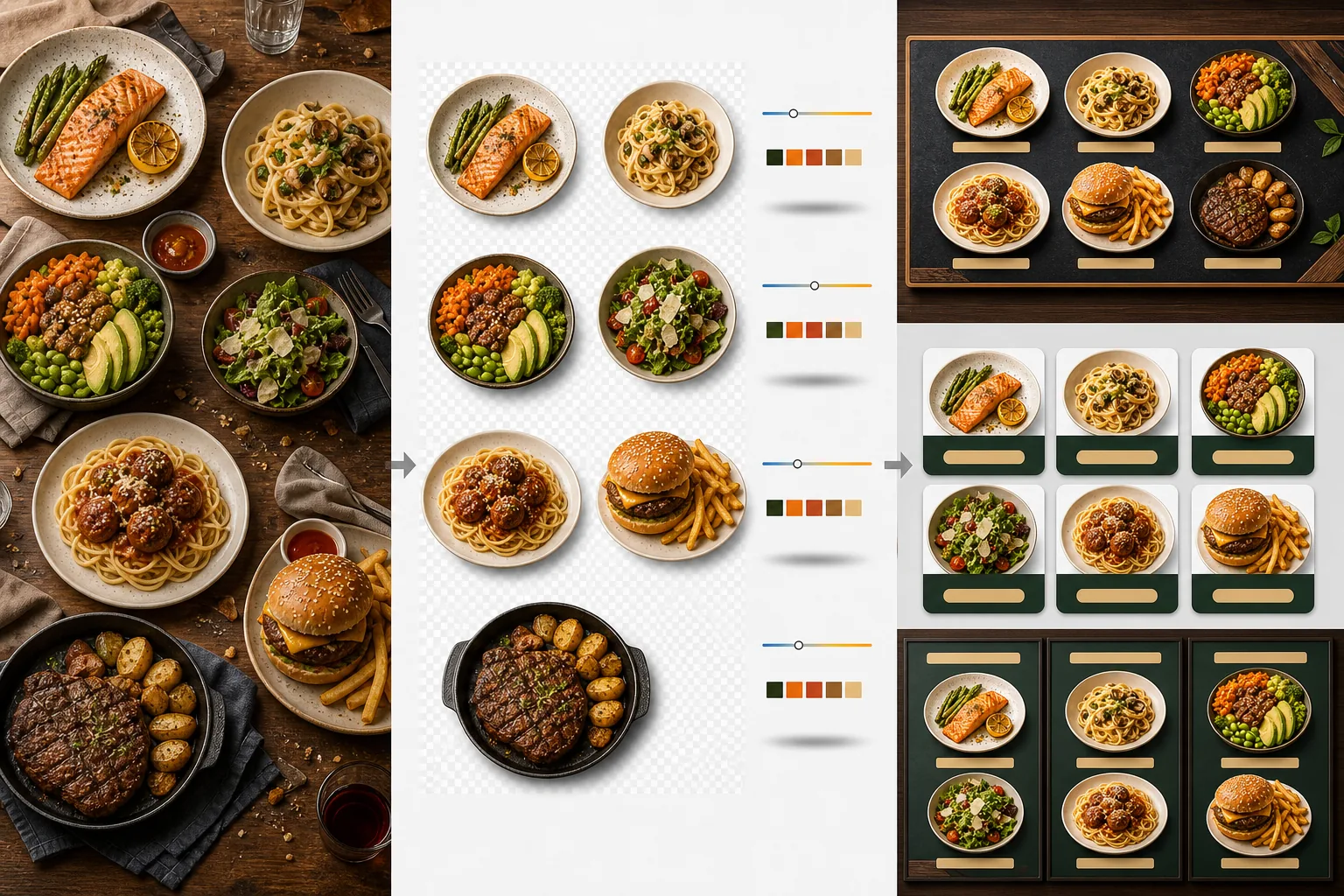
이 템플릿의 기능
서로 다른 시간, 다른 조명, 다른 식탁에서 촬영된 일관성 없는 음식 사진을 메뉴에 바로 쓸 수 있는 통일된 이미지 세트로 변환합니다. Background Eraser는 각 요리 — 접시, 그릇, 포장 — 를 원래의 식탁 세팅에서 분리하고, 배경을 레스토랑 브랜딩에 어울리는 일관된 색상이나 텍스처로 교체합니다. 색온도는 모든 항목에 걸쳐 정규화되어 따뜻한 텅스텐 조명, 차가운 LED 패널, 자연스러운 창가 빛 아래에서 촬영한 사진이 모두 일관되게 보입니다. 음식 색상은 비현실적인 수준으로 넘어가지 않으면서 식욕을 돋우도록 강화됩니다 — 채소는 선명하게, 고기는 따뜻하고 육즙이 풍부하게, 소스는 윤기 있게. 그 결과 무작위로 찍은 휴대폰 사진 모음이 아니라 통일된 시각적 메뉴 시스템으로 기능하는 이미지 세트를 얻게 됩니다.
템플릿 설정
| 배경 | 단색(브랜드 색상 일치), 나무 텍스처, 슬레이트 또는 투명 |
| 색온도 정규화 | 모든 항목을 5000K 주광 화이트 밸런스에 맞춤 |
| 음식 색상 강화 | 식욕을 돋우는 강화(따뜻한 단백질, 선명한 채소, 윤기 있는 소스) |
| 그림자 스타일 | 단색 배경에서 깊이감을 주는 은은한 드롭 섀도 |
| 출력 크기 | 1200×1200px(배달 플랫폼), 800×600px(디지털 메뉴 보드), 사용자 지정 |
이 템플릿 사용 방법
음식 사진 업로드
개별 메뉴 항목의 사진을 업로드하세요. 영업 중에 찍은 휴대폰 사진, 정식 음식 촬영, 배달 플랫폼 등록용 사진 모두 사용할 수 있습니다. 템플릿은 각 요리를 개별적으로 처리하여 전체 메뉴에 걸쳐 일관된 결과를 제공합니다.
배경에서 요리 분리하기
Background Eraser는 각 요리를 식탁, 식탁 매트 또는 카운터 표면에서 분리합니다. 가장자리 감지는 접시 테두리, 그릇 가장자리 또는 포장 윤곽선을 정밀하게 따라갑니다. 접시 가장자리를 넘어가는 가니시와 토핑 — 파슬리 한 줄기, 흘려 뿌린 소스 — 도 그대로 보존됩니다.
색상과 스타일 통일하기
색온도가 정규화되어 모든 요리가 동일하게 일관된 조명 아래에 있는 것처럼 보입니다. 음식 색상은 식욕을 자극하도록 강화됩니다. 각 요리 아래에 은은한 그림자가 추가되어 새 배경 위에서 안정감 있고 입체적인 모습을 줍니다.
메뉴와 플랫폼용으로 내보내기
DoorDash, Uber Eats, Grubhub 등록용으로 1200×1200px로 다운로드하세요. 디지털 메뉴 보드와 TV 디스플레이용으로는 800×600px로 내보내세요. 맞춤형 인쇄 메뉴와 사이니지를 제작하는 그래픽 디자이너를 위해 투명 PNG 내보내기도 제공됩니다.
최상의 결과를 위한 전문가 팁
- ✓요리는 바로 위에서(플랫 레이) 또는 45도 각도로 촬영하세요. 이 두 각도는 접시 윤곽이 완전히 보여 가장 깔끔한 배경 제거 결과를 만들며, AI가 요리를 식탁에서 정밀하게 분리할 수 있습니다.
- ✓촬영 전에 접시 테두리를 깨끗이 닦으세요. 접시 가장자리의 소스 자국과 부스러기는 분리된 이미지의 일부가 되어 깔끔한 새 배경 위에서 지저분해 보입니다.
- ✓모든 메뉴 항목을 동일한 설정으로 한 번에 일괄 처리하세요. 모든 요리 사진 전반의 일관성이 메뉴를 전문적으로 보이게 하는 요소입니다 — 어긋나는 색온도와 배경 색조는 훌륭한 음식조차 아마추어처럼 보이게 만듭니다.
자주 묻는 질문
음료에도 사용할 수 있나요?
+
네. 잔, 컵, 병, 칵테일도 접시에 담긴 요리와 동일한 정밀도로 분리됩니다. 물, 와인, 투명한 칵테일 같은 투명 음료는 새 배경 위에서도 투명함을 그대로 유지합니다.
음식이 인위적으로 보정된 것처럼 보이나요?
+
색상 강화는 비현실적인 수준으로 넘어가지 않으면서 음식이 가장 먹음직스럽게 보이도록 조정되어 있습니다. 강한 형광등 아래에서 찍은 음식과 자연스러운 주광에서 찍은 음식의 차이라고 생각하세요 — 템플릿은 모든 요리를 이상적인 조건에서 촬영한 것처럼 보이게 합니다.
배달 플랫폼 메뉴 사진에도 적합한가요?
+
네. 1200×1200px 정사각형 출력은 DoorDash, Uber Eats, Grubhub, Postmates의 이미지 요구 사항을 충족합니다. 배달 플랫폼에 전문적으로 보이는 메뉴 사진을 올린 레스토랑은 보정되지 않은 휴대폰 스냅샷을 사용하는 곳보다 꾸준히 더 높은 주문률을 받습니다.
모든 요리를 거부할 수 없게 보이게 하는 메뉴를 만드세요
음식 사진을 업로드하고 디지털 보드, 인쇄 메뉴, 배달 플랫폼에 바로 쓸 수 있는 일관되고 먹음직스러운 메뉴 이미지를 받아보세요.
무료로 사용해 보기Related templates
More food templates for your workflow.