
패션 룩북 사진
계절 컬렉션, 도매 프레젠테이션, 이커머스 캠페인을 위한 편집 품질의 룩북 이미지를 제작하세요. 이 템플릿은 촬영 장소의 배경을 제거하고 깔끔한 스튜디오 배경이나 엄선된 편집 환경으로 교체하며, 원단을 돋보이게 하는 패션 등급의 색상 그레이딩을 적용하고, 의상에 초점을 유지하는 자연스러운 리터칭으로 피부를 개선합니다.
이 템플릿 무료로 사용해 보기Fashion template preview
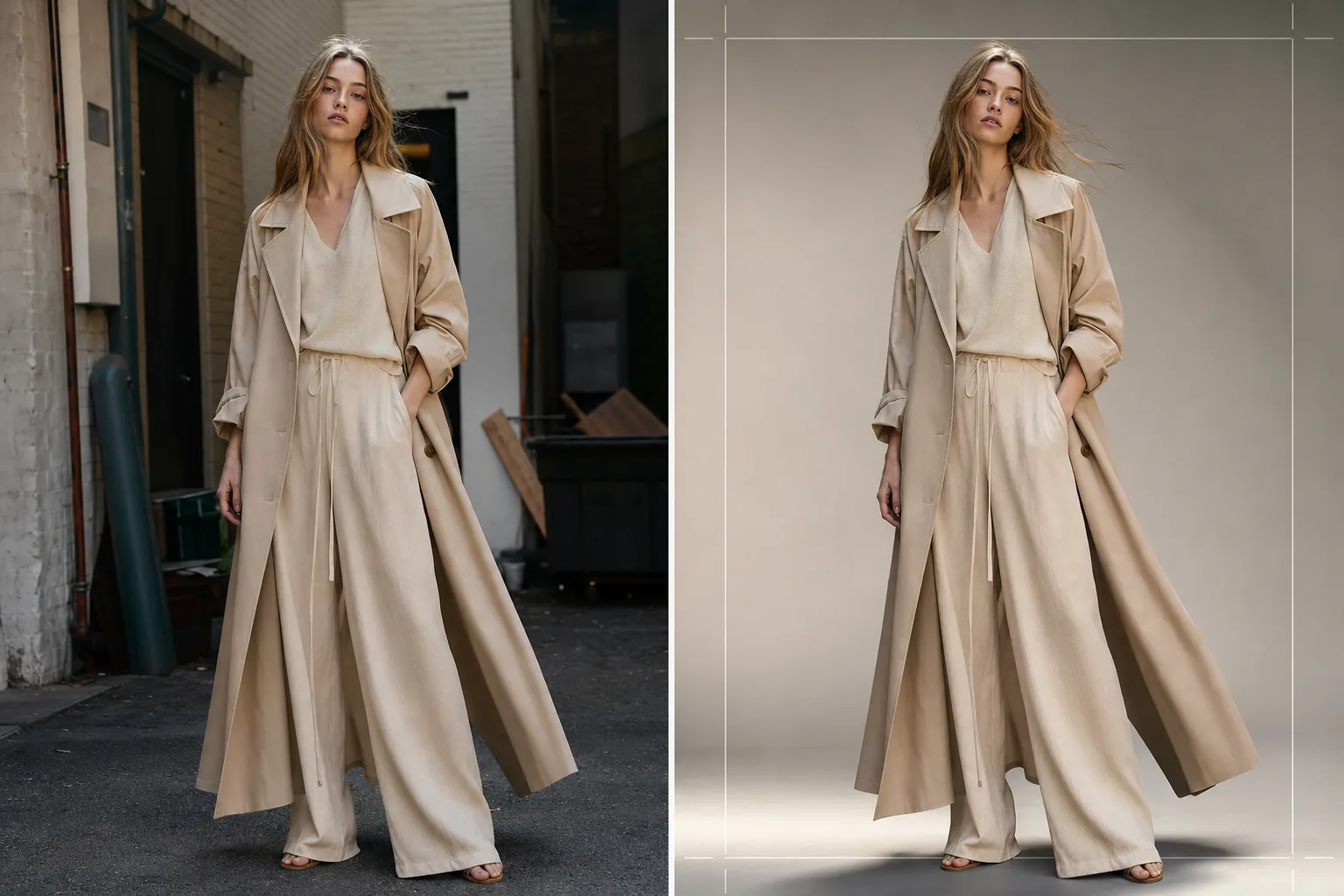
이 템플릿의 기능
현장 또는 스튜디오의 원본 촬영부터 세련되고 브랜드 일관성 있는 이미지까지 전체 룩북 후반 작업 파이프라인을 간소화합니다. Background Eraser는 어떤 환경에서든 모델과 의상을 분리하고 단색 스튜디오 색상, 그라데이션 스윕, 또는 콘크리트 벽, 자연 녹지, 도시 거리 장면 같은 엄선된 편집 배경으로의 교체를 제공합니다. AI Enhance는 원단 유형에 맞춘 색상 그레이딩을 적용하여 — 어스 톤의 린넨과 울에는 따뜻한 톤, 데님과 기능성 원단에는 차가운 톤 — 의상의 질감과 드레이프가 시각적 주인공이 되도록 합니다. 피부 리터칭은 가볍고 편집적이며, 주근깨, 점, 또는 모델을 진정성 있게 보이게 하는 자연스러운 특징을 제거하지 않으면서 일시적인 결점을 고르게 다듬습니다.
템플릿 설정
| 배경 스타일 | 스튜디오 화이트, 심리스 그레이, 그라데이션 스윕, 또는 편집 환경 |
| 색상 그레이딩 | 패션 편집 (원단 적응형: 천연 소재는 따뜻하게, 기능성 소재는 차갑게) |
| 피부 리터칭 | 가벼운 편집 (잡티 제거, 톤 균일화, 자연스러운 특징 보존) |
| 원단 향상 | 의상 디테일 가시성을 위한 질감 선명화 및 드레이프 강조 |
| 자르기 및 프레이밍 | 전신, 4분의 3, 또는 클로즈업 자르기 (텍스트 오버레이용 안전 여백 포함) |
| 출력 해상도 | 4000×6000px (세로 방향, 300 DPI에서 인쇄 준비 완료) |
이 템플릿 사용 방법
룩북 사진 업로드
주요 의상을 착용한 전신 또는 4분의 3 모델 샷을 업로드하세요. 스튜디오 촬영, 야외 장소, 쇼룸 사진 모두 사용 가능합니다. 이 템플릿은 RAW 변환, JPEG, 고해상도 TIFF를 처리합니다.
배경 교체 또는 정교화
Background Eraser는 느슨한 원단 가장자리, 흩날리는 머리카락, 시폰 같은 반투명 소재를 보존할 만큼 정밀한 엣지 감지로 모델을 분리합니다. 브랜드 가이드라인에 맞는 스튜디오 색상으로 배경을 교체하거나 컬렉션 분위기를 보완하는 편집 환경을 선택하세요.
색상 그레이딩 및 향상 적용
AI Enhance는 의상의 원단 질감과 실제 색상을 강조하는 색상 그레이드를 적용합니다. 피부 리터칭은 편집 강도로 적용되어 — 피부를 평평하게 만들거나 자연스러운 특징을 제거하지 않으면서 붉은기와 일시적인 잡티를 고르게 다듬습니다. 원단 선명화는 직조 패턴, 바느질, 드레이프 라인을 돋보이게 합니다.
룩북 및 이커머스용 내보내기
인쇄용 룩북과 라인시트 PDF용으로 4000×6000px로 다운로드하거나 Shopify, 도매 포털, 소셜 미디어용 웹 최적화 크기로 다운로드하세요. 이 템플릿은 통일된 룩북 레이아웃을 위해 전체 컬렉션에 걸쳐 일관된 자르기를 출력할 수 있습니다.
최상의 결과를 위한 전문가 팁
- ✓가능한 한 마네킹보다는 모델에게 의상을 입혀 촬영하세요. AI의 배경 제거와 피부 리터칭은 실제 인체 형태에서 가장 자연스러운 결과를 만들어내며, 구매자는 원단이 몸에 어떻게 드레이프되는지 보여주는 이미지에 더 긍정적으로 반응합니다.
- ✓촬영 중에는 머리끈이나 클립을 사용해 긴 머리카락을 상의와 재킷의 목선에서 떨어뜨려 두세요. 배경 제거는 흩날리는 머리카락을 잘 처리하지만, 칼라 디테일과 목선 구조를 덮는 머리카락은 구매자가 평가하는 바로 그 특징을 가립니다.
- ✓한 컬렉션의 모든 샷에서 일관된 조명 방향을 유지하세요. AI가 동일한 색상 그레이드를 적용하고 빛의 방향이 일관되면, 룩북은 서로 다른 촬영의 짜깁기가 아닌 일관된 편집 스토리로 읽힙니다.
자주 묻는 질문
이것을 플랫레이 의상 샷에 사용할 수 있나요?
+
이 템플릿은 모델 착용 사진에 최적화되어 있습니다. 테이블 위에 펼쳐 놓거나 걸어 놓은 플랫레이 의상 샷의 경우, Clothing Flat Lay Cleanup 템플릿이 몸에 드레이프된 것이 아니라 평평하게 놓인 원단의 기하학적 구조를 이해하기 때문에 해당 구성을 더 효과적으로 처리합니다.
시폰 같은 반투명 원단도 보존되나요?
+
예. Background Eraser의 엣지 감지는 반투명 원단 가장자리를 보존합니다. 교체된 배경은 원래 환경처럼 얇은 소재를 통해 보이며, 의상의 의도된 실루엣과 레이어링 효과를 유지합니다.
배경을 우리 브랜드의 정확한 hex 색상에 맞출 수 있나요?
+
예. 단색 배경 색상에 대한 정확한 hex 코드를 지정할 수 있으며, AI는 모델의 발 아래에 적절한 그림자 감쇠를 더해 안정적이고 사실적인 모습의 심리스 배경을 해당 색상으로 생성합니다.
어떤 촬영 장소에서든 세련된 룩북을 제작하세요
모델 샷을 업로드하고 인쇄, 웹, 도매 프레젠테이션에 바로 사용할 수 있는 브랜드 일관성 있는 편집 품질의 룩북 이미지를 받아보세요.
무료로 사용해 보기