
전자상거래 라이프스타일 사진
Trasforma semplici foto di prodotto in immagini lifestyle che mostrano i tuoi articoli in un contesto reale — su piani di lavoro della cucina, in soggiorni, su scrivanie o all'aperto. Questo modello rimuove lo sfondo originale e colloca il tuo prodotto in scene lifestyle curate con illuminazione abbinata e ombre naturali, offrendo ai tuoi annunci le immagini contestuali che guidano le decisioni d'acquisto senza un costoso servizio fotografico.
Prova gratis questo modelloE-commerce template preview
Cosa fa questo modello
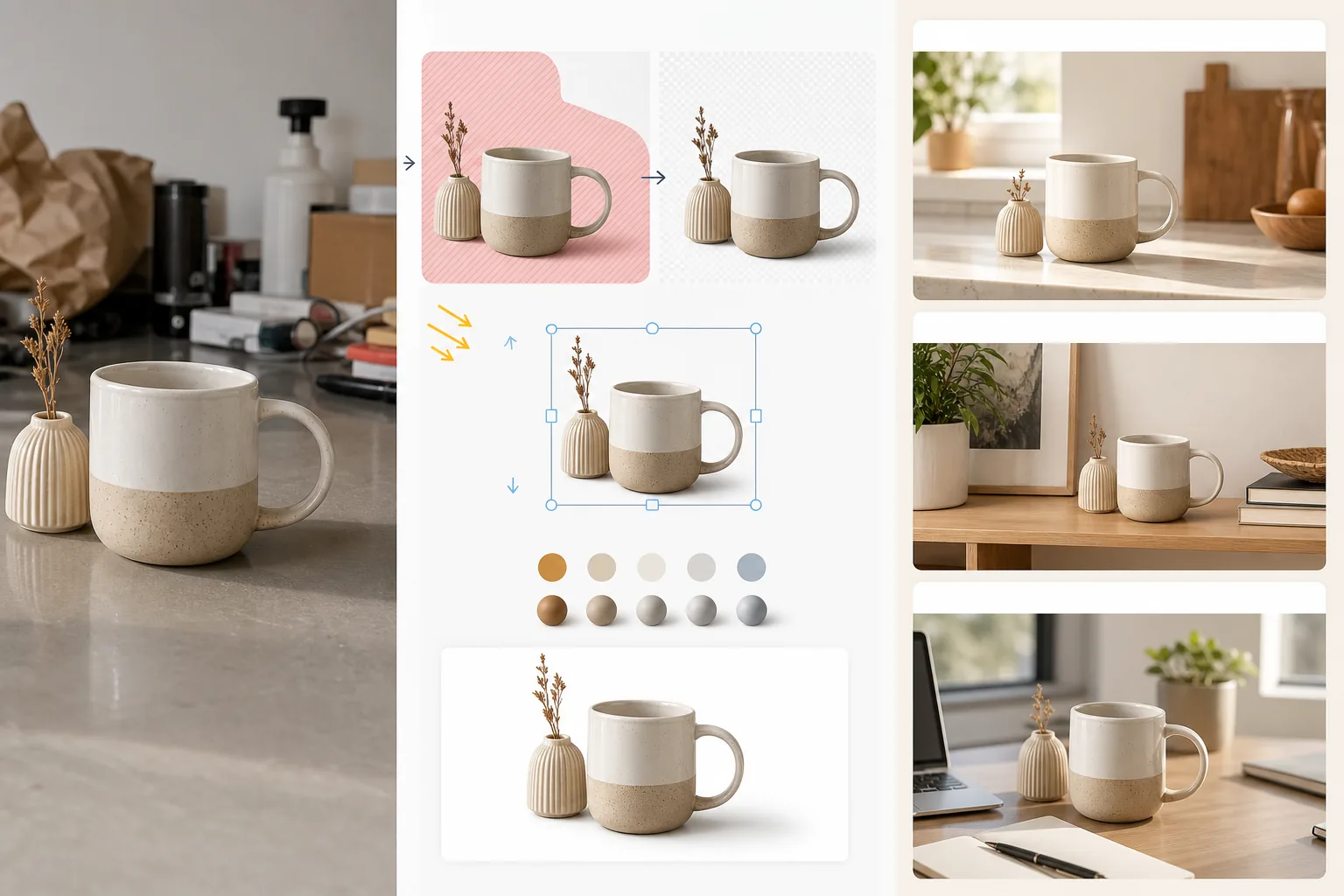
Converte le immagini standard di prodotto su sfondo bianco o le foto di prodotto informali in scene lifestyle che aiutano i clienti a immaginare di possedere e utilizzare l'articolo. Magic Eraser rimuove lo sfondo originale e qualsiasi elemento di disturbo attorno al prodotto. AI Enhance colloca poi il prodotto in un ambiente lifestyle curato — un piano di lavoro della cucina per le pentole, una mensola del soggiorno per l'arredo, una scrivania per l'elettronica, un patio all'aperto per gli articoli da giardino — con una direzione della luce e un rendering delle ombre adatti alla scena. Il colore e l'esposizione del prodotto vengono armonizzati con l'ambiente in modo che il fotomontaggio sembri un'unica fotografia scattata in un set curato. Questo colma il divario tra il requisito dello sfondo bianco puro dei marketplace (che vende la funzione) e il contesto lifestyle (che vende il desiderio) che le ricerche sulla conversione e-commerce mostrano costantemente come stimolo a tassi di aggiunta al carrello più elevati.
Impostazioni del modello
| Categoria della scena | Cucina, soggiorno, bagno, scrivania/ufficio, esterno o superficie per flat lay |
| Armonizzazione dell'illuminazione | Adatta la direzione della luce e la temperatura colore del prodotto alla scena |
| Rendering delle ombre | Ombra di contatto naturale e occlusione ambientale adattate alla geometria della scena |
| Scala del prodotto | Rilevamento automatico o dimensionamento manuale rispetto a mobili e oggetti della scena |
| Armonizzazione dei colori | Regola il bilanciamento del bianco del prodotto per adattarlo alla luce ambientale della scena |
| Risoluzione di output | 3000×3000px (quadrato 1:1) o 3000×2250px (4:3 per i siti di marca) |
Come usare questo modello
Carica la foto del tuo prodotto
Carica una foto di prodotto scattata su qualsiasi sfondo — studio bianco, piano del tavolo o persino il tuo piano di lavoro della cucina. Più lo sfondo originale è pulito, migliore è l'isolamento del prodotto, ma il modello gestisce anche ambienti disordinati. Includi l'intero prodotto senza tagliarne i bordi.
Seleziona una scena lifestyle
Scegli una categoria di scena che corrisponda al modo in cui i clienti userebbero il prodotto. L'IA seleziona un ambiente specifico all'interno di quella categoria in base al tipo e alle dimensioni del prodotto. Puoi sfogliare le alternative se il primo suggerimento non corrisponde all'estetica del tuo marchio.
Armonizza il prodotto nella scena
Il prodotto viene composito nella scena con direzione della luce abbinata, rendering delle ombre appropriato e regolazione della temperatura colore. L'IA garantisce che il prodotto appaia fisicamente presente — appoggiato sul piano di lavoro, posato sulla mensola, in piedi sulla scrivania — anziché fluttuare sopra la superficie.
Esporta per annunci e marketing
Scarica a 3000×3000px per gli slot delle immagini lifestyle dei marketplace o a 4:3 per le pagine prodotto dei siti di marca. Usala insieme alla tua immagine principale su sfondo bianco — la foto lifestyle mostra contesto e desiderio, mentre l'immagine su sfondo bianco mostra dettagli e specifiche.
Consigli da professionisti per risultati ottimali
- ✓Fotografa il tuo prodotto con la luce proveniente dall'angolo in alto a sinistra. La maggior parte degli ambienti delle scene lifestyle è illuminata dall'alto a sinistra, quindi abbinare questa direzione fin dall'inizio produce il fotomontaggio più convincente, in cui la direzione delle ombre è coerente tra prodotto e ambiente.
- ✓Includi una piccola porzione di superficie del terreno nella foto originale del prodotto. Il punto di contatto tra la base del prodotto e la superficie aiuta l'IA a comprendere la prospettiva del prodotto e a collocarlo in modo convincente sulla nuova superficie della scena.
- ✓Usa le immagini lifestyle per gli slot secondari degli annunci sui marketplace. Mantieni l'immagine principale come visual pulito su sfondo bianco per la conformità ai marketplace e usa le immagini lifestyle negli slot da 2 a 5 per mostrare il prodotto nel contesto. Questa combinazione supera costantemente gli approcci interamente bianchi o interamente lifestyle.
E-commerce workflow
Product photo hub
Use this template with the full ecommerce product photo workflow for marketplace backgrounds, cleanup, compression, resizing, and listing-ready exports.
View ecommerce product photo workflowDomande frequenti
Il prodotto sembrerà incollato sulla scena?
+
No. Il modello adatta la direzione della luce, la temperatura colore e l'angolo delle ombre del prodotto all'ambiente della scena. Le ombre di contatto nel punto in cui il prodotto incontra la superficie vengono renderizzate con una penombra morbida che corrisponde alla luce ambientale della scena. Il risultato sembra che il prodotto sia stato fotografato in quel contesto.
Posso usare foto di scena personalizzate?
+
Sì. Puoi caricare la tua foto di scena lifestyle come ambiente di sfondo. L'IA armonizzerà l'illuminazione e il colore del prodotto per adattarli alla tua scena personalizzata, proprio come fa con la libreria di scene integrata.
La scala del prodotto viene gestita automaticamente?
+
Sì. L'IA stima le dimensioni reali del prodotto dalla foto originale e lo ridimensiona in modo appropriato rispetto a mobili e oggetti della scena. Una tazza da caffè apparirà delle dimensioni di una tazza su un piano di lavoro della cucina, non grande quanto un paralume. Puoi regolare la scala manualmente se il rilevamento automatico necessita di correzioni.
Mostra ai clienti com'è possedere il tuo prodotto
Carica le foto dei prodotti e ottieni immagini lifestyle che guidano le decisioni d'acquisto con un contesto reale.
Provalo gratisRelated templates
More e-commerce templates for your workflow.
제품 사진을 위한 순수한 흰색 배경 템플릿입니다. 변환 가능한 깔끔하고 전문적인 제품 이미지를 위한 Amazon, Shopify 및 마켓플레이스 지원 설정입니다.
Etsy에 최적화된 목록 사진 템플릿입니다. 라이프스타일 사진을 2000px의 깔끔한 흰색 배경으로 변환하고 핸드메이드 제품 디테일을 향상시키며 Etsy의 이미지 가이드라인을 충족합니다.
eBay에 최적화된 목록 사진 템플릿입니다. eBay의 이미지 표준을 충족하는 갤러리 이미지, 상태 문서 개선 및 다중 각도 레이아웃을 위한 흰색 배경입니다.
반지, 목걸이, 시계를 위한 전문 보석 사진 템플릿입니다. 반사를 제어하고 보석의 광채를 강화하며 깨끗한 배경에 시장에 바로 사용할 수 있는 이미지를 제공합니다.
마켓플레이스 목록을 위한 전문 가구 사진 템플릿입니다. 방의 어수선한 부분을 제거하고, 실제 크기를 보여주고, 깔끔한 배경이나 스타일이 지정된 방 상황에 맞춰 작품을 제시하세요.
주름 제거, 보푸라기 청소, 순백색 배경 및 정확한 직물 색상을 사용하여 의류 플랫 레이 사진을 정리합니다. Shopify, Amazon 및 부티크 매장에 적합합니다.