
전후 슬라이더
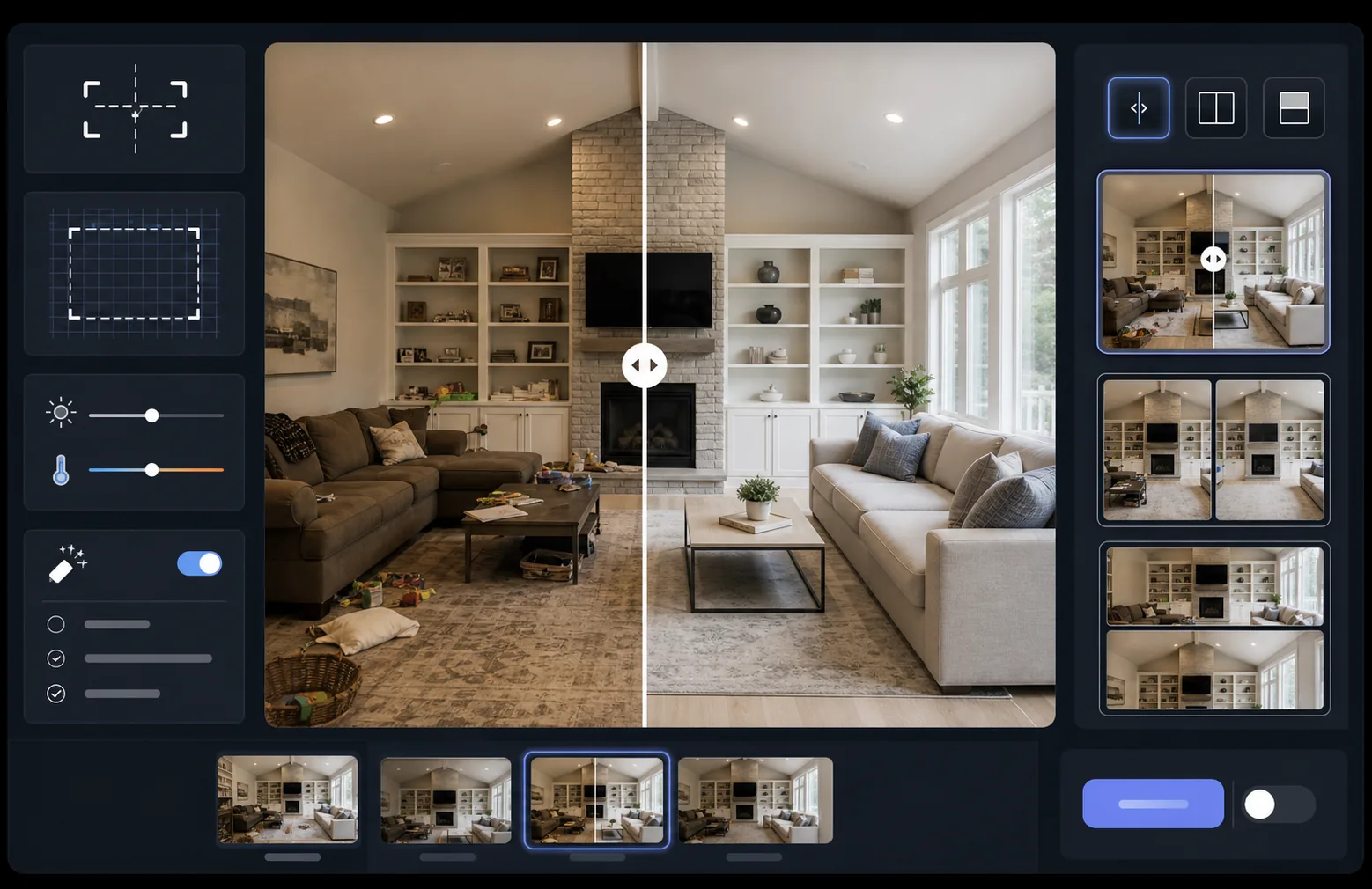
완벽하게 정렬된 전후 비교 이미지로 작업의 임팩트를 보여주세요. 이 템플릿은 일관된 구도, 조명 균형, 크기를 유지하는 데모용 페어를 만들어 줍니다. 시각적 변화가 스토리를 들려주는 포트폴리오, 사례 연구, 소셜 프루프, 제품 마케팅에 이상적입니다.
이 템플릿 무료로 사용해 보기Marketing template preview
이 템플릿의 기능
두 이미지(전과 후)를 처리하여 슬라이더 위젯, 좌우 배치 레이아웃, 애니메이션 공개에 바로 사용할 수 있는 완벽하게 정렬된 비교 페어로 만듭니다. AI Enhance는 두 프레임 간의 노출과 화이트 밸런스를 균일화하여 조명 차이가 비교를 흐리지 않고 변화가 뚜렷이 보이게 합니다. Magic Eraser는 의도한 변화에 포함되지 않는, 두 프레임 중 어느 쪽의 우발적인 방해 요소든 정리할 수 있습니다.
템플릿 설정
| 레이아웃 | 슬라이더용 페어, 좌우 배치 또는 세로 적층(선택 가능) |
| 출력 크기 | 프레임당 1600×1200px(동일한 치수) |
| 정렬 | 자동 정합 — 촬영 간 원근감과 구도를 일치시킵니다 |
| 조명 균일화 | 페어 전체에 걸쳐 노출과 화이트 밸런스를 조정합니다 |
| 라벨 오버레이 | 위치를 사용자 지정할 수 있는 선택형 'Before' / 'After' 라벨 |
| 테두리 | 1px 중립 회색 구분선 또는 이음매 없는 가장자리(선택 가능) |
이 템플릿 사용 방법
전(前) 이미지 업로드
시작 상태를 보여주는 원본의 수정되지 않은 사진을 업로드하세요. 리모델링 전의 방, 개선 전의 제품, 시술 전의 피부, 또는 보여주고 싶은 어떤 시각적 변화든 될 수 있습니다.
후(後) 이미지 업로드
완성된 변화를 보여주는 결과 사진을 업로드하세요. 전(前) 촬영과 동일한 각도와 거리에서 촬영하도록 노력하세요. 템플릿이 구도와 원근감의 작은 차이를 자동으로 정렬합니다.
균일화 및 정렬
템플릿이 두 이미지를 자동으로 정합하여 대응되는 요소가 픽셀 단위로 정렬됩니다. 노출과 화이트 밸런스가 균일화되어 촬영 세션 간 조명 차이가 실제 변화로부터 주의를 분산시키지 않습니다.
비교 이미지 내보내기
출력 형식을 선택하세요 — 슬라이더 위젯용 매칭 페어, 소셜 미디어용 좌우 합성, 또는 이메일 마케팅용 세로 적층. 선택형 Before/After 라벨을 추가하고 웹 최적화 또는 인쇄 품질 해상도로 내보내세요.
최상의 결과를 위한 전문가 팁
- ✓가능하면 전과 후를 정확히 같은 위치에서 촬영하세요 — 삼각대 위치를 표시하거나 같은 자리에 서세요. AI가 정렬을 보정해야 할 부분이 적을수록 비교가 더 선명해집니다.
- ✓두 촬영 모두 같은 초점 거리를 사용하여, 정렬된 비교가 미묘하게 어긋나 보이게 만드는 원근 왜곡 차이를 피하세요.
- ✓Magic Eraser를 사용해 전과 후 사이의 무관한 변화를 제거하세요 — 화분이 움직였거나 새로운 물체가 나타났다면 지워서 시청자가 의도한 변화에 집중하도록 하세요.
- ✓웹 슬라이더 임베드의 경우, 두 이미지를 동일한 치수로 내보내고 무손실 PNG를 사용하여 슬라이더 분할선을 따라 발생하는 압축 아티팩트를 방지하세요.
자주 묻는 질문
전과 후 사진이 약간 다른 각도에서 촬영된 경우에는 어떻게 되나요?
+
자동 정합 시스템은 카메라 각도, 거리, 구도의 적당한 차이를 처리합니다. 두 이미지에서 대응되는 기준점을 식별하고 일치하도록 변환합니다. 최상의 결과를 얻으려면 각도 차이가 15도 미만이어야 합니다.
변화를 보여주는 동영상 썸네일에 이것을 사용할 수 있나요?
+
예. 좌우 합성 출력은 YouTube와 소셜 미디어 동영상 썸네일에 이상적입니다. 라벨이 있는 분할 화면 레이아웃은 클릭을 유도하는 변화 스토리를 즉시 전달합니다.
조명 균일화가 표시되는 실제 결과를 바꾸나요?
+
아니요. 조명 균일화는 두 프레임이 동일한 조건에서 촬영된 것처럼 보이도록 전체 노출과 화이트 밸런스만 조정합니다. 실제 변화 — 피사체의 변화 — 는 촬영된 그대로 정확하게 유지됩니다.
결과를 나란히 보여주세요
전과 후 사진을 업로드하면 몇 초 만에 완벽하게 정렬되고 전문적으로 표현된 비교 이미지를 얻을 수 있습니다. 변화가 스스로 말하게 하세요.
무료로 사용해 보기