
더 많은 입찰을 이끌어내는 전문 프로젝트 사진
당신의 솜씨는 분명하게 드러날 가치가 있습니다. Magic Eraser은 계약자, 건축업자 및 기술자가 프로젝트 사진에서 작업 현장의 어수선한 부분을 제거하고, 설득력 있는 전후 비교를 생성하고, 새로운 비즈니스를 성사시키는 포트폴리오를 구축하는 데 도움이 됩니다.
Last updated
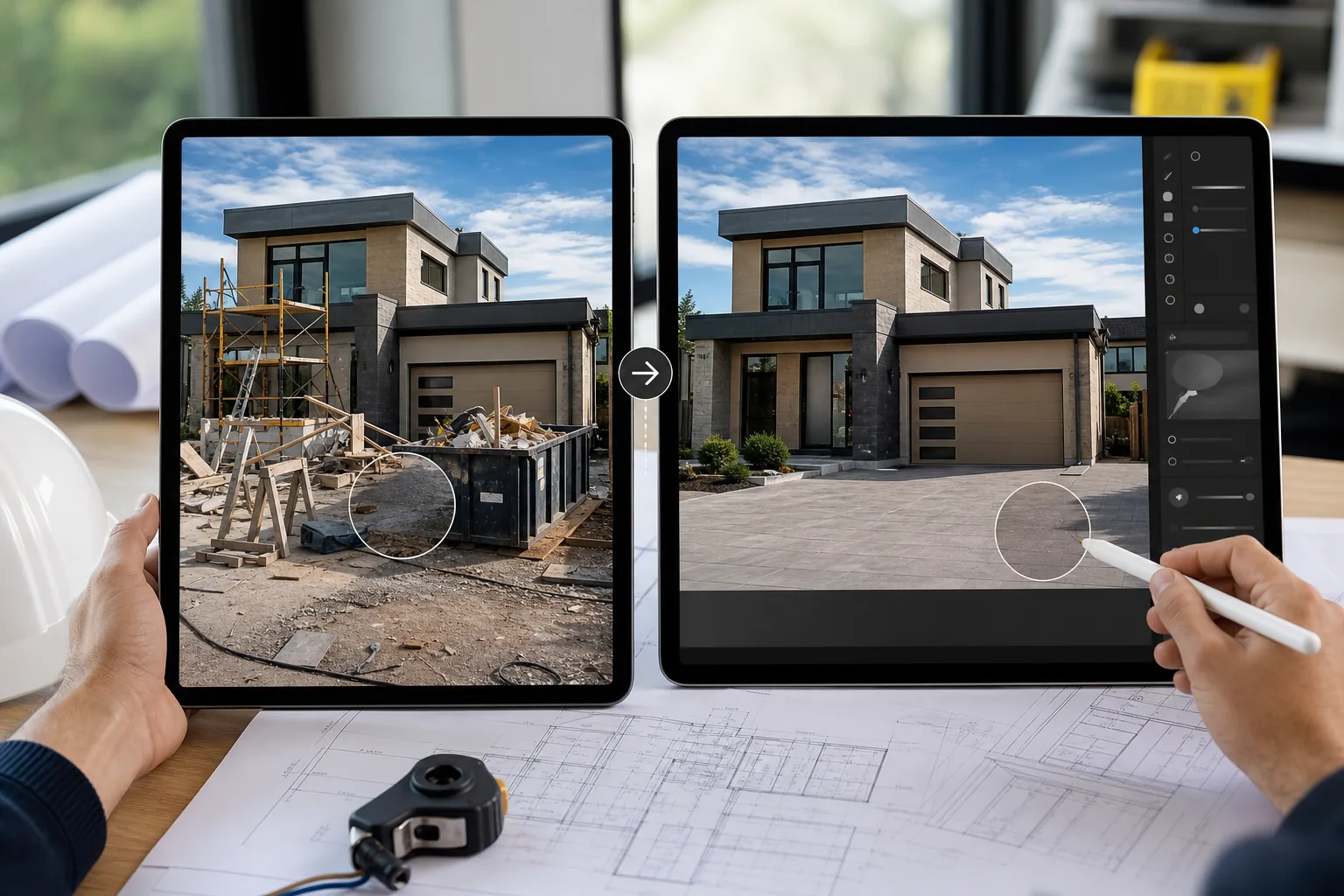
건설 전문가가 Magic Eraser을 선택하는 이유
작업 현장은 지저분합니다. 비계, 쓰레기 수거통, 도구 및 재료가 촬영할 때마다 어지러워집니다. Magic Eraser을 사용하면 계약자는 건축 잔해와 임시 장비를 제거하여 완성된 작업을 최상의 상태로 보여줄 수 있습니다. 작업 현장 원본 사진을 고객에게 깊은 인상을 주고 입찰에서 승리할 수 있는 포트폴리오 조각으로 바꾸세요. 건설 및 숙련된 기술 분야에서는 장인정신을 보여주는 시각적 증거가 가장 강력한 판매 도구입니다. 잠재 고객은 단일 리뷰를 읽기 전에 프로젝트 사진을 기반으로 계약자를 평가합니다. 완료된 작업에 대한 전문적인 문서화는 신뢰성을 구축하고 프리미엄 가격을 정당화합니다.
건설 및 무역의 주요 이점
전문적인 이미지로 프로젝트를 문서화하고 장인정신을 홍보하세요.
프로젝트 완료 사진
완성된 프로젝트 사진에서 공사 잔해, 안전 장비, 현장 잡동사니를 제거하여 완성된 작업의 품질을 보여주세요.
전후 문서
완성된 결과를 가리는 도구, 자재 스크랩 및 준비 항목을 제거하여 '애프터' 장면을 정리하여 매력적인 변환 비교를 만듭니다.
입찰 및 제안 포트폴리오
장인정신과 세부 사항에 대한 관심을 보여주는 세련된 이미지로 입찰 문서와 고객 제안서에서 최고의 작품을 선보이세요.
안전 및 교육 자료
안전 문서, 교육 매뉴얼 및 규정 준수 보고에 사용할 작업 현장 사진을 정리합니다.
사회적 증명 및 리뷰 콘텐츠
Google 비즈니스 프로필, Houzz, Angi 및 웹사이트에 고객 사용후기와 함께 전문가 수준의 프로젝트 사진을 게시하세요.
차량 및 장비 마케팅
트럭, 장비, 브랜드 차량의 사진을 찍은 후 어수선한 배경을 제거하여 웹사이트와 마케팅에 적합한 깔끔한 이미지를 얻으세요.
일반적인 사용 사례
프로젝트 문서 및 포트폴리오
완료된 프로젝트 사진에서 비계, 쓰레기 수거통 및 도구 더미를 제거합니다. 완성된 작업을 웹사이트와 제안서 문서에 공개하세요.
리노베이션 전후 이미지
'전' 사진을 원본 그대로 유지하면서 '후' 사진에서 공사 잔해를 제거하여 깔끔한 비교 이미지를 만듭니다. 대조는 귀하의 혁신 전문 지식을 판매합니다.
입찰 제안 및 견적 시각적 자료
전문 입찰 패키지에 포함할 참조 사진과 현장 조사를 정리합니다. 집중적인 현장 문서화를 위해 차량, 간판, 이웃 자산을 제거합니다.
무역 인증 및 교육 자료
안전 교육, 견습 자료, 인증 포트폴리오에 사용되는 작업 현장 사진에서 관련 없는 배경 세부정보를 제거하여 명확한 교육용 이미지를 준비합니다.
보험 및 보증 문서
이미지 선명도가 수행된 작업의 품질을 보여주는 보증 기록, 보험 문서 및 분쟁 해결 파일의 프로젝트 완료 사진을 향상합니다.
Magic Eraser 건설 도구
| Tool | How It Helps |
|---|---|
| 개체 제거 | 간단한 브러시 스트로크로 완료된 프로젝트 사진에서 쓰레기 수거통, 비계, 도구 더미 및 차량을 지울 수 있습니다. |
| AI 채우기 | 자연스럽게 마감된 모습을 위해 제거된 건축 잔해물을 외장재, 벽돌, 잔디 또는 진입로 표면과 같은 일치하는 재료로 교체합니다. |
| 이미지 강화제 | 어두운 조건에서 촬영한 실내 사진은 밝게 하고, 혹독한 한낮의 태양이나 흐린 날씨에서 촬영한 실외 사진은 선명하게 만듭니다. |
| Background Eraser | 제품 쇼케이스 및 공급업체 프리젠테이션을 위해 완성된 고정 장치, 설치물 또는 목공품을 깨끗한 배경에 격리합니다. |
작동 방식
업로드
작업 현장 사진을 휴대폰이나 태블릿에서 직접 업로드하세요. 먼저 컴퓨터로 전송할 필요가 없습니다.
편집하다
쓰레기통, 비계 또는 잡동사니를 치우십시오. AI는 이를 제거하고 일치하는 표면으로 채웁니다.
내보내다
포트폴리오, 입찰 제안 또는 웹사이트 갤러리용으로 정리된 프로젝트 사진을 다운로드하세요.
자주 묻는 질문
건물 사진에서 비계를 제거할 수 있나요?
+
예. 비계 부분을 브러시로 칠하면 Magic Eraser가 이를 제거하고 어울리는 외벽 질감으로 영역을 채웁니다. 입찰서나 문서에 사용하기 전에 중요한 세부 사항을 확인하세요.
고객이 사진이 편집되었음을 알 수 있습니까?
+
AI는 제거된 영역을 일치하는 질감과 재료로 채웁니다. 결과는 자연스러워 보입니다. 고객은 편집의 증거가 아닌 완성된 작업을 볼 수 있습니다.
채용 현장에서 휴대폰으로 사용할 수 있나요?
+
전적으로. Magic Eraser은 모든 모바일 브라우저에서 작동합니다. 완성된 작품의 사진을 찍고, 그 자리에서 정리하고, 즉시 고객과 공유하세요.
휴대폰으로 촬영한 현장 사진에 Magic Eraser을(를) 사용할 수 있나요?
+
예. Magic Eraser은 스마트폰 사진과 함께 작동하도록 설계되었습니다. 휴대폰의 카메라 롤에서 직접 업로드하고 작업 현장 사진을 포트폴리오 품질의 이미지로 변환하세요.
실외 및 조경 프로젝트 사진에 사용할 수 있나요?
+
전적으로. 조경 및 하드스케이프 프로젝트 사진에서 건축 잔해, 유틸리티 표시, 주변 자산의 방해 요소를 제거합니다.
업계 인증 및 수상을 위한 이미지를 만들 수 있나요?
+
예. 무역 인증 신청, 업계 수상 제출 및 협회 디렉토리 목록을 위한 세련된 프로젝트 사진을 준비합니다.
최고의 작품을 선보이세요
Magic Eraser을 사용하여 어수선한 작업 현장 사진을 세련된 포트폴리오 이미지로 바꿔 더 많은 거래를 성사시키는 계약자 및 상인과 함께 하세요.
Magic Eraser을 무료로 사용해 보세요More Industries
See how Magic Eraser helps professionals in other industries.
사진작가들은 후반 작업에서 방해 요소를 제거하고, 인물 사진을 수정하고, 배경을 완성하는 데 몇 시간을 소비합니다. Magic Eraser은 편집 작업 흐름을 가속화하므로 품질 저하 없이 세련된 이미지를 고객에게 더 빠르게 전달할 수 있습니다.
Magic Eraser는 중개인과 부동산 사진작가가 시선을 분산시키는 물체와 시각적 잡동사니를 제거하고 사진을 다듬도록 도와줍니다. 이미지가 부동산을 정확히 보여 주도록 모든 편집을 검토하고 현지 매물 플랫폼의 고지 규정을 따르세요.
온라인 쇼핑객은 이미지로 제품을 판단합니다. Magic Eraser은 지저분한 배경을 제거하고 산만한 요소를 삭제하며 구매자의 신뢰를 구축하고 전환율을 높이는 시장에 바로 사용할 수 있는 제품 사진을 만듭니다.
소셜 미디어는 빠르게 움직이며 시각적인 요소도 이에 맞춰야 합니다. Magic Eraser은 제작자, 마케팅 담당자 및 브랜드가 방해 요소를 제거하고, 배경을 교체하고, 이미지를 다듬어 Instagram, TikTok 및 Twitter의 혼잡한 피드에서 모든 게시물이 눈에 띄게 되도록 도와줍니다.
식욕을 돋우는 이미지는 주문과 방문객을 유도합니다. Magic Eraser은 레스토랑, 카페, 식품 브랜드가 음식 사진을 정리하고, 테이블을 깔끔하게 정리하고, 메뉴, 배달 앱, 소셜 미디어 마케팅을 위한 요리 프레젠테이션을 개선하는 데 도움을 줍니다.
룩북부터 제품 페이지까지 패션 브랜드에는 규모에 맞는 완벽한 비주얼이 필요합니다. Magic Eraser은 디자이너, 스타일리스트 및 패션 마케팅 담당자가 배경을 제거하고, 모델 사진을 수정하고, 모든 의류를 가장 잘 보여주는 세련된 플랫 레이를 만드는 데 도움이 됩니다.
여행 마케팅은 이미지에 따라 살고 죽습니다. Magic Eraser은 호텔, 여행사 및 여행지 마케팅 담당자가 명소에서 인파를 제거하고, 숙소 사진을 정리하고, 브라우저를 예약자로 전환하는 경치 좋은 사진을 향상하는 데 도움이 됩니다.
졸업앨범 초상화부터 캠퍼스 마케팅까지 교육 기관에는 깨끗하고 전문적인 이미지가 필요합니다. Magic Eraser은 학교, 대학 및 e-러닝 플랫폼이 사진에서 방해 요소를 제거하고 캠퍼스 이미지를 향상하며 모든 청중을 위한 세련된 시각적 자료를 만드는 데 도움이 됩니다.