
Restauration de photos vintage
Redonnez vie à vos précieuses vieilles photographies. Ce modèle répare les dommages que les décennies infligent aux photos imprimées : suppression des rayures, plis et taches, récupération des couleurs des tirages fanés, et même conversion des originaux sépia ou noir et blanc en couleurs réalistes tout en préservant le caractère d'époque de l'image.
Essayer ce modèle gratuitementRestoration template preview
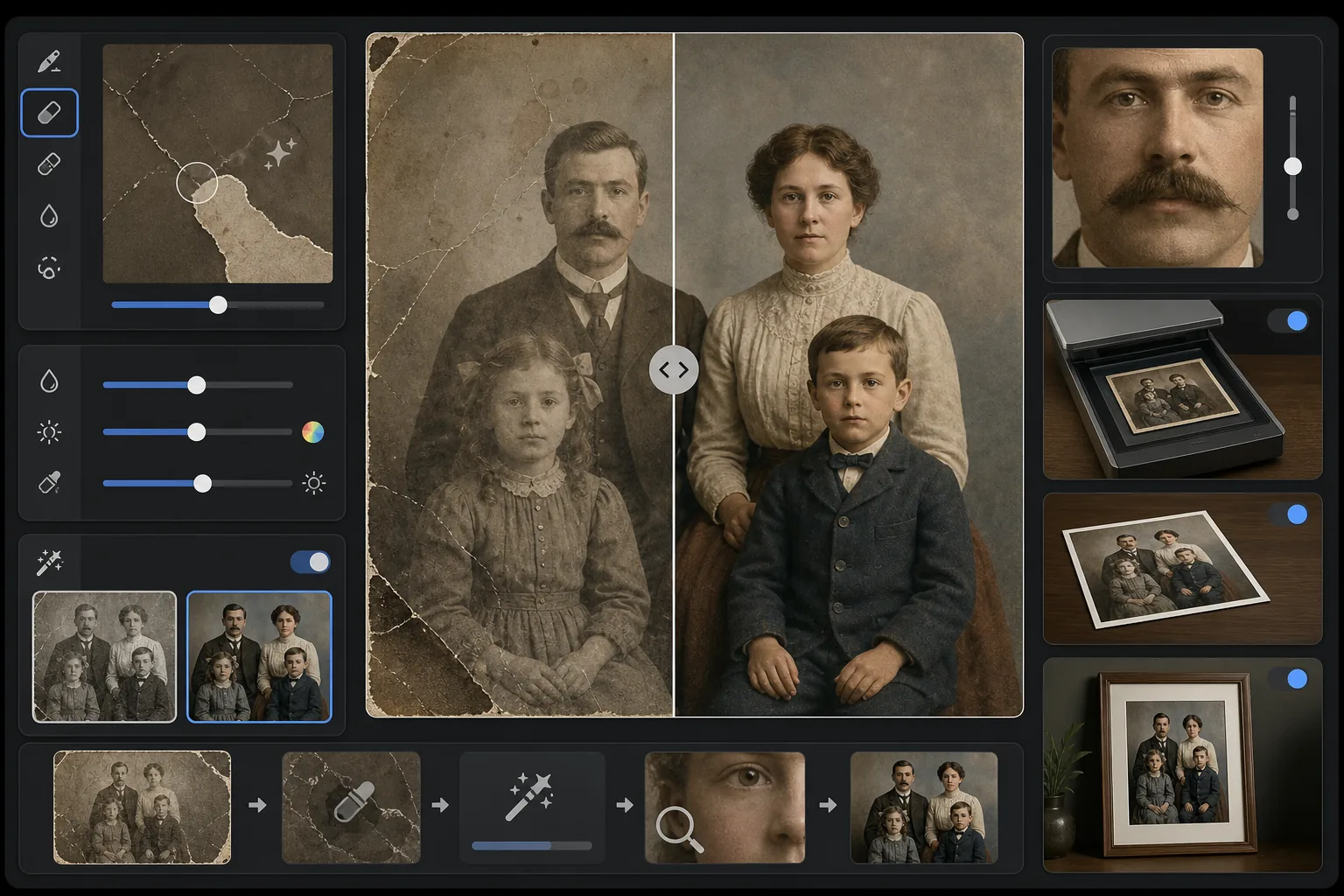
Ce que fait ce modèle
Répare les dommages physiques et les effets du vieillissement sur les photographies vintage numérisées. Magic Eraser supprime les rayures, plis, taches d'eau, taches de moisissure et bords déchirés en reconstruisant le contenu manquant de l'image à partir du contexte environnant. AI Enhance récupère les couleurs qui se sont décalées ou fanées au fil des décennies, accentue les détails adoucis par le temps et peut coloriser les photos en noir et blanc ou sépia avec des couleurs fidèles à l'époque qui respectent la période de l'image originale.
Paramètres du modèle
| Réparation des dommages | Agressive — supprime les rayures, plis, taches et bords déchirés |
| Récupération des couleurs | Spectre complet — restaure l'éclat d'origine des pigments fanés |
| Mode de colorisation | Désactivé, Subtil ou Complet (pour les originaux N&B et sépia) |
| Récupération des détails | Reconstruit les visages et les détails fins adoucis par l'âge et une faible résolution de numérisation |
| Taille de sortie | Correspond aux dimensions de numérisation d'origine avec une mise à l'échelle 2× facultative |
| Préservation de l'époque | Conserve la texture du grain et la qualité tonale propres à l'époque |
Comment utiliser ce modèle
Numérisez ou photographiez l'original
Numérisez la photo vintage à 600 DPI ou plus pour obtenir le maximum de détails récupérables. Si la numérisation n'est pas possible, photographiez le tirage sur une surface plane sous une lumière uniforme et diffuse — évitez le flash, qui crée des reflets sur les tirages brillants.
Réparez les dommages physiques
Magic Eraser identifie et supprime les rayures, plis, dégâts des eaux, taches de moisissure et résidus de ruban adhésif. L'IA reconstruit les zones manquantes en analysant le contenu environnant de l'image — comblant les coins déchirés, raccordant les fissures sur les visages et éliminant la décoloration des taches.
Récupérez ou ajoutez de la couleur
Pour les tirages couleur fanés, AI Enhance restaure la palette de couleurs d'origine en inversant les manières spécifiques dont les différentes couches de colorant se dégradent au fil du temps. Pour les originaux noir et blanc ou sépia, la colorisation facultative ajoute des couleurs réalistes basées sur des indices contextuels comme les teints de peau, le feuillage, le ciel et les motifs de tissu.
Accentuez et exportez
La récupération des détails accentue les traits du visage, le texte et les détails fins que des décennies de vieillissement ont adoucis. Exportez à la résolution de numérisation d'origine ou agrandissez à 2× pour imprimer dans des tailles supérieures à l'original.
Conseils de pro pour de meilleurs résultats
- ✓Numérisez à la résolution la plus élevée que votre scanner prend en charge — 600 DPI minimum, 1200 DPI de préférence. Plus de détails capturés donnent à l'IA plus de matière pour reconstruire les zones endommagées.
- ✓Si la photo est coincée dans un cadre ou un album, photographiez-la sur place plutôt que de risquer de la déchirer — le modèle peut supprimer les bords du cadre et les artefacts des pages d'album.
- ✓Pour la colorisation de photos historiques, fournissez si possible un contexte sur l'époque (décennie) et le lieu — les couleurs des vêtements, des voitures et des matériaux de construction variaient considérablement selon la période et la région.
- ✓Traitez d'abord la zone la plus endommagée de la photo comme test avant de lancer la restauration complète — cela vous permet de confirmer que la qualité de reconstruction répond à vos attentes.
Outils
Questions fréquentes
Peut-il réparer des photos avec des sections manquantes comme des coins arrachés ?
+
Oui. L'IA reconstruit les zones manquantes en utilisant le contexte de l'image environnante. Pour les arrière-plans comme le ciel, les murs et le feuillage, les résultats sont parfaits. Pour les portions manquantes de visages ou de détails importants, la reconstruction est impressionnante mais peut nécessiter un léger ajustement manuel pour les éléments essentiels.
Quelle est la précision de la colorisation des photos en noir et blanc ?
+
La colorisation utilise une analyse contextuelle pour attribuer des couleurs réalistes — les teints de peau, le bleu du ciel, le vert du feuillage et les couleurs de tissu courantes sont très précis. Les couleurs spécifiques d'objets que l'IA ne peut pas déterminer à partir du contexte (comme la teinte exacte d'une robe) seront plausibles plutôt que garanties exactes.
La restauration supprimera-t-elle le caractère vintage de la photo ?
+
Non. Le paramètre de préservation de l'époque conserve la texture du grain et la qualité tonale propres à l'époque qui donnent aux photos vintage leur caractère. Les dommages physiques comme les rayures et les taches sont supprimés, mais la qualité photographique de l'époque d'origine est respectée — une photo des années 1940 ressemble toujours à une photo des années 1940, simplement intacte.
Sauvez les souvenirs de votre famille
Téléchargez la numérisation de n'importe quelle photographie endommagée, fanée ou vieillissante et regardez des décennies d'usure disparaître. Rayures effacées, couleurs restaurées, souvenirs préservés.
Essayer gratuitement