
Photo de menu de restaurant
Transformez les photos de vos plats prises au téléphone en images prêtes pour les tableaux de menu et les applications de livraison. Ce modèle accentue l'éclat des couleurs des plats, nettoie les arrière-plans de dressage en désordre, isole les plats pour les vignettes des applications et exporte aux dimensions exactes requises par DoorDash, UberEats et Grubhub, sans photographe culinaire.
Essayer ce modèle gratuitementFood & Beverage template preview
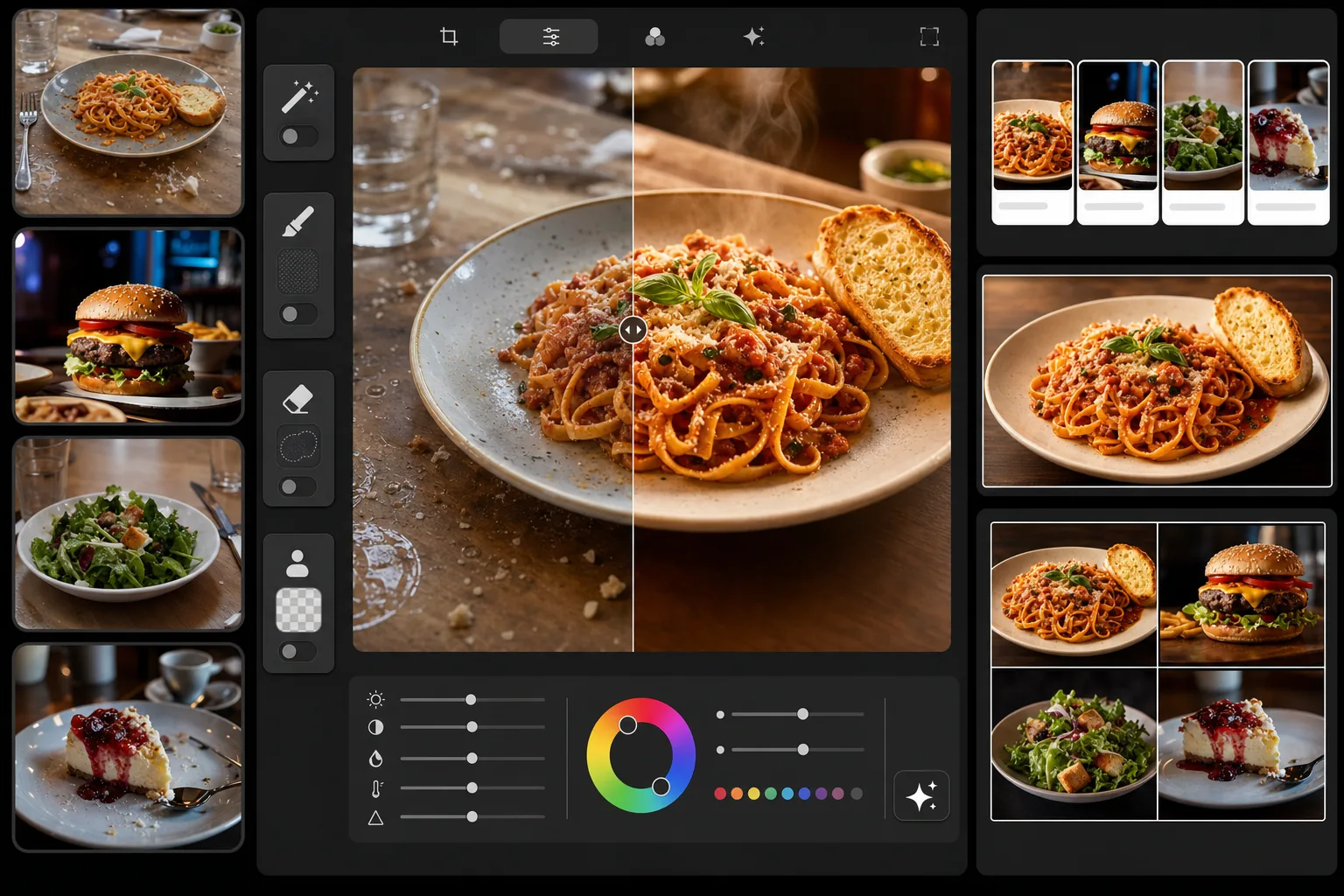
Ce que fait ce modèle
Transforme des photos de plats ordinaires en images de qualité menu professionnelle. Le modèle renforce les tons chauds et appétissants qui rendent la photographie culinaire efficace : il intensifie les rouges des sauces, dore les croûtes de pain et rend les légumes verts éclatants de fraîcheur. Magic Eraser supprime les éléments en désordre sur la table, les traces de doigts sur les assiettes et les miettes éparses. Background Eraser isole les plats pour des vignettes nettes destinées aux applications de livraison. Le résultat est dimensionné pour les tableaux de menu numériques, les menus imprimés et toutes les grandes plateformes de livraison de repas.
Paramètres du modèle
| Éclat des couleurs | Optimisé pour les plats (+15 % de saturation chaude, rouges/jaunes/verts) |
| Taille de sortie (applications de livraison) | 1200×800px (paysage 3:2, standard DoorDash/UberEats) |
| Taille de sortie (tableau de menu) | 1920×1080px (affichage de menu numérique 16:9) |
| Balance des blancs | Lumière du jour chaude 5200K (compense l'éclairage LED froid des restaurants) |
| Option d'arrière-plan | Isolation nette ou surface sombre (#2C2C2C) pour un dressage spectaculaire |
| Format de fichier | JPEG qualité 88 % (chargement rapide sur les applications de livraison) |
Comment utiliser ce modèle
Photographiez votre plat
Prenez une photo sous un angle de 45 degrés ou directement en plongée. Utilisez la lumière la plus vive disponible : près d'une fenêtre en journée, c'est idéal. Si possible, éteignez les éclairages chauds au plafond du restaurant, car ils ajoutent de fortes dominantes orange plus difficiles à corriger que la lumière naturelle.
Nettoyez la scène
Magic Eraser supprime le désordre sur la table, les miettes éparses, les traces de doigts sur les assiettes, les cernes de condensation et tout équipement de cuisine visible à l'arrière-plan. Pour les vignettes des applications de livraison, Background Eraser isole entièrement le plat de la surface de la table.
Sublimez les couleurs des plats
AI Enhance applique un étalonnage des couleurs propre aux plats : les sauces paraissent plus riches, les croûtes de pain et de viennoiseries prennent un ton doré et chaud, les légumes verts semblent frais et éclatants, et le fromage développe un éclat fondant appétissant. L'amélioration est calibrée pour rester appétissante sans paraître artificiellement saturée.
Exportez pour votre plateforme
Choisissez le préréglage pour applications de livraison (1200×800px pour DoorDash, UberEats, Grubhub), le préréglage pour tableau de menu numérique (1920×1080px) ou une taille personnalisée pour votre menu imprimé. Chaque exportation est compressée pour un chargement rapide sur la plateforme cible.
Conseils de pro pour de meilleurs résultats
- ✓Photographiez les plats dans les 90 secondes suivant le dressage. La vapeur, l'éclat des sauces et l'intégrité de la glace se dégradent rapidement. Le modèle peut sublimer les couleurs, mais ne peut pas restituer la glace fondue ou la sauce absorbée.
- ✓Utilisez un essuie-tout légèrement humide pour nettoyer le bord de l'assiette avant la prise de vue. Magic Eraser peut effacer les traces de sauce, mais un bord propre sur la photo d'origine donne le résultat le plus soigné.
- ✓Pour les vignettes des applications de livraison, l'angle en plongée (à plat) fonctionne le mieux, car le cadrage carré ou paysage montre le plat entier. L'angle de 45 degrés convient mieux aux tableaux de menu et aux menus imprimés où vous souhaitez montrer la hauteur et les couches.
- ✓Photographiez plusieurs plats du menu sur la même surface avec le même éclairage afin que l'ensemble de votre menu ait un aspect cohérent. Les applications de livraison affichent tous vos plats dans une grille, et la cohérence visuelle traduit votre professionnalisme auprès des clients.
Questions fréquentes
Quelles dimensions les applications de livraison exigent-elles ?
+
DoorDash recommande au minimum 1200×800px en paysage (ratio 3:2). UberEats exige au moins 320×320px, mais recommande 1200×800px pour une qualité d'affichage optimale. Grubhub utilise un format paysage similaire. Le préréglage pour applications de livraison du modèle exporte en 1200×800px, ce qui satisfait ou dépasse les exigences des trois plateformes.
Les plats auront-ils l'air retouchés de façon irréaliste ?
+
L'étalonnage des couleurs est calibré spécifiquement pour la photographie culinaire : il met en valeur les qualités appétissantes naturelles des plats sans les rendre artificiellement saturés ou fluo. Le résultat ressemble à une photo culinaire bien éclairée, et non à une publication Instagram filtrée.
Puis-je utiliser la même photo pour mon tableau de menu et les applications de livraison ?
+
Le modèle prend en charge plusieurs préréglages d'exportation à partir d'une seule image téléchargée. Exportez en 1920×1080px pour votre tableau de menu numérique et en 1200×800px pour les applications de livraison. Le recadrage s'ajuste à chaque format tout en gardant le plat centré et bien cadré.
Mettez en valeur chaque plat de votre menu
Téléchargez vos photos de plats et obtenez en quelques secondes des images prêtes pour les applications de livraison et les tableaux de menu. Aucun photographe culinaire ni compétence en stylisme requis.
Essayer gratuitementRelated templates
More food & beverage templates for your workflow.