
Paysage prêt à imprimer
Transformez vos photos de paysage en fichiers prêts à imprimer en grand format à 300 DPI. Ce modèle agrandit les images pour des tirages de 16x20 pouces et plus, tout en supprimant les éléments visuels parasites tels que les lignes électriques, les panneaux routiers et les clôtures qui détournent l'attention du paysage naturel. L'étalonnage des couleurs est optimisé pour les supports en toile, en métal et en papier beaux-arts.
Essayez ce modèle gratuitementPhotography template preview
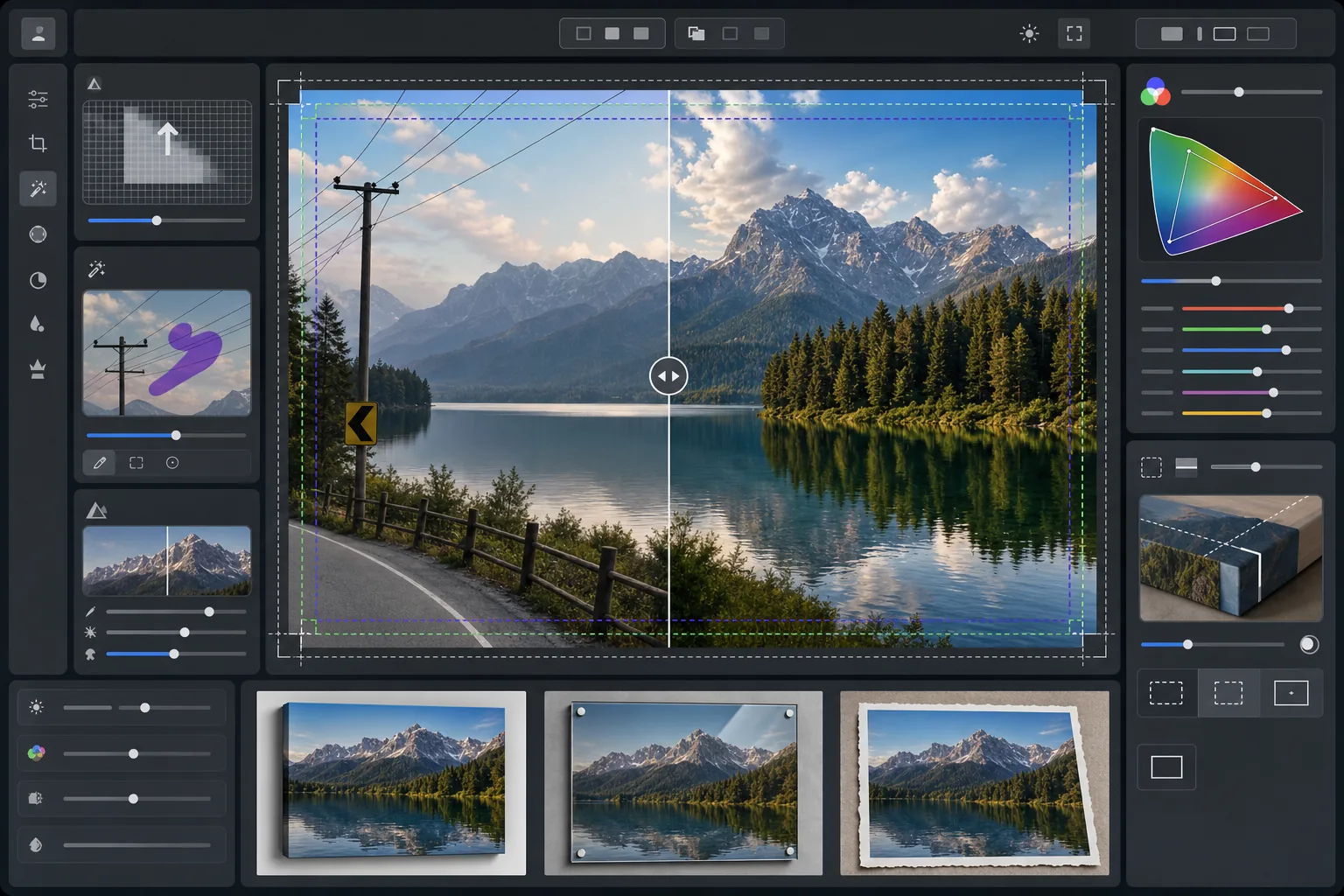
Ce que fait ce modèle
Prépare les photos de paysage pour l'impression professionnelle grand format en augmentant la résolution afin de respecter les exigences de 300 DPI au format 16x20 pouces et au-delà. AI Enhance augmente le nombre de pixels sans introduire d'artefacts, en préservant les détails fins du feuillage, des textures de l'eau et des formations nuageuses. Magic Eraser supprime les lignes électriques, les poteaux, les panneaux routiers, les clôtures et autres éléments artificiels qui perturbent la composition naturelle. La couleur est ajustée pour la gamme plus large et les différentes propriétés réfléchissantes des toiles tendues, des tirages métalliques en aluminium et du papier coton beaux-arts.
Paramètres du modèle
| Cible d'agrandissement | 6000×4000px minimum (300 DPI à 20×13 pouces) |
| Accentuation | Masque flou optimisé pour l'impression (rayon 1,2, intensité 80%) |
| Profil colorimétrique | ProPhoto RGB (gamme maximale pour l'impression beaux-arts) |
| Plage dynamique | Ombres +0,8 EV, récupération des hautes lumières -0,3 EV |
| Réduction du bruit | Sensible à la luminance (préserve le grain dans les ciels, lisse le feuillage) |
| Format de sortie | TIFF 16 bits avec profil ICC intégré |
Comment utiliser ce modèle
Importez votre photo de paysage
Importez une image de paysage prise avec n'importe quel appareil photo ou smartphone. L'IA analyse la résolution source et calcule le facteur d'agrandissement nécessaire pour atteindre 300 DPI à la taille d'impression souhaitée. Même les photos de smartphone de 12 mégapixels peuvent être agrandies proprement pour des tirages 16x20.
Supprimez les éléments visuels parasites
Magic Eraser identifie et supprime les lignes électriques, les poteaux, les panneaux routiers, les clôtures, les déchets et autres éléments artificiels qui détournent l'attention de la scène naturelle. L'IA reconstitue les dégradés du ciel, les contours des arbres et les textures du terrain derrière les objets supprimés.
Améliorez pour la sortie d'impression
AI Enhance agrandit l'image à la résolution souhaitée tout en l'accentuant pour la distance de visionnage d'impression. La couleur est convertie vers la gamme ProPhoto RGB afin de préserver toute la palette de verts, de bleus et de tons de coucher de soleil que le sRGB grand public écrête.
Exportez pour votre support d'impression
Téléchargez un fichier TIFF 16 bits avec le profil ICC intégré correspondant à votre sortie — toile tendue, tirage métallique ou papier beaux-arts. Le fichier comprend la marge de fond perdu et les traits de coupe requis par la plupart des laboratoires d'impression professionnels.
Conseils de pro pour de meilleurs résultats
- ✓Pour les toiles tendues, ajoutez 1,5 pouce de fond perdu de chaque côté afin que l'image enveloppe les barres de châssis sans rogner la composition principale. Le modèle inclut un guide de zone de sécurité pour toile tendue dans la sortie.
- ✓Les tirages métalliques réfléchissent la lumière et amplifient le contraste : réduisez donc le curseur de contraste de 10 à 15% par rapport à ce qui paraît bien à l'écran. Les ombres qui semblent détaillées sur votre moniteur peuvent se boucher complètement sur les supports en aluminium.
- ✓Lors de la suppression de longues lignes électriques traversant tout le cadre, l'IA les traite par segments. Pour un résultat optimal, utilisez une photo source où le ciel derrière les lignes présente un dégradé lisse plutôt que des motifs nuageux complexes.
- ✓Traitez à la plus grande taille que vous pourriez un jour imprimer, même si votre commande actuelle est plus petite. Réduire un fichier 24x36 vers 16x20 est sans perte, mais vous ne pourrez pas agrandir un fichier 16x20 vers 24x36 plus tard sans perte de qualité.
Outils
Questions fréquentes
Quelle taille puis-je imprimer à partir d'une photo de smartphone ?
+
Une photo de smartphone de 12 mégapixels (4032x3024) peut être agrandie proprement à 8000x6000 pixels, ce qui permet une impression à 300 DPI au format 26x20 pouces. Aux distances de visionnage standard pour les grands tirages (1 à 1,2 mètre), même les tirages 24x36 pouces paraissent nets à partir d'originaux de smartphone agrandis par IA.
La suppression des lignes électriques laisse-t-elle des traces visibles ?
+
L'IA reconstitue le dégradé du ciel, les contours des nuages et la ligne d'arbres derrière les lignes électriques supprimées à l'aide des données de pixels environnantes. Dans des conditions de ciel uniforme, la suppression est pratiquement indétectable. Les ciels complexes aux nuages spectaculaires peuvent présenter un léger fondu lors d'une inspection très rapprochée, mais aux distances de visionnage d'impression normales, le résultat est impeccable.
Quel format de fichier dois-je envoyer à un laboratoire d'impression ?
+
La plupart des laboratoires professionnels acceptent les fichiers TIFF 16 bits avec profils ICC intégrés, qui constituent la sortie par défaut de ce modèle. Si votre laboratoire demande du JPEG, exportez en qualité 100 dans l'espace colorimétrique Adobe RGB. Évitez le sRGB pour les tirages grand format, car il écrête les verts vifs et les bleus profonds courants en photographie de paysage.
Imprimez vos paysages dans n'importe quel format en toute confiance
Importez une photo de paysage et obtenez un fichier prêt à imprimer avec les lignes électriques supprimées, la résolution agrandie et les couleurs optimisées pour la toile, le métal ou le papier beaux-arts.
Essayez gratuitement