
Photo de lookbook de mode
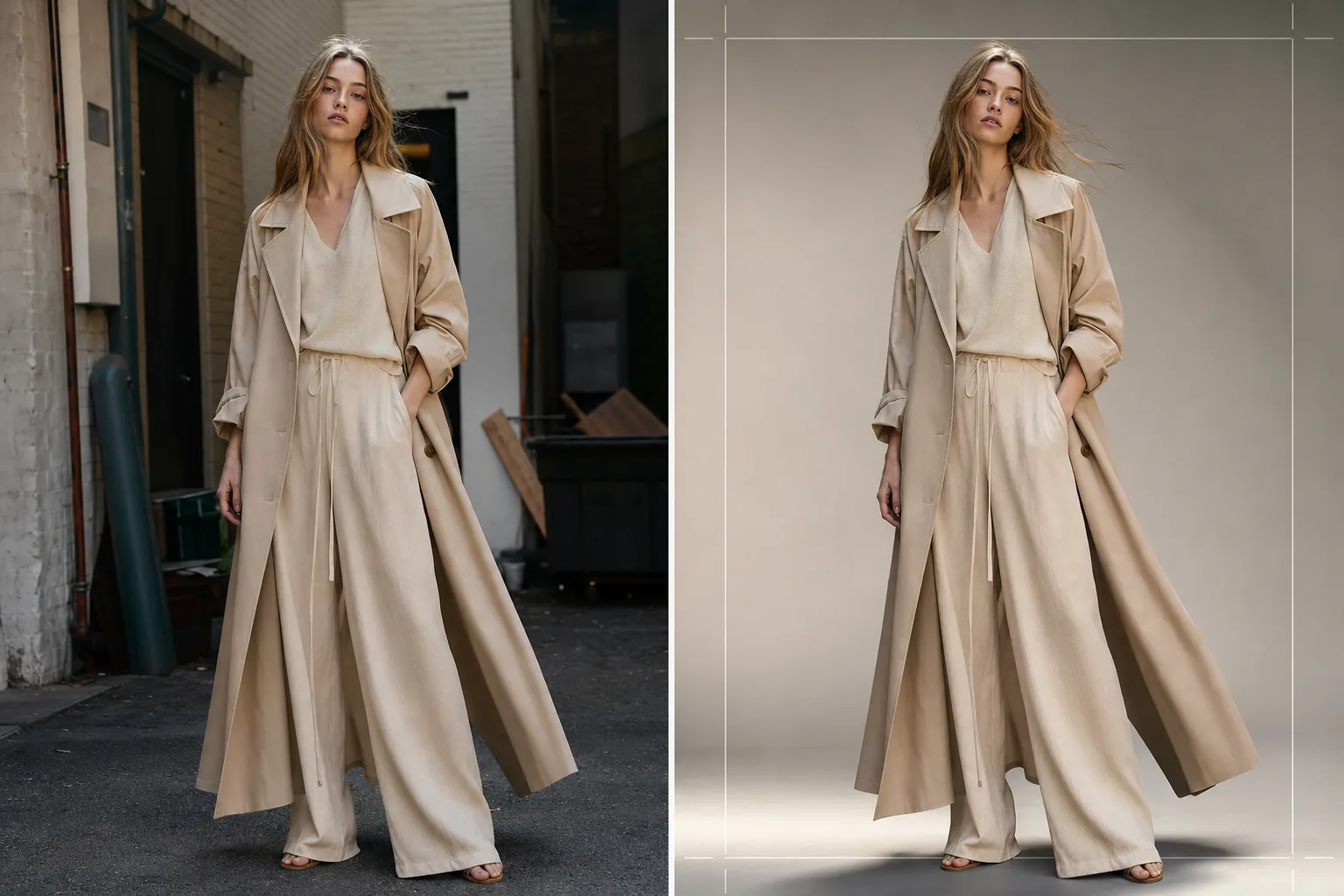
Produisez des images de lookbook de qualité éditoriale pour les collections saisonnières, les présentations de gros et les campagnes d'e-commerce. Ce modèle supprime les arrière-plans de lieu et les remplace par des fonds de studio épurés ou des environnements éditoriaux soignés, applique un étalonnage des couleurs de qualité mode qui fait ressortir les tissus, et sublime la peau avec une retouche naturelle qui maintient l'attention sur les vêtements.
Essayer ce modèle gratuitementFashion template preview
Ce que fait ce modèle
Rationalise tout le pipeline de post-production de lookbook, des prises de vue brutes en extérieur ou en studio jusqu'à des images soignées et cohérentes avec la marque. Background Eraser isole le mannequin et le vêtement de tout environnement et propose un remplacement par des couleurs de studio unies, des dégradés ou des fonds éditoriaux soignés tels que des murs en béton, de la verdure naturelle ou des scènes de rue urbaines. AI Enhance applique un étalonnage des couleurs adapté aux types de tissus — des tons chauds pour le lin et la laine aux teintes terreuses, des tons plus froids pour le denim et les tissus techniques — afin que la texture et le tombé du vêtement soient le héros visuel. La retouche de la peau est légère et éditoriale, atténuant les imperfections temporaires sans supprimer les taches de rousseur, les grains de beauté ou les caractéristiques naturelles qui rendent le mannequin authentique.
Paramètres du modèle
| Style d'arrière-plan | Studio blanc, gris uniforme, dégradé ou environnement éditorial |
| Étalonnage des couleurs | Éditorial mode (adaptatif au tissu : chaud pour les naturels, froid pour les techniques) |
| Retouche de la peau | Éditorial léger (suppression des imperfections, uniformisation du teint, caractéristiques naturelles préservées) |
| Amélioration du tissu | Accentuation de la texture et mise en valeur du tombé pour la visibilité des détails du vêtement |
| Recadrage et cadrage | Plein corps, trois quarts ou gros plan avec une marge de sécurité pour la superposition de texte |
| Résolution de sortie | 4000×6000px (orientation portrait, prêt à imprimer à 300 DPI) |
Comment utiliser ce modèle
Téléchargez votre photo de lookbook
Téléchargez une photo de mannequin en pied ou aux trois quarts portant le vêtement vedette. Les photos issues de prises de vue en studio, de lieux extérieurs et de showrooms conviennent toutes. Le modèle prend en charge les conversions RAW, les JPEG et les TIFF haute résolution.
Remplacez ou affinez l'arrière-plan
Background Eraser isole le mannequin avec une détection des contours suffisamment précise pour préserver les bords de tissu lâches, les cheveux flottants et les matières translucides comme la mousseline. Remplacez l'arrière-plan par une couleur de studio conforme à la charte de votre marque ou sélectionnez un environnement éditorial qui complète l'ambiance de la collection.
Appliquez l'étalonnage et l'amélioration
AI Enhance applique un étalonnage des couleurs qui met en valeur la texture du tissu et la couleur réelle du vêtement. La retouche de la peau est appliquée à une intensité éditoriale — atténuant les rougeurs et les imperfections temporaires sans aplatir la peau ni supprimer les caractéristiques naturelles. L'accentuation du tissu fait ressortir les motifs de tissage, les coutures et les lignes de tombé.
Exportez pour le lookbook et l'e-commerce
Téléchargez en 4000×6000px pour les lookbooks imprimés et les PDF de fiches produits, ou en formats optimisés pour le web destinés à Shopify, aux portails de gros et aux réseaux sociaux. Le modèle peut produire des recadrages cohérents sur toute une collection pour une mise en page de lookbook unifiée.
Conseils de pro pour de meilleurs résultats
- ✓Photographiez les vêtements sur un mannequin vivant plutôt que sur un mannequin de vitrine chaque fois que possible. La suppression de l'arrière-plan et la retouche de la peau de l'IA produisent les résultats les plus naturels avec des formes humaines réelles, et les acheteurs réagissent plus positivement aux images montrant comment le tissu tombe sur un corps.
- ✓Utilisez un élastique ou une pince pour éloigner les cheveux longs de l'encolure des hauts et des vestes pendant la prise de vue. La suppression de l'arrière-plan gère bien les cheveux lâchés, mais les cheveux qui couvrent les détails du col et la construction de l'encolure masquent précisément les caractéristiques que les acheteurs évaluent.
- ✓Maintenez une direction d'éclairage cohérente sur toutes les prises de vue d'une collection. Lorsque l'IA applique le même étalonnage et que la direction de la lumière est cohérente, le lookbook se lit comme une histoire éditoriale cohérente plutôt qu'un assemblage de prises de vue différentes.
Questions fréquentes
Puis-je l'utiliser pour des photos de vêtements à plat ?
+
Ce modèle est optimisé pour la photographie sur mannequin. Pour les photos de vêtements à plat sur des tables ou en suspension, le modèle Clothing Flat Lay Cleanup gère ces compositions plus efficacement, car il comprend la géométrie d'un tissu posé à plat plutôt que drapé sur un corps.
Les tissus translucides comme la mousseline seront-ils préservés ?
+
Oui. La détection des contours de Background Eraser préserve les bords de tissu semi-transparents. L'arrière-plan de remplacement est visible à travers la matière fine, tout comme l'environnement d'origine le serait, conservant la silhouette et l'effet de superposition prévus du vêtement.
Puis-je faire correspondre l'arrière-plan à la couleur hexadécimale exacte de ma marque ?
+
Oui. Vous pouvez spécifier un code hexadécimal exact pour la couleur d'arrière-plan unie, et l'IA génère un fond homogène de cette couleur avec une chute d'ombre appropriée sous les pieds du mannequin pour un rendu ancré et réaliste.
Produisez un lookbook raffiné depuis n'importe quel lieu de prise de vue
Téléchargez des photos de mannequin et obtenez des images de lookbook cohérentes avec la marque, de qualité éditoriale, prêtes pour l'impression, le web et les présentations de gros.
Essayer gratuitement