
Amélioration du sourire dentaire
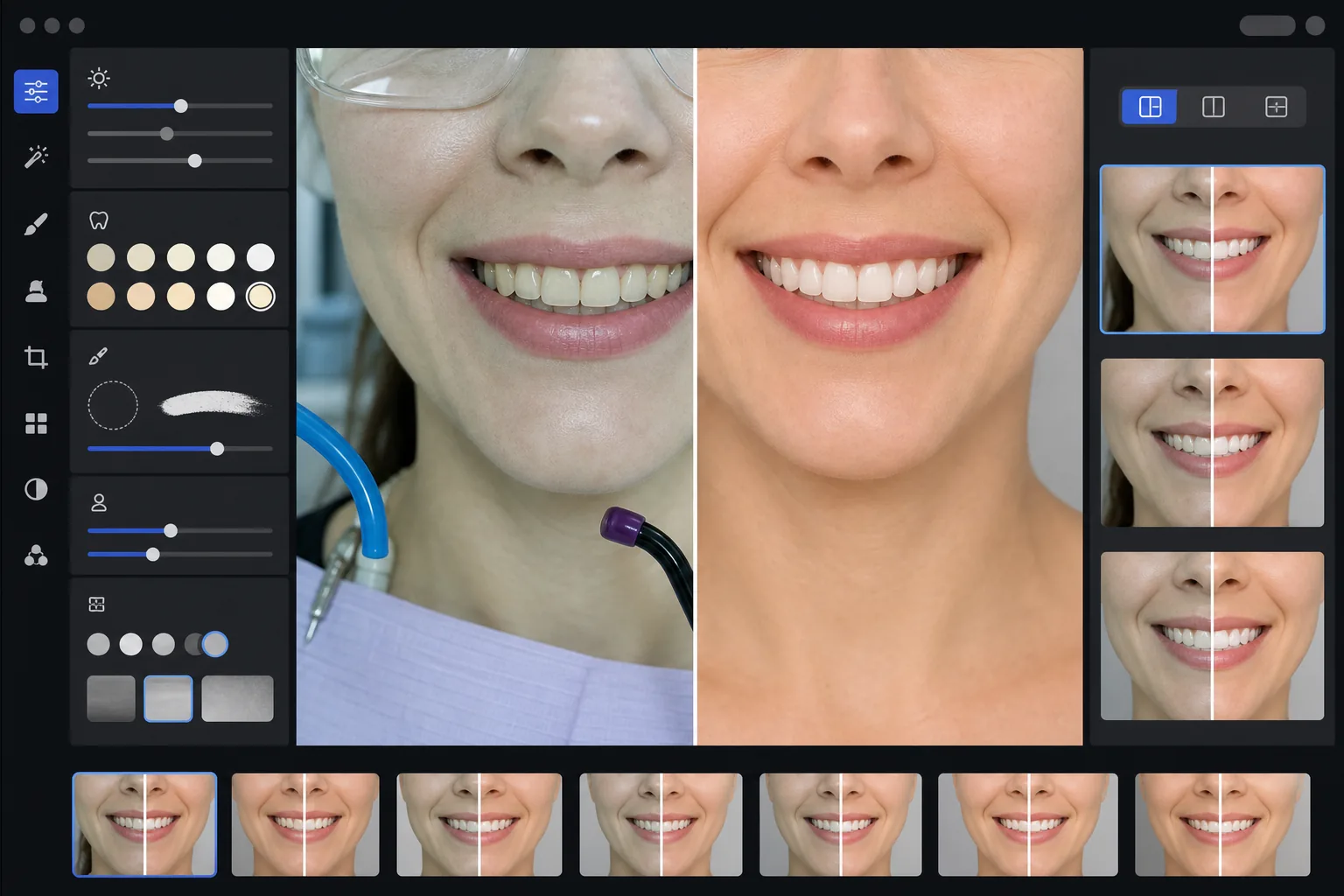
Créez des images marketing dentaires avant-après professionnelles qui mettent en valeur le travail de votre cabinet. Ce modèle applique un blanchiment dentaire d'aspect naturel, supprime l'encombrement clinique de l'arrière-plan, uniformise les arrière-plans des portraits de patients et équilibre l'éclairage zénithal dur courant sur les photos de salle de soins.
Essayer ce modèle gratuitementProfessional template preview
Ce que fait ce modèle
Transforme des photos dentaires cliniques en images marketing soignées pour les sites web de cabinets, les réseaux sociaux et les supports d'information des patients. AI Enhance corrige la dominante vert-blanc peu flatteuse de l'éclairage de salle de soins dentaire et applique un blanchiment subtil des dents d'aspect naturel — éclaircissant les dents de 2 à 3 teintes sans leur donner un aspect artificiel. Magic Eraser supprime les éléments cliniques en arrière-plan comme les tuyaux d'aspiration, les lampes à photopolymériser, les marques de papier à articuler sur les lèvres et les lunettes de protection. Les arrière-plans des portraits de patients sont uniformisés sur un fond net et cohérent dans toute votre galerie de cas.
Paramètres du modèle
| Blanchiment des dents | Éclaircissement naturel de +2 à +3 teintes (préserve la translucidité et la texture de l'émail) |
| Correction de l'éclairage | Équilibre lumière du jour de salle de soins dentaire (supprime la dominante clinique vert-blanc) |
| Arrière-plan | Fond gris ou blanc neutre cohérent avec léger vignettage |
| Teint de peau | Correction de la chaleur péribuccale (réduit la pâleur due à l'éclairage dentaire) |
| Couleur des lèvres | Récupération naturelle de la saturation (contre l'éclairage clinique délavé) |
Comment utiliser ce modèle
Importer les photos cliniques
Importez des gros plans de sourire, des photos avant-après de type portrait ou des images intra-orales prises dans votre salle de soins. Le modèle fonctionne avec des photos prises par des caméras dentaires spécialisées, des reflex avec flash annulaire et des photos de smartphone prises sous l'éclairage de la salle de soins.
Corriger l'éclairage clinique
AI Enhance neutralise la dominante vert-blanc des lampes du fauteuil dentaire en hauteur, réchauffe les teintes de peau autour de la bouche et restaure la couleur naturelle des lèvres. La couleur des dents est subtilement éclaircie pour montrer le résultat sous son meilleur jour tout en restant réaliste et honnête.
Nettoyer les arrière-plans et les distractions
Magic Eraser supprime les tuyaux visibles, les embouts de lampes à photopolymériser, les pinces de bavette, les taches de papier à articuler sur les lèvres et l'équipement clinique à l'arrière-plan. L'arrière-plan est remplacé par un fond neutre cohérent qui correspond à toutes vos paires avant-après.
Exporter pour un usage marketing
Téléchargez des images améliorées individuelles ou des montages avant-après côte à côte. Le résultat est dimensionné pour les galeries de sites web, les publications Instagram, Google Business Profile et les brochures patients imprimées, avec une résolution adaptée aux impressions 8x10 pouces.
Conseils de pro pour de meilleurs résultats
- ✓Pour les paires avant-après, photographiez les images de pré-traitement et de post-traitement sous le même angle, à la même distance et avec le même positionnement de l'éclairage. Le modèle peut corriger les différences d'exposition entre les deux, mais conserver l'angle de prise de vue d'origine produit la comparaison la plus convaincante.
- ✓Le blanchiment des dents est volontairement modéré — il éclaircit de 2 à 3 teintes vita plutôt que de rendre les dents blanc papier. Cela paraît plus naturel et crédible aux yeux des patients potentiels. Si votre résultat clinique réel est spectaculaire, une photo honnête avec une légère amélioration est plus persuasive qu'une image surtraitée.
- ✓Utilisez un écarteur de joues pour les prises de vue intra-orales du sourire afin d'obtenir la vue la plus complète du travail dentaire. Le modèle gère l'aspect légèrement clinique des photos prises avec écarteur en réchauffant les teintes de peau et en recadrant pour se concentrer sur la zone du sourire.
- ✓Traitez l'ensemble de votre galerie de cas en un seul lot pour garantir une couleur d'arrière-plan, une luminosité et une chaleur cohérentes sur toutes les paires avant-après. Un éclairage incohérent entre les cas sur votre site web nuit à l'impression de professionnalisme.
Outils
Questions fréquentes
Est-ce considéré comme de la publicité dentaire trompeuse ?
+
L'amélioration du blanchiment est limitée à 2-3 teintes vita et préserve la translucidité naturelle et la texture de surface de l'émail. Cela reste largement dans ce que l'éclairage photographique professionnel et la balance des blancs affectent naturellement. Le modèle ne modifie ni la forme des dents, ni leur alignement, ni le contour gingival — il corrige uniquement les effets de couleur peu flatteurs de l'éclairage clinique qui rendent les résultats moins beaux en photo qu'en personne.
Peut-il créer des montages avant-après côte à côte ?
+
Oui. Le modèle peut produire des images améliorées individuelles ou générer un montage côte à côte avec un séparateur central, un arrière-plan cohérent et des étiquettes avant/après. Les deux images de la paire reçoivent le même traitement d'arrière-plan, de sorte que la comparaison est visuellement nette et professionnelle.
Fonctionne-t-il avec les photos de caméra intra-orale ?
+
Oui. Les images de caméra intra-orale présentent généralement un éclairage très dur et direct qui efface la texture de surface. Le modèle restaure le détail de l'émail, corrige la dominante blanche extrême et ajuste le contraste pour montrer naturellement l'anatomie dentaire. Le résultat est plus détaillé et d'aspect plus naturel que la capture intra-orale brute.
Mettez en valeur votre travail dentaire avec des photos marketing professionnelles
Importez des photos cliniques et obtenez des images avant-après naturellement améliorées et au style cohérent, prêtes pour votre site web, vos réseaux sociaux et vos brochures patients.
Essayer gratuitementRelated templates
More professional templates for your workflow.
Modèle de portrait professionnel LinkedIn. Un arrière-plan épuré, une amélioration naturelle de la peau et un aspect soigné qui permet d'obtenir 14 fois plus de vues de profil.
Créez chez vous des photos de passeport et de visa conformes. Fond blanc, rapport de taille de tête correct, norme américaine 2 × 2 pouces et sortie 600 DPI qui répond aux exigences du Département d'État.
Modèle de portrait professionnel pour acteurs et modèles. Répondez aux normes des directeurs de casting avec une sortie 8×10 prête à imprimer, des retouches naturelles et des arrière-plans épurés pour les soumissions d’agence.