
Curseur Avant & Après
Montrez l'impact de votre travail avec des images de comparaison avant et après parfaitement alignées. Ce modèle crée des paires prêtes pour la démonstration qui conservent un cadrage, un équilibre lumineux et des dimensions cohérents — idéal pour les portfolios, les études de cas, la preuve sociale et le marketing produit où la transformation visuelle raconte l'histoire.
Essayer ce modèle gratuitementMarketing template preview
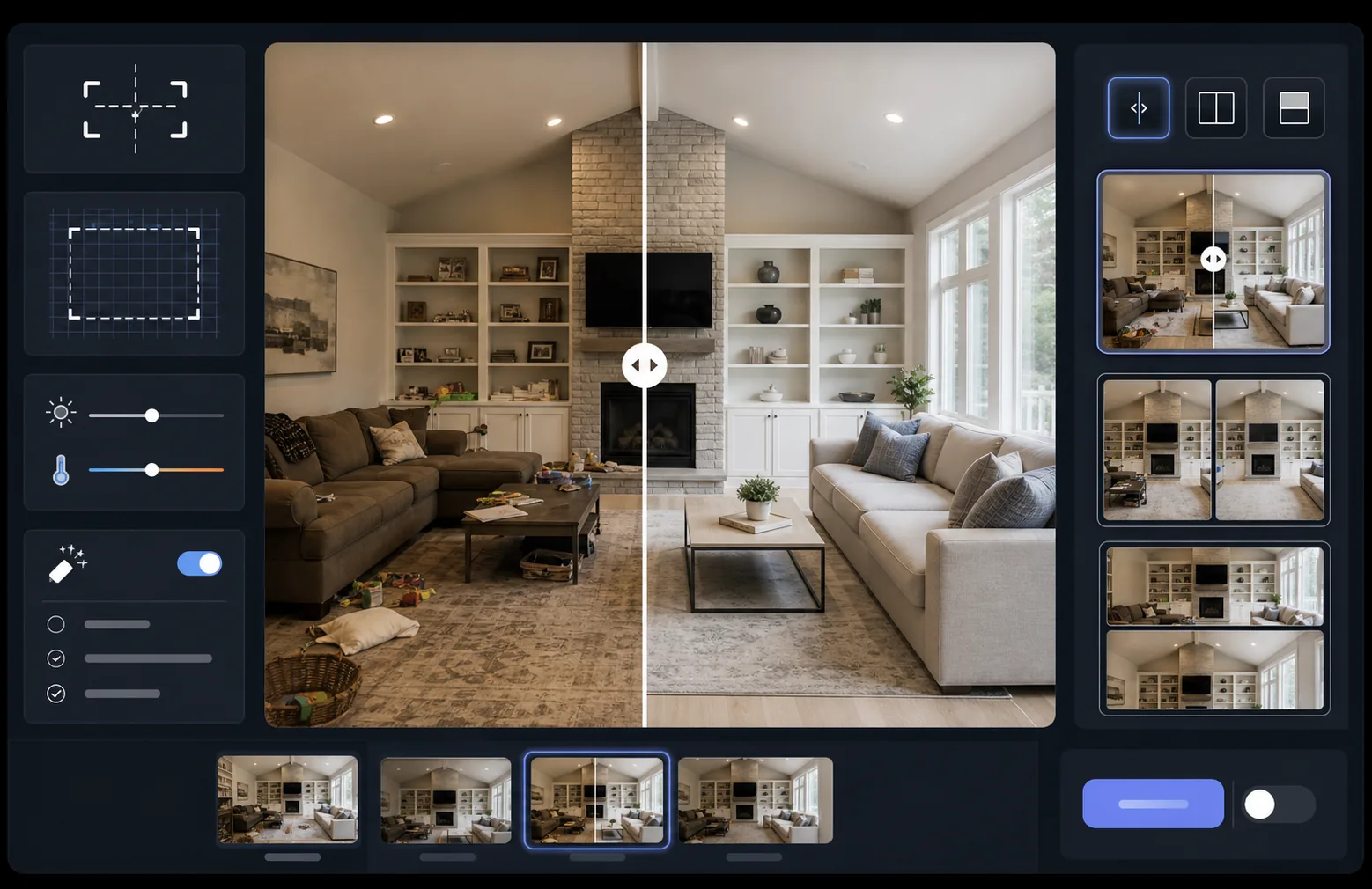
Ce que fait ce modèle
Traite deux images — un avant et un après — pour en faire une paire de comparaison parfaitement alignée, prête pour les widgets à curseur, les mises en page côte à côte ou les révélations animées. AI Enhance normalise l'exposition et la balance des blancs entre les deux images afin que la transformation soit clairement visible, sans que les différences d'éclairage ne brouillent la comparaison. Magic Eraser peut nettoyer les distractions accessoires présentes dans l'une ou l'autre image et qui ne font pas partie de la transformation voulue.
Paramètres du modèle
| Mise en page | Paire prête pour le curseur, côte à côte ou empilée à la verticale (au choix) |
| Taille de sortie | 1600×1200px par image (dimensions identiques) |
| Alignement | Recalage automatique — fait correspondre la perspective et le cadrage entre les prises |
| Normalisation de l'éclairage | Équilibre l'exposition et la balance des blancs sur l'ensemble de la paire |
| Superposition d'étiquettes | Étiquettes 'Before' / 'After' facultatives avec position personnalisable |
| Bordure | Séparateur gris neutre de 1px ou bord sans couture (au choix) |
Comment utiliser ce modèle
Importez votre image avant
Importez la photo originale, non modifiée, qui montre l'état de départ. Il peut s'agir d'une pièce avant rénovation, d'un produit avant amélioration, d'une peau avant traitement, ou de toute transformation visuelle que vous souhaitez démontrer.
Importez votre image après
Importez la photo du résultat montrant la transformation achevée. Essayez de photographier sous le même angle et à la même distance que la prise avant. Le modèle alignera automatiquement les petites différences de cadrage et de perspective.
Normalisez et alignez
Le modèle recale automatiquement les deux images afin que les éléments correspondants s'alignent pixel par pixel. L'exposition et la balance des blancs sont normalisées afin que les différences d'éclairage entre les séances de prise de vue ne détournent pas l'attention de la transformation réelle.
Exportez la comparaison
Choisissez votre format de sortie — paire assortie pour un widget à curseur, composition côte à côte pour les réseaux sociaux, ou empilage vertical pour le marketing par e-mail. Ajoutez des étiquettes Before/After facultatives et exportez en résolution optimisée pour le web ou en qualité d'impression.
Conseils de pro pour de meilleurs résultats
- ✓Photographiez l'avant et l'après depuis exactement la même position si possible — marquez l'emplacement de votre trépied ou tenez-vous au même endroit. Moins l'IA doit corriger l'alignement, plus la comparaison est nette.
- ✓Utilisez la même distance focale pour les deux prises afin d'éviter les différences de distorsion de perspective qui donnent aux comparaisons alignées un aspect subtilement décalé.
- ✓Supprimez les changements sans rapport entre l'avant et l'après à l'aide de Magic Eraser — si une plante a bougé ou si un nouvel objet est apparu, effacez-le pour que les spectateurs se concentrent sur la transformation voulue.
- ✓Pour les intégrations de curseur sur le web, exportez les deux images aux dimensions identiques et utilisez le PNG sans perte pour éviter les artéfacts de compression le long de la ligne de séparation du curseur.
Outils
Questions fréquentes
Que se passe-t-il si les photos avant et après ont été prises sous des angles légèrement différents ?
+
Le système de recalage automatique gère les différences modérées d'angle de prise de vue, de distance et de cadrage. Il identifie les points de référence correspondants dans les deux images et les transforme pour les faire coïncider. Pour de meilleurs résultats, l'écart d'angle devrait être inférieur à 15 degrés.
Puis-je l'utiliser pour des miniatures vidéo montrant des transformations ?
+
Oui. La sortie en composition côte à côte est idéale pour les miniatures vidéo sur YouTube et les réseaux sociaux. La mise en page en écran partagé avec étiquettes communique immédiatement une histoire de transformation qui suscite les clics.
La normalisation de l'éclairage modifie-t-elle les résultats réels affichés ?
+
Non. La normalisation de l'éclairage ajuste uniquement l'exposition globale et la balance des blancs afin que les deux images semblent avoir été prises dans les mêmes conditions. La transformation réelle — les changements du sujet — est conservée exactement telle qu'elle a été photographiée.
Montrez vos résultats, côte à côte
Importez vos photos avant et après et obtenez en quelques secondes une image de comparaison parfaitement alignée et présentée de façon professionnelle. Laissez la transformation parler d'elle-même.
Essayer gratuitement