
Comment éditer des photos de produits pour le commerce électronique
Transformez des photos de produits bruts en listes prêtes à être mises sur le marché. Supprimez les arrière-plans de studio, nettoyez les imperfections et créez des images professionnelles sur fond blanc qui répondent aux exigences d'Amazon, Shopify, Etsy et eBay, le tout sans compétences Photoshop ni éditeur professionnel.
Last updated
Modifiez les photos du produit maintenant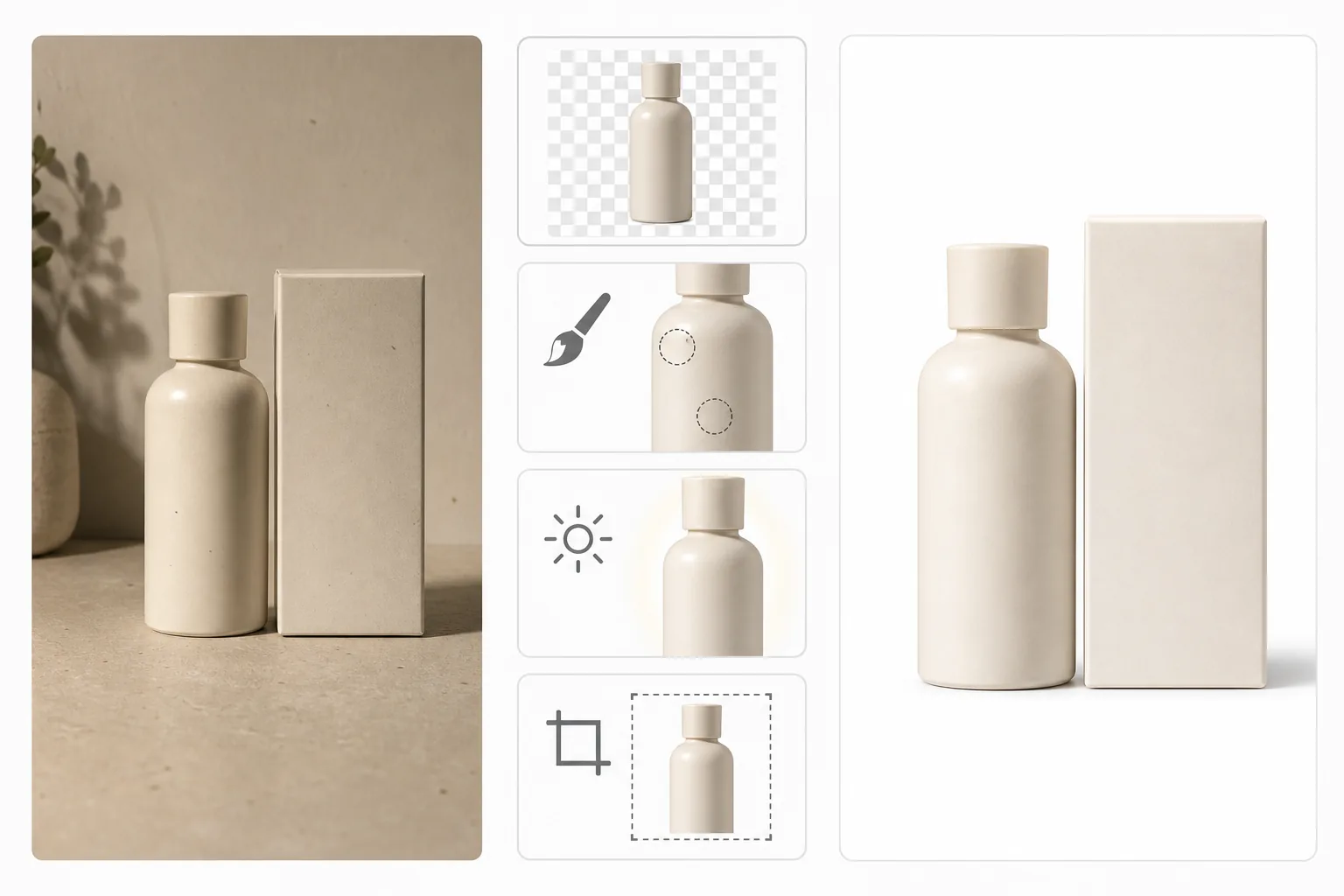
Pourquoi la qualité des photos des produits affecte directement les taux de conversion
Pour retoucher vos photos de produits e-commerce, ouvrez Magic Eraser sur le web, iOS ou Android, importez vos prises de vue, supprimez l'arrière-plan et remplacez-le par un blanc bien net, améliorez la luminosité et la netteté, puis exportez au format requis par votre marketplace. C'est gratuit pour commencer, sans inscription. La méthode reste la même sur Amazon, Shopify, eBay, Etsy et Walmart — un produit net et bien éclairé sur fond uni — mais chaque plateforme applique ses propres règles précises (Amazon impose des images principales sur fond blanc pur, le produit occupant environ 85 % du cadre). Vérifiez donc les spécifications d'image en vigueur de votre marketplace avant de publier. Restez fidèle au produit réel : corrigez l'éclairage et l'arrière-plan, mais ne modifiez pas la couleur ou la taille au point de fausser ce que vos acheteurs recevront. La photographie de produits est le facteur le plus important dans les taux de conversion du commerce électronique. Des études montrent systématiquement que les images de produits de haute qualité augmentent la conversion de 30 à 40 % par rapport aux alternatives de mauvaise qualité. Les plateformes Marketplace imposent des exigences spécifiques en matière d'image : Amazon exige un fond blanc pur (RVB 255 255 255) pour les images des listes principales, Shopify recommande un style cohérent dans tous les catalogues de produits et Etsy récompense les listes avec des photos claires et bien éclairées avec un meilleur placement dans la recherche. Le respect manuel de ces normes – en utilisant Photoshop pour découper des produits à partir d'arrière-plans de studio, corriger les couleurs de chaque image et redimensionner pour répondre aux exigences de plusieurs plates-formes – coûte entre 2 et 10 $ par image en cas d'externalisation. Les outils Background Eraser et AI Enhance de Magic Eraser automatisent ce flux de travail, produisant des images conformes au marché en quelques secondes par photo.
Before you start
Modifiez les photos de produits en cinq étapes
Start with photographiez votre produit. The result preview above and tips below use this guide's existing content; no separate before-and-after proof is assumed.
- 1
Photographiez votre produit
Photographiez sur une surface propre avec un éclairage uniforme et diffus. Un tableau d’affichage blanc ou une toile de fond en tissu fonctionnent bien. Évitez les ombres dures : la lumière du jour nuageuse près d’une fenêtre ou d’une simple softbox fournit un éclairage uniforme. Photographiez sous plusieurs angles : avant, arrière, latéral, gros plans détaillés et photos de style de vie en cours d'utilisation. Utilisez la résolution la plus élevée prise en charge par votre caméra.
- 2
Supprimer l'arrière-plan
Téléchargez chaque image de produit sur Magic Eraser et utilisez l'outil Background Eraser. L'IA isole le produit grâce à une détection précise des bords, en gérant des formes complexes telles que des chaînes de bijoux, des plis de tissu et des emballages transparents. Choisissez un fond blanc pur pour les images principales du marché ou conservez le PNG transparent pour une utilisation sur des arrière-plans de couleur personnalisée dans le thème de votre magasin.
- 3
Nettoyer les imperfections
Utilisez la brosse Magic Eraser pour éliminer la poussière, les peluches, les empreintes digitales, les rayures ou les petites marques visibles sur la surface du produit. Brossez les étiquettes, les balises ou les autocollants qui ne devraient pas apparaître dans la liste. Pour les produits réfléchissants (verre, métal, bijoux), nettoyez les reflets indésirables ou les points d'éblouissement.
- 4
Améliorer la qualité
Appliquez AI Enhance pour affiner les détails du produit, corriger la précision des couleurs et optimiser la luminosité et le contraste. Cela garantit une qualité constante dans l’ensemble de votre catalogue, même si des photos individuelles ont été prises dans des conditions d’éclairage légèrement différentes. L'IA ajuste chaque image indépendamment pour des résultats équilibrés et d'aspect professionnel.
- 5
Exporter pour chaque plateforme
Exportez des images à la résolution et au format requis par chaque marché. Les images principales d'Amazon nécessitent au moins 1 000 × 1 000 pixels sur un fond blanc pur. Shopify recommande des images carrées de 2048 × 2048. Enregistrez au format JPEG de haute qualité pour les marchés ou PNG pour votre propre magasin où la transparence ou la qualité sans perte est nécessaire.
Idéal pour
- Vendeurs Amazon qui ont besoin d'images principales sur fond blanc répondant aux exigences du marché
- Les propriétaires de magasins Shopify créent des catalogues de produits cohérents
- Vendeurs Etsy photographiant des objets faits à la main à la maison sans studio
- Vendeurs eBay qui ont besoin rapidement de photos d'annonces nettes et professionnelles
- Dropshippers qui ont besoin d'améliorer les images de produits fournies par les fournisseurs
- Propriétaires de petites entreprises qui photographient leurs propres produits et ont besoin de résultats professionnels
Conseils pour les photos de produits prêtes à être mises sur le marché
La cohérence compte plus que la perfection. Un catalogue dans lequel chaque image présente le même fond blanc, un éclairage similaire et un cadrage cohérent semble professionnel, même si les images individuelles ne sont pas des photographies primées. Photographiez un lot de produits en une seule séance pour maintenir un éclairage constant. Pour les vêtements et les vêtements, utilisez un mannequin ou une pose à plat plutôt que des cintres : les acheteurs veulent voir la forme et l'ajustement. Pour les bijoux et les petits objets, le mode macro ou les objectifs gros plan capturent les détails attendus par les acheteurs. Vérifiez les exigences spécifiques de chaque marché avant l'exportation par lots : Amazon exige un remplissage d'image d'au moins 85 %, eBay recommande 1 600 × 1 600 pixels et la plupart des plateformes interdisent les superpositions de texte sur l'image principale du produit. Magic Eraser traite chaque image en quelques secondes, ce qui permet de rééditer l'intégralité d'un catalogue lorsque vous mettez à jour les normes visuelles de votre magasin.
Questions fréquemment posées
- Est-ce que cela répond aux exigences d'Amazon en matière de fond blanc ?
- Oui. Le Background Eraser de Magic Eraser produit un arrière-plan blanc pur (RVB 255,255,255) qui répond aux principales exigences d'Amazon en matière d'image. L'IA crée des bords de produit nets, sans halos ni franges.
- Combien de photos de produits puis-je modifier ?
- Le niveau gratuit couvre plusieurs photos par jour. Premium (29,99 $/an) offre des modifications illimitées — recommandé pour les vendeurs disposant de catalogues de plus de 50 produits ou de mises à jour régulières de l'inventaire.
- Peut-il gérer des produits transparents ou réfléchissants ?
- Oui. L'IA détecte les bouteilles en verre, les emballages transparents, les métaux réfléchissants et les matériaux similaires difficiles à détecter. Il produit des masques de contour précis qui préservent les propriétés visuelles du produit, notamment la transparence et la brillance, sur le nouveau fond.
- Ai-je besoin de compétences Photoshop ?
- L'ensemble du flux de travail (suppression de l'arrière-plan, nettoyage, amélioration et exportation) utilise des outils d'IA en un clic. Aucune gestion des calques, outils de sélection ou masquage manuel n’est requis.
- Amazon, Shopify, eBay, Etsy et Walmart ont-ils des exigences photo différentes ?
- Oui — les bases se recoupent, mais les détails diffèrent : confirmez donc toujours les consignes en vigueur de chaque plateforme. Amazon est la plus stricte pour les images principales : fond blanc pur, produit occupant environ 85 % du cadre, ni texte ni logo, et au moins 1000 px sur le plus grand côté pour permettre le zoom. Walmart attend également un fond blanc ou très clair pour l'image principale. Shopify et votre propre boutique vous laissent le plus de liberté, mais récompensent une apparence cohérente sur tout le catalogue. Etsy et eBay autorisent les arrière-plans contextuels ou lifestyle et n'imposent pas le blanc pur. Une bonne approche consiste à exporter une version nette sur fond blanc qui satisfait les marketplaces les plus strictes, plus quelques photos lifestyle optionnelles pour les plateformes qui les acceptent.