
Prendre de meilleures photos avec votre téléphone
Améliorez la qualité de vos photos prises au téléphone dès la capture grâce à une meilleure composition, une conscience de l'éclairage et des réglages d'appareil photo.
Lesson context before the long read
Review the result preview above, then scan the learning objectives below before reading the full lesson. Updated 2026-05-17.
Example visual uses an existing public asset: /content-images/mobile-phone-camera-tips-academy.webp.
Learning Objectives
- 1Appliquer des techniques de composition fondamentales, notamment la règle des tiers, les lignes directrices et le cadrage sur l'écran d'un téléphone
- 2Utiliser efficacement l'éclairage naturel et artificiel pour améliorer la qualité des photos prises au téléphone avant toute retouche
- 3Naviguer dans les commandes manuelles de l'appareil photo de votre téléphone, notamment le verrouillage de l'exposition, le verrouillage de la mise au point et le choix de l'objectif
Maximiser la qualité de l'appareil photo du smartphone
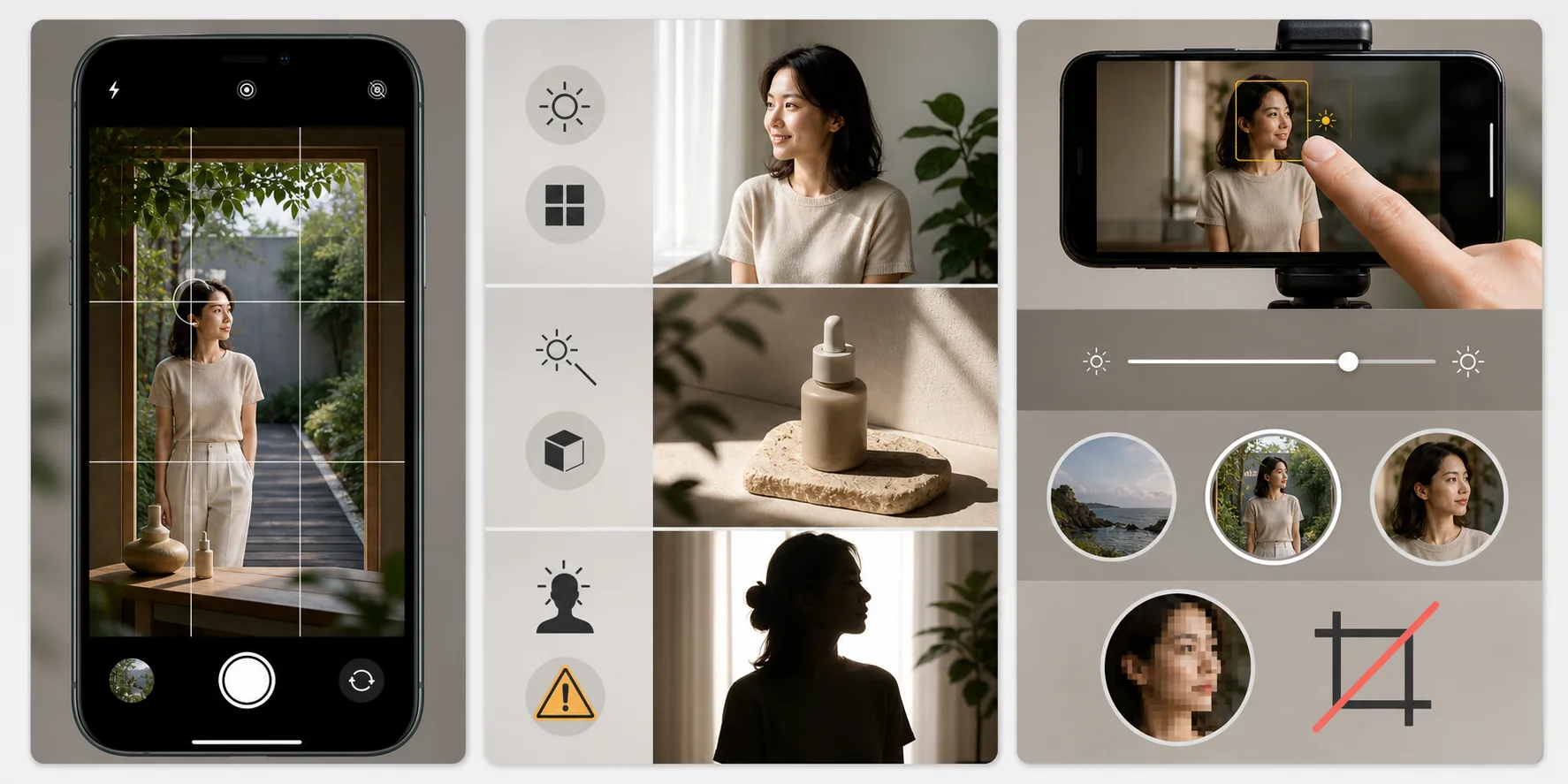
La meilleure retouche ne peut pas corriger une photo mal composée, donc apprendre à bien composer au moment de la capture économise un effort de retouche important par la suite. Activez la grille superposée sur l'appareil photo de votre téléphone pour aider à positionner les sujets le long des intersections de la règle des tiers, ce qui crée des images plus dynamiques et visuellement intéressantes que de tout centrer. Recherchez des lignes directrices comme des routes, des clôtures ou des arêtes architecturales qui attirent le regard du spectateur dans la scène. Utilisez des cadres naturels comme des portes, des fenêtres ou des branches en surplomb pour ajouter de la profondeur et concentrer l'attention sur votre sujet.
Techniques d'éclairage pour la photographie mobile
L'éclairage a le plus grand impact à lui seul sur la qualité des photos prises au téléphone, car les capteurs des téléphones sont plus petits que ceux des appareils dédiés et peinent davantage en faible luminosité. Lorsque c'est possible, positionnez votre sujet de sorte que la principale source de lumière éclaire son visage ou l'avant de l'objet que vous photographiez. L'éclairage latéral crée des ombres et des textures spectaculaires, ce qui fonctionne bien pour les paysages et la photographie produit mais peut être peu flatteur pour les portraits décontractés. Évitez de photographier directement face à des sources de lumière vives à moins de vouloir intentionnellement une silhouette, car les appareils photo des téléphones ont moins de plage dynamique pour récupérer les sujets à contre-jour que les appareils professionnels.
Règles de composition pour les petits écrans
Les téléphones modernes offrent des commandes manuelles que la plupart des utilisateurs n'explorent jamais. Appuyez et maintenez sur votre sujet pour verrouiller la mise au point et l'exposition, puis faites glisser le curseur d'exposition pour éclaircir ou assombrir l'image avant la capture. Cette seule technique améliore considérablement les résultats dans des conditions d'éclairage difficiles. Si votre téléphone possède plusieurs objectifs, apprenez quand utiliser chacun : l'objectif grand-angle est idéal pour les paysages et l'architecture, l'objectif principal produit la meilleure qualité pour un usage général, et l'objectif téléobjectif compresse la perspective pour les portraits et les détails. Évitez le zoom numérique, qui ne fait que recadrer l'image et réduire la qualité ; rapprochez-vous plutôt de votre sujet ou utilisez l'objectif téléobjectif.
Key Takeaways
- ✓Utilisez la grille superposée et la règle des tiers pour des compositions plus solides qui nécessitent moins de recadrage par la suite
- ✓Positionnez les sujets face à la source de lumière et évitez les situations à contre-jour pour les meilleurs résultats de l'appareil photo du téléphone
- ✓Verrouillez la mise au point et l'exposition en appuyant et maintenant, et utilisez des objectifs optiques plutôt que le zoom numérique