
Yapay Zeka ile Mükemmel Pasaport Fotoğrafları Oluşturun
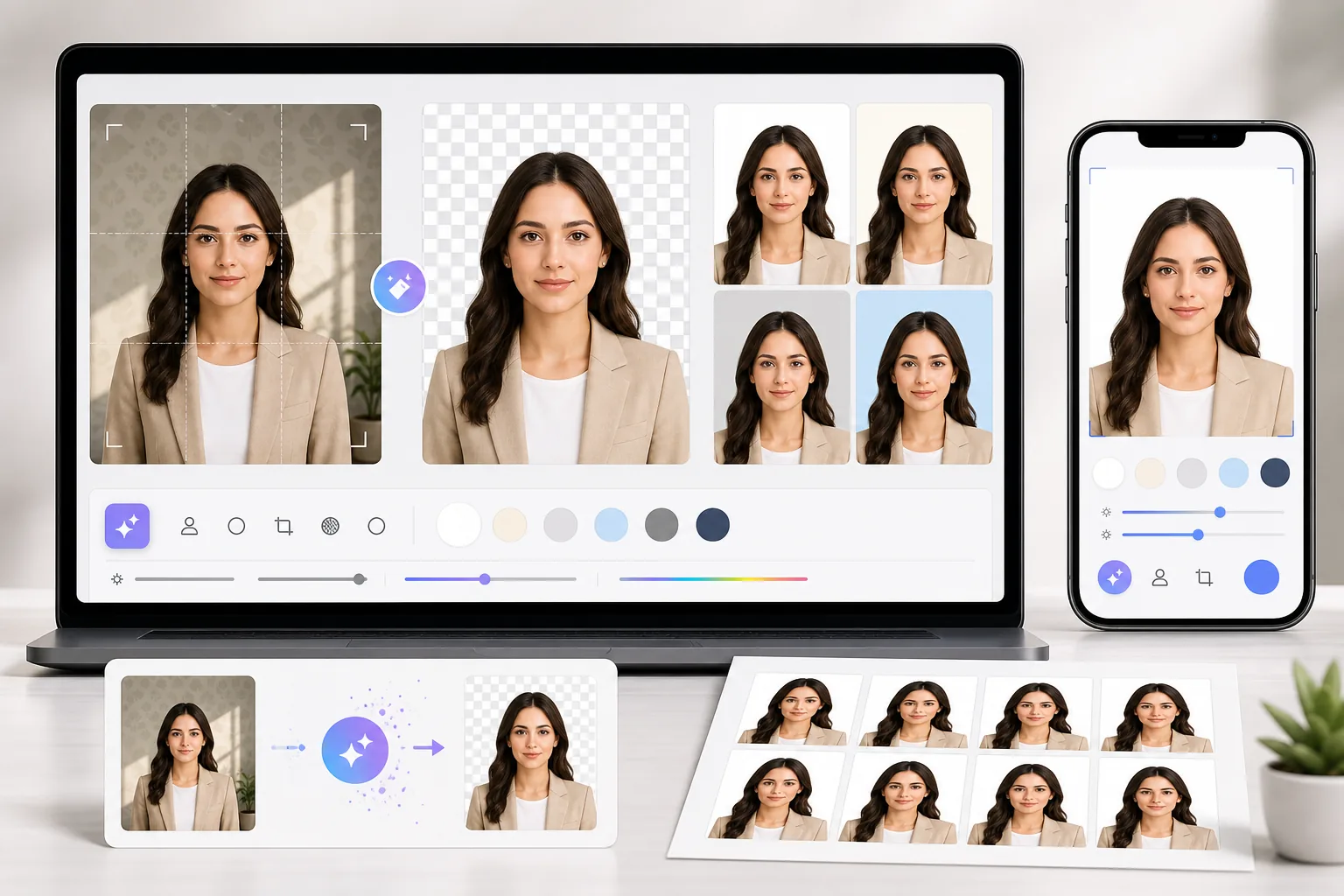
Pasaport ve vize ofisleri her gün yanlış arka plan nedeniyle binlerce fotoğrafı reddeder. Magic Eraser her türlü arka planı kaldırır ve ihtiyacınız olan tam renge — beyaz, açık gri veya mavi — saniyeler içinde değiştirir.
Reddedilen Fotoğraflar Zaman ve Para Kaybettirir
Resmi kurumların ülkeye göre değişen katı arka plan gereksinimleri vardır. Bir gölge, desenli bir duvar veya yanlış beyaz tonu reddedilmeye yol açabilir. Magic Eraser size resmi standartları karşılayan kusursuz biçimde tek tip bir arka plan sunar.
Profesyonel Fotoğraf Stüdyoları Pahalıdır
Tek bir pasaport fotoğrafı çekimi stüdyoda hatırı sayılır bir ücrete mal olur. Magic Eraser ile fotoğrafınızı evde kendiniz çekebilir ve stüdyo kalitesinde sonuçları ücretsiz alabilirsiniz — hem kendiniz hem de tüm aileniz için.
Son Dakika Seyahatinde Yeniden Çekime Vakit Yok
Seyahatiniz ayarlanmışken ve pasaportunuzun süresi gelecek hafta dolarken yeniden çekim için vaktiniz yoktur. Herhangi bir güncel vesikalık yükleyin, arka planı kaldırın ve standartlara uygun bir fotoğrafı 30 saniyeden kısa sürede indirin.
Magic Eraser ile Pasaport Fotoğrafı Nasıl Oluşturulur
Vesikalığınızı Çekin veya Yükleyin
Telefonunuzla herhangi bir duvarın önünde fotoğraf çekin veya mevcut bir vesikalık yükleyin. Yüzünüzün iyi aydınlatılmış, ortalanmış ve her iki kulağın görünür olduğundan emin olun.
Arka Planı Kaldırın
Magic Eraser'ın yapay zekası yüzünüzü ve saçınızı hassas biçimde algılar, arka planı temiz kenarlarla kaldırır — yeşil ekrana gerek yoktur.
Arka Plan Rengini Seçin
Çoğu ülkenin pasaportu için beyaz, birçok Asya ülkesi için açık mavi seçin veya ülkenizin tam gereksinimine uyması için özel bir hex kodu girin.
İndirin ve Yazdırın
Fotoğrafınızı gerekli boyutlarda (çoğu ülke için 35×45 mm) dışa aktarın ve evde veya herhangi bir fotoğraf kioskunda yazdırın.
Araçlar
Sıkça Sorulan Sorular
Pasaport fotoğrafım resmi gereksinimleri karşılayacak mı?
+
Magic Eraser temiz, düz renkli bir arka plan oluşturmaya yardımcı olur ancak kabul garantisi vermez. Belgeyi düzenleyen kurum fotoğrafın güncelliği, poz, ifade, aydınlatma, kırpma, ölçüler, dosya biçimi ve dijital düzenlemeye izin verilip verilmediği dahil fotoğrafın tamamını değerlendirir. Göndermeden önce güncel resmi kuralları kontrol edin.
Pasaport fotoğrafı için hangi arka plan rengine ihtiyacım var?
+
Çoğu merci düz beyaz veya kırık beyaz arka plan gerektirir. Magic Eraser'ın beyaz arka plan seçeneği bu standardı tam olarak karşılayacak şekilde kalibre edilmiştir.
Bunu vize ve kimlik kartı fotoğrafları için de kullanabilir miyim?
+
Evet. Magic Eraser her tür kimlik fotoğrafı için çalışır — pasaportlar, vize başvuruları, ulusal kimlik kartları, ehliyetler ve profesyonel vesikalıklar. Yalnızca belge türünüzün gerektirdiği arka plan rengini seçin.
Telefonumla çekilen fotoğraflarla çalışır mı?
+
Kesinlikle. Modern akıllı telefon kameraları pasaport fotoğrafları için fazlasıyla yeterli çözünürlük üretir. Yalnızca aydınlatmanızın eşit ve yüzünüzün net biçimde görünür olduğundan emin olun.
Pasaport Fotoğrafınızı Şimdi Oluşturun
Fotoğraf stüdyosunu atlayın. Arka planınızı kaldırın, doğru rengi seçin ve standartlara uygun bir pasaport fotoğrafını bir dakikadan kısa sürede indirin.
Ücretsiz deneİlgili kullanım alanları
Profesyonellerin bu araçları gerçek iş akışlarında nasıl kullandığını görün.
Kişisel eşyalar, park edilmiş araçlar veya inşaat ekipmanlarıyla dolu ilan fotoğrafları alıcıları uzaklaştırabilir. Magic Eraser, emlak fotoğraflarınızı anında temizlemek için yapay zeka kullanır — Photoshop becerisi gerektirmez.
Bulanık arka planlar ve dağınık ürün çekimleri her gün size satış kaybettiriyor. Magic Eraser, saniyeler içinde temiz, profesyonel ürün görselleri oluşturmanıza yardımcı olur — Photoshop becerisi gerekmez. Sadece yükleyin, dikkat dağıtıcı öğeleri silin ve güvenle listeleyin.
Dikkat çekici kolajlara, afişlere ve broşürlere ihtiyacınız var — ama ne bir tasarımcı bütçeniz ne de Photoshop öğrenecek vaktiniz var. Magic Eraser size düzen araçları, yapay zekâ ile üretilen arka planlar ve tek tıkla kesim sunarak dakikalar içinde kaydırmayı durduran pazarlama görselleri oluşturmanızı sağlar.
İlgili karşılaştırmalar
Magic Eraser'ın benzer araçlarla karşılaştırmasını görün.
TouchRetouch, nesneleri ve kusurları kaldırmak için popüler, ücretli bir mobil uygulamadır. Magic Eraser ise kurulum gerektirmeden her cihazda ücretsiz yapay zeka destekli düzenleme sunar. Özellikler, fiyatlandırma ve kullanım kolaylığı açısından nasıl karşılaştırıldıklarını görün.
Cleanup.pictures, hizli nesne kaldirma icin ucretsiz bir web aracidir. Magic Eraser, 8 AI destekli duzenleme araci, mobil uygulamalar ve gelismis isleme ile daha da ileri gider. Ikisinin nasil karsilastirildigini gorun.
remove.bg, güçlü bir API ile Photoshop ve Figma entegrasyonları sunan, arka plan kaldırma alanında pazar lideridir. Magic Eraser ise nesne kaldırmadan üretken doldurmaya, yapay zeka iyileştirmeden tasarıma kadar sekiz yapay zeka destekli düzenleme aracıyla daha ileri gider — hepsi tek bir düzenleyicide.
Farklı güçlü yönlere sahip iki güçlü yapay zeka fotoğraf düzenleyici. Magic Eraser daha geniş bir üretken yapay zeka araç seti sunarken, Photoroom e-ticaret ürün fotoğrafçılığı ve toplu işlemede üstündür. Hangisinin iş akışınıza uyduğunu görün.
İlgili rehberler
Bu iş akışıyla ilgili daha fazla rehber keşfedin.
Magic Eraser ile fotoğraflardan nesneleri, kişileri, metinleri ve dikkat dağıtan öğeleri kaldırıp daha temiz AI düzenleme sonuçları almayı öğrenin.
Yapay zekâ ile saniyeler içinde fotoğraflardan insanları kaldırmayı öğrenin. Seyahat, emlak ve ürün fotoğrafları için kılavuz.
Yapay zekâ ile kendi fotoğraflarınızdan filigranları kaldırmaya yönelik adım adım kılavuz. Ne zaman uygun olduğu, en iyi teknikler ve Magic Eraser'ın bunu nasıl yaptığı.