
Düğün Fotoğrafı Geliştirme
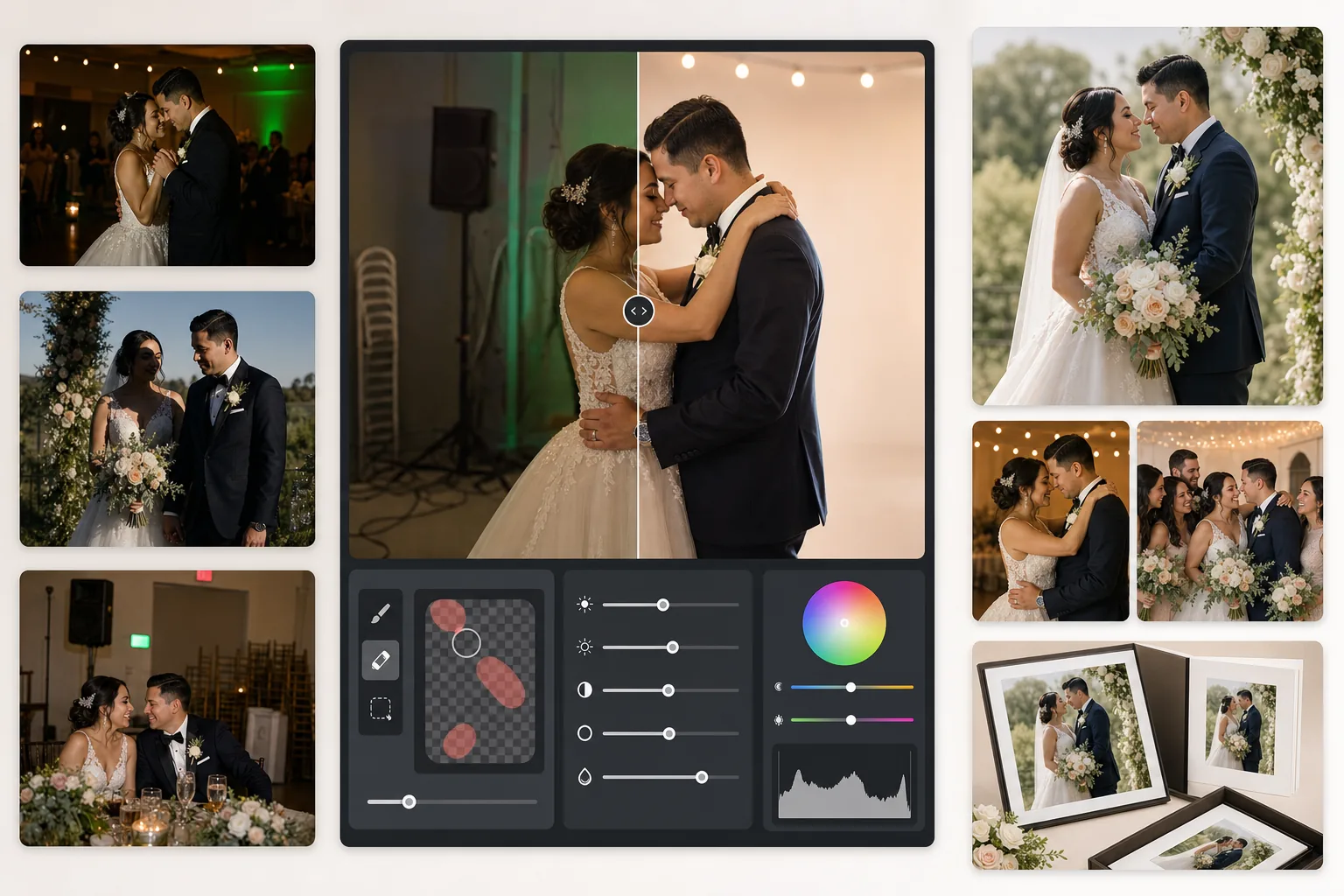
Az ışıklı resepsiyon fotoğraflarını kurtarın, dikkat dağıtan arka planları kaldırın ve albüme yakışır düğün görselleri için cilt tonlarını iyileştirin. Bu şablon, törenlerin ve resepsiyonların zorlu ışık koşulları için tasarlanmıştır: loş mekânlar, DJ ışıklarından kaynaklanan karışık renk tonları ve dikkati çiftten uzaklaştıran dağınık arka planlar.
Bu şablonu ücretsiz deneyinEvents template preview
Bu şablon ne yapar
Düğün fotoğrafçılığındaki en yaygın sorunları düzeltir: az pozlanmış resepsiyon çekimleri, tungstenin turuncu veya floresanın yeşil renk tonları, sert flaş gölgeleri ve çıkış tabelaları, üst üste dizilmiş sandalyeler ve ikram ekipmanı gibi dikkat dağıtan arka plan unsurları. AI Enhance, karanlık dans pisti fotoğraflarından ayrıntıları geri kazanır ve karışık aydınlatmayı dengelerken Magic Eraser, istenmeyen nesneleri iz bırakmadan kaldırır. Cilt tonları, aşırı pürüzsüzleştirme olmadan doğal ve sıcak görünecek şekilde iyileştirilir.
Şablon ayarları
| Pozlama kurtarma | Parlak alanların korunmasıyla +1,5 EV gölge yükseltme |
| Beyaz dengesi | Otomatik karışık ışık düzeltmesi (tungsten/floresan/gün ışığı) |
| Cilt tonu modu | Doğal sıcaklık (+5 sıcaklık, +3 pürüzsüzleştirme, ayrıntı korunur) |
| Çıktı çözünürlüğü | 4000px uzun kenar (300 DPI'de 13×19'a kadar baskıya hazır) |
| Renk profili | Adobe RGB (profesyonel baskı için daha geniş renk gamı) |
| Gürültü azaltma | Yüksek ISO uyarlamalı (yükseltilen gölgelerdeki ayrıntıyı korur) |
Bu şablon nasıl kullanılır
Düğün fotoğraflarınızı yükleyin
Resepsiyon çekimlerini, tören görüntülerini veya konukların akıllı telefonla çektiği fotoğrafları yükleyin. Şablon, profesyonel bir DSLR'den RAW olarak dışa aktarılan JPEG'lerden sıkıştırılmış telefon fotoğraflarına kadar her şeyi işler — yapay zeka, geliştirme gücünü kaynağın kalitesine göre ayarlar.
Işığı ve rengi düzeltin
AI Enhance, karanlık resepsiyon sahnelerini aydınlatır, mekânın karışık aydınlatmasından kaynaklanan turuncu-yeşil renk tonlarını nötralize eder ve flaşla aydınlatılmış ön planı ortam ışığıyla aydınlatılmış arka planla dengeler. Cilt tonları, gelinliğin beyazını veya dekor renklerini etkilemeden doğal bir sıcaklığa kaydırılır.
Dikkat dağıtan unsurları kaldırın
Magic Eraser; çıkış tabelalarını, yangın söndürücüleri, üst üste dizilmiş sandalyeleri, ikram arabalarını, yerdeki güç kablolarını ve arka planda kareye giren konukları kaldırır. Yapay zeka, kaldırılan nesnelerin arkasındaki arka plan desenini doğal şekilde yeniden oluşturur.
Albümler ve baskılar için dışa aktarın
Profesyonel fotoğraf laboratuvarı baskısı için Adobe RGB'de 4000px uzun kenarla ya da dijital paylaşım ve çevrimiçi galeriler için sRGB'de indirin. Çıktı, 300 DPI'de 13×19 inçe kadar baskılar için boyutlandırılmıştır.
En iyi sonuçlar için profesyonel ipuçları
- ✓Karanlık resepsiyon dans pisti çekimlerinde şablon, yaklaşık 1,5 diyaframlık gölge ayrıntısını geri kazanabilir. Orijinal fotoğraf neredeyse tamamen siyahsa geliştirme gürültü oluşturabilir — en azından özneleri silik de olsa görebildiğiniz fotoğraflarla başlayın.
- ✓Cilt tonu düzeltmesi, düğün fotoğrafçılığının sıcaklığına göre kalibre edilmiştir — nötrden biraz daha sıcaktır ve karışık aydınlatmada çoğu cilt tonunu güzel gösterir. Halihazırda iyi doğal ışığa sahip açık hava tören fotoğraflarında düzeltme belli belirsizdir.
- ✓Arka plan nesnelerini kaldırırken en doğal sonuçlar için aynı anda tek bir alanda çalışın. Çıkış tabelaları, yangın fıskiyeleri ve duvar prizleri tek geçişte temiz bir şekilde kaldırılacak kadar küçüktür. Üst üste dizilmiş sandalyeler gibi daha büyük nesneleri bölümler halinde kaldırmak daha iyi olabilir.
- ✓Önce çiftin portrelerini, ardından grup çekimlerini, sonra da samimi kareleri işleyin. Bu, ikincil görüntülere geçmeden önce en önemli fotoğraflarda tutarlı bir renk derecelendirme temeli oluşturmanızı sağlar.
Araçlar
Sık sorulan sorular
Bu, bulanık resepsiyon fotoğraflarını düzeltebilir mi?
+
AI Enhance, yavaş obtüratör hızlarından kaynaklanan hafif yumuşaklığı keskinleştirebilir ve önemli ölçüde gölge ayrıntısını geri kazanabilir; ancak öznelerin gözle görülür şekilde çizgilendiği ciddi hareket bulanıklığını düzeltemez. Hafif el titremesi bulanıklığı veya hafif odak yumuşaklığı olan fotoğraflar belirgin şekilde iyileşir.
Gelinin beyaz elbisesi ayrıntı kaybeder mi?
+
Ton eşleme algoritması, beyazlardaki parlak alan ayrıntısını özellikle korur. Aynı görüntüde gölgeler yükseltilse bile elbise dokusu, dantel desenleri ve kumaş kıvrımları korunur. Sonuç, parlak beyazlardan derin gölgelere kadar tam bir aralığı muhafaza eder.
Baskı albümleri için yeterince iyi mi?
+
Evet. 300 DPI'deki 4000px çıktı, 13×19 inçe kadar baskıları destekler. Adobe RGB renk profili, profesyonel fotoğraf laboratuvarlarının kullandığı daha geniş renk gamını korur. Standart 8×10 albüm sayfaları için çözünürlük, keskin baskılar için gerekenin çok ötesindedir.
Her düğün fotoğrafını albüme yakışır bir görsele dönüştürün
Resepsiyon ve tören fotoğraflarını yükleyin, saniyeler içinde profesyonelce geliştirilmiş, baskıya hazır görseller elde edin. Hem profesyonel kamera hem de akıllı telefon fotoğraflarında çalışır.
Ücretsiz deneyin