
Etkinlik Fotoğrafı Aydınlatma
Konserlerde, galalarda, doğum günü partilerinde ve kurumsal etkinliklerde çekilmiş karanlık mekan fotoğraflarından ayrıntıları geri kazanın. Bu şablon pozlamayı +2 EV'ye kadar yükseltir, sert flaş gölgelerini düzeltir, kırmızı gözü giderir ve orijinal sahnenin atmosferini güçlendirir; böylece etkinlik fotoğraflarınız o an kadar canlı görünür.
Bu şablonu ücretsiz deneyinEvents template preview
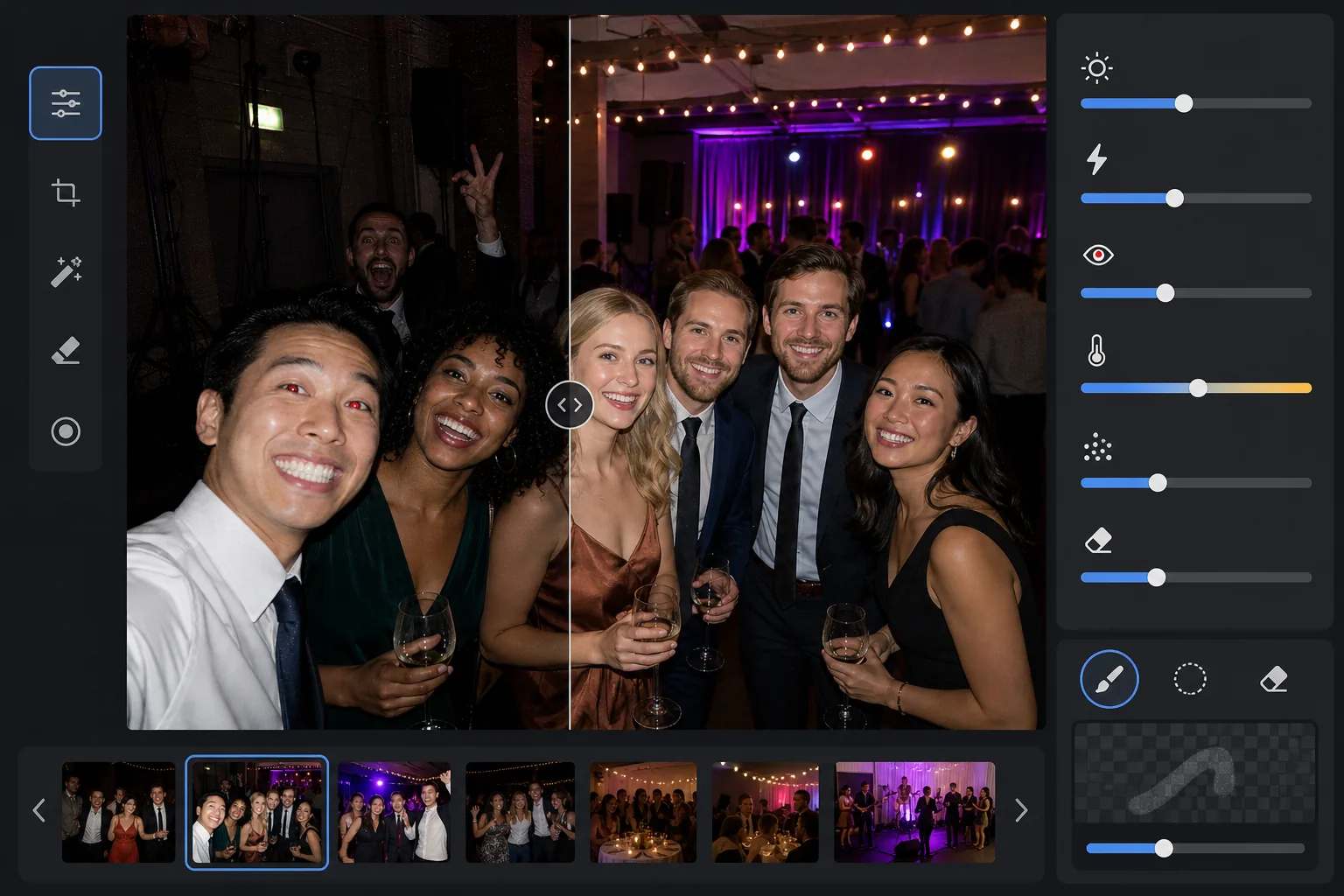
Bu şablon ne yapar
Zorlu düşük ışıklı ortamlarda çekilen etkinlik fotoğraflarını kurtarır — loş aydınlatılmış ziyafet salonları, renkli sahne aydınlatmalı konser mekanları, açık havadaki akşam partileri ve bodrum kattaki eğlence odaları. AI Enhance, renkli aydınlatmanın ve süslemelerin atmosferini korurken iki diyaframa kadar gölge ayrıntısını geri kazanır. Sert ön plan gölgeleri, kırmızı göz ve aşırı pozlanmış yüzler dahil flaş kusurları otomatik olarak düzeltilir. Magic Eraser, kareye giren yabancıları, çıkış tabelalarını, üst üste yığılmış ekipmanları ve etkinliklerde sık görülen diğer dikkat dağıtıcı unsurları kaldırır.
Şablon ayarları
| Pozlama yükseltme | Atmosfer korumalı +2,0 EV uyarlanabilir gölge geri kazanımı |
| Flaş düzeltme | Ön plan gölgelerini yumuşatma, flaşla aydınlanan ciltteki parlamayı azaltma |
| Kırmızı göz giderme | Otomatik algılama ve iris renginin yeniden oluşturulması |
| Beyaz dengesi | Karışık kaynaklı uyarlanabilir (DJ ışıkları, tungsten, floresan, mumlar) |
| Atmosfer modu | Sıcak atmosfer güçlendirme (arka planda +8 sıcaklık, +5 canlılık) |
Bu şablonu nasıl kullanırsınız
Etkinlik fotoğraflarını yükleyin
Herhangi bir etkinlikten fotoğraf yükleyin — konserler, düğünler, doğum günü partileri, kurumsal galalar veya arka bahçe buluşmaları. Şablon aydınlatma ortamını otomatik olarak algılar ve orijinalin ne kadar az pozlandığına göre iyileştirme yoğunluğunu ayarlar.
Pozlamayı geri kazanın ve flaşı düzeltin
AI Enhance gölge alanlarını +2 EV'ye kadar yükselterek karanlıkta kaybolan yüzleri ve ayrıntıları ortaya çıkarır. Ön plandaki öznelerde flaşla yanmış parlamalar, cilt dokusunu geri kazanmak için azaltılır ve flaşla aydınlanan öznelerin arkasındaki sert düşen gölgeler doğal biçimde kaynaşacak şekilde yumuşatılır.
Kırmızı gözü ve dikkat dağıtıcı unsurları kaldırın
Doğrudan flaştan kaynaklanan kırmızı göz otomatik olarak algılanır ve doğal iris rengiyle değiştirilir. Magic Eraser, kareye giren yabancıları, hoparlör yığınları ve kablolar gibi görünür ekipmanları, çıkış tabelalarını ve anın değerini düşüren diğer dağınıklığı kaldırır.
İyileştirilmiş fotoğrafları dışa aktarın
Aydınlatılmış etkinlik fotoğraflarını sosyal paylaşım, baskı veya arşivleme için orijinal çözünürlükte indirin. Çıktı, orijinal sahnenin atmosferini — sıcak mum ışığı, renkli sahne ışıkları veya parıldayan ışık dizileri — korurken yüzleri ve ayrıntıları net biçimde görünür kılar.
En iyi sonuçlar için profesyonel ipuçları
- ✓+2 EV geri kazanımı, öznelerin orijinalde en azından soluk biçimde görünür olduğu fotoğraflarda en iyi sonucu verir. Fotoğraf birkaç ışık kaynağı dışında tamamen siyahsa, geri kazanılan gölgeler önemli ölçüde gürültü içerir. Siluetleri seçebildiğiniz fotoğraflarla başlayın.
- ✓Çarpıcı renkli sahne aydınlatmalı konser fotoğraflarında beyaz dengesi düzeltmesi, sanatsal renk tonunu nötrlemek yerine korur. Mavi ve macenta sahne yıkamaları korunurken sahneye yakın öznelerin cilt tonları yine de düzeltilir.
- ✓Aynı etkinlikten bir grup fotoğrafı işlerken önce temsili bir karanlık fotoğraf ve bir flaş fotoğrafı üzerinde test yapın. Bu, tüm gruba uygulamadan önce parlaklık düzeyinin ve sıcaklığın uygun olduğunu doğrulamanızı sağlar.
- ✓Kırmızı göz düzeltmesi hem insan hem de evcil hayvan gözlerinde çalışır. Etkinliklerdeki evcil hayvan fotoğraflarında yapay zeka, hayvanların kamera flaşından kaynaklanan yeşil veya sarı göz parıltısını işler ve onu doğal koyu bir gözbebeğiyle değiştirir.
Araçlar
Sık sorulan sorular
Bu, tamamen siyah fotoğrafları düzeltebilir mi?
+
Şablon, kabaca bir fotoğrafı dört kat daha parlak yapmaya denk gelen +2 EV'ye kadar gölge ayrıntısını geri kazanır. Orijinal fotoğraf öznelerinizin en azından soluk hatlarını gösteriyorsa, geri kazanım kullanılabilir sonuçlar üretir. Yalnızca noktasal ışık kaynaklarının göründüğü tamamen siyah kareler genellikle anlamlı ayrıntıyı geri kazanmaya yetecek sensör verisi içermez.
Aydınlatmak fotoğrafları taneli gösterir mi?
+
Derin gölgeler yükseltilirken bir miktar gürültü kaçınılmazdır, ancak uyarlanabilir gürültü azaltma özellikle yükseltilen alanları hedefler. Karenin iyi aydınlatılmış kısımlarındaki ince ayrıntılar korunurken geri kazanılan gölgelerdeki gürültü yumuşatılır. Sonuç, temel bir fotoğraf düzenleyicide yalnızca parlaklığı artırmaktan önemli ölçüde daha iyidir.
Bu, sahne aydınlatmalı konser fotoğraflarında çalışır mı?
+
Evet. Şablon, karışık ve renkli aydınlatmayı işlemek üzere tasarlanmıştır. Mavi, kırmızı, macenta ve yeşil sahne yıkamaları, düzeltilecek renk tonları olarak ele alınmak yerine sahnenin sanatsal öğeleri olarak korunur. Sahneye yakın öznelerin yüzleri seçici beyaz dengesi ayarı alırken arka plan aydınlatmasının atmosferi korunur.
Her etkinlik fotoğrafını paylaşmaya değer kılın
Karanlık, flaşla yanmış veya kırmızı gözden etkilenmiş etkinlik fotoğraflarını yükleyin ve anın enerjisini yakalayan parlak, doğal görünümlü sonuçlar elde edin.
Ücretsiz deneyin