
Menü Panosu Tasarımı
Kendi yemek fotoğraflarınızdan profesyonel menü panosu grafikleri oluşturun. Bu şablon, her bir yemeği masa düzenlerinden ve dağınık arka planlardan ayırır, tutarlı bir menü için tüm öğelerin görünümünü standartlaştırır ve dijital menü panoları, basılı menüler ile DoorDash, Uber Eats ve Grubhub gibi dağıtım platformu listelemeleri için optimize edilmiş, düzene hazır görüntüler dışa aktarır.
Bu şablonu ücretsiz deneyinFood template preview
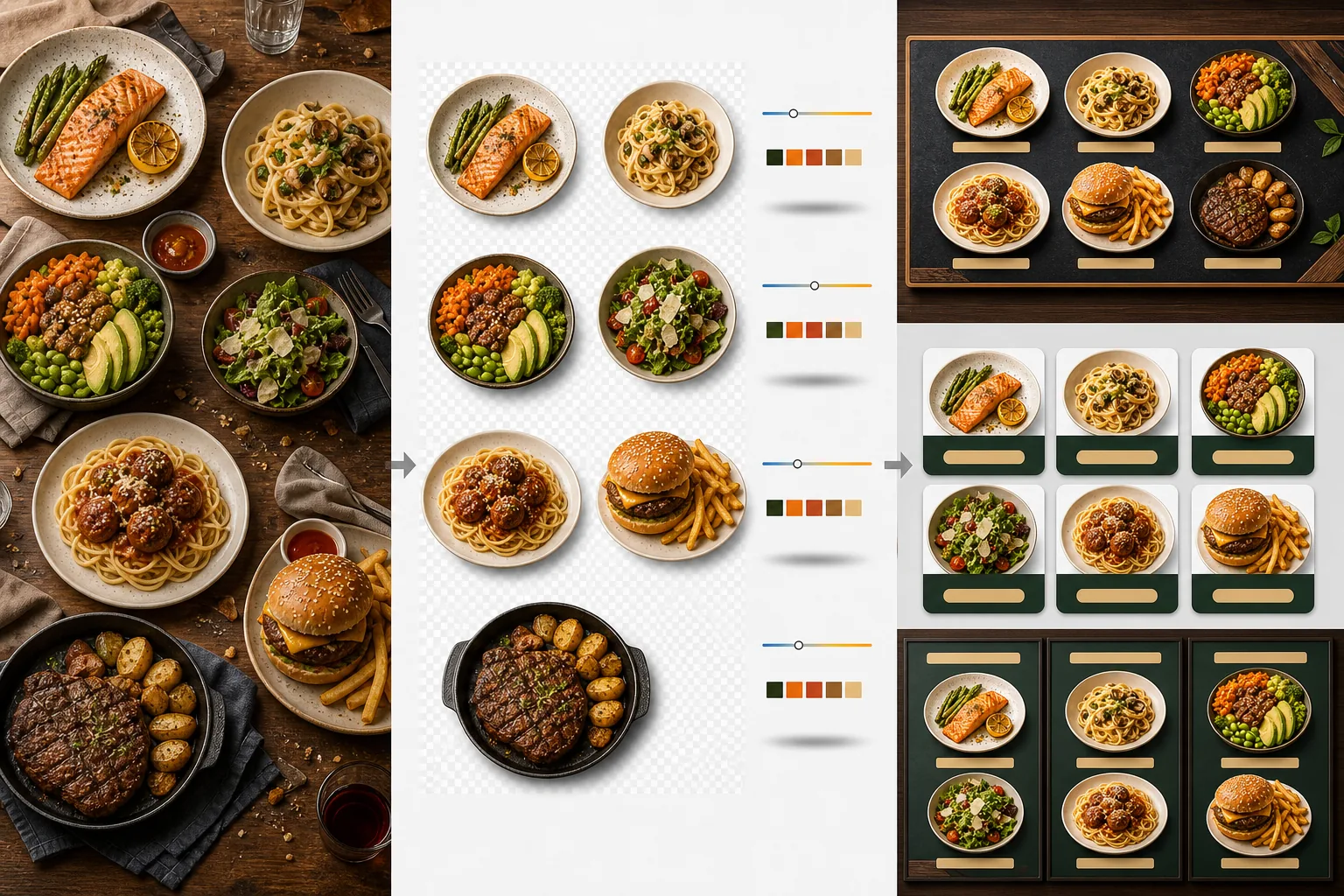
Bu şablon ne yapar
Farklı zamanlarda, farklı aydınlatmada ve farklı masalarda çekilmiş tutarsız yemek fotoğraflarını, menüye hazır görüntülerden oluşan birleşik bir kümeye dönüştürür. Background Eraser her yemeği — tabak, kase veya ambalaj — orijinal masa düzeninden ayırır ve arka planı restoran markanıza uyan tutarlı bir renk veya dokuyla değiştirir. Renk sıcaklığı tüm öğelerde normalleştirilir, böylece sıcak tungsten ışığı, soğuk LED panelleri ve doğal pencere ışığı altında çekilen fotoğrafların hepsi tutarlı görünür. Yemek renkleri, gerçek dışı bölgeye geçmeden iştah açıcı görünecek şekilde geliştirilir — yeşillikler canlı, etler sıcak ve sulu, soslar parlaktır. Sonuç, rastgele telefon fotoğraflarından oluşan bir koleksiyon yerine birleşik bir görsel menü sistemi olarak işlev gören bir görüntü kümesidir.
Şablon ayarları
| Arka plan | Düz renk (markayla uyumlu), ahşap doku, arduvaz veya saydam |
| Renk sıcaklığı normalleştirme | Tüm öğeleri 5000K gün ışığı beyaz dengesine eşleştirin |
| Yemek rengi geliştirme | İştah açıcı güçlendirme (sıcak proteinler, canlı yeşillikler, parlak soslar) |
| Gölge stili | Düz arka planlarda derinlik için ince düşük gölge |
| Çıktı boyutları | 1200×1200px (dağıtım platformları), 800×600px (dijital menü panoları), özel |
Bu şablon nasıl kullanılır
Yemek fotoğraflarını yükleyin
Her bir menü öğesinin fotoğraflarını yükleyin. Servis sırasında çekilen telefon fotoğrafları, profesyonel yemek fotoğrafçılığı çekimleri ve dağıtım platformu listeleme fotoğraflarının hepsi işe yarar. Şablon, menünüzün tamamında tutarlı sonuçlar için her yemeği ayrı ayrı işler.
Yemekleri arka planlardan ayırın
Background Eraser her yemeği masasından, sofra örtüsünden veya tezgah yüzeyinden ayırır. Kenar algılama, tabak kenarını, kase kenarını veya ambalaj hattını hassas bir şekilde takip eder. Tabak kenarının ötesine uzanan garnitürler ve süslemeler — bir maydanoz dalı, bir damla sos — korunur.
Renk ve stili standartlaştırın
Renk sıcaklığı normalleştirilir, böylece tüm yemekler aynı tutarlı aydınlatma altında görünür. Yemek renkleri iştahı açacak şekilde geliştirilir. Yeni arka planda oturmuş, üç boyutlu bir görünüm için her yemeğin altına ince bir gölge eklenir.
Menüler ve platformlar için dışa aktarın
DoorDash, Uber Eats ve Grubhub listelemeleri için 1200×1200px boyutunda indirin. Dijital menü panoları ve TV ekranları için 800×600px boyutunda dışa aktarın. Özel basılı menüler ve tabelalar oluşturan grafik tasarımcılar için saydam PNG dışa aktarımları mevcuttur.
En iyi sonuçlar için profesyonel ipuçları
- ✓Yemekleri doğrudan yukarıdan (düz yerleşim) veya 45 derecelik bir açıyla fotoğraflayın. Bu iki açı en temiz arka plan kaldırmayı sağlar çünkü tabak hattı tamamen görünür ve yapay zeka yemeği masadan hassasiyetle ayırabilir.
- ✓Fotoğraflamadan önce tabak kenarını silerek temizleyin. Tabak kenarındaki sos lekeleri ve kırıntılar, ayrılan görüntünün bir parçası haline gelir ve yeni temiz arka planda dağınık görünür.
- ✓Tüm menü öğelerini aynı ayarlarla tek bir partide işleyin. Her yemek fotoğrafı arasındaki tutarlılık, bir menüyü profesyonel gösteren şeydir — uyumsuz renk sıcaklıkları ve arka plan tonları, en iyi yemekleri bile amatörce gösterir.
Araçlar
Sık sorulan sorular
Bunu içecekler için kullanabilir miyim?
+
Evet. Bardaklar, fincanlar, şişeler ve kokteyller, tabakta sunulan yemeklerle aynı hassasiyetle ayrılır. Su, şarap ve berrak kokteyller gibi saydam içecekler, yeni arka planda saydamlıklarını korur.
Yemek yapay olarak geliştirilmiş mi görünecek?
+
Renk geliştirme, yemeği gerçek dışı bölgeye geçmeden en iştah açıcı haliyle göstermek için kalibre edilmiştir. Bunu, sert floresan ışık altında fotoğraflanan yemek ile doğal gün ışığında fotoğraflanan yemek arasındaki fark olarak düşünün — şablon her yemeği ideal koşullarda çekilmiş gibi gösterir.
Bu, dağıtım platformu menü fotoğrafları için işe yarar mı?
+
Evet. 1200×1200px kare çıktı, DoorDash, Uber Eats, Grubhub ve Postmates'in görüntü gereksinimlerini karşılar. Dağıtım platformlarında profesyonel görünen menü fotoğraflarına sahip restoranlar, işlenmemiş telefon enstantaneleri kullananlara kıyasla sürekli olarak daha yüksek sipariş oranları alır.
Her yemeği karşı konulmaz gösteren bir menü oluşturun
Yemek fotoğraflarını yükleyin ve dijital panolar, basılı menüler ve dağıtım platformları için hazır, tutarlı ve iştah açıcı menü görüntüleri elde edin.
Ücretsiz deneyinRelated templates
More food templates for your workflow.
Renk canlılığı iyileştirmesi, temiz arka planlar, buhar ve tazelik efektleri ve platform için optimize edilmiş boyutlarla iştah açıcı yemek dağıtım menüsü fotoğrafları oluşturun.
Baskı kalitesinde keskinleştirme, içerik renk doğruluğu, stilize edilmiş sahne temizleme ve yüksek çözünürlüklü çıktıyla yemek kitapları ve yemek blogları için tarif fotoğraflarını geliştirin.