
Yemek Kitabı Tarifi Fotoğrafı
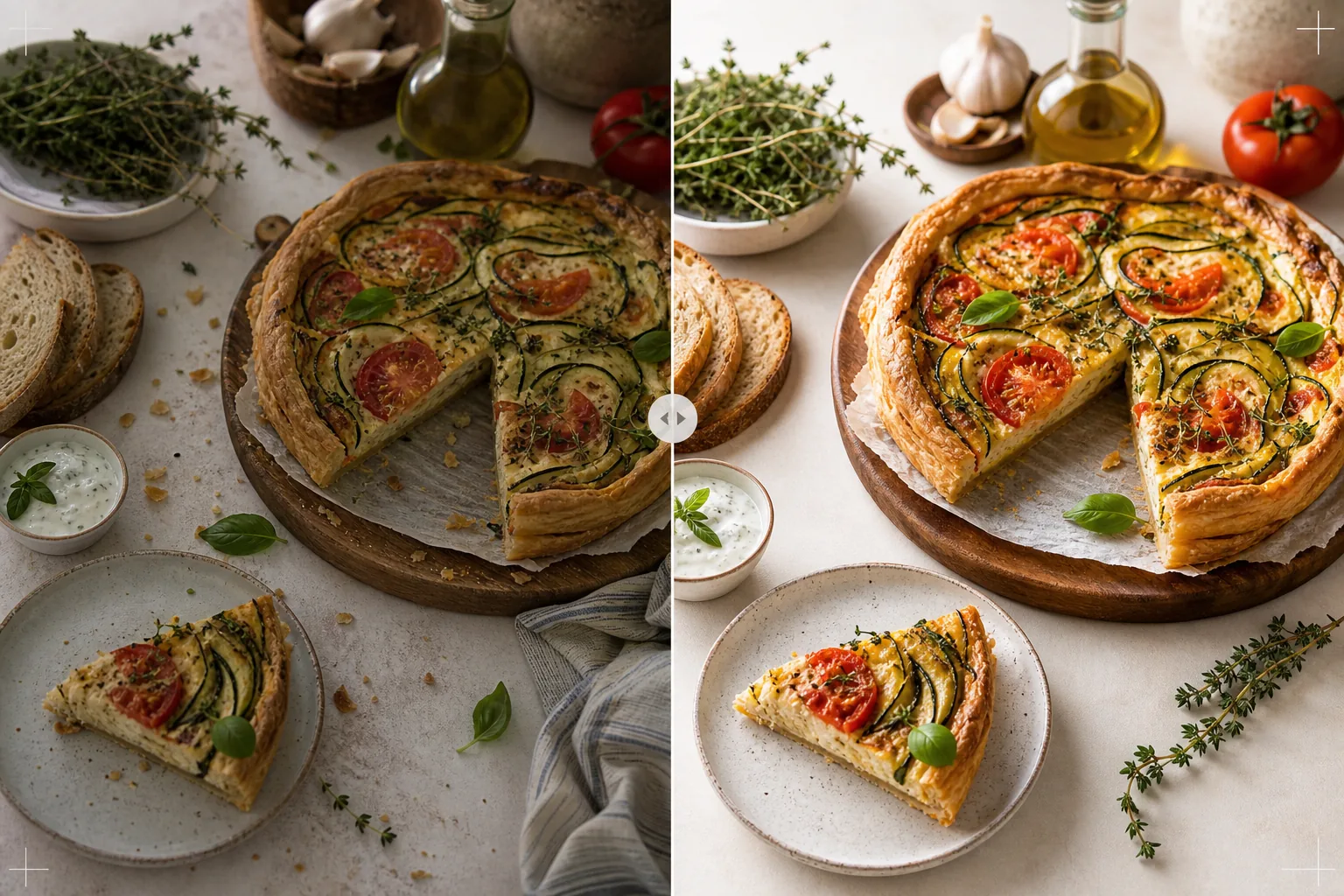
Evde pişirilen tarif fotoğraflarını yemek kitabı kalitesindeki standartlara yükseltin. Bu şablon, baskı doğruluğu için malzeme renklerini iyileştirir, yüksek çözünürlüklü çoğaltma için yemek dokularını keskinleştirir, stilize edilmiş sahnelerden istenmeyen öğeleri kaldırır ve yemek kitapları, yemek blogları ve tarif kartları için baskı kalitesinde çözünürlükte çıktı verir.
Bu şablonu ücretsiz deneyinFood template preview
Bu şablon ne yapar
Evdeki mutfak tarif fotoğraflarını, yayımlanmış yemek kitaplarına ve profesyonel yemek bloglarına yakışır görüntülere dönüştürür. Yemek kitabı fotoğrafçılığı, sosyal medyadan daha yüksek standartlar gerektirir — renkler baskıda doğru olmalı (yalnızca ekranda çekici değil), dokular büyük boyutlarda 300 DPI baskı için yeterince keskin olmalı ve stilize edilmiş sahneler görünür dağınıklık olmadan kasıtlı görünmelidir. AI Enhance, malzeme renklerinin yalnızca ekranlarda değil kâğıt üzerinde de doğru şekilde çoğaltılmasını sağlayan baskıya kalibre edilmiş renk düzeltmesi uygular. Magic Eraser, arka plan dağınıklığını, başıboş mutfak gereçlerini, sahnede görünen kirli tabakları ve baskı çözünürlüğünde daha belirgin hale gelen yemek stilizasyonundaki kusurları kaldırır. Sonuç, yılların yemek stilizasyonu deneyimine sahip bir yemek kitabı fotoğrafçısı tarafından çekilmiş gibi görünür.
Şablon ayarları
| Renk profili | Baskı için Adobe RGB veya dijital için sRGB (seçilebilir) |
| Yemek dokusu | Gevreklik, kırıntı ve sır için yüksek frekanslı ayrıntı keskinleştirme |
| Sahne temizliği | Başıboş mutfak gereçlerini, kırıntıları ve arka plan dağınıklığını kaldırın |
| Renk doğruluğu | Baskıya kalibre edilmiş (kâğıt üzerinde doğru yeşiller, kırmızılar ve kahverengiler) |
| Çıktı çözünürlüğü | 6000px uzun kenar (tam sayfa yemek kitabı yayılımı için 300 DPI) |
Bu şablon nasıl kullanılır
Tarif fotoğrafınızı yükleyin
Stilize edilmiş tarif çekimini yükleyin — tepeden düz yerleşim, 45 derecelik açı veya bitmiş yemeğin yakın çekim ayrıntısı. Amaçlanan kompozisyonun parçası olan malzemeler, mutfak gereçleri ve tekstiller gibi aksesuarları dahil edin. Şablon, kasıtlı stilizasyonu korurken istenmeyen öğeleri kaldırır.
Renk ve doku iyileştirmesi
AI Enhance, baskı doğruluğu için renk sıcaklığını düzeltir ve yemek dokularını keskinleştirir — ekmek kabuğunun çıtırlığı, çikolata ganajının parlaklığı, kesitteki belirgin katmanlar. Renk kalibrasyonu, ekranda doğru görünen yeşillerin, kırmızıların ve altın kahverengilerin kâğıda basıldığında da doğru şekilde çoğaltılmasını sağlar.
Sahne iyileştirmesi
Magic Eraser, kompozisyona hizmet etmeyen öğeleri kaldırır — amaçlanan alanın dışındaki başıboş kırıntılar, kenardan giren bir bulaşık bezi köşesi, kare çevresinde görünen arka plan dağınıklığı veya aksesuarlar ve yüzeylerdeki lekeler. Stilize edilmiş sahne, kasıtlı ve cilalı görünecek şekilde iyileştirilir.
Baskı veya dijital için dışa aktarın
Tam sayfa yayılıma kadar 300 DPI'de yemek kitabı baskısı için Adobe RGB'de 6000px uzun kenarda veya yemek blogu ve tarif web sitesi kullanımı için sRGB'de indirin. Yüksek çözünürlük, okuyucuların baskı büyütmesinde tek tek ot yapraklarını, tohum dokularını ve sos kıvamını görmesi için yeterli ayrıntıyı korur.
En iyi sonuçlar için profesyonel ipuçları
- ✓Gölge tarafında beyaz bir reflektörle, tek yönden gelen doğal pencere ışığında çekim yapın. Bu, profesyonel yemek fotoğrafçılığını karakterize eden yumuşak yönlü aydınlatmayı oluşturur. Şablon yapay aydınlatmayı düzeltebilir, ancak doğal ışık en başından en otantik yemek renklerini üretir.
- ✓Önce ana yemeği tabağa koyun ve dokular ile renkler en üst düzeydeyken beş dakika içinde fotoğraflayın. Ardından adım adım süreç çekimlerini fotoğraflayın. Şablon, buhar ve nem gibi tazelik ipuçlarını iyileştirir ancak uzun süre beklemiş yemeği eski haline getiremez.
- ✓En görsel açıdan dengeli kompozisyon için tek sayıda aksesuar kullanın (üç malzeme, bir mutfak gereci, bir tekstil). Şablon sahneyi temizler ancak mevcut kompozisyonunuz dahilinde çalışır — iyi düzenlenmiş bir başlangıç noktası daha profesyonel bir nihai görüntü üretir.
- ✓Kesit çekimleri için (kesilmiş kekler, dilimlenmiş ekmekler, ikiye bölünmüş hamur işleri) çok keskin bir bıçak kullanın ve fotoğraflamadan hemen önce kesin. Şablon, katman tanımını ve kırıntı dokusunu keskinleştirir ancak iç yapıyı gizleyen pürüzlü bir kesimi düzeltemez.
Araçlar
Sık sorulan sorular
Bu, profesyonel bir yemek fotoğrafçısının yerini alabilir mi?
+
Şablon, evde çekilen tarif fotoğraflarını kendi yayımladığınız yemek kitapları, yemek blogları ve tarif kartları için uygun bir seviyeye getirir. Katı görsel standartlara sahip büyük yayıncı yemek kitapları için profesyonel bir fotoğrafçı ve stilist üstün sonuçlar üretir, ancak şablon bağımsız yazarlar ve içerik üreticileri için mükemmel bir seçenektir.
Adım adım süreç fotoğraflarına ne dersiniz?
+
Süreç fotoğrafları (karıştırma, doğrama, dökme) aynı renk düzeltmesi ve temizlemeden yararlanır. Şablon, hareketli eller ve mutfak gereçlerinin doğal bulanıklığını korurken yemeği seçici olarak keskinleştirerek aksiyon çekimlerine özgü hareket bulanıklığını yönetir.
Baskı renk kalibrasyonu nasıl çalışır?
+
Adobe RGB çıktısı, sRGB'den daha geniş bir renk gamı içerir ve sRGB dönüşümünde kaybolan yeşiller ile kırmızılardaki ince renk farklılıklarını korur. Kalibre edilmiş bir baskı makinesinde basıldığında bu renkler daha doğru şekilde çoğaltılır. Ev baskısı için sRGB çıktısı çoğu tüketici yazıcıda daha iyi sonuçlar üretir.
Yayımlanmış bir yemek kitabına yakışır tarif fotoğrafları
Yemek fotoğraflarınızı yükleyin ve keskin dokular ve iyileştirilmiş kompozisyonlarla baskı kalitesinde, renk açısından doğru görüntüler elde edin.
Ücretsiz deneyinRelated templates
More food templates for your workflow.
Renk canlılığı iyileştirmesi, temiz arka planlar, buhar ve tazelik efektleri ve platform için optimize edilmiş boyutlarla iştah açıcı yemek dağıtım menüsü fotoğrafları oluşturun.
Dijital ekranlar, basılı menüler ve üçüncü taraf dağıtım platformları için yiyecek fotoğrafı arka planını kaldırma, tutarlı stil ve düzene hazır dışa aktarma özellikleriyle menü panosu grafikleri oluşturun.