
Best Emoji Remover Tools in 2026: 6 Erasers Ranked
Fotoğraf düzenleme için en iyi Emoji kaldırıcılar'ı keşfedin. Doğru aracı seçmenize yardımcı olmak için özellikleri, fiyatları ve AI yeteneklerini karşılaştırdık.
Last updated
Magic Eraser'ı ücretsiz deneComparison rows are editorial summaries from the latest page review, not a guarantee of current pricing, limits, watermark policy, batch support, speed, or platform availability.
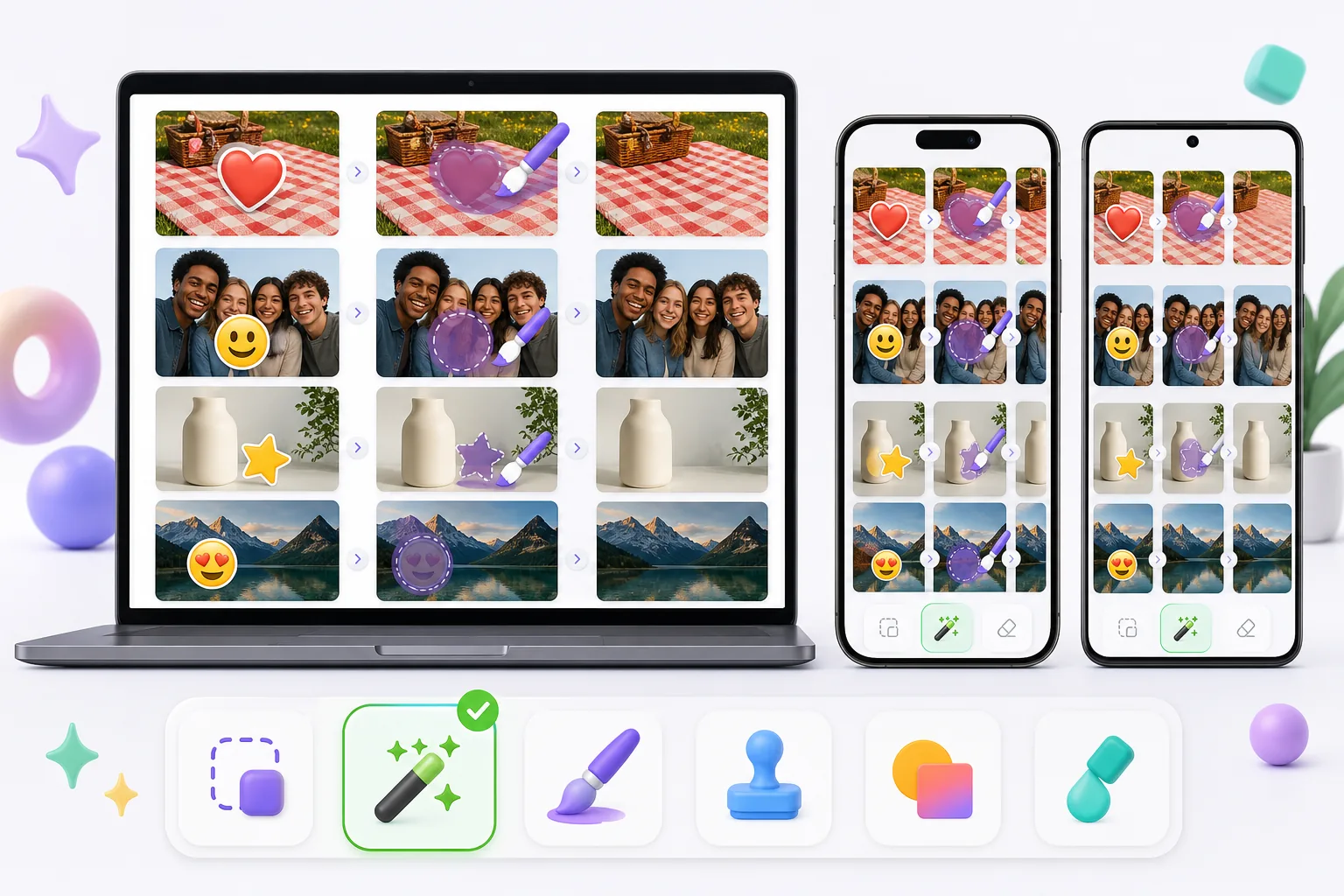
Genel Bakış
Magic Eraser, nesne kaldırma, arka plan kaldırma, fotoğraf iyileştirme, görüntü genişletme, AI doldurma, AI filtre ve toplu işleme özelliklerine sahip ücretsiz web tabanlı bir AI fotoğraf düzenleyicisidir. Tarayıcısı olan herhangi bir cihazda çalışır — kurulum gerekmez.
Other capable emoji removers exist, and the best one for you depends on the photo. Pixelcut, Picsart, and MyEdit pair object/emoji removal with broader editing suites; Cleanup.pictures is a simple web eraser; Snapseed's healing tool can patch small emoji on a phone. Quality, free limits, and watermark policies vary between them, so it's worth matching the tool to whether the emoji sits on plain background, skin, or a face.
Özellik karşılaştırması
Magic Eraser, nesne kaldırma, arka plan kaldırma, fotoğraf iyileştirme, görüntü genişletme, AI doldurma, AI filtre ve toplu işleme özelliklerine sahip ücretsiz web tabanlı bir AI fotoğraf düzenleyicisidir. Tarayıcısı olan herhangi bir cihazda çalışır — kurulum gerekmez.
Other capable emoji removers exist, and the best one for you depends on the photo. Pixelcut, Picsart, and MyEdit pair object/emoji removal with broader editing suites; Cleanup.pictures is a simple web eraser; Snapseed's healing tool can patch small emoji on a phone. Quality, free limits, and watermark policies vary between them, so it's worth matching the tool to whether the emoji sits on plain background, skin, or a face.
| Feature | Magic Eraser | Others |
|---|---|---|
| Free tier for emoji removal | Yes — free to start after sign-in | Often limited or trial-gated |
| No watermark on export | No watermark | Some add a watermark on the free plan |
| AI reconstruction behind the emoji | Generative inpainting rebuilds the area | Ranges from AI fill to simple clone/blur |
| Works on mobile and web | Web + iOS + Android, same engine | Many are mobile-only or web-only |
| Handles emoji over faces and busy backgrounds | Reconstructs backgrounds well; faces are AI-estimated | Varies; small/plain areas handled best |
| Remove several emoji at once (batch on one image) | Brush all, erase in one pass | Often one-at-a-time |
| Guidance for emoji-specific cases | 11 emoji how-tos (iPhone, screenshot, face, story) | General object-removal docs |
Feature rows summarize visible product positioning and should be rechecked against official product pages before purchase, migration, or compliance decisions.
- Last content review June 20, 2026
- Magic Eraser source: https://magiceraser.live/tr/product/magic-eraser
- Pricing, feature availability, platform support, and limits can change; recheck official sources before relying on a buying decision.
Magic Eraser'ın avantajları
Built for emoji, not just objects
Beyond a general eraser, Magic Eraser has a dedicated emoji-removal tool and 11 emoji-specific how-tos — covering iPhone photos, screenshots, Instagram stories, group shots, and emoji over faces. That focus means the workflow is tuned for the exact cases people hit: heart-eyes stickers, smiley censors, and promo stamps burned into saved images.
AI rebuilds what the emoji hid
An emoji flattens into the file, so the pixels behind it are gone. Instead of blurring or clone-stamping, Magic Eraser's generative AI reads the surrounding skin tone, pattern, and texture and synthesizes a plausible fill. On repetitive backgrounds — grass, fabric, walls, sky — the result is often seamless, which is where simpler erasers tend to smear.
Free, no watermark
Emoji removal runs on the free tier: upload, brush over the emoji, export the cleaned photo at no cost and with no watermark or account required. Some other tools gate exports behind a sign-up or stamp a watermark on free output, which defeats the point of cleaning up a photo to share.
Same tool on phone and desktop
Magic Eraser works in any mobile browser and as native iOS and Android apps, so you can erase emoji straight from your camera roll or screenshots — then switch to the desktop web version for larger images or finer brushing. The AI and results are identical across devices, with a 4.9 rating from 559,700 reviews.
Sıkça sorulan sorular
Magic Eraser ücretsiz mi?
+
Evet, Magic Eraser fotoğraflarınızı hemen ücretsiz düzenlemenize olanak tanır. Kayıt veya kurulum gerekmez. Sınırsız işleme için Pro planına yükseltebilirsiniz.
Magic Eraser Emoji kaldırıcılar ile nasıl karşılaştırılır?
+
Magic Eraser, 8 AI aracını tek bir platformda birleştirir: nesne kaldırma, arka plan kaldırma, iyileştirme, genişletme, AI doldurma, AI filtre, AI görüntü oluşturma ve tasarım. Emoji kaldırıcılar ile karşılaştırıldığında, Magic Eraser yazılım yüklemeden daha fazla özellik sunar.
Magic Eraser telefonda çalışır mı?
+
Evet, Magic Eraser iOS, Android ve web üzerinde kullanılabilir. Cihazlar arasında sorunsuz geçiş yapabilirsiniz.
Hesap oluşturmam gerekir mi?
+
Hayır, hesap oluşturmadan hemen düzenlemeye başlayabilirsiniz. Sadece tarayıcınızı açın ve başlayın.
Magic Eraser'ı denemeye hazır mısınız?
İlk fotoğrafınızı ücretsiz düzenleyin — kayıt gerekmez.
Magic Eraser'ı ücretsiz deneİlgili kullanım alanları
Profesyonellerin bu araçları gerçek iş akışlarında nasıl kullandığını görün.
Kişisel eşyalar, park edilmiş araçlar veya inşaat ekipmanlarıyla dolu ilan fotoğrafları alıcıları uzaklaştırabilir. Magic Eraser, emlak fotoğraflarınızı anında temizlemek için yapay zeka kullanır — Photoshop becerisi gerektirmez.
Bulanık arka planlar ve dağınık ürün çekimleri her gün size satış kaybettiriyor. Magic Eraser, saniyeler içinde temiz, profesyonel ürün görselleri oluşturmanıza yardımcı olur — Photoshop becerisi gerekmez. Sadece yükleyin, dikkat dağıtıcı öğeleri silin ve güvenle listeleyin.
Yabancılar seyahat fotoğraflarınızı mı mahvediyor? Dağınık arka planlar selfie'lerinizi mi bozuyor? Photoshop'ta saatlerce vakit kaybetmeyi bırakın. Magic Eraser dikkat dağıtıcıları kaldırır, dağınık çekimleri temizler ve fotoğraflarınızı her platform formatına uyacak şekilde genişletir — hepsi tek dokunuşla.
İlgili rehberler
Bu iş akışıyla ilgili daha fazla rehber keşfedin.
Magic Eraser ile fotoğraflardan nesneleri, kişileri, metinleri ve dikkat dağıtan öğeleri kaldırıp daha temiz AI düzenleme sonuçları almayı öğrenin.
Yapay zekâ ile saniyeler içinde fotoğraflardan insanları kaldırmayı öğrenin. Seyahat, emlak ve ürün fotoğrafları için kılavuz.
Yapay zekâ ile kendi fotoğraflarınızdan filigranları kaldırmaya yönelik adım adım kılavuz. Ne zaman uygun olduğu, en iyi teknikler ve Magic Eraser'ın bunu nasıl yaptığı.
Diğer karşılaştırmalar
Magic Eraser'ın diğer fotoğraf düzenleme araçlarıyla karşılaştırmasını görün.
Sizin yapmanıza gerek kalmasın diye en iyi yapay zeka fotoğraf düzenleme araçlarını test edip karşılaştırdık. Nesne silmeden arka plan değiştirmeye kadar, hangi editörün iş akışınız için en iyi sonuçları verdiğini görün.
Photoshop, derin görüntü düzenlemenin sektör standardıdır, ancak birçok kişi yalnızca hızlı nesne kaldırma, temiz arka planlar ve yapay zekâ destekli düzeltmeler ister. Magic Eraser, web ve mobilde saniyeler içinde çalışan daha hafif bir iş akışıyla bu işlere odaklanır.
Adobe Photoshop güçlüdür, ancak çoğu insan özelliklerinin yalnızca küçük bir kısmını kullanır. Magic Eraser, gerçekten ihtiyaç duyduğunuz fotoğraf temizleme araçlarını — nesne kaldırma, arka plan kaldırma, AI iyileştirme ve üretken doldurma — başlamak için abonelik gerektirmeden web ve mobilde çalışan daha basit bir arayüzde sunar.
Tried to remove an object or background and hit a Pro paywall in Canva, Adobe Express/Photoshop, or Fotor? Magic Eraser does the same job — object removal, background removal, watermark cleanup, and enhancement — for free. No subscription, and no watermark stamped on your download.
Magic Eraser'ı magic-eraser.io ile karşılaştırın. Özellikleri, fiyatları ve kullanım kolaylığını yan yana görün. AI fotoğraf düzenleme için Magic Eraser'ın neden daha iyi bir seçim olduğunu keşfedin.
Magic Eraser'ı Pixelcut ile karşılaştırın. Özellikleri, fiyatları ve kullanım kolaylığını yan yana görün. AI fotoğraf düzenleme için Magic Eraser'ın neden daha iyi bir seçim olduğunu keşfedin.