
การเพิ่มประสิทธิภาพภาพถ่ายงานแต่งงาน
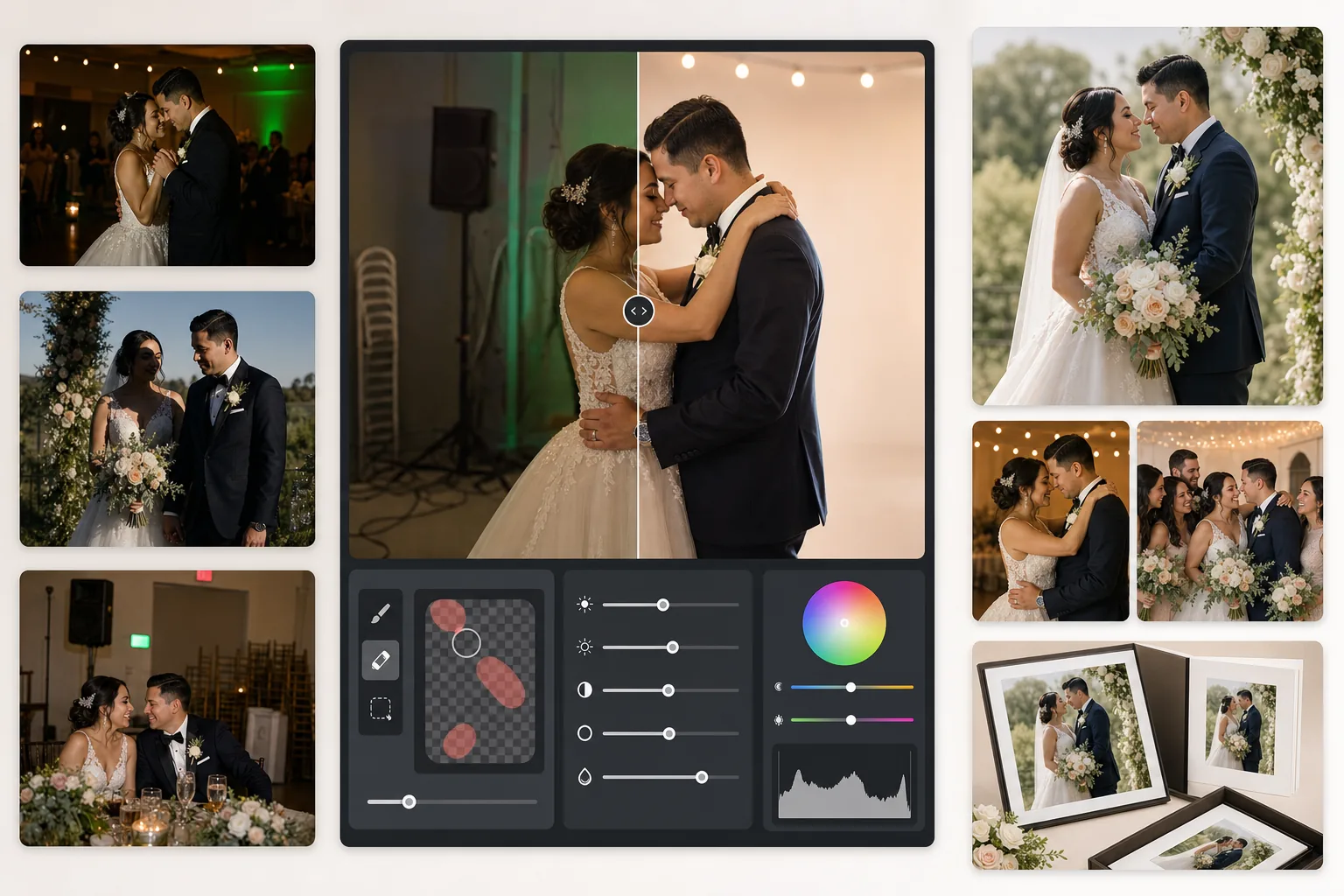
กอบกู้ภาพงานเลี้ยงที่แสงน้อย ลบพื้นหลังที่รบกวนสายตา และปรับโทนสีผิวให้ได้ภาพงานแต่งงานที่คู่ควรกับอัลบั้ม เทมเพลตนี้ออกแบบมาสำหรับสภาพแสงที่ท้าทายของพิธีและงานเลี้ยง — สถานที่ที่มืดสลัว สีเพี้ยนผสมจากไฟ DJ และพื้นหลังที่รกซึ่งดึงความสนใจไปจากคู่บ่าวสาว
ลองใช้เทมเพลตนี้ฟรีEvents template preview
เทมเพลตนี้ทำอะไรได้บ้าง
แก้ไขปัญหาที่พบบ่อยที่สุดในการถ่ายภาพงานแต่งงาน ได้แก่ ภาพงานเลี้ยงที่แสงน้อยเกินไป สีเพี้ยนส้มจากหลอดทังสเตนหรือสีเพี้ยนเขียวจากหลอดฟลูออเรสเซนต์ เงาแฟลชที่แข็งกระด้าง และองค์ประกอบพื้นหลังที่รบกวนสายตา เช่น ป้ายทางออก เก้าอี้ที่วางซ้อนกัน และอุปกรณ์จัดเลี้ยง AI Enhance กู้คืนรายละเอียดจากภาพฟลอร์เต้นรำที่มืดและปรับสมดุลแสงผสม ในขณะที่ Magic Eraser ลบวัตถุที่ไม่ต้องการออกโดยไม่ทิ้งร่องรอย โทนสีผิวได้รับการปรับให้ดูเป็นธรรมชาติและอบอุ่นโดยไม่เกลี่ยผิวมากเกินไป
การตั้งค่าเทมเพลต
| การกู้คืนค่าแสง | ดึงเงาขึ้น +1.5 EV พร้อมรักษาส่วนสว่าง |
| สมดุลแสงขาว | แก้ไขแสงผสมอัตโนมัติ (ทังสเตน/ฟลูออเรสเซนต์/แสงกลางวัน) |
| โหมดโทนสีผิว | ความอบอุ่นตามธรรมชาติ (+5 ความอบอุ่น, +3 การเกลี่ย, รักษารายละเอียด) |
| ความละเอียดของไฟล์ | ด้านยาว 4000px (พร้อมพิมพ์ที่ 300 DPI ขนาดสูงสุด 13×19) |
| โปรไฟล์สี | Adobe RGB (ขอบเขตสีกว้างขึ้นสำหรับการพิมพ์ระดับมืออาชีพ) |
| การลดสัญญาณรบกวน | ปรับตาม ISO สูง (รักษารายละเอียดในเงาที่ดึงขึ้น) |
วิธีใช้เทมเพลตนี้
อัปโหลดภาพถ่ายงานแต่งงานของคุณ
อัปโหลดภาพงานเลี้ยง ภาพพิธี หรือภาพที่แขกถ่ายด้วยสมาร์ทโฟน เทมเพลตนี้รองรับทุกอย่างตั้งแต่ไฟล์ JPEG ที่ส่งออกจาก RAW ของกล้อง DSLR ระดับมืออาชีพ ไปจนถึงภาพจากโทรศัพท์ที่ถูกบีบอัด — AI จะปรับความเข้มของการปรับปรุงตามคุณภาพของต้นฉบับ
แก้ไขแสงและสี
AI Enhance ดึงฉากงานเลี้ยงที่มืดให้สว่างขึ้น ลดสีเพี้ยนส้ม-เขียวจากแสงผสมของสถานที่ และปรับสมดุลระหว่างฉากหน้าที่ส่องด้วยแฟลชกับพื้นหลังที่ส่องด้วยแสงโดยรอบ โทนสีผิวจะถูกปรับไปทางความอบอุ่นตามธรรมชาติโดยไม่กระทบกับสีขาวของชุดหรือสีของของตกแต่ง
ลบสิ่งรบกวน
Magic Eraser ลบป้ายทางออก ถังดับเพลิง เก้าอี้ที่วางซ้อนกัน รถเข็นจัดเลี้ยง สายไฟบนพื้น และแขกที่หลุดเข้ามาในเฟรมที่พื้นหลัง AI จะสร้างลวดลายพื้นหลังขึ้นใหม่อย่างเป็นธรรมชาติด้านหลังวัตถุที่ถูกลบ
ส่งออกสำหรับอัลบั้มและงานพิมพ์
ดาวน์โหลดที่ด้านยาว 4000px ในโปรไฟล์ Adobe RGB สำหรับการพิมพ์ที่แล็บภาพระดับมืออาชีพ หรือในโปรไฟล์ sRGB สำหรับการแชร์แบบดิจิทัลและแกลเลอรีออนไลน์ ไฟล์ที่ได้มีขนาดสำหรับงานพิมพ์สูงสุด 13×19 นิ้วที่ 300 DPI
เคล็ดลับระดับมืออาชีพเพื่อผลลัพธ์ที่ดีที่สุด
- ✓สำหรับภาพฟลอร์เต้นรำในงานเลี้ยงที่มืด เทมเพลตสามารถกู้คืนรายละเอียดในเงาได้ประมาณ 1.5 สต็อป หากภาพต้นฉบับเกือบดำสนิท การปรับปรุงอาจทำให้เกิดสัญญาณรบกวน — เริ่มจากภาพที่อย่างน้อยคุณยังพอเห็นตัวแบบรางๆ ได้
- ✓การแก้ไขโทนสีผิวถูกปรับเทียบให้เข้ากับความอบอุ่นของการถ่ายภาพงานแต่งงาน — อบอุ่นกว่าค่ากลางเล็กน้อย ซึ่งช่วยขับโทนสีผิวส่วนใหญ่ให้ดูดีภายใต้แสงผสม สำหรับภาพพิธีกลางแจ้งที่มีแสงธรรมชาติดีอยู่แล้ว การแก้ไขจะดูแนบเนียน
- ✓เมื่อลบวัตถุพื้นหลัง ให้ทำทีละบริเวณเพื่อผลลัพธ์ที่เป็นธรรมชาติที่สุด ป้ายทางออก หัวสปริงเกลอร์ และปลั๊กไฟผนังมีขนาดเล็กพอที่จะลบได้สะอาดในครั้งเดียว ส่วนวัตถุที่ใหญ่กว่าอย่างเก้าอี้ที่วางซ้อนกัน อาจได้ผลดีกว่าหากลบเป็นส่วนๆ
- ✓ประมวลผลภาพคู่บ่าวสาวก่อน จากนั้นเป็นภาพหมู่ แล้วจึงเป็นภาพแคนดิด วิธีนี้ช่วยให้คุณกำหนดมาตรฐานการเกรดสีที่สม่ำเสมอในภาพที่สำคัญที่สุดก่อนจะไปต่อที่ภาพรอง
เครื่องมือ
คำถามที่พบบ่อย
เทมเพลตนี้แก้ไขภาพงานเลี้ยงที่เบลอได้ไหม
+
AI Enhance สามารถเพิ่มความคมชัดให้กับความนุ่มเล็กน้อยจากความเร็วชัตเตอร์ต่ำ และกู้คืนรายละเอียดในเงาได้อย่างมาก แต่ไม่สามารถแก้ไขภาพเบลอจากการเคลื่อนไหวที่รุนแรงซึ่งตัวแบบเป็นเส้นยืดเห็นได้ชัด ภาพที่เบลอเล็กน้อยจากมือสั่นหรือโฟกัสนุ่มเล็กน้อยจะดีขึ้นอย่างมาก
ชุดสีขาวของเจ้าสาวจะสูญเสียรายละเอียดหรือไม่
+
อัลกอริทึมการแมปโทนจะปกป้องรายละเอียดส่วนสว่างในโทนสีขาวเป็นพิเศษ พื้นผิวชุด ลวดลายลูกไม้ และรอยจีบผ้าจะได้รับการรักษาไว้แม้จะดึงเงาขึ้นในภาพเดียวกัน ผลลัพธ์ยังคงช่วงโทนเต็มตั้งแต่สีขาวสว่างไปจนถึงเงาที่ลึก
คุณภาพดีพอสำหรับอัลบั้มที่พิมพ์ออกมาหรือไม่
+
ใช่ ไฟล์ขนาด 4000px ที่ 300 DPI รองรับงานพิมพ์สูงสุด 13×19 นิ้ว โปรไฟล์สี Adobe RGB รักษาขอบเขตสีที่กว้างขึ้นซึ่งแล็บภาพระดับมืออาชีพใช้งาน สำหรับหน้าอัลบั้มมาตรฐานขนาด 8×10 ความละเอียดนี้เกินกว่าที่จำเป็นสำหรับงานพิมพ์ที่คมชัดมาก
เปลี่ยนทุกภาพถ่ายงานแต่งงานให้เป็นภาพที่คู่ควรกับอัลบั้ม
อัปโหลดภาพงานเลี้ยงและพิธี แล้วรับภาพที่ปรับปรุงอย่างมืออาชีพ พร้อมพิมพ์ ภายในไม่กี่วินาที ใช้งานได้ทั้งกับภาพจากกล้องมืออาชีพและภาพจากสมาร์ทโฟน
ลองใช้ฟรีRelated templates
More events templates for your workflow.