
การทำให้ภาพถ่ายงานอีเวนต์สว่างขึ้น
กู้คืนรายละเอียดจากภาพถ่ายในสถานที่มืดที่ถ่ายในคอนเสิร์ต งานกาล่า งานวันเกิด และงานองค์กร เทมเพลตนี้เพิ่มการเปิดรับแสงได้สูงสุด +2 EV แก้ไขเงาแฟลชที่แข็งกระด้าง ลบตาแดง และเสริมบรรยากาศของฉากต้นฉบับ เพื่อให้ภาพถ่ายงานของคุณดูสดใสเหมือนช่วงเวลาจริง
ลองใช้เทมเพลตนี้ฟรีEvents template preview
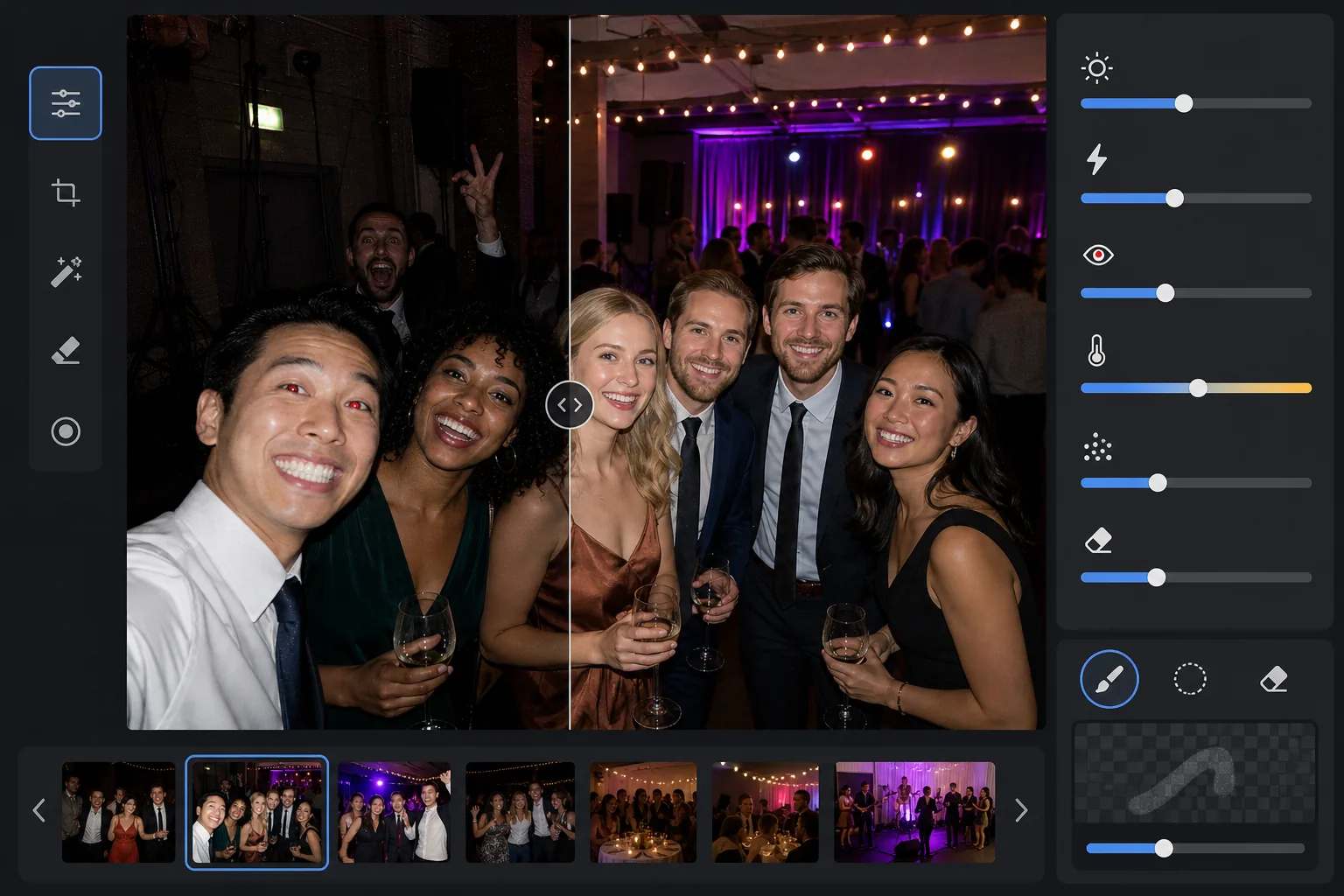
เทมเพลตนี้ทำอะไร
ช่วยกอบกู้ภาพถ่ายงานที่ถ่ายในสภาพแสงน้อยที่ท้าทาย — ห้องจัดเลี้ยงที่แสงสลัว สถานที่คอนเสิร์ตที่มีไฟเวทีสีต่าง ๆ งานปาร์ตี้กลางแจ้งยามค่ำ และห้องนันทนาการใต้ดิน AI Enhance กู้คืนรายละเอียดในเงาได้ถึงสองสต็อปพร้อมรักษาบรรยากาศของไฟสีและการตกแต่ง ข้อบกพร่องจากแฟลช รวมถึงเงาด้านหน้าที่แข็งกระด้าง ตาแดง และใบหน้าที่สว่างจ้าเกินไป จะได้รับการแก้ไขโดยอัตโนมัติ Magic Eraser ลบคนที่บังเอิญเข้ามาในภาพ ป้ายทางออก อุปกรณ์ที่วางซ้อนกัน และสิ่งรบกวนอื่น ๆ ที่พบบ่อยในงานอีเวนต์
การตั้งค่าเทมเพลต
| การเพิ่มการเปิดรับแสง | การกู้คืนเงาแบบปรับอัตโนมัติ +2.0 EV พร้อมรักษาบรรยากาศ |
| การแก้ไขแฟลช | ทำให้เงาด้านหน้านุ่มนวลขึ้น ลดไฮไลต์บนผิวที่ถูกแฟลชส่อง |
| การลบตาแดง | ตรวจจับอัตโนมัติและสร้างสีม่านตาขึ้นใหม่ |
| สมดุลแสงขาว | ปรับอัตโนมัติสำหรับแหล่งแสงผสม (ไฟ DJ, ทังสเตน, ฟลูออเรสเซนต์, เทียน) |
| โหมดบรรยากาศ | เพิ่มบรรยากาศอบอุ่น (+8 ความอบอุ่น, +5 ความสดใสในพื้นหลัง) |
วิธีใช้เทมเพลตนี้
อัปโหลดภาพถ่ายงาน
อัปโหลดภาพจากงานใดก็ได้ — คอนเสิร์ต งานแต่งงาน งานวันเกิด งานกาล่าองค์กร หรือการรวมตัวที่สนามหลังบ้าน เทมเพลตจะตรวจจับสภาพแสงโดยอัตโนมัติและปรับความเข้มของการปรับปรุงตามระดับที่ภาพต้นฉบับเปิดรับแสงน้อยเกินไป
กู้คืนการเปิดรับแสงและแก้ไขแฟลช
AI Enhance เพิ่มความสว่างในบริเวณเงาได้ถึง +2 EV เผยให้เห็นใบหน้าและรายละเอียดที่หายไปในความมืด ไฮไลต์ที่ถูกแฟลชทำให้สว่างจ้าบนวัตถุด้านหน้าจะถูกลดลงเพื่อกู้คืนพื้นผิวของผิว และเงาที่ทอดยาวแข็งกระด้างด้านหลังวัตถุที่ถูกแฟลชส่องจะถูกทำให้นุ่มนวลเพื่อกลมกลืนอย่างเป็นธรรมชาติ
ลบตาแดงและสิ่งรบกวน
ตาแดงจากแฟลชโดยตรงจะถูกตรวจจับโดยอัตโนมัติและแทนที่ด้วยสีม่านตาที่เป็นธรรมชาติ Magic Eraser ลบคนแปลกหน้าที่บังเอิญเข้ามาในภาพ อุปกรณ์ที่มองเห็นได้ เช่น กองลำโพงและสายเคเบิล ป้ายทางออก และความรกรุงรังอื่น ๆ ที่ลดทอนคุณค่าของช่วงเวลานั้น
ส่งออกภาพที่ปรับปรุงแล้ว
ดาวน์โหลดภาพถ่ายงานที่ทำให้สว่างขึ้นในความละเอียดต้นฉบับเพื่อแชร์บนโซเชียล พิมพ์ หรือเก็บถาวร ผลลัพธ์จะรักษาบรรยากาศของฉากต้นฉบับไว้ — แสงเทียนอบอุ่น ไฟเวทีหลากสี หรือไฟประดับระยิบระยับ — ในขณะที่ทำให้ใบหน้าและรายละเอียดมองเห็นได้ชัดเจน
เคล็ดลับระดับมืออาชีพเพื่อผลลัพธ์ที่ดีที่สุด
- ✓การกู้คืน +2 EV ได้ผลดีที่สุดกับภาพที่อย่างน้อยยังมองเห็นวัตถุได้เลือนรางในต้นฉบับ หากภาพมืดสนิททั้งหมดยกเว้นแหล่งแสงเพียงไม่กี่จุด เงาที่กู้คืนมาจะมีสัญญาณรบกวนมาก เริ่มต้นด้วยภาพที่คุณยังพอแยกแยะเงาร่างได้
- ✓สำหรับภาพคอนเสิร์ตที่มีไฟเวทีสีสันน่าตื่นตา การแก้ไขสมดุลแสงขาวจะรักษาโทนสีเชิงศิลปะไว้แทนที่จะทำให้เป็นกลาง ฉากแสงเวทีสีน้ำเงินและสีม่วงแดงจะยังคงอยู่ในขณะที่ยังแก้ไขโทนผิวของวัตถุที่อยู่ใกล้เวที
- ✓เมื่อประมวลผลภาพชุดหนึ่งจากงานเดียวกัน ให้ทดสอบกับภาพมืดที่เป็นตัวแทนหนึ่งภาพและภาพแฟลชหนึ่งภาพก่อน วิธีนี้ช่วยให้คุณตรวจสอบได้ว่าระดับความสว่างและความอบอุ่นเหมาะสมก่อนที่จะดำเนินการกับทั้งชุด
- ✓การแก้ไขตาแดงใช้ได้ทั้งกับดวงตาของคนและสัตว์เลี้ยง สำหรับภาพสัตว์เลี้ยงในงาน AI จะจัดการกับแสงสะท้อนในดวงตาสีเขียวหรือสีเหลืองที่สัตว์เกิดจากแฟลชกล้อง โดยแทนที่ด้วยรูม่านตาสีเข้มที่เป็นธรรมชาติ
เครื่องมือ
คำถามที่พบบ่อย
สิ่งนี้แก้ไขภาพที่มืดสนิททั้งหมดได้ไหม
+
เทมเพลตกู้คืนรายละเอียดในเงาได้ถึง +2 EV ซึ่งเทียบเท่ากับการทำให้ภาพสว่างขึ้นประมาณสี่เท่า หากภาพต้นฉบับแสดงเค้าโครงเลือนรางของวัตถุอย่างน้อย การกู้คืนจะให้ผลลัพธ์ที่ใช้งานได้ เฟรมที่มืดสนิททั้งหมดซึ่งเห็นเพียงแหล่งแสงแบบจุดมักไม่มีข้อมูลเซ็นเซอร์เพียงพอที่จะกู้คืนรายละเอียดที่มีความหมาย
การทำให้สว่างขึ้นจะทำให้ภาพดูเป็นเม็ดหยาบไหม
+
สัญญาณรบกวนบางส่วนเป็นสิ่งที่หลีกเลี่ยงไม่ได้เมื่อยกระดับเงาที่ลึก แต่การลดสัญญาณรบกวนแบบปรับอัตโนมัติจะมุ่งเป้าไปที่บริเวณที่ถูกยกระดับโดยเฉพาะ รายละเอียดที่ละเอียดในส่วนที่มีแสงเพียงพอของเฟรมจะถูกรักษาไว้ในขณะที่สัญญาณรบกวนในเงาที่กู้คืนถูกทำให้เรียบเนียน ผลลัพธ์ดีกว่าการเพิ่มความสว่างในโปรแกรมแก้ไขภาพพื้นฐานอย่างมาก
สิ่งนี้ใช้ได้กับภาพคอนเสิร์ตที่มีไฟเวทีไหม
+
ได้ เทมเพลตออกแบบมาเพื่อจัดการกับแสงผสมและแสงสี ฉากแสงเวทีสีน้ำเงิน แดง ม่วงแดง และเขียว จะถูกรักษาไว้เป็นองค์ประกอบเชิงศิลปะของฉากแทนที่จะถือเป็นโทนสีที่ต้องแก้ไข ใบหน้าของวัตถุที่อยู่ใกล้เวทีจะได้รับการปรับสมดุลแสงขาวแบบเลือกเฉพาะในขณะที่บรรยากาศของแสงพื้นหลังยังคงอยู่
ทำให้ภาพถ่ายงานทุกภาพคุ้มค่าแก่การแชร์
อัปโหลดภาพถ่ายงานที่มืด สว่างจ้าจากแฟลช หรือมีตาแดง แล้วรับผลลัพธ์ที่สว่างและดูเป็นธรรมชาติซึ่งถ่ายทอดพลังของช่วงเวลานั้น
ลองใช้ฟรีRelated templates
More events templates for your workflow.