
การออกแบบกระดานเมนู
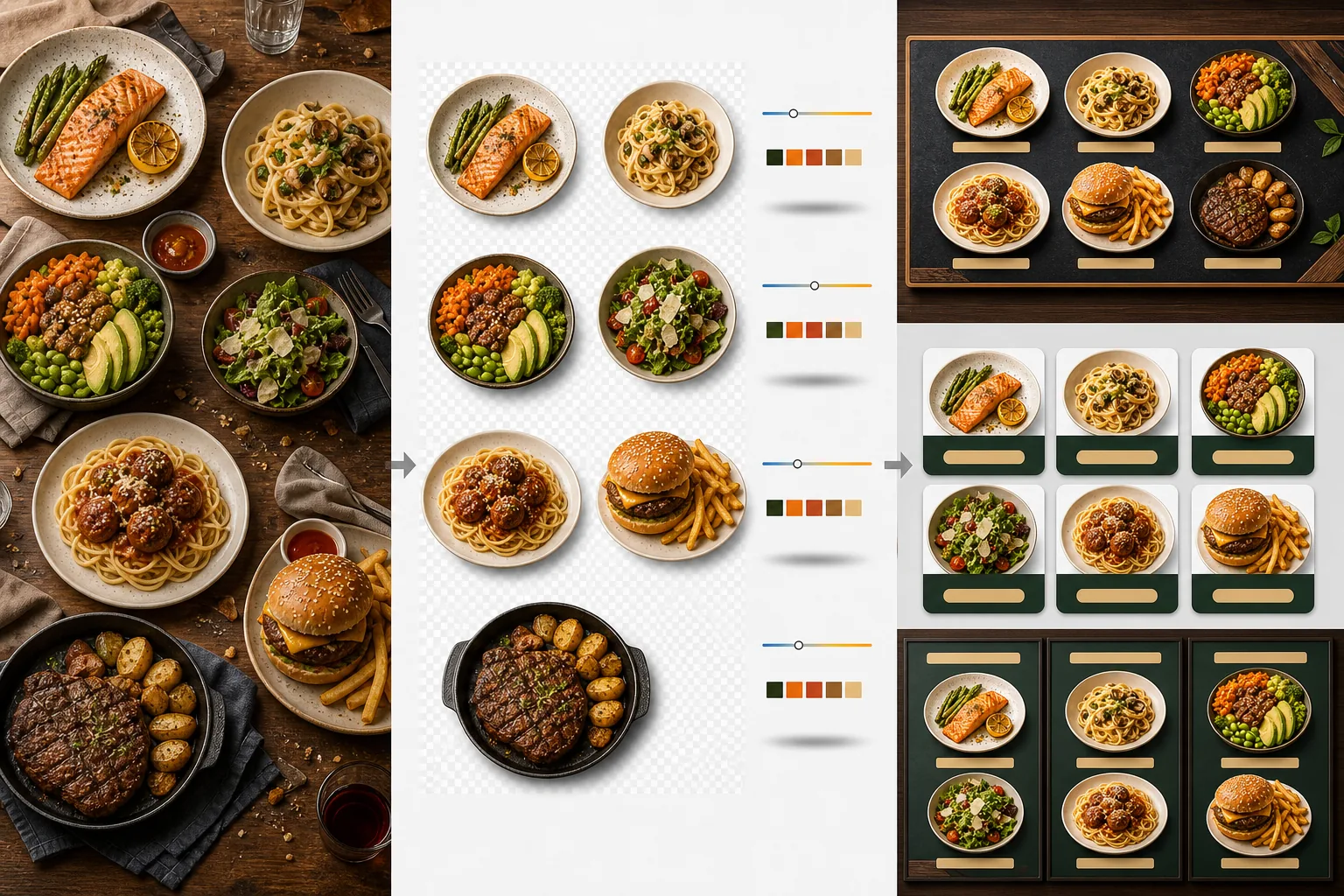
สร้างกราฟิกกระดานเมนูระดับมืออาชีพจากภาพถ่ายอาหารของคุณเอง เทมเพลตนี้แยกแต่ละจานออกจากการจัดโต๊ะและพื้นหลังที่รกรุงรัง ปรับรูปลักษณ์ของทุกรายการให้สม่ำเสมอเพื่อเมนูที่กลมกลืน และส่งออกภาพที่พร้อมสำหรับเลย์เอาต์ซึ่งปรับให้เหมาะกับกระดานเมนูดิจิทัล เมนูที่พิมพ์ และรายการบนแพลตฟอร์มจัดส่งอย่าง DoorDash, Uber Eats และ Grubhub
ลองใช้เทมเพลตนี้ฟรีFood template preview
เทมเพลตนี้ทำอะไร
เปลี่ยนภาพถ่ายอาหารที่ไม่สม่ำเสมอซึ่งถ่ายในเวลาต่างกัน แสงต่างกัน และบนโต๊ะต่างกัน ให้เป็นชุดภาพที่พร้อมสำหรับเมนูอย่างเป็นหนึ่งเดียว Background Eraser แยกแต่ละจาน — จาน ชาม หรือบรรจุภัณฑ์ — ออกจากการจัดโต๊ะเดิม และแทนที่พื้นหลังด้วยสีหรือพื้นผิวที่สม่ำเสมอซึ่งเข้ากับแบรนด์ร้านอาหารของคุณ อุณหภูมิสีถูกปรับให้เป็นมาตรฐานในทุกรายการ ดังนั้นภาพที่ถ่ายภายใต้แสงทังสเตนอุ่น แผง LED เย็น และแสงธรรมชาติจากหน้าต่างจึงดูสม่ำเสมอ สีของอาหารถูกเพิ่มให้ดูน่ารับประทานโดยไม่ก้าวข้ามไปสู่ความไม่สมจริง — ผักเขียวสดใส เนื้อสัตว์อุ่นและฉ่ำ และซอสเป็นมันวาว ผลลัพธ์คือชุดภาพที่ทำงานเป็นระบบเมนูภาพอันเป็นหนึ่งเดียว แทนที่จะเป็นการรวบรวมภาพถ่ายจากโทรศัพท์แบบสุ่ม
การตั้งค่าเทมเพลต
| พื้นหลัง | สีทึบ (เข้ากับแบรนด์), พื้นผิวไม้, หินชนวน หรือโปร่งใส |
| การปรับอุณหภูมิสีให้เป็นมาตรฐาน | ปรับทุกรายการให้เข้ากับสมดุลแสงขาวกลางวัน 5000K |
| การเพิ่มสีของอาหาร | เพิ่มความน่ารับประทาน (โปรตีนอุ่น ผักเขียวสดใส ซอสมันวาว) |
| สไตล์เงา | เงาตกกระทบที่ละเอียดอ่อนเพื่อเพิ่มมิติบนพื้นหลังสีทึบ |
| ขนาดส่งออก | 1200×1200px (แพลตฟอร์มจัดส่ง), 800×600px (กระดานเมนูดิจิทัล), กำหนดเอง |
วิธีใช้เทมเพลตนี้
อัปโหลดภาพถ่ายอาหาร
อัปโหลดภาพถ่ายของแต่ละรายการในเมนู ภาพถ่ายจากโทรศัพท์ที่ถ่ายระหว่างให้บริการ การถ่ายภาพอาหารอย่างเป็นทางการ และภาพรายการบนแพลตฟอร์มจัดส่งใช้ได้ทั้งหมด เทมเพลตประมวลผลแต่ละจานแยกกันเพื่อผลลัพธ์ที่สม่ำเสมอทั่วทั้งเมนูของคุณ
แยกจานออกจากพื้นหลัง
Background Eraser แยกแต่ละจานออกจากโต๊ะ แผ่นรองจาน หรือพื้นเคาน์เตอร์ การตรวจจับขอบจะตามขอบจาน ขอบชาม หรือเส้นรอบรูปบรรจุภัณฑ์อย่างแม่นยำ เครื่องเคียงและท็อปปิ้งที่ยื่นเลยขอบจาน — ผักชีฝรั่งหนึ่งก้าน เส้นซอสที่ราด — จะถูกเก็บรักษาไว้
ปรับสีและสไตล์ให้เป็นมาตรฐาน
อุณหภูมิสีถูกปรับให้เป็นมาตรฐานเพื่อให้ทุกจานปรากฏภายใต้แสงที่สม่ำเสมอเหมือนกัน สีของอาหารถูกเพิ่มเพื่อกระตุ้นความอยากอาหาร มีการเพิ่มเงาที่ละเอียดอ่อนใต้แต่ละจานเพื่อรูปลักษณ์ที่มั่นคงและเป็นสามมิติบนพื้นหลังใหม่
ส่งออกสำหรับเมนูและแพลตฟอร์ม
ดาวน์โหลดที่ 1200×1200px สำหรับรายการ DoorDash, Uber Eats และ Grubhub ส่งออกที่ 800×600px สำหรับกระดานเมนูดิจิทัลและจอแสดงผลทีวี มีการส่งออก PNG แบบโปร่งใสสำหรับนักออกแบบกราฟิกที่สร้างเมนูพิมพ์และป้ายแบบกำหนดเอง
เคล็ดลับมืออาชีพเพื่อผลลัพธ์ที่ดีที่สุด
- ✓ถ่ายภาพจานจากด้านบนโดยตรง (flat lay) หรือที่มุม 45 องศา สองมุมนี้ให้การลบพื้นหลังที่สะอาดที่สุดเพราะเส้นรอบรูปจานมองเห็นได้เต็มที่ และ AI สามารถแยกจานออกจากโต๊ะได้อย่างแม่นยำ
- ✓เช็ดขอบจานให้สะอาดก่อนถ่ายภาพ คราบซอสและเศษอาหารที่ขอบจานจะกลายเป็นส่วนหนึ่งของภาพที่แยกออกมา และดูไม่เรียบร้อยบนพื้นหลังใหม่ที่สะอาด
- ✓ประมวลผลทุกรายการในเมนูในชุดเดียวด้วยการตั้งค่าเดียวกัน ความสม่ำเสมอในทุกภาพถ่ายจานคือสิ่งที่ทำให้เมนูดูเป็นมืออาชีพ — อุณหภูมิสีและเฉดพื้นหลังที่ไม่เข้ากันทำให้แม้แต่อาหารที่ยอดเยี่ยมก็ดูสมัครเล่น
เครื่องมือ
คำถามที่พบบ่อย
ฉันใช้สิ่งนี้กับเครื่องดื่มได้ไหม
+
ได้ แก้ว ถ้วย ขวด และค็อกเทลถูกแยกออกด้วยความแม่นยำเดียวกับจานที่จัดเสิร์ฟ เครื่องดื่มโปร่งใสอย่างน้ำ ไวน์ และค็อกเทลใสจะรักษาความใสของมันไว้บนพื้นหลังใหม่
อาหารจะดูถูกปรับแต่งอย่างไม่เป็นธรรมชาติหรือไม่
+
การเพิ่มสีถูกปรับเทียบเพื่อให้อาหารดูน่ารับประทานที่สุดโดยไม่ก้าวข้ามไปสู่ความไม่สมจริง ลองนึกถึงความแตกต่างระหว่างอาหารที่ถ่ายภายใต้แสงฟลูออเรสเซนต์ที่รุนแรงกับอาหารที่ถ่ายภายใต้แสงธรรมชาติในเวลากลางวัน — เทมเพลตทำให้ทุกจานดูเหมือนถูกถ่ายภายใต้สภาวะที่เหมาะสมที่สุด
สิ่งนี้ใช้ได้กับภาพถ่ายเมนูบนแพลตฟอร์มจัดส่งหรือไม่
+
ได้ ผลลัพธ์สี่เหลี่ยมจัตุรัส 1200×1200px ตรงตามข้อกำหนดภาพของ DoorDash, Uber Eats, Grubhub และ Postmates ร้านอาหารที่มีภาพถ่ายเมนูที่ดูเป็นมืออาชีพบนแพลตฟอร์มจัดส่งจะได้รับอัตราการสั่งซื้อที่สูงกว่าอย่างสม่ำเสมอเมื่อเทียบกับร้านที่ใช้ภาพถ่ายจากโทรศัพท์ที่ไม่ได้ประมวลผล
สร้างเมนูที่ทำให้ทุกจานดูน่าหลงใหลจนยากจะต้านทาน
อัปโหลดภาพถ่ายอาหารและรับภาพเมนูที่สม่ำเสมอและน่ารับประทาน พร้อมสำหรับกระดานดิจิทัล เมนูพิมพ์ และแพลตฟอร์มจัดส่ง
ลองใช้ฟรีRelated templates
More food templates for your workflow.
สร้างภาพถ่ายเมนูส่งอาหารที่น่ารับประทานด้วยการเพิ่มความสดใสของสี พื้นหลังที่สะอาดตา เอฟเฟกต์ไอน้ำและความสด และขนาดที่ปรับให้เหมาะสมกับแพลตฟอร์ม
ปรับปรุงภาพถ่ายสูตรอาหารสำหรับตำราอาหารและบล็อกอาหารด้วยความคมชัดคุณภาพการพิมพ์ ความถูกต้องของสีของส่วนผสม การล้างฉากที่มีสไตล์ และเอาต์พุตที่มีความละเอียดสูง