
ภาพถ่ายสูตรอาหารตำราอาหาร
ยกระดับภาพถ่ายสูตรอาหารทำเองที่บ้านให้ได้มาตรฐานคุณภาพระดับตำราอาหาร เทมเพลตนี้ช่วยปรับสีของส่วนผสมให้แม่นยำสำหรับการพิมพ์ เพิ่มความคมชัดของพื้นผิวอาหารเพื่อการทำซ้ำในความละเอียดสูง ลบองค์ประกอบที่ไม่ต้องการออกจากฉากที่จัดวาง และส่งออกที่ความละเอียดระดับงานพิมพ์สำหรับตำราอาหาร บล็อกอาหาร และการ์ดสูตรอาหาร
ลองใช้เทมเพลตนี้ฟรีFood template preview
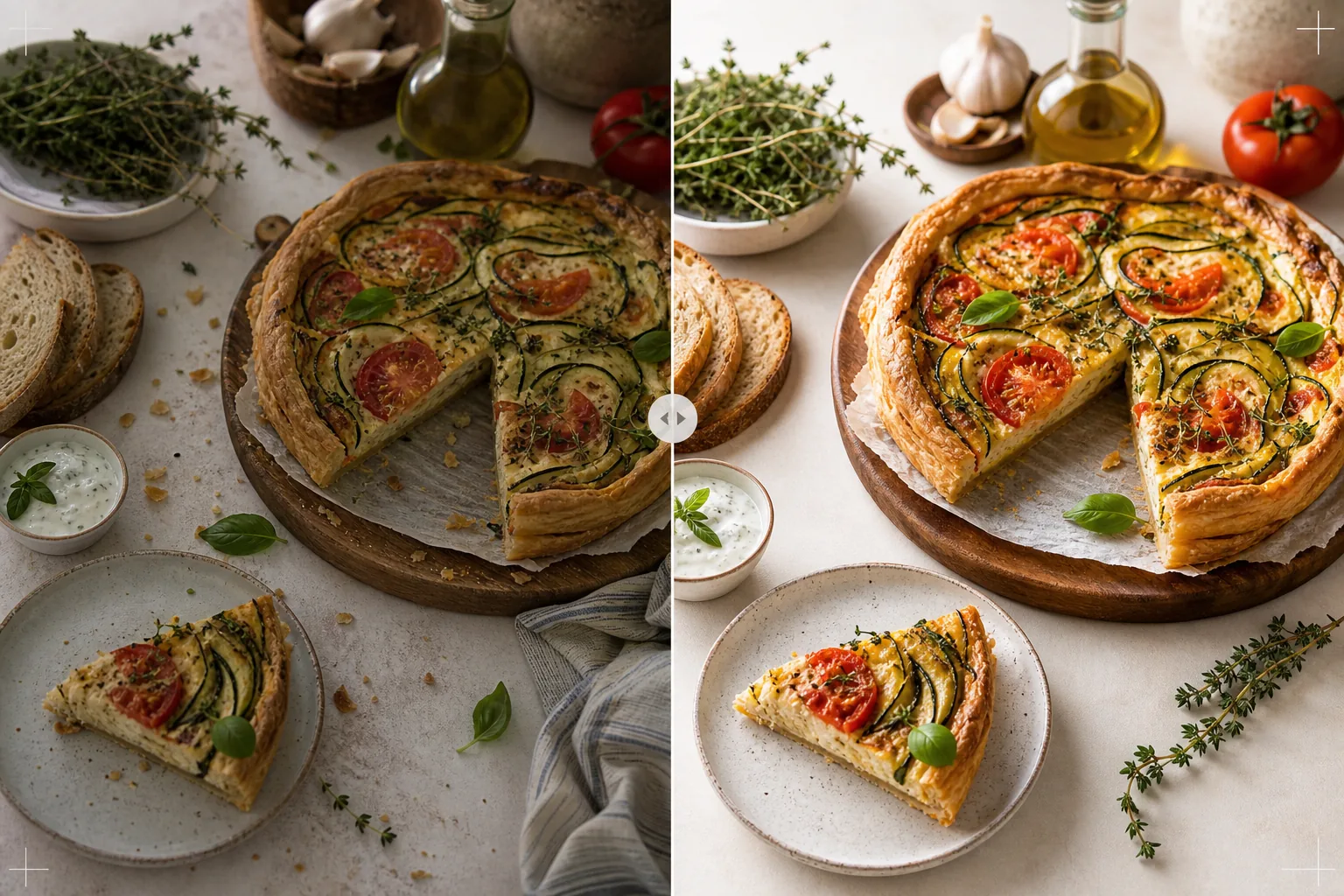
เทมเพลตนี้ทำอะไร
เปลี่ยนภาพถ่ายสูตรอาหารที่ถ่ายในครัวที่บ้านให้เป็นภาพที่คู่ควรกับตำราอาหารที่ตีพิมพ์และบล็อกอาหารระดับมืออาชีพ การถ่ายภาพสำหรับตำราอาหารต้องการมาตรฐานที่สูงกว่าโซเชียลมีเดีย — สีต้องแม่นยำเมื่อพิมพ์ (ไม่ใช่แค่ดูดึงดูดบนหน้าจอ) พื้นผิวต้องคมชัดพอสำหรับการพิมพ์ที่ 300 DPI ในขนาดใหญ่ และฉากที่จัดวางต้องดูตั้งใจโดยไม่มีความรกที่มองเห็นได้ AI Enhance ใช้การปรับสีที่ปรับเทียบสำหรับการพิมพ์ซึ่งรับประกันว่าสีของส่วนผสมจะถูกทำซ้ำอย่างแม่นยำบนกระดาษ ไม่ใช่แค่บนหน้าจอ Magic Eraser ลบความรกในพื้นหลัง อุปกรณ์ที่วางเกะกะ จานสกปรกที่มองเห็นในฉาก และข้อบกพร่องในการจัดวางอาหารที่ชัดเจนยิ่งขึ้นที่ความละเอียดการพิมพ์ ผลลัพธ์ดูเหมือนถ่ายโดยช่างภาพตำราอาหารที่มีประสบการณ์การจัดสไตล์อาหารหลายปี
การตั้งค่าเทมเพลต
| โปรไฟล์สี | Adobe RGB สำหรับการพิมพ์ หรือ sRGB สำหรับดิจิทัล (เลือกได้) |
| พื้นผิวอาหาร | การเพิ่มความคมชัดรายละเอียดความถี่สูงเพื่อความกรอบ เนื้อขนม และความเงา |
| การล้างฉาก | ลบอุปกรณ์ที่วางเกะกะ เศษขนม และความรกในพื้นหลัง |
| ความแม่นยำของสี | ปรับเทียบสำหรับการพิมพ์ (สีเขียว แดง และน้ำตาลที่แม่นยำบนกระดาษ) |
| ความละเอียดเอาต์พุต | ด้านยาว 6000px (300 DPI สำหรับหน้าคู่เต็มหน้าของตำราอาหาร) |
วิธีใช้เทมเพลตนี้
อัปโหลดภาพถ่ายสูตรอาหารของคุณ
อัปโหลดภาพถ่ายสูตรอาหารที่จัดวางแล้ว — ถ่ายจากด้านบนแบบแบนราบ มุม 45 องศา หรือภาพระยะใกล้แสดงรายละเอียดของจานที่เสร็จสมบูรณ์ รวมพร็อพอย่างส่วนผสม อุปกรณ์ และผ้าที่เป็นส่วนหนึ่งขององค์ประกอบที่ตั้งใจไว้ เทมเพลตจะลบองค์ประกอบที่ไม่ต้องการออกพร้อมรักษาการจัดสไตล์ที่ตั้งใจไว้
การเพิ่มประสิทธิภาพสีและพื้นผิว
AI Enhance ปรับอุณหภูมิสีเพื่อความแม่นยำในการพิมพ์ และเพิ่มความคมชัดของพื้นผิวอาหาร — ความกรอบของเปลือกขนมปัง ความเงาของกานาชช็อกโกแลต ชั้นที่ชัดเจนในภาพตัดขวาง การปรับเทียบสีรับประกันว่าสีเขียว แดง และน้ำตาลทองที่ดูแม่นยำบนหน้าจอจะถูกทำซ้ำอย่างแม่นยำเช่นกันเมื่อพิมพ์ลงบนกระดาษ
การปรับแต่งฉาก
Magic Eraser ลบองค์ประกอบที่ไม่เอื้อต่อองค์ประกอบภาพ — เศษขนมที่กระจายนอกพื้นที่ที่ตั้งใจไว้ มุมผ้าเช็ดจานที่โผล่เข้ามาจากขอบ ความรกในพื้นหลังที่มองเห็นได้ที่ขอบเฟรม หรือรอยเปื้อนบนพร็อพและพื้นผิว ฉากที่จัดวางจะถูกปรับแต่งให้ดูตั้งใจและประณีต
ส่งออกสำหรับการพิมพ์หรือดิจิทัล
ดาวน์โหลดที่ด้านยาว 6000px ในรูปแบบ Adobe RGB สำหรับการพิมพ์ตำราอาหารที่ 300 DPI จนถึงหน้าคู่เต็มหน้า หรือในรูปแบบ sRGB สำหรับใช้กับบล็อกอาหารและเว็บไซต์สูตรอาหาร ความละเอียดสูงรักษารายละเอียดเพียงพอให้ผู้อ่านเห็นใบสมุนไพรแต่ละใบ พื้นผิวเมล็ด และความข้นของซอสที่กำลังขยายในการพิมพ์
เคล็ดลับมืออาชีพเพื่อผลลัพธ์ที่ดีที่สุด
- ✓ถ่ายภาพด้วยแสงธรรมชาติจากหน้าต่างในทิศทางเดียว โดยมีแผ่นสะท้อนแสงสีขาวอยู่ด้านเงา สิ่งนี้สร้างแสงทิศทางที่นุ่มนวลซึ่งเป็นลักษณะเฉพาะของการถ่ายภาพอาหารระดับมืออาชีพ เทมเพลตสามารถแก้ไขแสงประดิษฐ์ได้ แต่แสงธรรมชาติให้สีอาหารที่สมจริงที่สุดตั้งแต่เริ่มต้น
- ✓จัดจานหลักก่อนและถ่ายภาพภายในห้านาทีขณะที่พื้นผิวและสีอยู่ในจุดที่ดีที่สุด จากนั้นจึงถ่ายภาพขั้นตอนกระบวนการทีละขั้น เทมเพลตเพิ่มสัญญาณความสดอย่างไอน้ำและความชื้น แต่ไม่สามารถกู้คืนอาหารที่วางทิ้งไว้เป็นเวลานานได้
- ✓ใช้พร็อพจำนวนคี่ (ส่วนผสมสามอย่าง อุปกรณ์หนึ่งชิ้น ผ้าหนึ่งผืน) เพื่อองค์ประกอบที่สมดุลทางสายตามากที่สุด เทมเพลตจะล้างฉากแต่ทำงานภายในองค์ประกอบที่มีอยู่ของคุณ — จุดเริ่มต้นที่จัดองค์ประกอบดีจะให้ภาพสุดท้ายที่ดูเป็นมืออาชีพยิ่งขึ้น
- ✓สำหรับภาพตัดขวาง (เค้กที่ตัด ขนมปังที่หั่น ขนมอบที่ผ่า) ใช้มีดที่คมมากและตัดก่อนถ่ายภาพทันที เทมเพลตเพิ่มความคมชัดของการกำหนดชั้นและพื้นผิวเนื้อขนม แต่ไม่สามารถแก้ไขรอยตัดที่ขรุขระซึ่งบดบังโครงสร้างภายในได้
เครื่องมือ
คำถามที่พบบ่อย
สิ่งนี้สามารถแทนที่ช่างภาพอาหารมืออาชีพได้หรือไม่?
+
เทมเพลตยกระดับภาพถ่ายสูตรอาหารที่ถ่ายที่บ้านให้อยู่ในระดับที่เหมาะสมสำหรับตำราอาหารที่ตีพิมพ์เอง บล็อกอาหาร และการ์ดสูตรอาหาร สำหรับตำราอาหารของสำนักพิมพ์ใหญ่ที่มีมาตรฐานภาพที่เข้มงวด ช่างภาพและสไตลิสต์มืออาชีพให้ผลลัพธ์ที่เหนือกว่า แต่เทมเพลตเป็นตัวเลือกที่ยอดเยี่ยมสำหรับผู้เขียนอิสระและผู้สร้างเนื้อหา
แล้วภาพถ่ายขั้นตอนกระบวนการทีละขั้นล่ะ?
+
ภาพถ่ายกระบวนการ (การผสม การหั่น การเท) ได้รับประโยชน์จากการปรับสีและการล้างแบบเดียวกัน เทมเพลตจัดการกับการเบลอจากการเคลื่อนไหวซึ่งเป็นลักษณะทั่วไปของภาพแอ็กชัน โดยการเพิ่มความคมชัดให้อาหารแบบเลือกสรรในขณะที่รักษาการเบลอตามธรรมชาติของมือและอุปกรณ์ที่กำลังเคลื่อนไหว
การปรับเทียบสีสำหรับการพิมพ์ทำงานอย่างไร?
+
เอาต์พุต Adobe RGB มีขอบเขตสีที่กว้างกว่า sRGB โดยรักษาความแตกต่างของสีที่ละเอียดอ่อนในสีเขียวและแดงที่สูญหายไปในการแปลงเป็น sRGB เมื่อพิมพ์บนแท่นพิมพ์ที่ปรับเทียบแล้ว สีเหล่านี้จะถูกทำซ้ำได้แม่นยำยิ่งขึ้น สำหรับการพิมพ์ที่บ้าน เอาต์พุต sRGB ให้ผลลัพธ์ที่ดีกว่าบนเครื่องพิมพ์สำหรับผู้บริโภคส่วนใหญ่
ภาพถ่ายสูตรอาหารที่คู่ควรกับตำราอาหารที่ตีพิมพ์
อัปโหลดภาพถ่ายอาหารของคุณและรับภาพคุณภาพการพิมพ์ สีแม่นยำ พร้อมพื้นผิวคมชัดและองค์ประกอบที่ปรับแต่งอย่างประณีต
ลองใช้ฟรีRelated templates
More food templates for your workflow.
สร้างภาพถ่ายเมนูส่งอาหารที่น่ารับประทานด้วยการเพิ่มความสดใสของสี พื้นหลังที่สะอาดตา เอฟเฟกต์ไอน้ำและความสด และขนาดที่ปรับให้เหมาะสมกับแพลตฟอร์ม
สร้างกราฟิกบอร์ดเมนูด้วยการลบพื้นหลังรูปภาพอาหาร จัดรูปแบบที่สอดคล้องกัน และส่งออกเค้าโครงพร้อมสำหรับจอแสดงผลดิจิทัล เมนูที่พิมพ์ และแพลตฟอร์มการจัดส่งของบุคคลที่สาม