
ทางเลือกแทน Canva ที่สร้างมาเพื่อการแก้ไขภาพด้วย AI
Canva เป็นแพลตฟอร์มออกแบบอเนกประสงค์ แต่เครื่องมือแก้ไขภาพของมันเป็นเพียงส่วนรองจากจุดเน้นด้านการออกแบบ Magic Eraser ถูกสร้างขึ้นโดยเฉพาะสำหรับการแก้ไขภาพด้วย AI — มอบการลบวัตถุ การลบพื้นหลัง การปรับปรุงภาพ และการเติมภาพแบบ generative ที่ดีกว่า สำหรับผู้ใช้ที่ต้องการเครื่องมือทำความสะอาดภาพโดยเฉพาะ
Last updated
ลองใช้ Magic Eraser ฟรีComparison rows are editorial summaries from the latest page review, not a guarantee of current pricing, limits, watermark policy, batch support, speed, or platform availability.
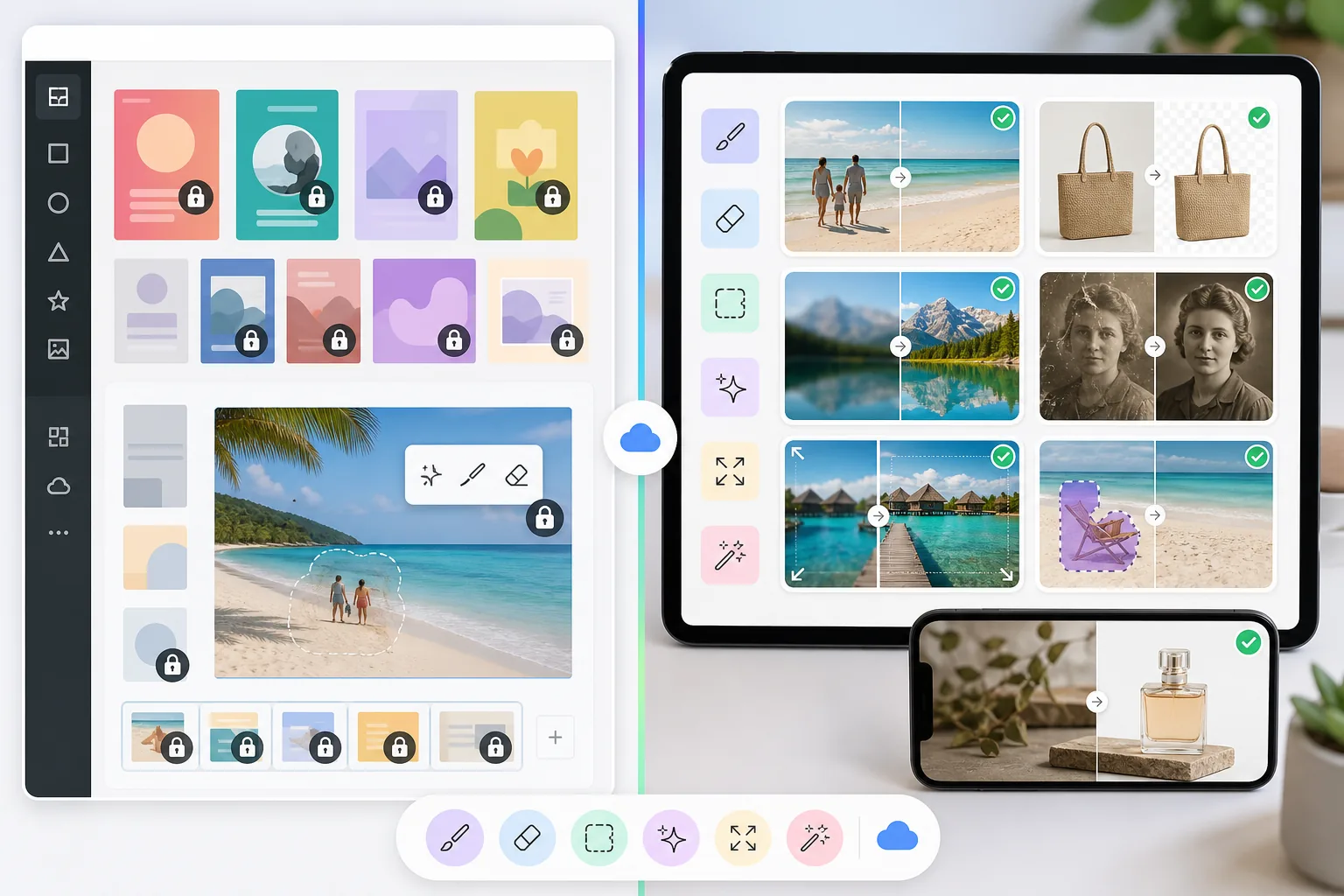
ภาพรวม
Magic Eraser เป็นโปรแกรมแก้ไขภาพด้วย AI โดยเฉพาะ ที่เชี่ยวชาญด้านการลบวัตถุ การลบพื้นหลัง การปรับปรุงภาพ การเติมภาพแบบ generative การขยายภาพ และการบูรณะภาพ ทุกเครื่องมือได้รับการปรับให้เหมาะสมเพื่อสร้างการแก้ไขภาพที่สะอาดและเป็นมืออาชีพได้อย่างรวดเร็ว
Canva เป็นแพลตฟอร์มออกแบบออนไลน์ที่กว้างขวาง สำหรับสร้างงานนำเสนอ กราฟิกโซเชียลมีเดีย วิดีโอ เอกสาร และสื่อการตลาด มันมีฟีเจอร์แก้ไขภาพพื้นฐานอย่างการลบพื้นหลัง แต่ฟีเจอร์เหล่านี้เป็นส่วนหนึ่งของผลิตภัณฑ์ที่เน้นการออกแบบเป็นหลัก
การเปรียบเทียบฟีเจอร์
Magic Eraser เป็นโปรแกรมแก้ไขภาพด้วย AI โดยเฉพาะ ที่เชี่ยวชาญด้านการลบวัตถุ การลบพื้นหลัง การปรับปรุงภาพ การเติมภาพแบบ generative การขยายภาพ และการบูรณะภาพ ทุกเครื่องมือได้รับการปรับให้เหมาะสมเพื่อสร้างการแก้ไขภาพที่สะอาดและเป็นมืออาชีพได้อย่างรวดเร็ว
Canva เป็นแพลตฟอร์มออกแบบออนไลน์ที่กว้างขวาง สำหรับสร้างงานนำเสนอ กราฟิกโซเชียลมีเดีย วิดีโอ เอกสาร และสื่อการตลาด มันมีฟีเจอร์แก้ไขภาพพื้นฐานอย่างการลบพื้นหลัง แต่ฟีเจอร์เหล่านี้เป็นส่วนหนึ่งของผลิตภัณฑ์ที่เน้นการออกแบบเป็นหลัก
| Feature | Magic Eraser | Canva |
|---|---|---|
| การลบวัตถุ | มี — เครื่องมือแปรง AI โดยเฉพาะ | มี — Magic Eraser tool (Pro) |
| การลบพื้นหลัง | มี — ทันที ความแม่นยำสูง | มี — BG Remover (Pro) |
| การปรับปรุงภาพด้วย AI | มี — ขยายความละเอียด เพิ่มความคมชัด ลดสัญญาณรบกวน | จำกัด — การปรับแต่งพื้นฐาน |
| การเติมภาพแบบ generative | มี — inpainting ขับเคลื่อนด้วย AI | มี — Magic Edit (พื้นฐาน) |
| การบูรณะภาพ | มี — ซ่อมแซมภาพเก่าหรือภาพที่เสียหาย | ไม่มี |
| การขยายภาพ | มี — AI ขยายผืนผ้าใบอย่างเป็นธรรมชาติ | ไม่มี |
| เทมเพลตออกแบบ | มี — เทมเพลตที่เน้นเฉพาะทาง | มี — คลังที่ครอบคลุม |
| เหมาะที่สุดสำหรับ | การแก้ไขและทำความสะอาดภาพด้วย AI | การออกแบบกราฟิกและงานนำเสนอ |
Feature rows summarize visible product positioning and should be rechecked against official product pages before purchase, migration, or compliance decisions.
- Last content review May 8, 2026
- Canva source: official product site (https://www.canva.com/)
- Magic Eraser source: https://magiceraser.live/th/product/magic-eraser
- Pricing, feature availability, platform support, and limits can change; recheck official sources before relying on a buying decision.
ทำไมจึงควรเลือก Magic Eraser แทน Canva สำหรับการแก้ไขภาพ
AI ที่สร้างมาเพื่อการแก้ไขภาพโดยเฉพาะ
ทุกเครื่องมือใน Magic Eraser ได้รับการออกแบบและฝึกฝนมาเพื่องานแก้ไขภาพ ในขณะที่ Canva เพิ่มฟีเจอร์ภาพเป็นส่วนเสริมภายในแพลตฟอร์มออกแบบ โมเดล AI ของ Magic Eraser เชี่ยวชาญเฉพาะด้านการลบวัตถุ ความแม่นยำของพื้นหลัง และการปรับปรุงคุณภาพของภาพ
ผลลัพธ์ที่ดีกว่าสำหรับการลบวัตถุและการทำความสะอาด
เครื่องมือลบวัตถุของ Magic Eraser เป็นจุดแข็งหลักของผลิตภัณฑ์ ด้วย AI ที่ฝึกมาเพื่องานนี้โดยเฉพาะ ส่วนฟีเจอร์ Magic Eraser ของ Canva เป็นเครื่องมือรองที่ใช้ได้กับกรณีง่ายๆ แต่มีปัญหากับการลบที่ซับซ้อน เงาสะท้อน และการสร้างใหม่ที่ละเอียด
ความสามารถขั้นสูงที่ Canva ไม่มี
Magic Eraser มีการบูรณะภาพสำหรับภาพที่เสียหาย การขยายภาพด้วย AI เพื่อขยายผืนผ้าใบอย่างเป็นธรรมชาติ และการขยายความละเอียดระดับมืออาชีพ — ฟีเจอร์ที่ Canva ไม่มีให้แม้ในแพ็กเกจ Pro
เสริมการทำงานร่วมกับเวิร์กโฟลว์ Canva ของคุณ
Magic Eraser และ Canva ทำงานร่วมกันได้ดี ใช้ Magic Eraser เพื่อทำความสะอาด ปรับปรุง และทำให้ภาพของคุณสมบูรณ์แบบ จากนั้นนำภาพที่ขัดเกลาแล้วเข้าสู่ Canva สำหรับโปรเจกต์ออกแบบของคุณ ได้สิ่งที่ดีที่สุดจากทั้งสองเครื่องมือ
คำถามที่พบบ่อย
Magic Eraser ใช้แทน Canva ได้หรือไม่?
+
ไม่เชิง — ทั้งสองมีวัตถุประสงค์หลักที่ต่างกัน Canva โดดเด่นในการออกแบบกราฟิก งานนำเสนอ และสื่อการตลาด ส่วน Magic Eraser โดดเด่นในการแก้ไขและทำความสะอาดภาพด้วย AI ผู้ใช้หลายคนได้ผลลัพธ์ที่ดีที่สุดด้วยการใช้ทั้งสองเครื่องมือร่วมกัน
Canva มีการลบวัตถุหรือไม่?
+
มี Canva Pro มี Magic Eraser tool สำหรับการลบวัตถุพื้นฐาน อย่างไรก็ตาม มันไม่ทรงพลังเท่าเครื่องมือเฉพาะทาง Magic Eraser ให้ผลลัพธ์ที่สะอาดกว่าในการลบที่ซับซ้อน จัดการกับเงาสะท้อนและเงาได้ดีกว่า และมีการควบคุมกระบวนการแก้ไขมากกว่า
ทำไมไม่ใช้ Canva สำหรับทุกอย่างไปเลย?
+
Canva เป็นเครื่องมือออกแบบแบบครอบจักรวาล เมื่อคุณต้องการการแก้ไขภาพคุณภาพสูง — ลบวัตถุที่ซับซ้อน เพิ่มความละเอียดของภาพ บูรณะภาพเก่า หรือขยายภาพด้วย AI — เครื่องมือเฉพาะทางอย่าง Magic Eraser ให้ผลลัพธ์ที่ดีกว่าอย่างมาก
ฉันสามารถใช้ Magic Eraser ร่วมกับ Canva ได้หรือไม่?
+
ได้ เวิร์กโฟลว์ยอดนิยมคือการแก้ไขและทำความสะอาดภาพใน Magic Eraser ก่อน จากนั้นนำเข้าภาพที่ขัดเกลาแล้วไปยัง Canva สำหรับการจัดเลย์เอาต์งานออกแบบ การเพิ่มข้อความ การสร้างแบรนด์ และองค์ประกอบการออกแบบอื่นๆ
เครื่องมือไหนคุ้มค่ากว่าสำหรับการแก้ไขภาพ?
+
สำหรับการแก้ไขภาพโดยเฉพาะ Magic Eraser ให้ความคุ้มค่ามากกว่า เพราะทุกฟีเจอร์มุ่งเน้นที่การแก้ไขภาพ Canva Pro มีราคาแพงกว่า และรวมการแก้ไขภาพเข้ากับฟีเจอร์ออกแบบที่คุณอาจไม่ต้องการ หากเป้าหมายหลักของคุณคือการทำความสะอาดและปรับปรุงภาพ
ต้องการการแก้ไขภาพที่ดีกว่าที่ Canva มีให้หรือไม่?
ลองใช้ Magic Eraser ฟรี สำหรับการลบวัตถุ การลบพื้นหลัง การปรับปรุงภาพ และการเติมภาพแบบ generative ที่ขับเคลื่อนด้วย AI ใช้ควบคู่กับ Canva หรือใช้เดี่ยวๆ เพื่อผลลัพธ์ภาพระดับมืออาชีพ
ลองใช้ Magic Eraser ฟรีกรณีการใช้งานที่เกี่ยวข้อง
ดูว่ามืออาชีพใช้เครื่องมือเหล่านี้ในเวิร์กโฟลว์จริงอย่างไร
ภาพประกาศที่เต็มไปด้วยของส่วนตัว รถจอด หรืออุปกรณ์ก่อสร้าง ทำให้ผู้ซื้อไม่สนใจ Magic Eraser ใช้ AI ทำความสะอาดภาพอสังหาริมทรัพย์ของคุณทันที — ไม่ต้องมีทักษะ Photoshop
รูปสินค้าที่พื้นหลังรกรุงรังทำให้ลูกค้าเลื่อนผ่านร้านคุณทุกวัน Magic Eraser ช่วยสร้างรูปสินค้ามืออาชีพได้ในไม่กี่วินาที ไม่ต้องเก่ง Photoshop อัปโหลด ลบสิ่งรบกวน แล้วลงขายได้เลย
คนแปลกหน้าทำลายรูปท่องเที่ยวของคุณ? พื้นหลังรกๆ ทำให้เซลฟี่ดูไม่ดี? เลิกเสียเวลาหลายชั่วโมงกับ Photoshop ได้แล้ว Magic Eraser ลบสิ่งรบกวน ทำความสะอาดฉากหลัง และขยายรูปให้พอดีทุกแพลตฟอร์ม — แค่แตะครั้งเดียว
คู่มือที่เกี่ยวข้อง
ดูคู่มือและเนื้อหาเชิงบรรณาธิการเพิ่มเติมที่เกี่ยวข้องกับเวิร์กโฟลว์นี้
สำรวจว่า AI กำลังเปลี่ยนการดำเนินงานของธุรกิจอย่างไร ตั้งแต่ระบบอัตโนมัติ การวิเคราะห์ข้อมูล ไปจนถึงประสบการณ์ลูกค้าที่เป็นส่วนตัวมากขึ้น
เรียนรู้วิธีใช้ Magic Eraser เพื่อลบวัตถุ คน ข้อความ และสิ่งรบกวนออกจากรูปภาพ พร้อมผลลัพธ์ AI ที่สะอาดขึ้น
เรียนรู้วิธีใช้ปลั๊กอินแปลภาษาใน Figma เพื่อโลคัลไลซ์ไฟล์ออกแบบได้เร็วขึ้นโดยยังคุม layout ได้ดี
การเปรียบเทียบอื่นๆ
ดูว่า Magic Eraser เปรียบเทียบกับเครื่องมือแก้ไขรูปภาพอื่นอย่างไร
PhotoRoom เน้นที่การลบพื้นหลังและเทมเพลตการถ่ายภาพสินค้า ส่วน Magic Eraser มีความสามารถเหล่านั้นครบถ้วนและเพิ่มเครื่องมือ AI อันทรงพลังสำหรับการลบวัตถุ การปรับปรุงคุณภาพภาพ generative fill และการออกแบบเชิงสร้างสรรค์ — มอบพลังการแก้ไขที่มากขึ้นทั้งบนเว็บและมือถือ
โปรแกรมแต่งรูป AI ที่ทรงพลังสองตัวที่มีจุดแข็งต่างกัน Magic Eraser มีเครื่องมือ AI สร้างสรรค์ที่หลากหลายกว่า ขณะที่ Photoroom เชี่ยวชาญด้านภาพถ่ายสินค้าอีคอมเมิร์ซและการประมวลผลแบบกลุ่ม ดูว่าตัวไหนเหมาะกับคุณ
เราทดสอบและเปรียบเทียบเครื่องมือแต่งรูป AI ชั้นนำเพื่อคุณ จากการลบวัตถุไปจนถึงการเปลี่ยนพื้นหลัง ดูว่าโปรแกรมไหนให้ผลลัพธ์ที่ดีที่สุด
Canva ยอดเยี่ยมสำหรับการจัดวางและกราฟิกโซเชียล แต่ผู้ใช้จำนวนมากต้องการการลบวัตถุที่เร็วกว่า การแก้ไขพื้นหลังที่สะอาดกว่า และเครื่องมือภาพ AI ที่ทรงพลังกว่า การเปรียบเทียบนี้แสดงให้เห็นว่า Magic Eraser เหมาะกว่าตรงไหนสำหรับเวิร์กโฟลว์ที่เน้นภาพเป็นหลัก
เราได้ทดสอบเครื่องมือสร้างพื้นหลัง AI ชั้นนำในด้านคุณภาพการลบ ตัวเลือกการแทนที่ ความยืดหยุ่นในการสร้างสรรค์ และความง่ายในการใช้งาน ดูว่าเครื่องมือใดช่วยให้คุณลบ แทนที่ และสร้างพื้นหลังใหม่สำหรับภาพถ่ายของคุณได้ง่ายที่สุด
เราทดสอบเครื่องสร้างภาพถ่ายโปรไฟล์ AI ชั้นนำในด้านคุณภาพ ความสมจริง การปรับแต่ง และความคุ้มค่า ไม่ว่าคุณต้องการภาพโปรไฟล์สำหรับ LinkedIn ภาพทีม หรือภาพบุคคลแบบมืออาชีพ มาดูกันว่าเครื่องมือใดให้ผลลัพธ์ที่ดีที่สุด