
Aprimoramento de fotos de casamento
Resgate fotos de recepção subexpostas, remova fundos que distraem e refine os tons de pele para obter imagens de casamento dignas de um álbum. Este modelo foi desenvolvido para as condições de iluminação desafiadoras de cerimônias e recepções: locais mal iluminados, dominantes de cor mistas das luzes do DJ e fundos desordenados que tiram a atenção do casal.
Experimente este modelo gratuitamenteEvents template preview
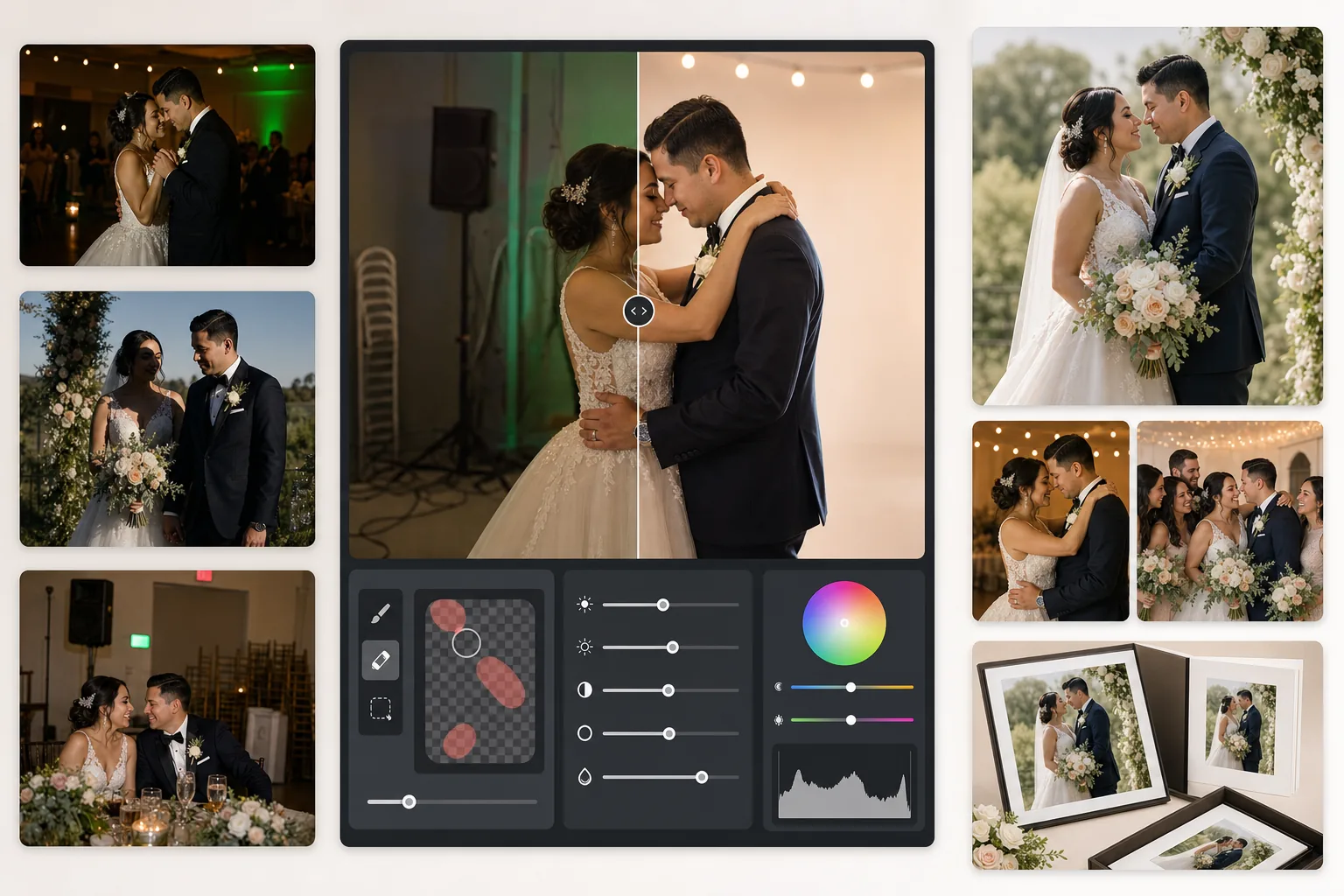
O que este modelo faz
Corrige os problemas mais comuns na fotografia de casamento: fotos de recepção subexpostas, dominantes laranja do tungstênio ou verdes das lâmpadas fluorescentes, sombras duras do flash e elementos de fundo que distraem, como placas de saída, cadeiras empilhadas e equipamentos de buffet. O AI Enhance recupera detalhes de fotos escuras da pista de dança e equilibra a iluminação mista, enquanto o Magic Eraser remove objetos indesejados sem deixar vestígios. Os tons de pele são refinados para parecer naturais e quentes, sem suavização excessiva.
Configurações do modelo
| Recuperação de exposição | Clareamento de sombras de +1,5 EV com preservação das altas luzes |
| Balanço de branco | Correção automática de luz mista (tungstênio/fluorescente/luz do dia) |
| Modo de tom de pele | Calor natural (+5 calor, +3 suavização, detalhe preservado) |
| Resolução de saída | 4000px no lado maior (pronto para impressão a 300 DPI até 13×19) |
| Perfil de cor | Adobe RGB (gama mais ampla para impressão profissional) |
| Redução de ruído | Adaptativa de ISO alto (preserva detalhes nas sombras clareadas) |
Como usar este modelo
Carregue suas fotos de casamento
Carregue fotos da recepção, imagens da cerimônia ou fotos tiradas pelos convidados com o smartphone. O modelo lida com tudo, desde JPEGs exportados de RAW de uma DSLR profissional até fotos comprimidas de celular — a IA adapta a intensidade do aprimoramento com base na qualidade da fonte.
Corrija a iluminação e a cor
O AI Enhance clareia cenas escuras da recepção, neutraliza as dominantes laranja-verde da iluminação mista do local e equilibra os primeiros planos iluminados pelo flash com os fundos de luz ambiente. Os tons de pele são deslocados para um calor natural sem afetar os brancos do vestido nem as cores da decoração.
Remova as distrações
O Magic Eraser remove placas de saída, extintores, cadeiras empilhadas, carrinhos de buffet, cabos de energia no chão e convidados que aparecem ao fundo. A IA reconstrói o padrão do fundo de forma natural por trás dos objetos removidos.
Exporte para álbuns e impressões
Baixe em 4000px no lado maior em Adobe RGB para impressão em laboratório fotográfico profissional, ou em sRGB para compartilhamento digital e galerias on-line. A saída é dimensionada para impressões de até 13×19 polegadas a 300 DPI.
Dicas profissionais para os melhores resultados
- ✓Para fotos escuras na pista de dança, o modelo pode recuperar cerca de 1,5 ponto de detalhe de sombra. Se a foto original estiver quase totalmente preta, o aprimoramento pode introduzir ruído — comece com fotos em que você consiga ao menos distinguir fracamente os sujeitos.
- ✓A correção de tom de pele é calibrada para o calor da fotografia de casamento — ligeiramente mais quente que o neutro, o que valoriza a maioria dos tons de pele sob iluminação mista. Para fotos de cerimônia ao ar livre que já têm boa luz natural, a correção é sutil.
- ✓Ao remover objetos de fundo, trabalhe uma área de cada vez para obter os resultados mais naturais. Placas de saída, sprinklers e tomadas de parede são pequenos o suficiente para uma remoção limpa em uma única passada. Objetos maiores, como cadeiras empilhadas, são melhor removidos por seções.
- ✓Processe primeiro os retratos do casal, depois as fotos de grupo e, por fim, as espontâneas. Isso permite estabelecer uma base consistente de gradação de cor nas fotos mais importantes antes de passar para as imagens secundárias.
Ferramentas
Perguntas frequentes
Isto consegue corrigir fotos de recepção borradas?
+
O AI Enhance pode aumentar a nitidez de uma leve falta de foco causada por velocidades de obturador baixas e recuperar detalhes significativos nas sombras, mas não consegue corrigir um borrão de movimento intenso em que os sujeitos aparecem visivelmente arrastados. Fotos com leve borrão por tremor de mão ou pequena falta de foco melhorarão substancialmente.
O vestido branco da noiva perderá detalhes?
+
O algoritmo de mapeamento de tons protege especificamente o detalhe das altas luzes nos brancos. A textura do vestido, os padrões de renda e as dobras do tecido são preservados mesmo ao clarear as sombras na mesma imagem. O resultado mantém uma faixa completa, do branco brilhante às sombras profundas.
Isto é bom o suficiente para álbuns impressos?
+
Sim. A saída de 4000px a 300 DPI suporta impressões de até 13×19 polegadas. O perfil de cor Adobe RGB preserva a gama mais ampla usada por laboratórios fotográficos profissionais. Para páginas de álbum padrão de 8×10, a resolução supera em muito o necessário para impressões nítidas.
Transforme cada foto de casamento em uma imagem digna de um álbum
Carregue fotos da recepção e da cerimônia e obtenha em segundos imagens aprimoradas profissionalmente e prontas para impressão. Funciona tanto com fotos de câmera profissional quanto de smartphone.
Experimente gratuitamenteRelated templates
More events templates for your workflow.