
Clareamento de fotos de eventos
Recupere detalhes de fotos tiradas em locais escuros durante shows, galas, festas de aniversário e eventos corporativos. Este modelo eleva a exposição em até +2 EV, corrige sombras duras do flash, remove olhos vermelhos e realça a atmosfera da cena original para que suas fotos de eventos fiquem tão vibrantes quanto o momento.
Experimente este modelo gratuitamenteEvents template preview
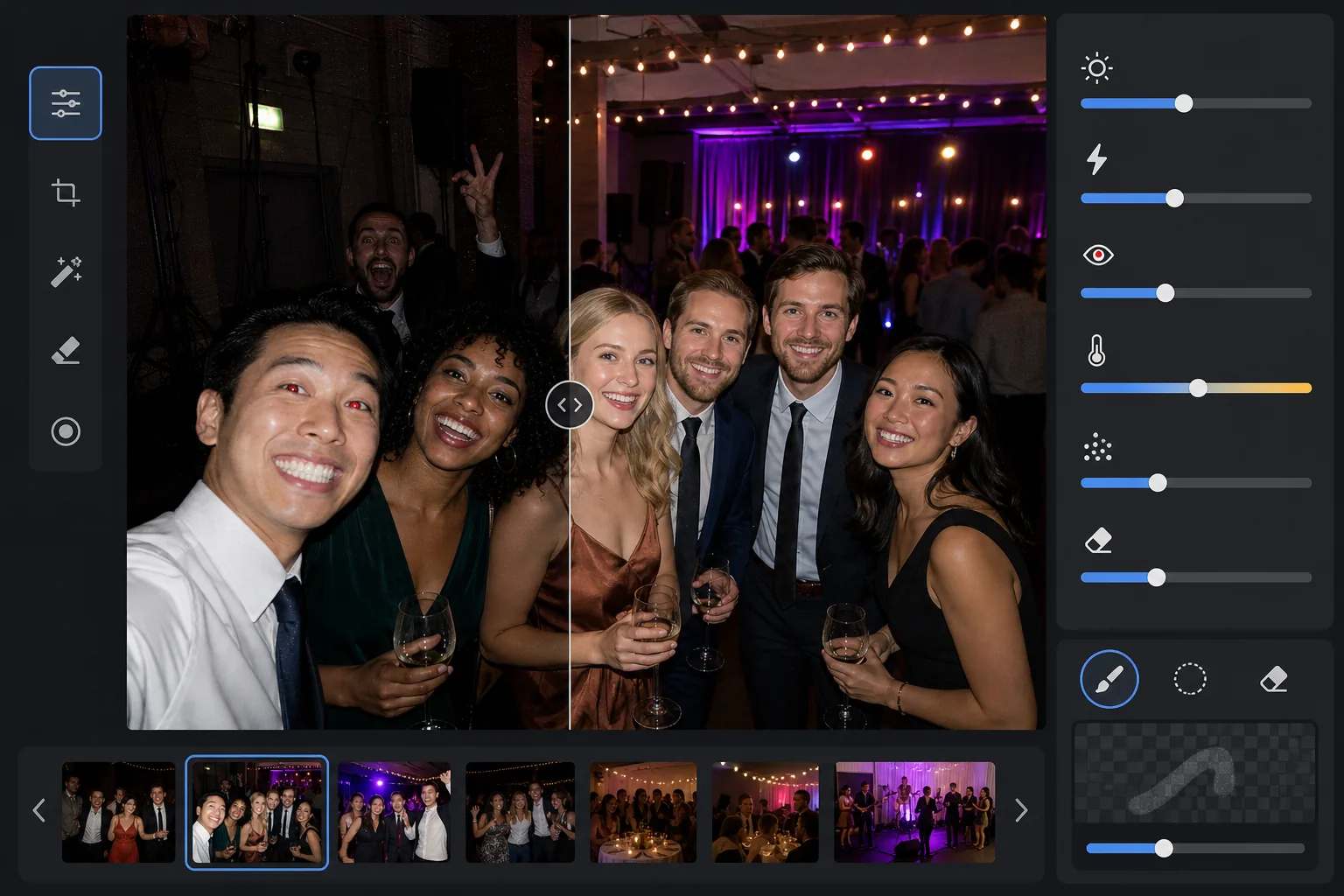
O que este modelo faz
Resgata fotos de eventos tiradas em ambientes desafiadores com pouca luz — salões de banquete mal iluminados, locais de shows com iluminação de palco colorida, festas noturnas ao ar livre e salas de jogos no porão. O AI Enhance recupera até dois pontos de detalhe nas sombras preservando o clima da iluminação colorida e das decorações. Defeitos do flash, incluindo sombras duras em primeiro plano, olhos vermelhos e rostos estourados, são corrigidos automaticamente. O Magic Eraser remove intrusos, placas de saída, equipamentos empilhados e outras distrações comuns em eventos.
Configurações do modelo
| Elevação da exposição | Recuperação adaptativa de sombras de +2,0 EV com preservação do ambiente |
| Correção do flash | Suavização das sombras em primeiro plano, atenuação de altas luzes na pele iluminada pelo flash |
| Remoção de olhos vermelhos | Detecção automática e reconstrução da cor da íris |
| Balanço de branco | Adaptativo de fontes mistas (luzes de DJ, tungstênio, fluorescente, velas) |
| Modo atmosfera | Realce quente do ambiente (+8 de calor, +5 de vibração no fundo) |
Como usar este modelo
Envie fotos do evento
Envie fotos de qualquer evento — shows, casamentos, festas de aniversário, galas corporativas ou reuniões no quintal. O modelo detecta automaticamente o ambiente de iluminação e ajusta a intensidade do aprimoramento conforme o quanto o original está subexposto.
Recupere a exposição e corrija o flash
O AI Enhance eleva as áreas de sombra em até +2 EV, revelando rostos e detalhes perdidos na escuridão. As altas luzes estouradas pelo flash nos sujeitos em primeiro plano são atenuadas para recuperar a textura da pele, e as sombras projetadas duras atrás dos sujeitos iluminados pelo flash são suavizadas para se mesclar naturalmente.
Remova olhos vermelhos e distrações
Olhos vermelhos do flash direto são detectados automaticamente e substituídos por uma cor de íris natural. O Magic Eraser remove estranhos que aparecem na foto, equipamentos visíveis como pilhas de caixas de som e cabos, placas de saída e outras bagunças que prejudicam o momento.
Exporte as fotos aprimoradas
Baixe as fotos de eventos clareadas na resolução original para compartilhamento social, impressão ou arquivamento. O resultado mantém a atmosfera da cena original — o brilho quente das velas, as coloridas luzes de palco ou as luzinhas cintilantes — ao mesmo tempo que torna rostos e detalhes claramente visíveis.
Dicas profissionais para melhores resultados
- ✓A recuperação de +2 EV funciona melhor em fotos onde os sujeitos estão pelo menos vagamente visíveis no original. Se a foto estiver completamente preta exceto por algumas fontes de luz, as sombras recuperadas conterão ruído significativo. Comece com fotos em que você consiga distinguir silhuetas.
- ✓Para fotos de shows com uma dramática iluminação de palco colorida, a correção do balanço de branco preserva a dominante de cor artística em vez de neutralizá-la. Os banhos de luz azuis e magenta do palco são mantidos enquanto os tons de pele dos sujeitos próximos ao palco ainda são corrigidos.
- ✓Ao processar um lote de fotos do mesmo evento, faça primeiro um teste em uma foto escura representativa e em uma foto com flash. Isso permite verificar se o nível de brilho e o calor estão adequados antes de processar o lote inteiro.
- ✓A correção de olhos vermelhos funciona tanto em olhos humanos quanto de animais. Para fotos de animais em eventos, a IA lida com o brilho verde ou amarelo dos olhos que os animais produzem com o flash da câmera, substituindo-o por uma pupila escura natural.
Ferramentas
Perguntas frequentes
Isso consegue corrigir fotos completamente pretas?
+
O modelo recupera até +2 EV de detalhe nas sombras, o que equivale aproximadamente a deixar uma foto quatro vezes mais clara. Se a foto original mostrar ao menos contornos tênues dos seus sujeitos, a recuperação produzirá resultados utilizáveis. Quadros completamente pretos em que apenas fontes de luz pontuais são visíveis normalmente não contêm dados do sensor suficientes para recuperar detalhes significativos.
Clarear vai deixar as fotos granuladas?
+
Algum ruído é inevitável ao elevar sombras profundas, mas a redução de ruído adaptativa foca especificamente nas áreas elevadas. Os detalhes finos nas partes bem iluminadas do quadro são preservados enquanto o ruído nas sombras recuperadas é suavizado. O resultado é substancialmente melhor do que simplesmente aumentar o brilho em um editor de fotos básico.
Isso funciona em fotos de shows com iluminação de palco?
+
Sim. O modelo foi projetado para lidar com iluminação mista e colorida. Os banhos de luz de palco em azul, vermelho, magenta e verde são preservados como elementos artísticos da cena em vez de tratados como dominantes de cor a corrigir. Os rostos dos sujeitos próximos ao palco recebem um ajuste seletivo do balanço de branco enquanto o clima da iluminação de fundo é mantido.
Faça de cada foto de evento algo digno de compartilhar
Envie fotos de eventos escuras, estouradas pelo flash ou afetadas por olhos vermelhos e obtenha resultados claros e de aparência natural que capturam a energia do momento.
Experimente grátisRelated templates
More events templates for your workflow.