
Foto de inventário de veículos
Transforme as fotos tiradas no pátio em imagens de veículos com qualidade de showroom para listagens de inventário on-line. Este modelo remove os fundos desordenados da concessionária — outros carros, placas, edifícios — e os substitui por um fundo branco, cinza ou de estilo estúdio bem limpo. O Magic Eraser limpa os reflexos do para-brisa, os detalhes da placa e os adesivos do pátio, enquanto a correção de cor garante que a pintura apareça fiel à realidade sob qualquer iluminação.
Experimente este modelo gratuitamenteE-commerce template preview
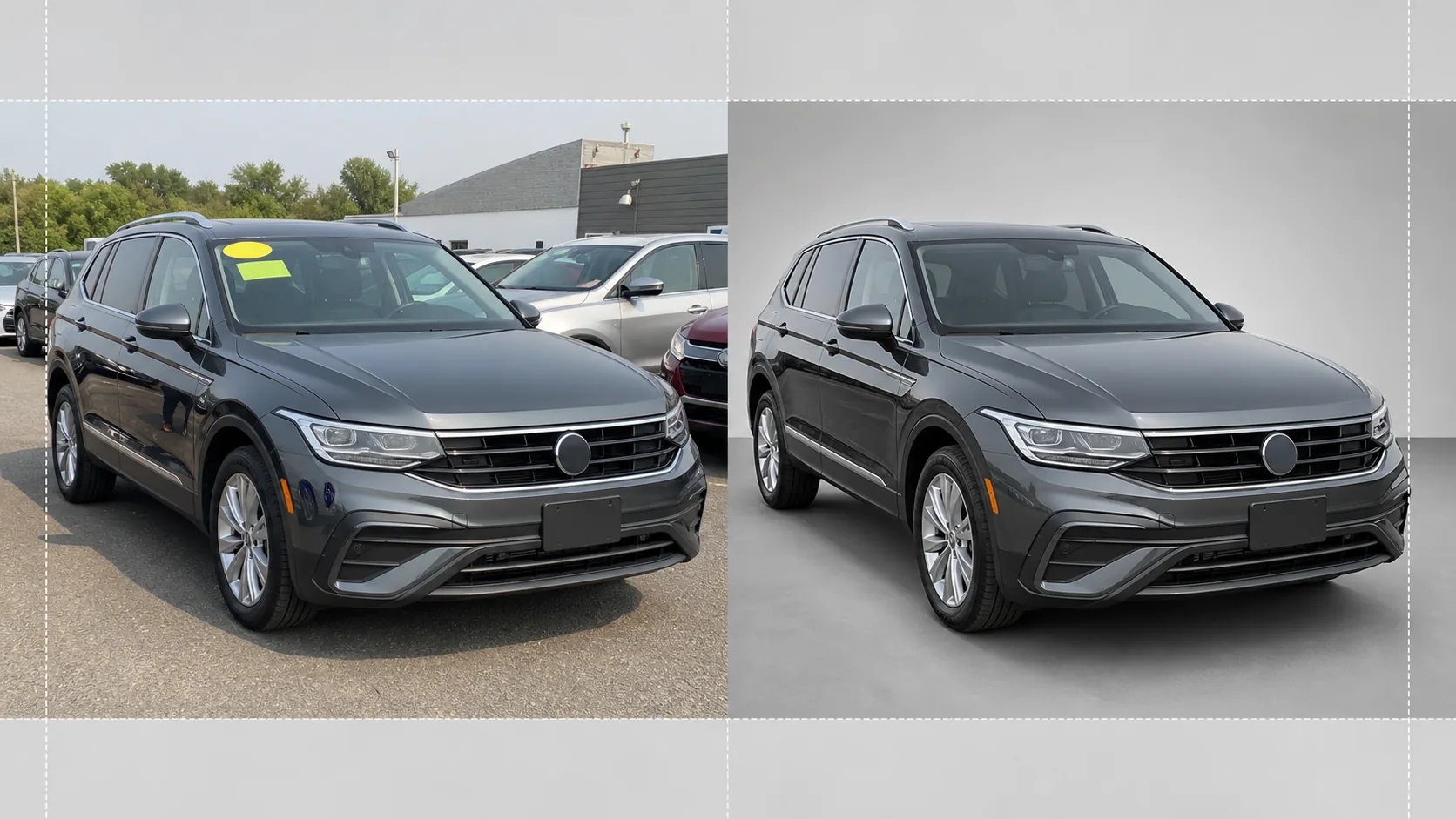
O que este modelo faz
Cuida de todo o fluxo de trabalho da fotografia de inventário de concessionárias. O Background Eraser isola o veículo do ambiente do pátio e substitui o fundo por um fundo de estilo estúdio bem limpo, que concentra toda a atenção no carro, na picape ou no SUV. O Magic Eraser remove os adesivos de preço do para-brisa, as etiquetas do pátio, as placas (por privacidade) e os reflexos do fotógrafo ou dos veículos ao redor na pintura brilhante e nos vidros. A correção de cor normaliza a cor da pintura para que as fotos tiradas sob céu nublado, sob a luz de sódio do estacionamento ou sob o sol forte do meio-dia mostrem todas a mesma tonalidade de pintura precisa. A imagem final é recortada e nivelada para que o veículo fique centralizado e na horizontal em todo o seu inventário.
Configurações do modelo
| Fundo | Branco estúdio, cinza neutro ou piso de showroom em gradiente |
| Limpeza de reflexos | Remove o fotógrafo, a desordem do pátio e os carros adjacentes dos reflexos na pintura e no vidro |
| Correção da cor da pintura | Normaliza para a aparência do código de pintura do fabricante sob luz do dia neutra |
| Ocultação por privacidade | Desfoca ou remove automaticamente as placas |
| Recortar e nivelar | Centraliza o veículo automaticamente, nivela o horizonte, proporção 16:9 |
| Resolução de saída | 3000×1688px (otimizada para AutoTrader, Cars.com e sites de concessionárias) |
Como usar este modelo
Faça upload da foto do pátio
Faça upload de uma foto do veículo tirada no pátio da concessionária. O ângulo frontal de três quartos é o ideal, mas perfis laterais e ângulos traseiros também funcionam. O modelo lida igualmente bem com smartphones, câmeras compactas e equipamentos profissionais.
Remova o fundo e as distrações
O Background Eraser recorta o ambiente do pátio e o substitui por um fundo limpo. O Magic Eraser remove os adesivos do para-brisa, as etiquetas com o número do pátio, os decalques de preço e o texto da placa. Os reflexos dos carros vizinhos e do fotógrafo na pintura e nos vidros são limpos automaticamente.
Corrija a cor e a exposição
A cor da pintura é normalizada para corresponder à tonalidade pretendida pelo fabricante sob luz do dia neutra. As altas-luzes superexpostas no cromado e no vidro são recuperadas, e os detalhes das sombras sob os para-lamas e os para-choques são realçados para uma aparência uniforme e com qualidade de showroom.
Exporte para a listagem de inventário
Baixe a imagem finalizada em 3000×1688px na proporção 16:9. O formato é otimizado para AutoTrader, Cars.com, CarGurus, Facebook Marketplace e seu sistema de gestão de concessionária. O processamento em lote está disponível para sessões de inventário de todo o pátio.
Dicas profissionais para os melhores resultados
- ✓Fotografe o veículo a partir de um ângulo frontal de três quartos, na altura do para-choque. Isso captura tanto a frente quanto o perfil lateral em uma única imagem e é o ângulo mais clicado nas listagens de inventário on-line.
- ✓Evite fotografar sob sol direto a pino — isso cria sombras duras sob o carro e altas-luzes estouradas no teto e no capô. Dias nublados ou áreas sombreadas do pátio produzem a iluminação mais uniforme para a IA trabalhar.
- ✓Remova o adesivo de preço do para-brisa antes da foto, se possível. Embora a IA possa apagá-lo digitalmente, adesivos grandes que cobrem detalhes do painel às vezes deixam um leve contorno que exige retoque manual.
- ✓Mantenha o veículo limpo antes de fotografar. O modelo corrige iluminação e fundo, mas sujeira, manchas de água e fezes de pássaros na pintura são mais bem tratadas com uma lavagem rápida do que com retoque por IA.
Ferramentas
E-commerce workflow
Product photo hub
Use this template with the full ecommerce product photo workflow for marketplace backgrounds, cleanup, compression, resizing, and listing-ready exports.
View ecommerce product photo workflowPerguntas frequentes
Posso processar um inventário inteiro de uma vez?
+
Sim. Faça upload de várias fotos de veículos e o modelo aplica as mesmas configurações de fundo, correção de cor e limpeza a cada uma. Isso garante consistência visual em todo o seu inventário on-line.
A cor da pintura será precisa?
+
A correção de cor normaliza a pintura para corresponder à sua aparência sob luz do dia neutra (5500K). Se você souber o código de pintura do fabricante, a IA o usa como referência para garantir que a cor na tela corresponda o máximo possível ao veículo físico.
Funciona para motocicletas e barcos?
+
Sim. A remoção de fundo e a limpeza de reflexos funcionam para qualquer tipo de veículo, incluindo motocicletas, barcos, motorhomes e caminhões pesados. A centralização automática e a proporção de recorte podem precisar de ajuste manual para proporções de veículo fora do padrão.
Faça com que cada veículo do seu pátio pareça pronto para o showroom
Faça upload das fotos do pátio da concessionária e obtenha imagens de inventário limpas, consistentes e profissionais em segundos.
Experimente gratuitamenteRelated templates
More e-commerce templates for your workflow.
Modelo de fundo branco puro para fotos de produtos. Amazon, Shopify e configurações prontas para o mercado para imagens de produtos limpas e profissionais que podem ser convertidas.
Modelo de foto de listagem otimizado para Etsy. Converte fotos de estilo de vida em fundos brancos limpos a 2.000 pixels, aprimora detalhes de produtos feitos à mão e atende às diretrizes de imagem da Etsy.
Modelo de foto de listagem otimizado para eBay. Fundo branco para imagens de galeria, aprimoramento de documentação de condições e layouts de vários ângulos que atendem aos padrões de imagem do eBay.
Modelo profissional de fotografia de joias para anéis, colares e relógios. Controla os reflexos, melhora o brilho das pedras preciosas e fornece imagens prontas para o mercado em fundos limpos.
Modelo profissional de foto de móveis para listagens de mercado. Remova a desordem do ambiente, mostre dimensões reais e apresente peças em fundos limpos ou em contextos de ambiente estilizados.
Limpe fotos planas de roupas com remoção de rugas, limpeza de fiapos, fundos brancos puros e cores de tecido precisas. Pronto para Shopify, Amazon e boutiques.