
Limpeza de roupas em flat lay
Transforme fotos brutas de roupas em flat lay em imagens de produto prontas para marketplaces. Este modelo remove rugas, fiapos, pelos de animais e fios soltos, substitui fundos bagunçados por branco puro e corrige a cor do tecido para que o que os clientes veem na tela corresponda ao que chega na embalagem.
Experimente este modelo gratuitamenteE-commerce template preview
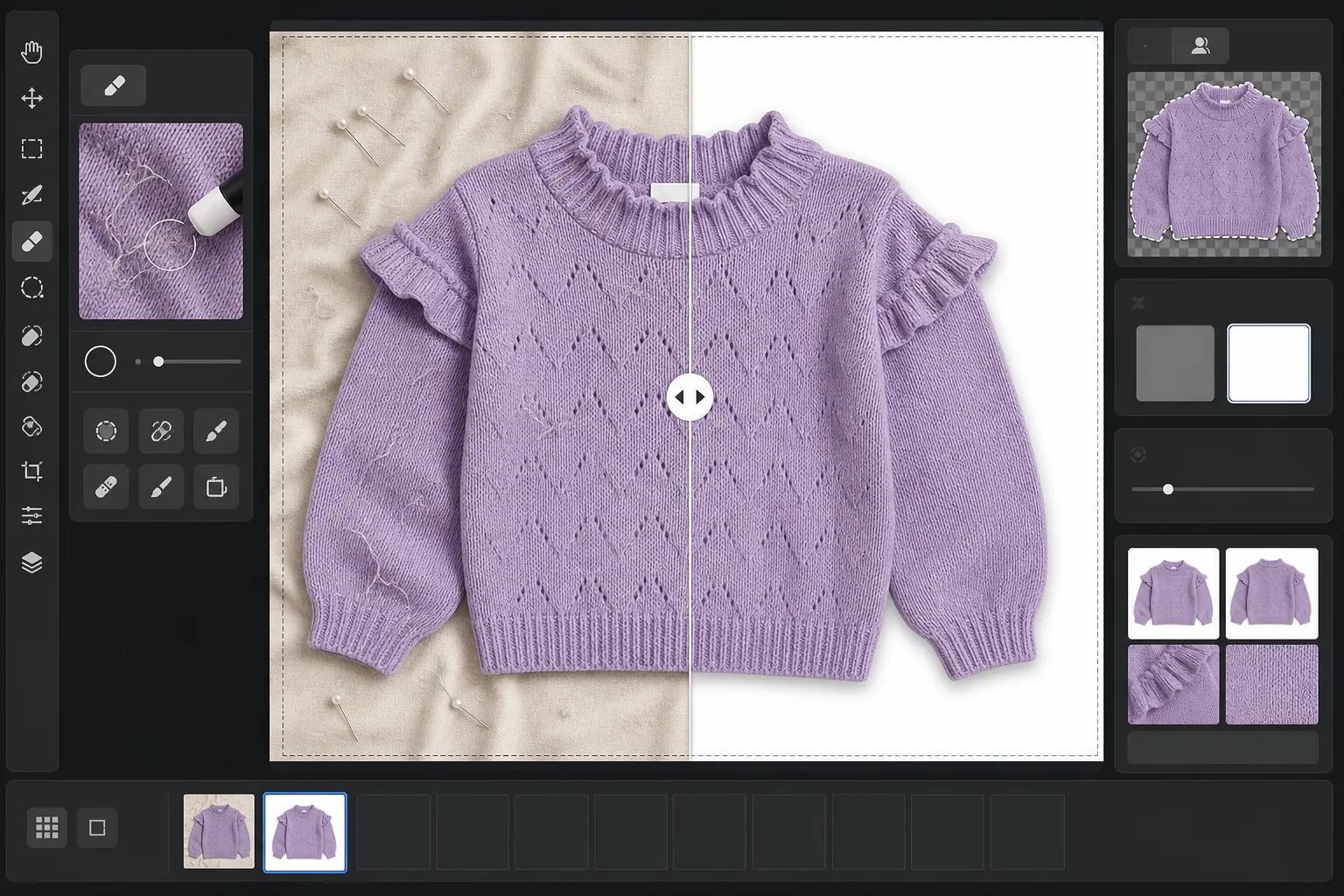
O que este modelo faz
Resolve os problemas mais comuns na fotografia de roupas em flat lay: rugas no tecido causadas por dobras e transporte, fiapos e pelos de animais que a câmera capta mas o olho não percebe, fundos irregulares causados por lençóis ou emendas de placas de cartão e cores de tecido imprecisas devido à iluminação mista. O Magic Eraser remove sujeira de superfície, fios soltos e etiquetas de cuidados que aparecem nos decotes. O Background Eraser isola a peça e a coloca sobre um fundo branco limpo. O AI Enhance corrige a temperatura de cor para que as tinturas do tecido apareçam fiéis em monitores e catálogos impressos.
Configurações do modelo
| Fundo | Branco puro (#FFFFFF) com suavização de borda de 2px |
| Redução de rugas | Média (alisa vincos de transporte, preserva pregas intencionais) |
| Precisão de cor | sRGB com calibração automática do ponto branco em cartão cinza neutro |
| Remoção de fiapos | Detecção automática de fibras, pelos e poeira acima de 3px |
| Sombra | Sombra projetada sutil (deslocamento de 4px, opacidade de 15%) para dar profundidade |
| Dimensões de saída | Recorte quadrado 2000×2000px com margem de 10% |
Como usar este modelo
Envie sua foto em flat lay
Fotografe a peça estendida sobre qualquer superfície limpa — uma cama, uma mesa ou uma placa de cartão. O fundo não precisa estar perfeitamente branco ou sem rugas, pois será substituído. A luz natural do dia perto de uma janela produz as cores de tecido mais fiéis.
Remova fiapos, fios e etiquetas
O Magic Eraser detecta e remove automaticamente fiapos, pelos de animais, fios soltos e etiquetas de cuidados visíveis acima do decote ou do cós. Você também pode selecionar e remover manualmente cabides, clipes ou alfinetes de styling deixados na foto.
Substitua o fundo
O Background Eraser isola a peça de qualquer superfície em que foi fotografada e a coloca sobre um fundo branco puro. A detecção de bordas segue o contorno real da peça, incluindo babados, franjas e detalhes em renda, sem cortar características delicadas.
Corrija a cor e exporte
O AI Enhance ajusta o balanço de branco para que a cor do tecido na tela corresponda à peça física da forma mais fiel possível. Baixe a imagem final como JPEG quadrado de 2000x2000px, pronta para Shopify, Amazon, Etsy ou sua própria loja — dimensionada para atender aos requisitos de imagem da maioria dos marketplaces.
Dicas profissionais para melhores resultados
- ✓Passe vapor ou ferro na peça antes de fotografar, se possível. A redução de rugas lida bem com vincos leves de transporte, mas marcas de dobra profundas causadas por armazenamento prolongado são mais difíceis de alisar sem afetar o caimento e a textura naturais do tecido.
- ✓Inclua um pequeno cartão cinza ou cartão de referência de balanço de branco na borda do quadro (fora da área de recorte final). O algoritmo de precisão de cor o usa para calibrar o ponto branco, produzindo cores de tecido visivelmente mais fiéis do que apenas o balanço de branco automático.
- ✓Para tecidos escuros sobre fundos brancos, certifique-se de que a foto original tenha contraste suficiente entre a borda da peça e a superfície. Peças pretas sobre madeira escura são mais difíceis de recortar com nitidez do que peças pretas sobre um lençol cinza claro ou branco.
- ✓Fotografe todas as peças no mesmo lote sob a mesma iluminação para manter a consistência de cor em todo o catálogo. Processá-las juntas com este modelo garante um balanço de branco uniforme em toda a linha de produtos.
Ferramentas
E-commerce workflow
Product photo hub
Use this template with the full ecommerce product photo workflow for marketplace backgrounds, cleanup, compression, resizing, and listing-ready exports.
View ecommerce product photo workflowPerguntas frequentes
A remoção de rugas deixa o tecido com aparência artificialmente lisa?
+
A redução de rugas é calibrada para remover vincos de dobras e transporte preservando a textura natural do tecido — a trama do linho, a sarja do jeans, a canelagem do algodão e os padrões de tricô são todos mantidos. O resultado parece uma peça recém-passada a vapor, e não uma superfície pintada digitalmente.
As cores corresponderão entre a foto e a peça real?
+
A precisão de cor depende da iluminação da sua foto original. Sob luz natural do dia ou luzes de estúdio calibradas, o algoritmo de correção de cor produz resultados dentro de um delta-E de 3 em relação à peça física em um monitor calibrado. Sob luz fluorescente ou de tungstênio forte, a melhoria é significativa, mas a correspondência exata exige uma referência de cartão cinza.
Quais marketplaces aceitam essas dimensões?
+
A saída quadrada de 2000x2000px atende aos requisitos de imagem da Amazon, Shopify, Etsy, eBay, Poshmark e da maioria das outras plataformas de e-commerce. A Amazon recomenda pelo menos 1000px no lado mais longo para a função de zoom, e 2000px ultrapassa esse valor com uma margem confortável.
Anuncie roupas que ficam tão boas on-line quanto pessoalmente
Envie fotos em flat lay e obtenha imagens de produto sem fiapos, com rugas alisadas e fundo branco, prontas para qualquer plataforma de e-commerce.
Experimente grátisRelated templates
More e-commerce templates for your workflow.
Modelo de fundo branco puro para fotos de produtos. Amazon, Shopify e configurações prontas para o mercado para imagens de produtos limpas e profissionais que podem ser convertidas.
Modelo de foto de listagem otimizado para Etsy. Converte fotos de estilo de vida em fundos brancos limpos a 2.000 pixels, aprimora detalhes de produtos feitos à mão e atende às diretrizes de imagem da Etsy.
Modelo de foto de listagem otimizado para eBay. Fundo branco para imagens de galeria, aprimoramento de documentação de condições e layouts de vários ângulos que atendem aos padrões de imagem do eBay.
Modelo profissional de fotografia de joias para anéis, colares e relógios. Controla os reflexos, melhora o brilho das pedras preciosas e fornece imagens prontas para o mercado em fundos limpos.
Modelo profissional de foto de móveis para listagens de mercado. Remova a desordem do ambiente, mostre dimensões reais e apresente peças em fundos limpos ou em contextos de ambiente estilizados.
Crie fotos de produtos compatíveis com a Amazon com fundos brancos puros, correção de iluminação adequada e dimensões otimizadas para imagens de listagem principal e secundária.