
Retoque natural da pele
Aprimore retratos sem o aspecto plástico. Este modelo remove imperfeições temporárias, uniformiza o tom da pele e suaviza irregularidades de iluminação, ao mesmo tempo em que preserva deliberadamente os poros, as linhas finas e a textura natural que fazem a pele parecer real. O resultado é um retrato em que a pessoa aparece na sua melhor versão no seu melhor dia — não um manequim gerado por IA.
Experimente este modelo grátisPortrait template preview
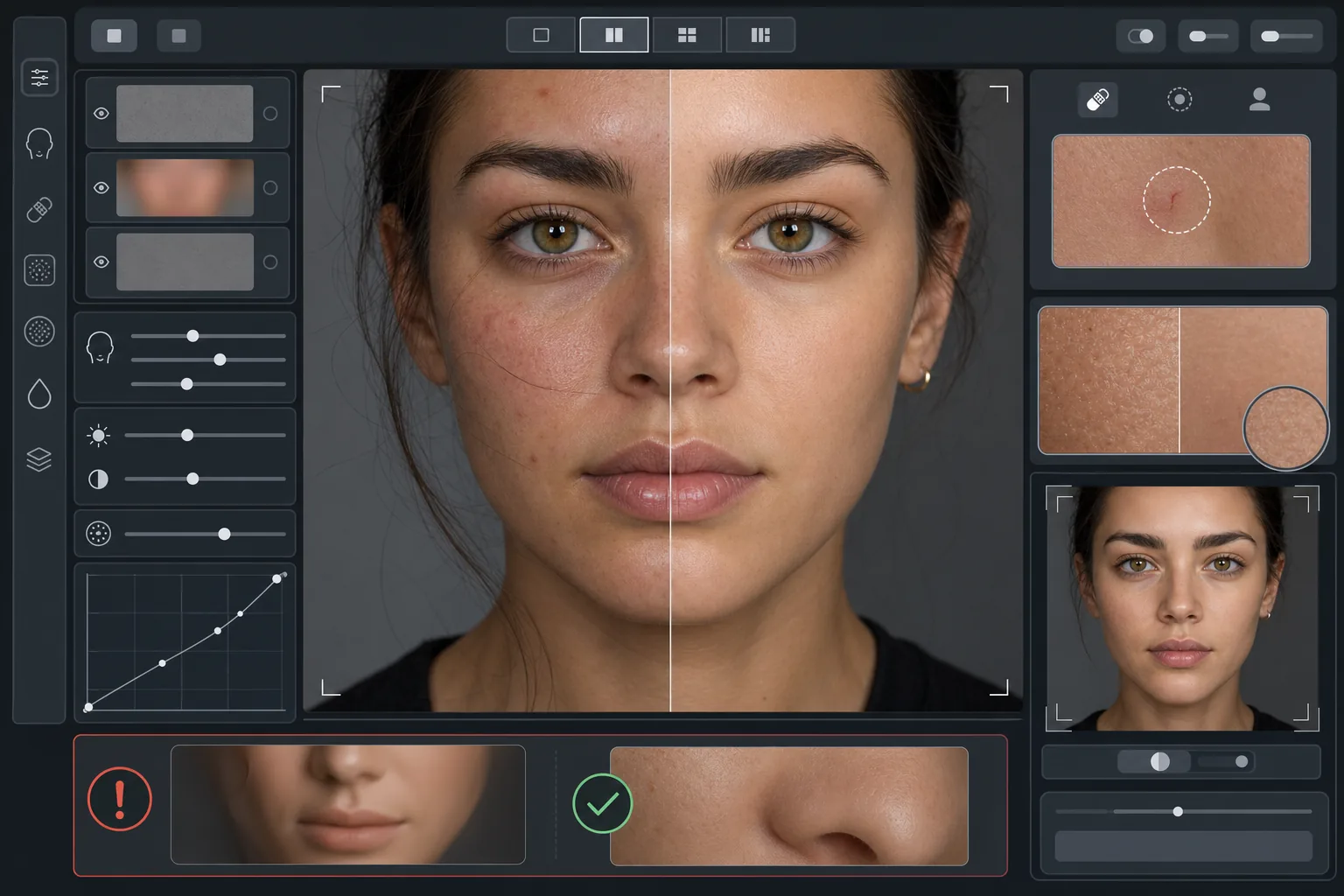
O que este modelo faz
Aplica um retoque de pele baseado em frequências que separa a textura do tom. O AI Enhance remove imperfeições temporárias (espinhas, vermelhidão, olheiras) preservando a textura fina da pele — poros, penugem e variação natural — que o olho percebe como autêntica. O Magic Eraser cuida da remoção pontual onde o aprimoramento por IA é amplo demais, como apagar um único arranhão ou uma picada de inseto sem afetar a pele ao redor. O efeito geral é uma pele uniforme e de aparência saudável que passa no teste do zoom.
Configurações do modelo
| Intensidade do retoque | Natural — foca em imperfeições e vermelhidão, preserva a textura |
| Preservação dos poros | Total — mantém toda a textura natural da pele no nível do pixel |
| Uniformização do tom | Moderada — reduz manchas e vermelhidão sem achatar a variação de cor |
| Correção das olheiras | Sutil — clareia as olheiras sem eliminar a sombra natural |
| Suavização da iluminação | Preenche sombras duras e reduz pontos de luz do flash direto |
| Resolução de saída | Igual à entrada (preserva todos os detalhes para corte e zoom) |
Como usar este modelo
Envie uma foto de retrato
Use um retrato bem iluminado com o rosto em foco nítido. O modelo funciona melhor quando a textura natural da pele está visível no original — imagens com foco suave ou muito comprimidas oferecem menos textura para a IA preservar.
Aplique o retoque natural
O AI Enhance identifica imperfeições temporárias, vermelhidão irregular e irregularidades de tom e as corrige mantendo a textura subjacente da pele totalmente intacta. Poros, linhas finas e variação de cor natural permanecem visíveis — apenas as imperfeições mudam.
Corrija áreas específicas
Use o Magic Eraser para qualquer marca individual restante que queira remover — um arranhão em cicatrização, uma irritação temporária ou um fio de cabelo solto sobre o rosto. Cada remoção se integra à textura natural da pele ao redor.
Revise no zoom máximo e exporte
Amplie para 100% para verificar se a textura da pele está intacta — os poros devem ficar visíveis e naturais. Se alguma área parecer lisa demais, reduza a intensidade do retoque e reprocesse. Exporte na resolução máxima para preservar o detalhe natural.
Dicas profissionais para os melhores resultados
- ✓Comece com a menor intensidade de retoque e aumente apenas se necessário — é mais fácil adicionar suavização do que recuperar uma textura já eliminada no processamento.
- ✓Para pessoas com acne ou rosácea, o modelo remove imperfeições individuais sem alterar o tom de pele subjacente — o resultado parece um dia de pele limpa, não uma pessoa diferente.
- ✓Evite combinar este modelo com os filtros de beleza da câmera do celular — a suavização integrada de muitas câmeras de celular já reduz a textura, e o processamento duplo cria o aspecto plástico que este modelo busca evitar.
- ✓Fotografe em formato RAW se possível e converta para JPEG antes de enviar — o RAW captura mais dados de textura da pele que a IA pode preservar durante o retoque.
Ferramentas
Perguntas frequentes
Como isso difere dos filtros de beleza que suavizam a pele?
+
Os filtros de beleza aplicam um desfoque uniforme que apaga poros, linhas finas e textura natural — criando o inconfundível aspecto plástico. Este modelo usa um processamento baseado em frequências que separa a textura do tom, removendo as imperfeições da camada de tom e deixando a camada de textura intacta. O resultado parece pele real, não uma superfície renderizada.
Isso muda o formato das feições do rosto?
+
Não. O modelo afeta apenas a aparência superficial da pele — tom, imperfeições e uniformidade da iluminação. Ele nunca remodela o nariz, o queixo, os olhos ou qualquer estrutura facial. A pessoa fica exatamente como ela é, apenas com uma pele mais limpa e iluminada de forma mais uniforme.
Posso usar isso em retratos profissionais e trabalhos de portfólio?
+
Sim. O padrão de retoque natural atende às expectativas profissionais de retratos corporativos, portfólios de atuação, perfis de relacionamento e redes sociais onde a autenticidade importa. A pessoa parecerá com sua foto pessoalmente — que é exatamente o objetivo do retoque natural.
Pele melhor, ainda você
Envie um retrato e obtenha em segundos um retoque de pele natural que preserva a textura. Sem aspecto plástico, sem suavização estranha — apenas você no seu melhor dia.
Experimente grátisRelated templates
More portrait templates for your workflow.
Modelo de retoque de retrato escolar adequado à idade. Remoção natural de manchas, planos de fundo consistentes e saída padrão de anuário com processamento em lote para turmas inteiras.
Modelo de retrato de animal de estimação com qualidade de estúdio. Lida com bordas de pele, remove coleiras e manipuladores, substitui fundos e aguça os olhos de cães, gatos e outros animais.
Aprimore fotos de recém-nascidos e bebês com tons suaves e quentes, suavização suave da pele, remoção de acessórios e distrações e dimensionamento pronto para impressão para anúncios e arte de parede.
Retoque fotos de maternidade com suavização suave da pele, iluminação com brilho suave, simplificação de fundo e gradação de cores quentes para um visual atemporal de retrato de gravidez.
Limpe retratos de família removendo distrações de fundo, corrigindo a exposição irregular, suavizando a pele naturalmente e garantindo que todos tenham a melhor aparência no mesmo quadro.