
Limpeza de retrato de família
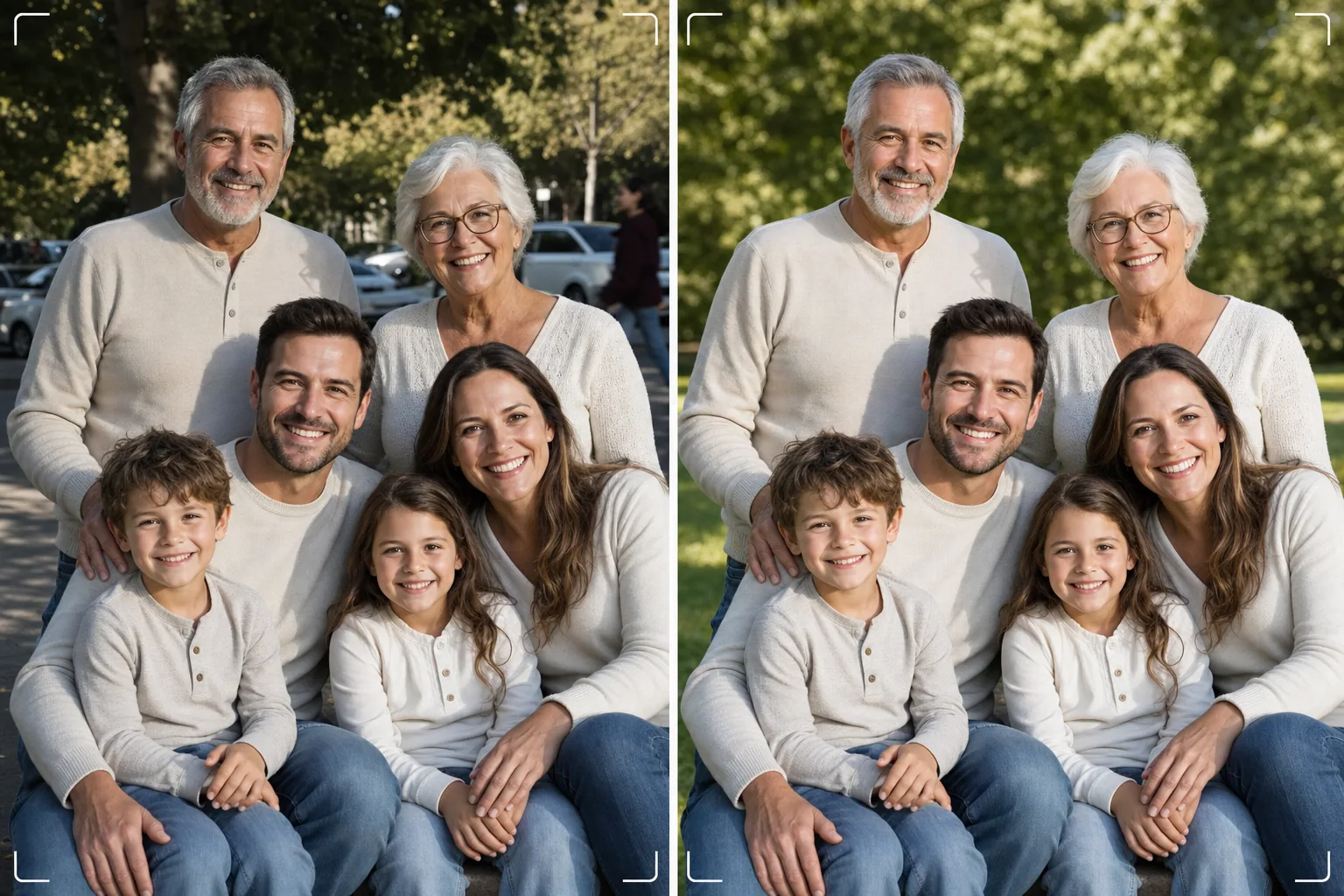
Obtenha a foto de família perfeita sem precisar de cem tentativas. Este modelo remove distrações de fundo, corrige a iluminação irregular em todo o grupo, reduz imperfeições de forma natural em cada rosto e elimina os pequenos defeitos que impedem que uma boa foto de grupo se torne excelente.
Experimente este modelo grátisPortrait template preview
O que este modelo faz
Resolve o problema universal das fotos de família: fazer com que todos apareçam ótimos em um único quadro. O Magic Eraser remove intrusos, latas de lixo, placas de saída, fios elétricos, carros estacionados e outras distrações que arruínam composições de grupo que, de outra forma, seriam boas. O AI Enhance corrige a iluminação irregular que ocorre quando alguns familiares estão na sombra enquanto outros estão sob sol direto, levando todos a uma exposição uniforme e favorável. A suavização natural da pele reduz imperfeições, olheiras e vermelhidão em cada rosto sem deixar ninguém com aparência artificialmente retocada. O resultado é o retrato de família que você imaginou ao reunir todos.
Configurações do modelo
| Limpeza de fundo | Detecta e remove distrações automaticamente (pessoas, placas, objetos) |
| Equilíbrio de exposição | Iluminação uniforme em todos os indivíduos (preenchimento de sombras + recuperação de altas luzes) |
| Aprimoramento da pele | Redução natural de imperfeições rosto a rosto (preserva traços únicos) |
| Correção de cor | Balanço de branco unificado em fotos de grupo com iluminação mista |
| Nitidez | Nitidez com reconhecimento de rosto (prioriza olhos e sorrisos) |
| Resolução de saída | Lado maior de 6000px (impressão de parede a 300 DPI de até 20×13 polegadas) |
Como usar este modelo
Envie a foto de família
Envie a foto de grupo tirada em uma reunião de família, feriado, encontro ou sessão de retrato. O modelo lida com grupos de duas a trinta pessoas. Para obter os melhores resultados, escolha o quadro em que o maior número de rostos está olhando para a câmera com expressões agradáveis — o modelo corrige fundo e iluminação, mas não pode alterar expressões faciais ou olhos fechados.
Remova as distrações de fundo
O Magic Eraser identifica e remove estranhos, placas que distraem, lixo, veículos e outros elementos indesejados atrás do grupo familiar. A IA reconstrói o fundo de forma natural, preenchendo grama, céu, paredes ou piso atrás dos objetos removidos.
Equilibre a iluminação e aprimore os rostos
O AI Enhance corrige as diferenças de exposição entre os familiares — chega de metade do grupo na sombra e metade apertando os olhos no sol. Cada rosto recebe uma redução individual de imperfeições e um sutil clareamento dos olhos, preservando os traços únicos e a aparência natural de cada pessoa.
Exporte para impressão ou compartilhamento
Baixe com lado maior de 6000px para grandes impressões de parede, ou com 2000px para redes sociais e cartões de festa digitais. O modelo exporta em sRGB para exibição em tela ou em Adobe RGB para impressão profissional. Várias proporções de corte (4:5, 5:7, 8:10) estão disponíveis para os tamanhos de moldura comuns.
Dicas de especialista para os melhores resultados
- ✓Tire de três a cinco fotos em sucessão rápida. Escolha aquela em que o maior número de pessoas está com os olhos abertos e uma expressão natural — o modelo cuida de todo o resto, mas as expressões e o estado de olhos abertos não podem ser alterados depois.
- ✓Posicione a família em sombra aberta — sob a copa de uma árvore ou no lado sombreado de um edifício — em vez de em uma mistura de sol e sombra. Isso dá ao modelo um ponto de partida com iluminação uniforme que produz o aprimoramento mais natural.
- ✓Para grupos grandes (dez ou mais), organize as pessoas em fileiras escalonadas, com os membros mais altos atrás. Essa estratificação natural cria profundidade e garante que cada rosto fique visível. O modelo pode clarear os rostos nas fileiras de trás que estão um pouco mais escuros devido à distância da fonte de luz.
Ferramentas
Perguntas frequentes
Isso pode corrigir olhos fechados ou expressões ruins?
+
Não. O modelo aprimora a iluminação, remove distrações e suaviza a pele, mas não pode alterar expressões faciais, abrir olhos fechados ou reposicionar pessoas. Escolha o quadro com a melhor expressão antes de enviar — o modelo fará esse quadro ter a melhor aparência possível.
E os grandes grupos de encontros?
+
O modelo lida com grupos de até cerca de trinta pessoas. Para grupos muito grandes, o aprimoramento individual dos rostos fica mais sutil devido ao menor tamanho dos rostos no quadro, mas a limpeza de fundo e a correção de iluminação são totalmente eficazes em qualquer tamanho de grupo.
Posso remover uma pessoa da foto de família?
+
Sim, o Magic Eraser pode remover indivíduos específicos do grupo. Selecione a pessoa que deseja remover e a IA reconstruirá o fundo atrás dela. Isso funciona melhor quando a pessoa está na borda do grupo, em vez de no centro, entre outras.
O retrato de família perfeito está a uma limpeza de distância
Envie suas fotos de grupo e obtenha retratos de família limpos, uniformemente iluminados e aprimorados de forma natural, prontos para a parede.
Experimente grátisRelated templates
More portrait templates for your workflow.
Modelo de retoque de retrato escolar adequado à idade. Remoção natural de manchas, planos de fundo consistentes e saída padrão de anuário com processamento em lote para turmas inteiras.
Modelo de retrato de animal de estimação com qualidade de estúdio. Lida com bordas de pele, remove coleiras e manipuladores, substitui fundos e aguça os olhos de cães, gatos e outros animais.
Modelo de retoque natural da pele que remove manchas preservando os poros e a textura. Iluminação uniforme, sem aparência de plástico – apenas uma pele melhor na câmera.
Aprimore fotos de recém-nascidos e bebês com tons suaves e quentes, suavização suave da pele, remoção de acessórios e distrações e dimensionamento pronto para impressão para anúncios e arte de parede.
Retoque fotos de maternidade com suavização suave da pele, iluminação com brilho suave, simplificação de fundo e gradação de cores quentes para um visual atemporal de retrato de gravidez.