
Home staging virtual imobiliário
Decore ambientes vazios com móveis e decoração fotorrealistas sem mover uma única peça de mobiliário físico. Este modelo usa o AI Fill para posicionar sofás, mesas, tapetes e obras de arte em ambientes desocupados, enquanto o Magic Eraser remove a bagunça existente, os móveis antigos e os objetos pessoais antes do início da decoração. O resultado é uma foto de anúncio acolhedora e convidativa que ajuda os compradores a se imaginarem vivendo no espaço.
Experimente este modelo gratuitamenteReal Estate template preview
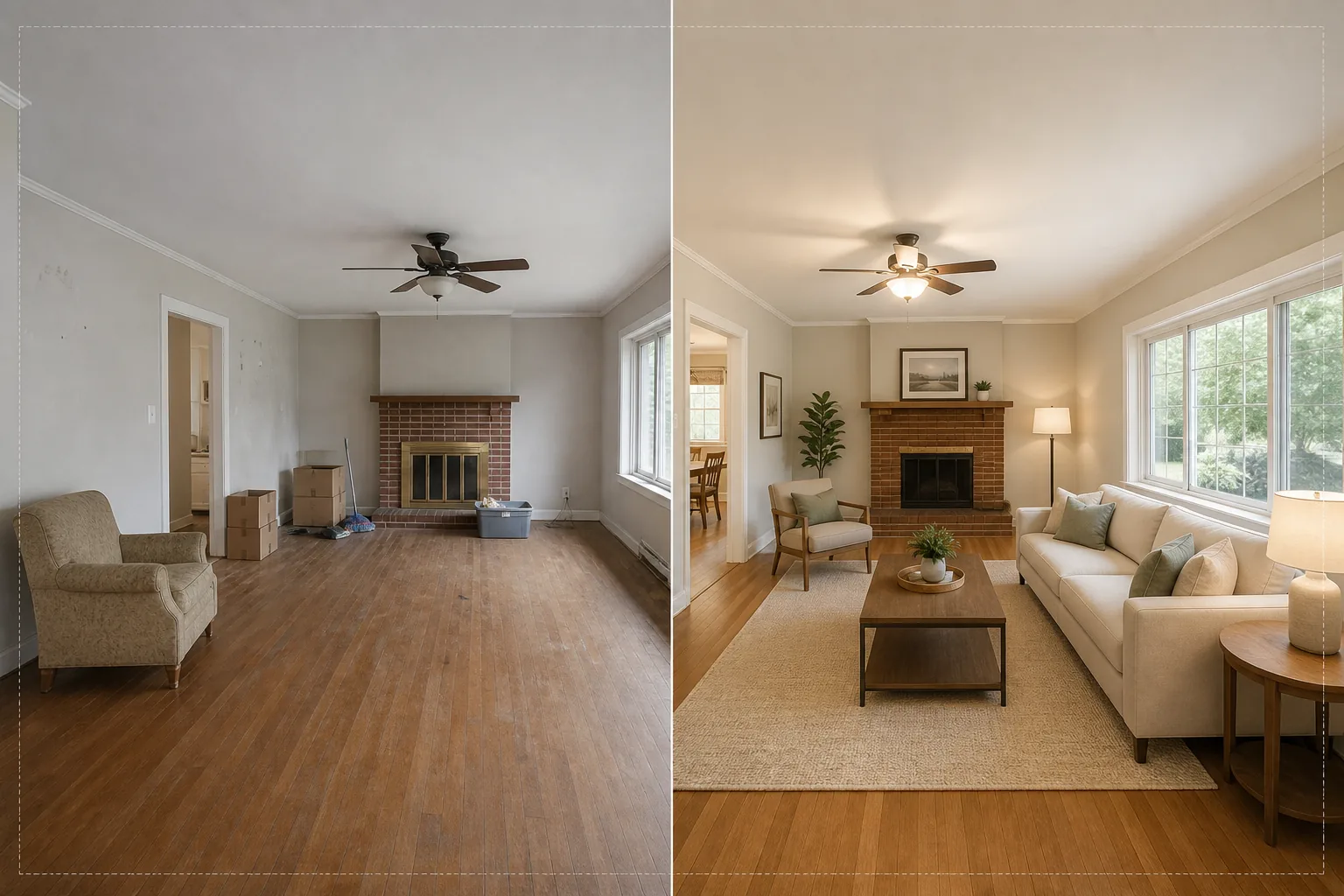
O que este modelo faz
Resolve o maior desafio da fotografia imobiliária: fazer com que ambientes vazios ou bagunçados pareçam um lar. O Magic Eraser primeiro remove qualquer bagunça existente — móveis antigos, caixas de mudança, pertences pessoais, marcas nas paredes e arranhões nos pisos. Em seguida, o AI Fill posiciona móveis adequados ao contexto no ambiente já limpo, ajustando o estilo à arquitetura. Um loft moderno recebe peças mid-century com toques industriais, enquanto uma casa colonial tradicional recebe móveis estofados clássicos e tons de madeira quentes. A iluminação e as sombras dos móveis virtuais são calculadas a partir da luz da janela já presente na foto, de modo que a decoração pareça fisicamente presente, e não colada.
Configurações do modelo
| Estilo de decoração | Moderno, Tradicional, Escandinavo, Mid-Century ou Litorâneo |
| Tipo de ambiente | Detectado automaticamente (sala de estar, quarto, sala de jantar, escritório, cozinha) |
| Remoção de bagunça | Remove automaticamente caixas, objetos pessoais e móveis antigos antes da decoração |
| Renderização de sombras | Ajustada à direção e à intensidade da luz da janela existente |
| Resolução de saída | 4000×3000px (compatível com MLS a 300 DPI) |
| Temperatura de cor | Interior quente (3200K–4000K para combinar com a iluminação interna típica) |
Como usar este modelo
Envie a foto do ambiente vazio ou bagunçado
Envie uma foto em grande angular do ambiente. Fotografe a partir de um canto para captar duas paredes e o piso e obter a decoração mais realista. O modelo funciona com fotos de smartphones, câmeras DSLR e câmeras imobiliárias profissionais, incluindo lentes ultra grande-angular.
Remova a bagunça existente
O Magic Eraser detecta e remove automaticamente caixas de mudança, móveis antigos, fotos pessoais nas paredes e bagunça no piso. A IA reconstrói o piso, a pintura das paredes e os rodapés atrás dos objetos removidos, de modo que o ambiente pareça limpo e desocupado.
Decore com móveis virtuais
O AI Fill posiciona móveis adequados ao tipo de ambiente detectado e ao estilo selecionado. Uma sala de estar recebe um sofá, uma mesa de centro, um tapete, mesas laterais e arte de parede. Um quarto recebe uma cama, criados-mudos, luminárias e almofadas decorativas. Os móveis se ajustam às dimensões do ambiente e projetam sombras realistas.
Exporte para MLS e anúncios
Baixe a foto decorada em 4000×3000px, pronta para uploads em MLS, Zillow, Realtor.com e folhetos impressos. A imagem inclui tags de metadados para facilitar a catalogação no seu sistema de gestão de anúncios.
Dicas profissionais para os melhores resultados
- ✓Fotografe a partir de um canto a cerca de 1,20 m de altura — isso capta duas paredes e área de piso suficiente para a IA posicionar os móveis com a perspectiva correta e sombras de contato com o chão.
- ✓Acenda todas as luzes do ambiente antes de fotografar. A IA usa as fontes de luz visíveis e os reflexos das janelas para calcular onde as sombras devem cair sobre os móveis decorados.
- ✓Para anúncios com vários ambientes, use o mesmo estilo de decoração em todos eles para criar uma história de design coerente, como se um verdadeiro decorador tivesse mobiliado a casa inteira.
Ferramentas
Perguntas frequentes
O home staging virtual está em conformidade com as regras do MLS?
+
A maioria dos sistemas MLS permite fotos decoradas virtualmente, desde que sejam identificadas como tais. O modelo não adiciona a etiqueta automaticamente — verifique as regras do seu MLS local e adicione uma legenda de divulgação como 'Decoração virtual' ao enviar.
Posso decorar um pátio ou varanda externa?
+
Sim. O modelo detecta espaços de convivência externos e os decora com móveis de pátio, vasos e tapetes de área externa adequados. Os cálculos de iluminação consideram o céu aberto e a luz solar direta, em vez da luz ambiente interna.
Quão realistas são os móveis?
+
Os móveis decorados projetam sombras que correspondem à direção da luz existente do ambiente, assentam-se no plano do piso com a perspectiva correta e refletem a cor ambiente das paredes ao redor. A uma distância normal de visualização, a decoração é indistinguível de uma fotografia realmente mobiliada.
Decore qualquer ambiente em segundos, não em horas
Envie fotos de ambientes vazios e obtenha lindas imagens de anúncio mobiliadas que fazem os compradores se apaixonarem por cada espaço.
Experimente grátisRelated templates
More real estate templates for your workflow.
Modelo profissional de fotos imobiliárias para listagens da MLS. Aprimoramento semelhante ao HDR, substituição do céu, remoção de desordem e correção de cores para fotos de propriedades que vendem mais rapidamente.
Aprimore fotos de exteriores arquitetônicos com correção de linhas verticais, substituição de céu, remoção de carros e pedestres e gradação de cor da hora dourada para anúncios e portfólios.
Transforme fotos do Airbnb e de aluguel por temporada com iluminação de quarto, remoção de desordem, Color correction e correção de distorção de lente grande angular para taxas de reserva mais altas.
Aprimore as fotos do portfólio de design de interiores com iluminação de ambiente, remoção de desordem, nitidez de textura de material e renderização de cores precisas de acabamentos e tecidos.
Aprimore a fotografia aérea de drone com substituição do céu, realce de limites de propriedade, vibração de cores Boost e remoção de distrações para levantamentos imobiliários e de terrenos.
Limpe, aprimore e padronize imagens de plantas baixas para listagens de imóveis com remoção de manchas, nitidez de linhas e estilo consistente.