
Spinner de produto 360
Crie visualizações giratórias de produto em 360 graus de qualidade profissional a partir de fotos de mesa giratória. Este modelo remove o fundo de cada ângulo de rotação, garante iluminação e cor consistentes em todos os quadros, elimina poeira e imperfeições da superfície e gera um conjunto de imagens uniforme, pronto para os visualizadores 360 interativos das suas páginas de produto.
Experimente este modelo gratuitamenteE-commerce template preview
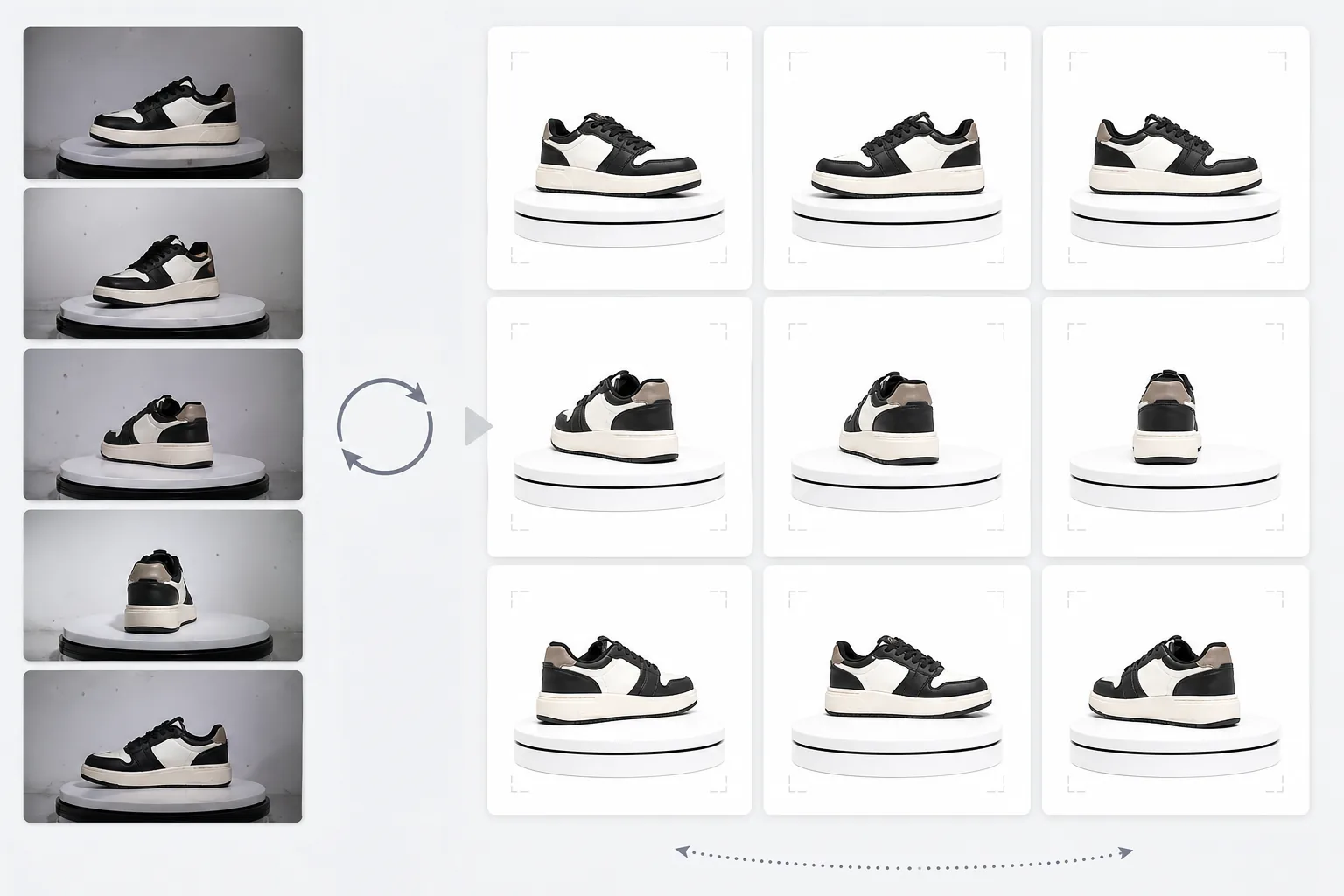
O que este modelo faz
Processa fotos de produto de vários ângulos em um conjunto consistente, adequado para visualizadores giratórios interativos de 360 graus em sites de comércio eletrônico. Quando você fotografa um produto em uma mesa giratória a partir de 24 ou 36 ângulos, pequenas inconsistências de fundo, iluminação e sombra se acumulam e criam uma experiência de rotação trêmula e pouco profissional. Este modelo usa o Background Eraser para isolar o produto de cada ângulo com tratamento de bordas consistente, normaliza a iluminação e a temperatura de cor em todos os quadros para que o produto não oscile entre tons quentes e frios ao girar, e usa o Magic Eraser para remover poeira, impressões digitais e imperfeições da superfície que se tornam incômodas quando aparecem em um quadro mas não no seguinte.
Configurações do modelo
| Fundo | Branco puro (#FFFFFF) — consistente em todos os quadros de rotação |
| Normalização da iluminação | Consistência entre quadros (elimina a cintilação entre ângulos) |
| Limpeza de superfície | Remove poeira, impressões digitais e reflexos em cada quadro |
| Centralização do produto | Centraliza automaticamente o produto em cada quadro para um eixo de rotação suave |
| Dimensões de saída | 1500 × 1500 px por quadro (otimizado para visualizadores 360 web) |
| Número de quadros | Suporta sequências de 12, 24 ou 36 quadros |
Como usar este modelo
Envie suas fotos da mesa giratória
Envie o conjunto completo de fotos de rotação (12, 24 ou 36 quadros) tiradas em uma mesa giratória com intervalos consistentes. Nomeie os arquivos de forma sequencial (001.jpg a 036.jpg) para que o modelo os processe na ordem de rotação correta. O modelo lida com fotos de qualquer fundo — fundo branco, cinza ou colorido.
Remoção de fundo e consistência
O Background Eraser remove o fundo de cada quadro usando as mesmas configurações de detecção de bordas, garantindo que o contorno do produto seja consistente em todos os ângulos. O produto é centralizado automaticamente em cada quadro para que o eixo de rotação permaneça estável e a rotação não oscile.
Normalização entre quadros
Iluminação, temperatura de cor e exposição são normalizadas em todos os quadros. Isso elimina as sutis flutuações de brilho e cor que ocorrem quando a iluminação da mesa giratória não é perfeitamente uniforme em cada ângulo. As imperfeições de superfície visíveis em alguns ângulos são limpas para manter a consistência.
Exportar a sequência de quadros
Baixe a sequência completa de quadros a 1500 × 1500 px por quadro no formato JPEG. Os arquivos são numerados de forma sequencial e prontos para importação direta em plugins de visualizador 360 como Magic 360, Sirv ou Webrotate 360. O tamanho total dos arquivos é otimizado para um carregamento web rápido.
Dicas profissionais para melhores resultados
- ✓Use uma mesa giratória manual com marcações de graus em vez de uma rotação à mão livre. Intervalos consistentes de 10 graus (36 quadros) produzem a rotação mais suave. O modelo pode lidar com pequenas inconsistências de rotação, mas um espaçamento uniforme produz um resultado visivelmente mais suave.
- ✓Fixe sua câmera em um tripé e use configurações de exposição manual para todos os quadros. A exposição automática faz com que a câmera ajuste o brilho de forma diferente em cada ângulo, criando o efeito de cintilação que o modelo precisa depois corrigir. As configurações manuais oferecem ao modelo um ponto de partida mais limpo.
- ✓Limpe bem o seu produto antes de fotografar — poeira e impressões digitais são mais visíveis e incômodas em uma rotação de 360 graus do que em uma única foto estática, pois aparecem e desaparecem à medida que o produto gira. O modelo as remove, mas começar com uma superfície limpa produz melhores resultados.
Ferramentas
E-commerce workflow
Product photo hub
Use this template with the full ecommerce product photo workflow for marketplace backgrounds, cleanup, compression, resizing, and listing-ready exports.
View ecommerce product photo workflowPerguntas frequentes
De quantos quadros eu preciso?
+
36 quadros (intervalos de 10 graus) produzem a rotação mais suave para a maioria dos produtos. 24 quadros (intervalos de 15 graus) são aceitáveis para produtos sem detalhes finos. 12 quadros (intervalos de 30 graus) são o mínimo para uma rotação reconhecível, mas resultarão em uma rotação truncada para produtos detalhados como relógios ou eletrônicos.
Posso processar quadros de um vídeo?
+
Sim, se você extrair os quadros de um vídeo de mesa giratória em intervalos uniformes. Exporte os quadros na maior resolução disponível e garanta uma distribuição angular uniforme ao longo dos 360 graus completos. Os quadros de vídeo podem ter qualidade inferior à de fotos estáticas dedicadas devido ao desfoque de movimento e à compressão de vídeo.
Quais plugins de visualizador 360 são compatíveis?
+
A saída JPEG sequencial é compatível com todas as principais soluções de visualizador 360, incluindo Magic 360, Sirv 360, Webrotate 360, jQuery Reel e implementações personalizadas. As dimensões consistentes e a convenção de nomenclatura facilitam a importação.
Ofereça aos compradores a visualização de produto 360 que eles esperam
Envie fotos da mesa giratória e obtenha uma sequência de quadros limpa e consistente, pronta para os visualizadores giratórios 360 interativos das suas páginas de produto.
Experimente gratuitamenteRelated templates
More e-commerce templates for your workflow.
Modelo de fundo branco puro para fotos de produtos. Amazon, Shopify e configurações prontas para o mercado para imagens de produtos limpas e profissionais que podem ser convertidas.
Modelo de foto de listagem otimizado para Etsy. Converte fotos de estilo de vida em fundos brancos limpos a 2.000 pixels, aprimora detalhes de produtos feitos à mão e atende às diretrizes de imagem da Etsy.
Modelo de foto de listagem otimizado para eBay. Fundo branco para imagens de galeria, aprimoramento de documentação de condições e layouts de vários ângulos que atendem aos padrões de imagem do eBay.
Modelo profissional de fotografia de joias para anéis, colares e relógios. Controla os reflexos, melhora o brilho das pedras preciosas e fornece imagens prontas para o mercado em fundos limpos.
Modelo profissional de foto de móveis para listagens de mercado. Remova a desordem do ambiente, mostre dimensões reais e apresente peças em fundos limpos ou em contextos de ambiente estilizados.
Limpe fotos planas de roupas com remoção de rugas, limpeza de fiapos, fundos brancos puros e cores de tecido precisas. Pronto para Shopify, Amazon e boutiques.