
Design de quadro de menu
Crie gráficos profissionais de quadro de menu a partir das suas próprias fotos de pratos. Este modelo isola cada prato individual das mesas postas e dos fundos desorganizados, uniformiza a aparência de todos os itens para um menu coeso e exporta imagens prontas para layout otimizadas para quadros de menu digitais, menus impressos e listagens em plataformas de entrega como DoorDash, Uber Eats e Grubhub.
Experimente este modelo grátisFood template preview
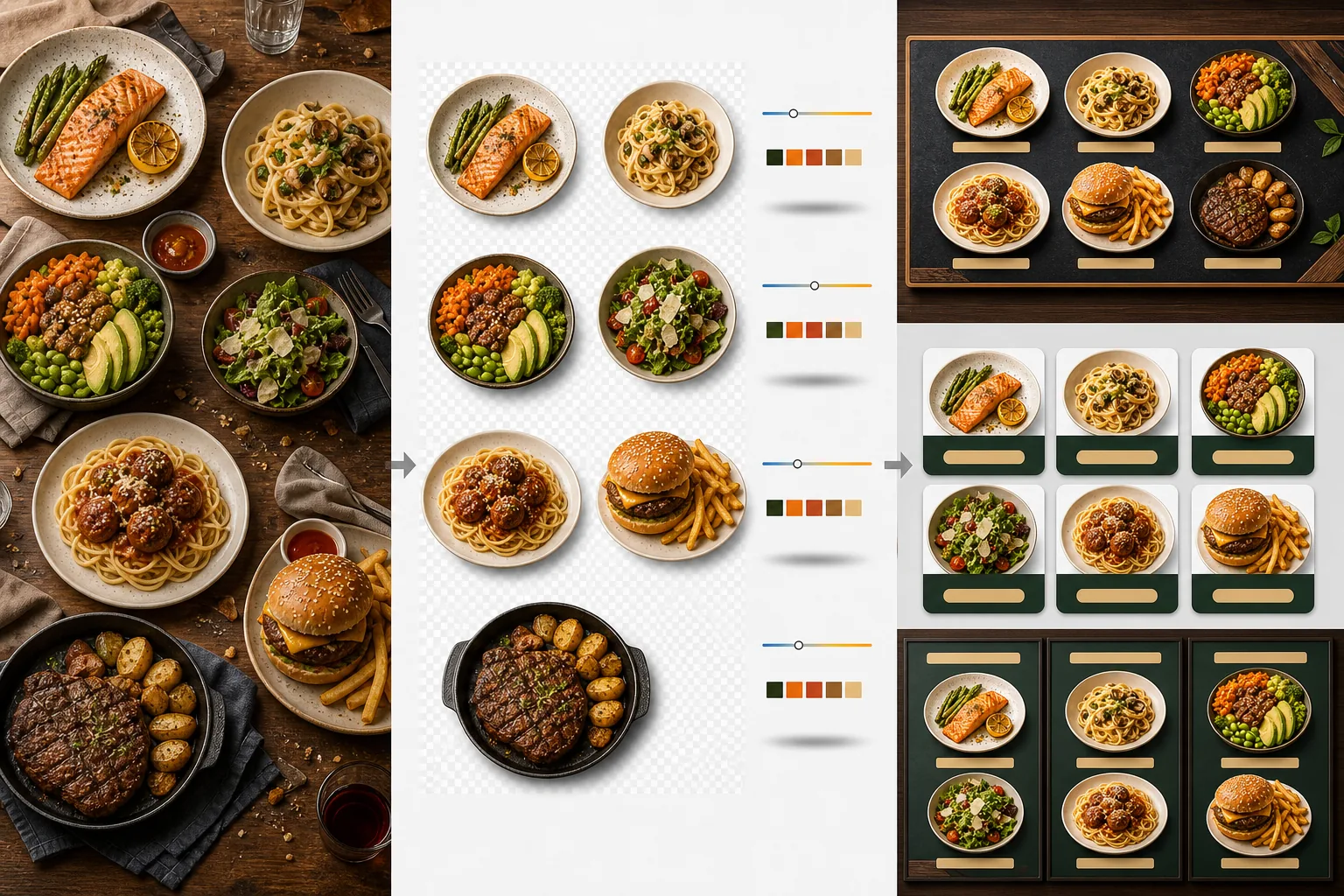
O que este modelo faz
Transforma fotos de pratos inconsistentes tiradas em momentos diferentes, com iluminações diferentes e em mesas diferentes em um conjunto unificado de imagens prontas para o menu. O Background Eraser isola cada prato — prato, tigela ou embalagem — da sua mesa posta original e substitui o fundo por uma cor ou textura consistente que combina com a identidade da sua marca de restaurante. A temperatura de cor é normalizada em todos os itens, de modo que fotos tiradas sob luz quente de tungstênio, painéis de LED frios e luz natural de janela pareçam todas consistentes. As cores dos alimentos são realçadas para parecerem apetitosas sem entrar no território irreal — os verdes ficam vibrantes, as carnes quentes e suculentas e os molhos brilhantes. O resultado é um conjunto de imagens que funciona como um sistema visual de menu unificado, em vez de uma coleção aleatória de fotos de celular.
Configurações do modelo
| Fundo | Cor sólida (combinando com a marca), textura de madeira, ardósia ou transparente |
| Normalização da temperatura de cor | Alinhar todos os itens a um balanço de branco de luz do dia de 5000K |
| Realce da cor dos alimentos | Realce apetitoso (proteínas quentes, verdes vibrantes, molhos brilhantes) |
| Estilo de sombra | Sombra projetada sutil para dar profundidade em fundos sólidos |
| Tamanhos de saída | 1200×1200px (plataformas de entrega), 800×600px (quadros de menu digitais), personalizado |
Como usar este modelo
Envie as fotos dos pratos
Envie fotos de cada item do menu. Fotos de celular tiradas durante o serviço, sessões de fotografia gastronômica profissional e fotos de listagens em plataformas de entrega funcionam todas. O modelo processa cada prato separadamente para resultados consistentes em todo o seu menu.
Isole os pratos dos fundos
O Background Eraser separa cada prato da sua mesa, jogo americano ou superfície de balcão. A detecção de bordas segue com precisão a borda do prato, a borda da tigela ou o contorno da embalagem. Guarnições e coberturas que se estendem além da borda do prato — um raminho de salsa, um fio de molho — são preservadas.
Uniformize a cor e o estilo
A temperatura de cor é normalizada para que todos os pratos apareçam sob a mesma iluminação consistente. As cores dos alimentos são realçadas para despertar o apetite. Uma sombra sutil é adicionada sob cada prato para um visual firme e tridimensional no novo fundo.
Exporte para menus e plataformas
Baixe em 1200×1200px para as listagens do DoorDash, Uber Eats e Grubhub. Exporte em 800×600px para quadros de menu digitais e telas de TV. Exportações em PNG transparente estão disponíveis para designers gráficos que criam menus impressos e sinalização personalizados.
Dicas profissionais para melhores resultados
- ✓Fotografe os pratos diretamente de cima (flat lay) ou em um ângulo de 45 graus. Esses dois ângulos produzem a remoção de fundo mais limpa porque o contorno do prato fica totalmente visível e a IA consegue separar o prato da mesa com precisão.
- ✓Limpe a borda do prato antes de fotografar. Manchas de molho e migalhas na borda do prato passam a fazer parte da imagem isolada e parecem desleixadas no novo fundo limpo.
- ✓Processe todos os itens do menu em um único lote com as mesmas configurações. A consistência em cada foto de prato é o que faz um menu parecer profissional — temperaturas de cor e tons de fundo descombinados fazem até a melhor comida parecer amadora.
Ferramentas
Perguntas frequentes
Posso usar isto para bebidas?
+
Sim. Copos, xícaras, garrafas e coquetéis são isolados com a mesma precisão dos pratos empratados. Bebidas transparentes como água, vinho e coquetéis claros preservam sua transparência no novo fundo.
A comida vai parecer realçada artificialmente?
+
O realce de cor é calibrado para fazer a comida parecer o mais apetitosa possível sem entrar no território irreal. Pense nisso como a diferença entre comida fotografada sob luz fluorescente dura e comida fotografada sob luz natural do dia — o modelo faz cada prato parecer ter sido fotografado em condições ideais.
Isto funciona para fotos de menu das plataformas de entrega?
+
Sim. A saída quadrada de 1200×1200px atende aos requisitos de imagem do DoorDash, Uber Eats, Grubhub e Postmates. Restaurantes com fotos de menu de aparência profissional nas plataformas de entrega recebem consistentemente taxas de pedido mais altas do que aqueles com fotos de celular não processadas.
Crie um menu que faz cada prato parecer irresistível
Envie fotos de pratos e obtenha imagens de menu consistentes e apetitosas, prontas para quadros digitais, menus impressos e plataformas de entrega.
Experimente grátisRelated templates
More food templates for your workflow.
Crie fotos apetitosas de menu de entrega de comida com aprimoramento de cores vibrantes, fundos limpos, efeitos de vapor e frescor e dimensões otimizadas para plataforma.
Aprimore fotos de receitas para livros de receitas e blogs de culinária com nitidez de qualidade de impressão, precisão de cores de ingredientes, limpeza de cena estilizada e saída de alta resolução.