
Foto de menu de entrega
Faça os itens do seu menu de entrega parecerem tão apetitosos quanto o sabor. Este modelo realça as cores dos pratos para o máximo apelo ao apetite, remove fundos de cozinha desorganizados, intensifica o calor visual e o frescor dos pratos e gera imagens otimizadas para DoorDash, Uber Eats, Grubhub e outras plataformas de entrega.
Experimente este modelo gratuitamenteFood template preview
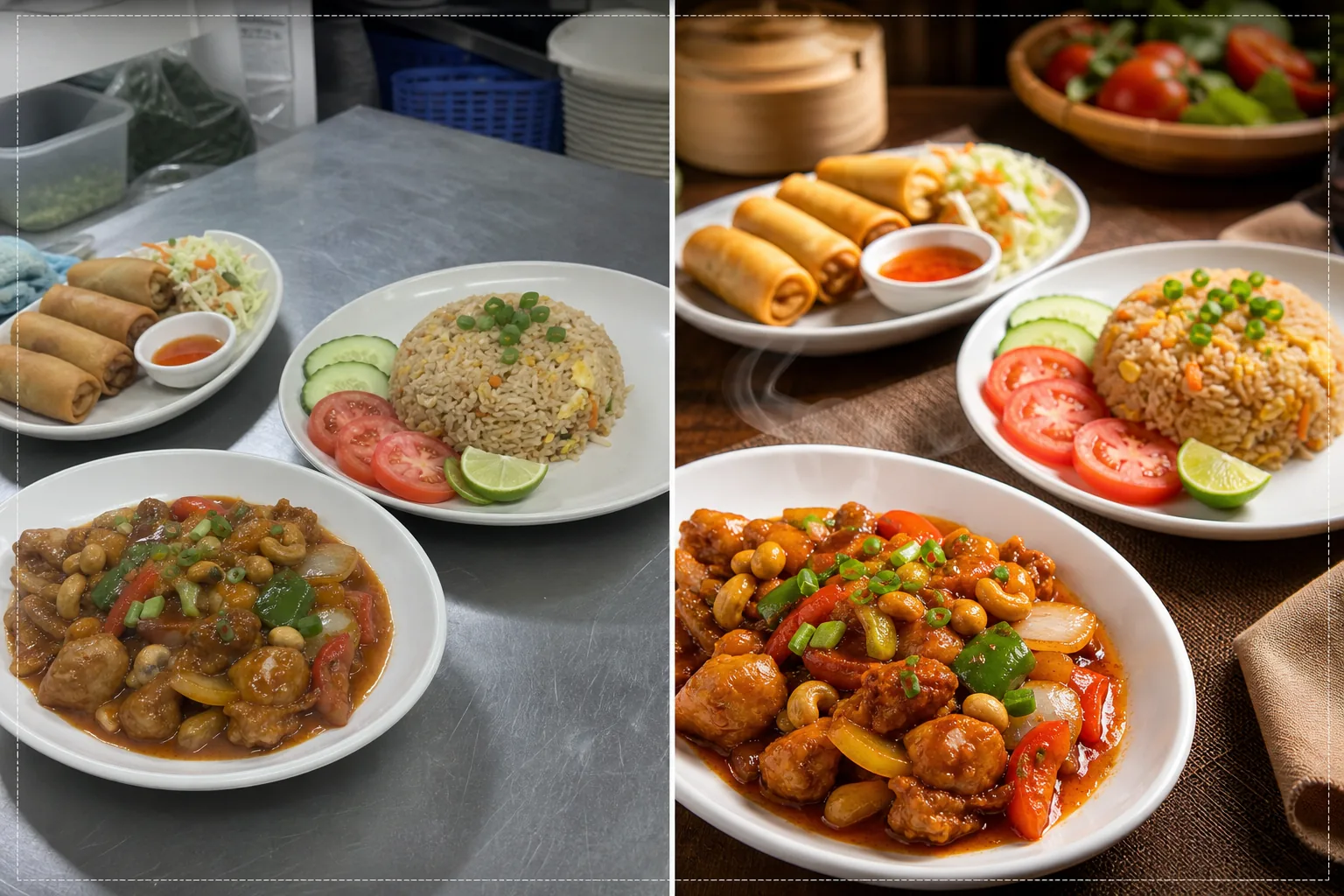
O que este modelo faz
Transforma fotos rápidas de cozinha em imagens de qualidade de menu que impulsionam pedidos nas plataformas de entrega de comida. Os restaurantes costumam fotografar os pratos em cozinhas movimentadas, sob iluminação fluorescente que faz a comida parecer pouco apetitosa: frango com tom esverdeado, arroz marrom sem graça e molhos desbotados. Este modelo corrige a temperatura de cor para tons quentes e apetitosos e aumenta a saturação de ingredientes naturalmente vibrantes, como tomates, folhas verdes e pimentões. O Background Eraser remove fundos de cozinha desorganizados e os substitui por superfícies limpas e adequadas para comida. O AI Enhance aprimora as texturas dos alimentos para que os compradores vejam a crocância dos fritos, o vapor subindo dos pratos quentes e o frescor das guarnições.
Configurações do modelo
| Calor das cores | Tons quentes e apetitosos (+15% de deslocamento quente, corrige o verde fluorescente) |
| Saturação da comida | Realce seletivo de vermelhos, verdes e amarelos (cores naturais dos alimentos) |
| Aprimoramento de textura | Nitidez de detalhes de crocância, umidade e brilho |
| Fundo | Superfície de mesa limpa, cor sólida ou fundo escuro e atmosférico |
| Dimensões de saída | 1200 × 800 px (ideal para plataformas de entrega) e 1080 × 1080 px (redes sociais) |
Como usar este modelo
Envie a foto do seu prato
Fotografe o prato montado diretamente de cima (flat lay) ou em um ângulo de 45 graus — ambas as composições funcionam bem para menus de entrega. Use a melhor luz natural disponível ou posicione o prato perto de uma janela. Envie direto do seu celular — não é preciso montar um estúdio.
Correção de cor e calor
O modelo corrige a dominante de cor da iluminação fluorescente e LED da cozinha, deslocando os tons da comida para matizes quentes e apetitosos. Os molhos ficam mais ricos, as proteínas mais douradas e os vegetais mais frescos. A correção realça o que está naturalmente presente, em vez de fazer a comida parecer colorida artificialmente.
Aprimoramento de fundo e textura
O Background Eraser troca o fundo da cozinha por uma superfície limpa — mesa de madeira, mármore, ardósia ou uma simples cor sólida. O AI Enhance aprimora as texturas da comida para destacar a crocância dos fritos, o brilho dos molhos e o frescor dos produtos. A imagem como um todo ganha qualidade de fotografia gastronômica profissional.
Exportar para plataformas de entrega
Baixe em 1200 × 800 px para listagens de menu em plataformas de entrega (DoorDash, Uber Eats, Grubhub) ou em 1080 × 1080 px para posts gastronômicos no Instagram. O perfil de cor quente garante que o prato pareça apetitoso em todos os dispositivos e tipos de tela.
Dicas profissionais para melhores resultados
- ✓Fotografe os pratos imediatamente após a montagem, enquanto o vapor, a umidade e o frescor das guarnições estão no auge. A fotografia gastronômica tem uma janela de cerca de três a cinco minutos antes que os molhos assentem, as guarnições murchem e o vapor se dissipe. O modelo realça esses sinais de frescor, mas não pode criá-los.
- ✓Use um prato branco ou de cor clara para as fotos do menu. Pratos brancos criam o maior contraste com a comida, fazendo as cores saltarem e permitindo que a IA produza bordas mais limpas durante a remoção do fundo. Pratos escuros também funcionam, mas reduzem a vantagem do contraste de cor.
- ✓Para combos e pedidos com vários itens, organize todos os itens em um único enquadramento a uma leve distância. O modelo aprimora cada elemento da comida individualmente, e mostrar o pedido completo dá aos clientes de entrega uma expectativa clara do que vão receber.
Ferramentas
Perguntas frequentes
Isso corrige fotos tiradas sob as luzes fluorescentes da cozinha?
+
Sim. A iluminação fluorescente é o problema mais comum na fotografia gastronômica de restaurantes, criando uma dominante verde-amarelada que faz a comida parecer pouco apetitosa. O modelo corrige especificamente essa mudança de cor e a substitui por tons quentes e apetitosos que fazem a comida parecer naturalmente deliciosa.
Isso funciona para todos os tipos de culinária?
+
O modelo lida com todos os tipos de comida — americana, asiática, mexicana, italiana, indiana, do Oriente Médio e muito mais. A correção e o aprimoramento de cor são calibrados para as cores naturais dos alimentos de todas as tradições culinárias, realçando os vermelhos em pratos à base de tomate, os verdes em saladas e os tons dourados em fritos e assados.
Posso processar o meu menu inteiro de uma vez?
+
Sim. Envie todas as fotos dos itens do menu e processe-as em lote. O modelo aplica tratamento de cor, fundo e dimensões consistentes em todo o seu menu para uma galeria de menu uniforme e profissional nas plataformas de entrega.
Fotos de menu que fazem os clientes tocarem em pedir agora
Envie fotos dos pratos da sua cozinha e obtenha imagens apetitosas e prontas para as plataformas que geram mais pedidos de entrega.
Experimente grátisRelated templates
More food templates for your workflow.
Aprimore fotos de receitas para livros de receitas e blogs de culinária com nitidez de qualidade de impressão, precisão de cores de ingredientes, limpeza de cena estilizada e saída de alta resolução.
Crie gráficos de menu com remoção de fundo de fotos de alimentos, estilo consistente e exportações prontas para layout para displays digitais, menus impressos e plataformas de entrega de terceiros.