
Foto de tributo memorial
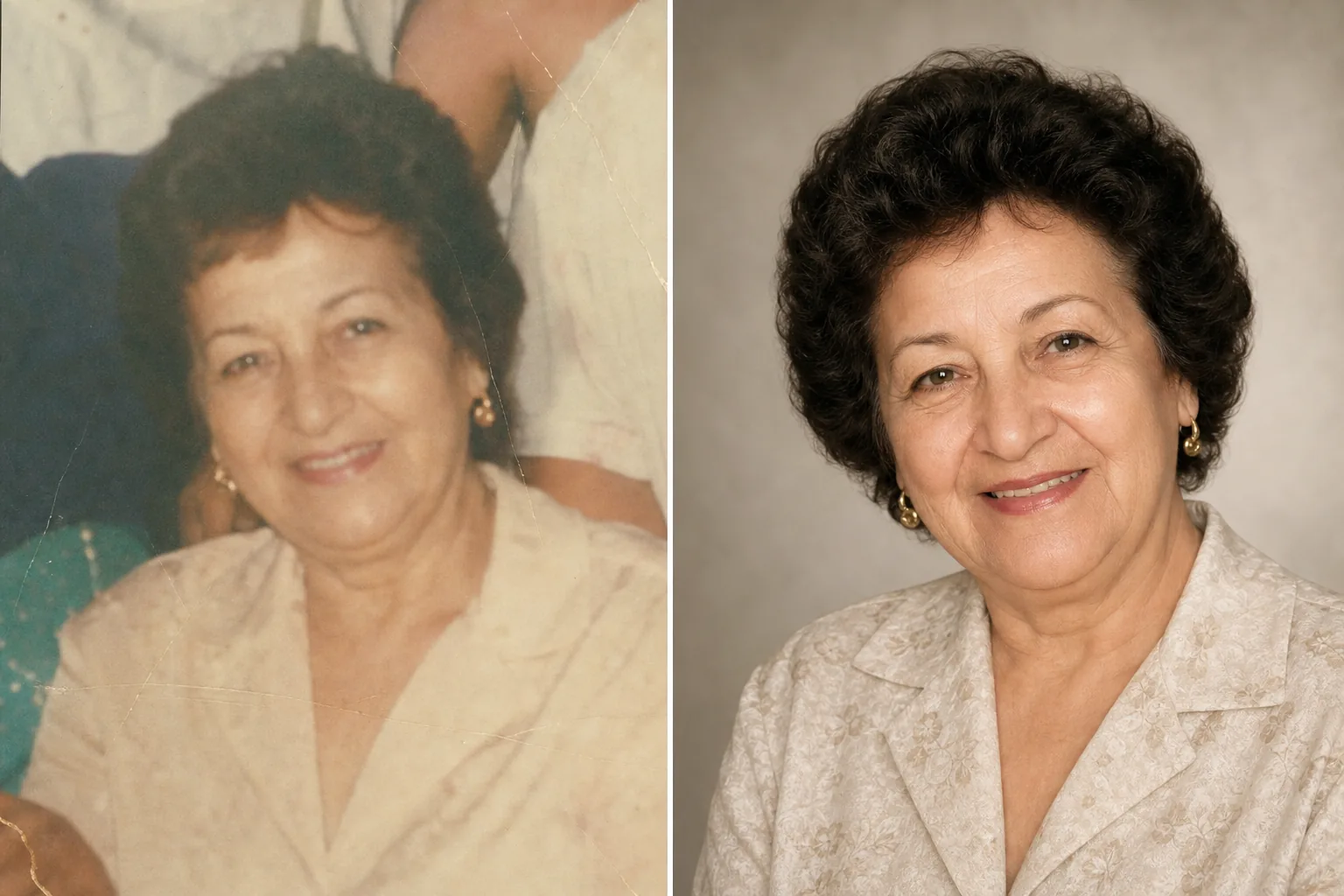
Homenageie entes queridos com uma foto de tributo lindamente aprimorada. Este modelo restaura com delicadeza fotos antigas, realça a nitidez e a cor de originais desbotados, remove fundos que distraem e gera um retrato digno e pronto para impressão, ideal para cerimônias memoriais, obituários e exposições de lembrança duradouras.
Experimente este modelo gratuitamentePersonal template preview
O que este modelo faz
Prepara retratos para cerimônias memoriais, obituários, programas de funeral, exposições de lembrança e montagens de tributo com o cuidado e o respeito que a ocasião exige. Muitas vezes, a melhor foto disponível de um ente querido foi tirada anos atrás — pode ser um instantâneo casual, uma foto de grupo da qual é preciso isolá-lo ou uma cópia desbotada que foi digitalizada. O AI Enhance restaura a cor e a nitidez de fotos antigas ou desbotadas, clareia imagens subexpostas e suaviza com delicadeza pequenas imperfeições, preservando a semelhança autêntica da pessoa. O Magic Eraser remove distrações do fundo e pode isolar uma pessoa de uma foto de grupo. O tom geral é caloroso, digno e respeitoso — nunca excessivamente processado.
Configurações do modelo
| Restauração de foto | Recuperar cor e detalhe de fotos desbotadas ou envelhecidas |
| Fundo | Gradiente neutro suave, cor sólida ou original simplificado |
| Gradação de cor | Calorosa e digna (tons de pele naturais, calor suave) |
| Nível de aprimoramento | Sutil e respeitoso (preserva a semelhança autêntica) |
| Dimensões de saída | 8×10 pol a 300 DPI (retrato memorial padrão) ou personalizado |
Como usar este modelo
Envie o retrato
Envie a melhor foto disponível da pessoa — um retrato dedicado, um recorte de uma foto de grupo ou a digitalização de uma fotografia impressa. O modelo lida com fotos de qualquer época e estado, incluindo cópias antigas com desbotamento de cor, vincos e pequenos danos.
Restaurar e aprimorar
O AI Enhance recupera as cores desbotadas, dá nitidez aos detalhes suavizados e corrige a dominante amarela ou azul que surge em fotografias envelhecidas. Em fotos digitalizadas a partir de cópias, os artefatos da digitalização e a textura do papel são reduzidos. O aprimoramento é deliberadamente sutil — o objetivo é apresentar a pessoa como ela era, com nitidez e calor, sem alterar sua aparência.
Fundo e enquadramento
O fundo é substituído por uma opção suave e neutra — um gradiente delicado, uma cor sólida discreta ou uma versão suavizada do cenário original. Se a foto for de um grupo, a pessoa é isolada e enquadrada como um retrato individual. A composição é ajustada às proporções padrão de um retrato memorial.
Exportar para serviços e exibição
Baixe em 8×10 polegadas a 300 DPI para impressão em funerárias e cerimônias memoriais, ou em dimensões personalizadas para publicações de obituário, cartões de lembrança e exibições de tributo digitais. O resultado é adequado tanto para impressão colorida quanto em preto e branco.
Dicas profissionais para melhores resultados
- ✓Escolha uma foto em que a expressão e a personalidade da pessoa transpareçam, mesmo que a qualidade técnica não seja perfeita. O modelo pode melhorar consideravelmente a qualidade da imagem, mas a conexão emocional com a foto importa mais do que a resolução.
- ✓Ao digitalizar fotos impressas, use o maior DPI que seu scanner suportar (mínimo de 600 DPI) e digitalize sobre uma superfície limpa e plana. Digitalizações de maior resolução dão ao modelo mais dados para trabalhar ao restaurar detalhes e corrigir o desbotamento.
- ✓Se não houver um retrato individual, o modelo pode isolar uma pessoa de uma foto de grupo. Escolha uma foto de grupo em que o rosto da pessoa esteja claramente visível, desobstruído e voltado para a câmera, para obter o melhor resultado de isolamento.
- ✓Considere criar tanto uma versão colorida quanto uma em preto e branco. Retratos memoriais em preto e branco têm uma qualidade atemporal e digna e funcionam bem quando a foto colorida original apresenta desbotamento significativo ou danos de cor que não podem ser totalmente restaurados.
Ferramentas
Perguntas frequentes
Isto consegue restaurar fotos muito danificadas?
+
O modelo lida com danos moderados — desbotamento, alterações de cor, vincos leves e suavidade pela idade. Danos graves, como grandes rasgos, manchas fortes de água ou partes faltantes consideráveis, exigem restauração manual por um retocador profissional. O modelo é mais eficaz quando o rosto e os traços principais estão visíveis e intactos no original.
A foto aprimorada parecerá natural?
+
Sim. O aprimoramento é calibrado para ser sutil e respeitoso. A pessoa parecerá ela mesma — nem mais jovem, nem mais velha, nem diferente. O objetivo é apresentar a foto como se tivesse sido tirada com melhor iluminação, uma melhor câmera e em um dia melhor, preservando cada aspecto de quem a pessoa era.
Posso usar isto para uma apresentação de slides de tributo em vídeo?
+
Sim. Processe cada foto com o modelo usando configurações consistentes de fundo e cor para uma apresentação coesa. O tratamento uniforme une fotos de diferentes épocas e fontes em um tributo visual unificado.
Uma foto de tributo tão bonita quanto as lembranças
Envie qualquer foto de um ente querido e receba um retrato delicadamente restaurado e aprimorado com calor, pronto para cerimônias memoriais e para uma lembrança duradoura.
Experimente grátisRelated templates
More personal templates for your workflow.
Crie fotos de identificação compatíveis para vistos, carteiras de motorista e identidades nacionais com cor de fundo, tamanho de cabeça e requisitos de expressão facial adequados.
Aprimore fotos de formatura com limpeza de fundo, boné e bata Color correction, remoção de manchas e nitidez pronta para impressão para molduras e anúncios.
Aprimore fotos de shows e eventos com redução de ruído em condições de pouca luz, iluminação de palco correção de cor, remoção de distrações da multidão e recuperação de detalhes de fotos de locais escuros.
Crie lindas fotos de cartões de anúncio de recém-nascidos com fundos suaves, gradação de cores suave, remoção de lixo hospitalar e dimensões prontas para impressão para envio pelo correio.
Prepare fotos de família e retratos para cartões comemorativos de feriados com fundos festivos, classificação de cores quentes, efeitos de neve e dimensões de cartão padrão para impressão.
Transforme fotos de abrigos e resgate de animais de estimação com substituição de fundo, correção de iluminação e aprimoramento de detalhes de pele para ajudar os animais a encontrarem um lar mais rapidamente.