
Foto de produto de bolsa
Crie fotos de produto de nível de luxo para bolsas, carteiras de mão, carteiras e artigos de couro. Este modelo isola a bolsa de qualquer superfície, substitui o fundo por um cenário de estúdio limpo ou de estilo de vida, realça a granulação do couro e o detalhe das costuras e dá nitidez a elementos de hardware como zíperes, fechos e fivelas para que os clientes possam avaliar o trabalho artesanal de todos os ângulos.
Experimente este modelo gratuitamenteE-commerce template preview
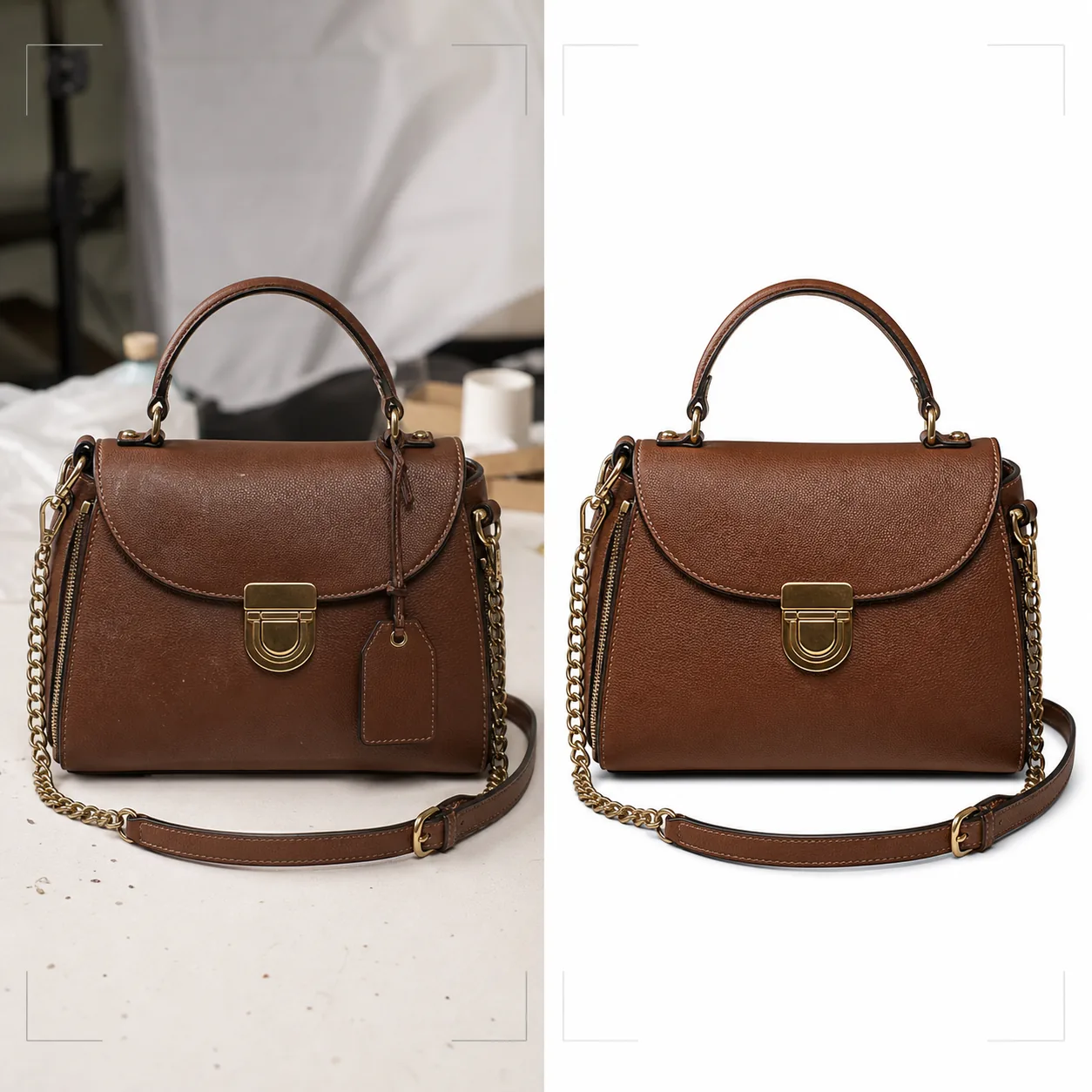
O que este modelo faz
Oferece o padrão visual que as marcas de bolsas de luxo e de gama média exigem para o varejo online. O Background Eraser isola a bolsa de tampos de mesa, superfícies de fotografia e bagunça do estúdio, substituindo o ambiente por branco puro para conformidade com marketplaces ou por fundos estilizados que combinam com a estética da marca. O Magic Eraser remove partículas de poeira, impressões digitais no hardware e etiquetas de preço que passaram despercebidas durante a sessão. O aprimoramento por IA realça a granulação do couro, a trama da lona ou a textura do tecido que comunica qualidade, enquanto os elementos de hardware — zíperes, fechos, alças de corrente e placas com logotipo — recebem nitidez para que os clientes possam inspecionar a qualidade do acabamento como se estivessem segurando a bolsa em uma boutique.
Configurações do modelo
| Fundo | Branco puro, creme ou superfície estilizada (mármore, linho, prateleira de madeira) |
| Aprimoramento do couro | Nitidez da textura da granulação com preservação do brilho natural |
| Detalhe do hardware | Dar nitidez a zíperes, fechos, fivelas e placas de logotipo em metal |
| Remoção de poeira e impressões digitais | Detectar e remover automaticamente partículas de superfície e manchas no hardware |
| Estilo de sombra | Sombra projetada natural ou sombra de reflexo em fundo branco |
| Resolução de saída | 3000×3000px (1:1 para marketplaces) ou 2400×3200px (3:4 para sites de marca) |
Como usar este modelo
Envie a foto da sua bolsa
Envie uma foto de produto da bolsa — de frente, em ângulo para mostrar profundidade ou em flat lay com a bolsa aberta. Inclua tomadas de vários ângulos para um anúncio completo. O modelo lida com fotos de câmeras de celular, montagens de estúdio e equipamentos DSLR.
Limpe o fundo e remova imperfeições
O Background Eraser separa a bolsa da superfície de fotografia com detecção de bordas que preserva as bordas macias do couro, as alças penduradas e os detalhes da corrente. O Magic Eraser remove pontos de poeira no couro, manchas de impressões digitais no hardware polido e quaisquer etiquetas de preço ou sensores de segurança ainda presos.
Aprimore materiais e hardware
A textura do couro recebe nitidez para revelar os padrões da granulação e as costuras. Os elementos de hardware são aprimorados para maior clareza — os clientes podem ver se os zíperes são YKK, se os fechos são de latão maciço ou banhados e se as costuras são uniformes e firmes. A correção de cores garante que o couro apareça em sua verdadeira tonalidade de tingimento.
Exporte para comércio eletrônico
Baixe em 3000×3000px para Amazon, eBay e Poshmark, ou em proporções personalizadas para o site da sua marca. A versão com fundo branco puro atende aos requisitos de imagem dos marketplaces. As versões com fundo de estilo de vida funcionam para redes sociais e campanhas de e-mail.
Dicas profissionais para melhores resultados
- ✓Preencha a bolsa com papel de seda antes de fotografar para dar a ela o formato e a estrutura pretendidos. Uma bolsa vazia se desmancha e se dobra de maneiras que a fazem parecer menos premium do que é pessoalmente.
- ✓Fotografe os close-ups do hardware separadamente. Embora o modelo aprimore o hardware nas fotos da bolsa inteira, um close-up dedicado do fecho, do puxador do zíper e da placa do logotipo oferece aos clientes a experiência de inspeção de detalhes que têm em uma loja física.
- ✓Limpe o hardware com um pano de microfibra antes de fotografar. O modelo remove impressões digitais digitalmente, mas manchas intensas em hardware polido de ouro ou prata podem reduzir a clareza do acabamento metálico subjacente mesmo após a limpeza por IA.
Ferramentas
E-commerce workflow
Product photo hub
Use this template with the full ecommerce product photo workflow for marketplace backgrounds, cleanup, compression, resizing, and listing-ready exports.
View ecommerce product photo workflowPerguntas frequentes
Isso consegue lidar com bolsas feitas de lona ou náilon?
+
Sim. O modelo detecta o tipo de material e ajusta o aprimoramento da textura de acordo. As texturas da trama de lona e do náilon ripstop recebem nitidez de forma diferente da granulação do couro para destacar as qualidades características de cada material.
O detalhe da alça de corrente será preservado durante a remoção do fundo?
+
Sim. A detecção de bordas é calibrada para detalhes metálicos finos como elos de corrente, alças finas de couro e puxadores de zíper pendurados. Esses elementos são preservados com bordas limpas no novo fundo.
Posso adicionar uma sombra de reflexo em fundo branco?
+
Sim. O modelo oferece tanto uma sombra projetada natural (como se a bolsa estivesse sobre uma superfície branca iluminada por cima) quanto uma sombra de reflexo (um esmaecimento espelhado sob a bolsa) comumente usada na fotografia de produtos de luxo.
Apresente cada bolsa com detalhe de nível boutique
Envie fotos de bolsas e obtenha imagens de produto de nível de luxo com textura de couro aprimorada, hardware nítido e fundos limpos.
Experimente grátisRelated templates
More e-commerce templates for your workflow.
Modelo de fundo branco puro para fotos de produtos. Amazon, Shopify e configurações prontas para o mercado para imagens de produtos limpas e profissionais que podem ser convertidas.
Modelo de foto de listagem otimizado para Etsy. Converte fotos de estilo de vida em fundos brancos limpos a 2.000 pixels, aprimora detalhes de produtos feitos à mão e atende às diretrizes de imagem da Etsy.
Modelo de foto de listagem otimizado para eBay. Fundo branco para imagens de galeria, aprimoramento de documentação de condições e layouts de vários ângulos que atendem aos padrões de imagem do eBay.
Modelo profissional de fotografia de joias para anéis, colares e relógios. Controla os reflexos, melhora o brilho das pedras preciosas e fornece imagens prontas para o mercado em fundos limpos.
Modelo profissional de foto de móveis para listagens de mercado. Remova a desordem do ambiente, mostre dimensões reais e apresente peças em fundos limpos ou em contextos de ambiente estilizados.
Limpe fotos planas de roupas com remoção de rugas, limpeza de fiapos, fundos brancos puros e cores de tecido precisas. Pronto para Shopify, Amazon e boutiques.