
Como remover pessoas de uma foto de viagem
Aquela foto perfeita da Torre Eiffel, do Taj Mahal ou do pôr do sol em Santorini - exceto pelos 50 turistas no quadro. Magic Eraser remove pessoas indesejadas de fotos de viagens enquanto reconstrói perfeitamente o fundo por trás delas.
Last updated
Remover pessoas agora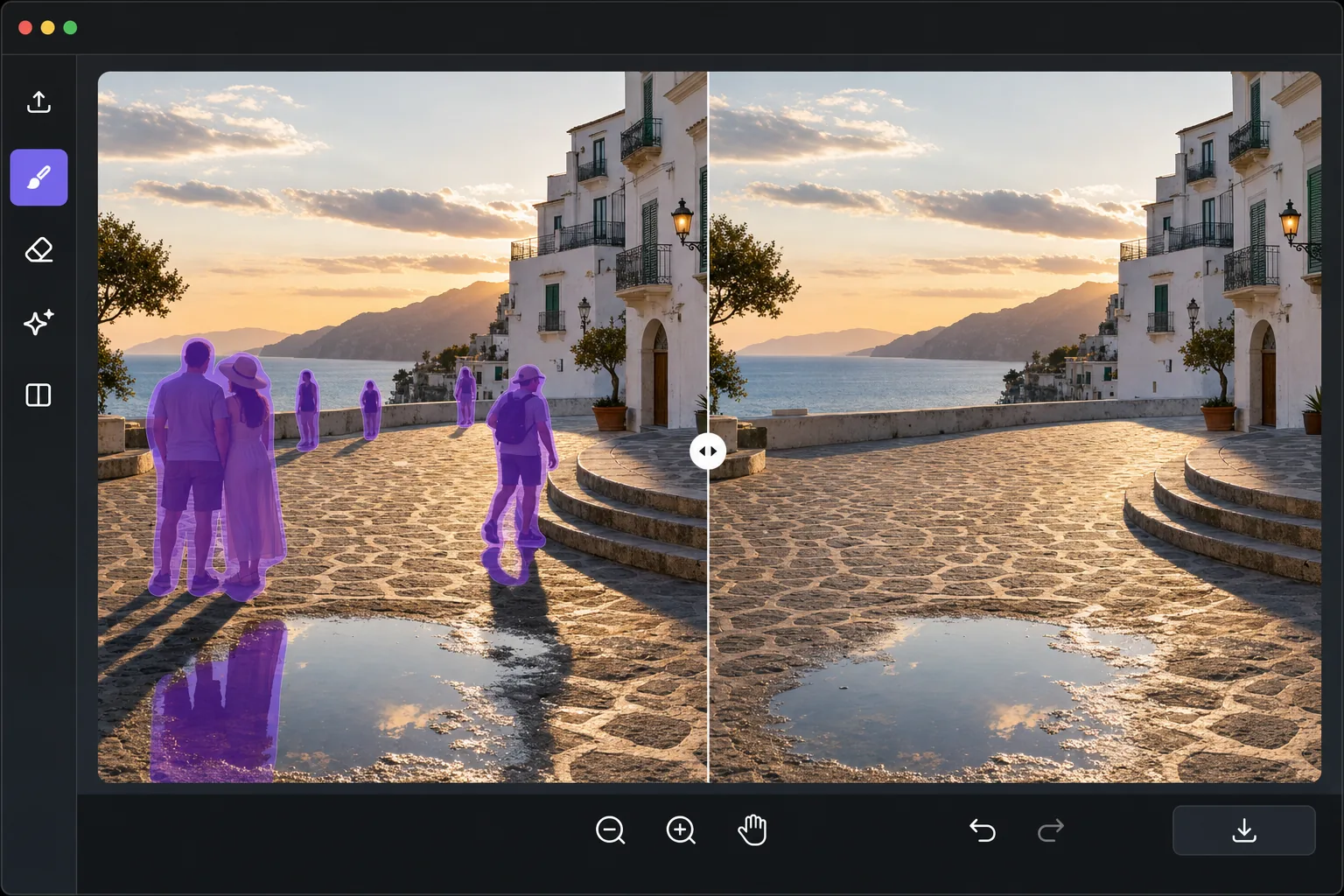
O eterno problema da fotografia de viagem
Destinos turísticos populares estão lotados. Obter uma foto nítida de um ponto de referência, cena de rua ou vista panorâmica sem estranhos no quadro requer chegar ao amanhecer, esperar por lacunas impossíveis no tráfego de pedestres ou tirar dezenas de fotos para empilhar e compor mais tarde. Nada disso é prático para a maioria dos viajantes. A remoção de pessoas com tecnologia de IA resolve isso no pós-processamento: você passa por cima de cada pessoa indesejada e a IA preenche o fundo atrás delas usando o contexto da cena ao redor. Ele reconstrói padrões de paralelepípedos, fachadas de edifícios, texturas de paisagens e gradientes do céu que seriam visíveis se as pessoas não estivessem lá. O resultado parece que você tinha o lugar só para você.
Before you start
Remova pessoas de fotos de viagens em três etapas
Start with envie sua foto de viagem. The result preview above and tips below use this guide's existing content; no separate before-and-after proof is assumed.
- 1
Envie sua foto de viagem
Abra Magic Eraser na web, iOS ou Android. Carregue a foto da viagem com pessoas indesejadas. A ferramenta funciona com qualquer resolução, desde instantâneos de telefone até exportações DSLR RAW. Fotos amplas de paisagens e detalhes arquitetônicos em close funcionam bem.
- 2
Passe sobre as pessoas para remover
Use a ferramenta pincel para pintar sobre cada pessoa que deseja remover. Você pode selecionar várias pessoas de uma vez antes de processar. Ajuste o tamanho do pincel para maior eficiência: pincel maior para figuras distantes, pincel menor para pessoas próximas a detalhes importantes. Inclua o reflexo ou sombra da pessoa em sua seleção para obter o resultado mais limpo.
- 3
Revise a reconstrução e exportação
A IA reconstrói o cenário onde cada pessoa estava. Combina texturas, iluminação e perspectiva circundantes. Para fundos complexos (pisos de cerâmica, paredes estampadas), amplie para verificar a continuidade do padrão. Exporte a foto limpa para mídias sociais, impressões ou sua coleção de fotos de viagens.
Melhor para
- Fotógrafos de viagens que desejam fotos nítidas de pontos de referência, sem multidões de turistas
- Viajantes postando fotos de paisagens nas redes sociais sem estranhos no quadro
- Blogueiros de viagens que precisam de fotografia de destino com aparência profissional
- Sessões de viagens imobiliárias onde as propriedades precisam parecer vagas e convidativas
- Fotógrafos criando banco de imagens de pontos de referência e destinos
Dicas para melhores resultados
Remova as pessoas de trás para frente – comece com as figuras menores e mais distantes e trabalhe em direção a assuntos maiores em primeiro plano. Isso dá à IA um contexto de fundo mais limpo para cada remoção subsequente. Inclua sombras e reflexos na sua seleção de pincel – uma sombra faltante é o sinal mais comum de retoque. Para cenas muito lotadas onde as pessoas se sobrepõem, processe em lotes: remova algumas pessoas, exporte, importe novamente e remova o próximo lote. Se uma pessoa estiver diante de uma característica complexa e única (como um detalhe arquitetônico específico), a IA pode simplificar a reconstrução – considere se esse detalhe é crítico antes de removê-lo.
Perguntas frequentes
- Posso remover dezenas de pessoas de uma foto?
- Sim. Você pode escovar quantas pessoas forem necessárias. Para cenas muito lotadas, o processamento em lotes de 5 a 10 pessoas produz os melhores resultados, pois a IA tem um contexto mais limpo para trabalhar em cada reconstrução.
- Funciona com fundos complexos, como azulejos estampados?
- Sim. A IA é particularmente boa em repetir padrões como paralelepípedos, alvenaria e ladrilhos. Ele analisa a escala e a orientação do padrão nas áreas circundantes e o estende pela região removida.
- Remover pessoas de fotos de viagens é gratuito?
- Sim. Os recursos de remoção de objetos estão disponíveis no nível gratuito com limites de uso diários. O Premium remove limites para viajantes que processam grandes lotes de fotos de férias.