
Como remover um emoji de uma foto
Alguém cobriu o rosto com um emoji ou uma sobreposição de adesivo esconde detalhes importantes? A pintura de IA de Magic Eraser remove emojis e adesivos enquanto reconstrói o que estava por baixo, produzindo um resultado limpo e de aparência natural.
Last updated
Remover emoji agora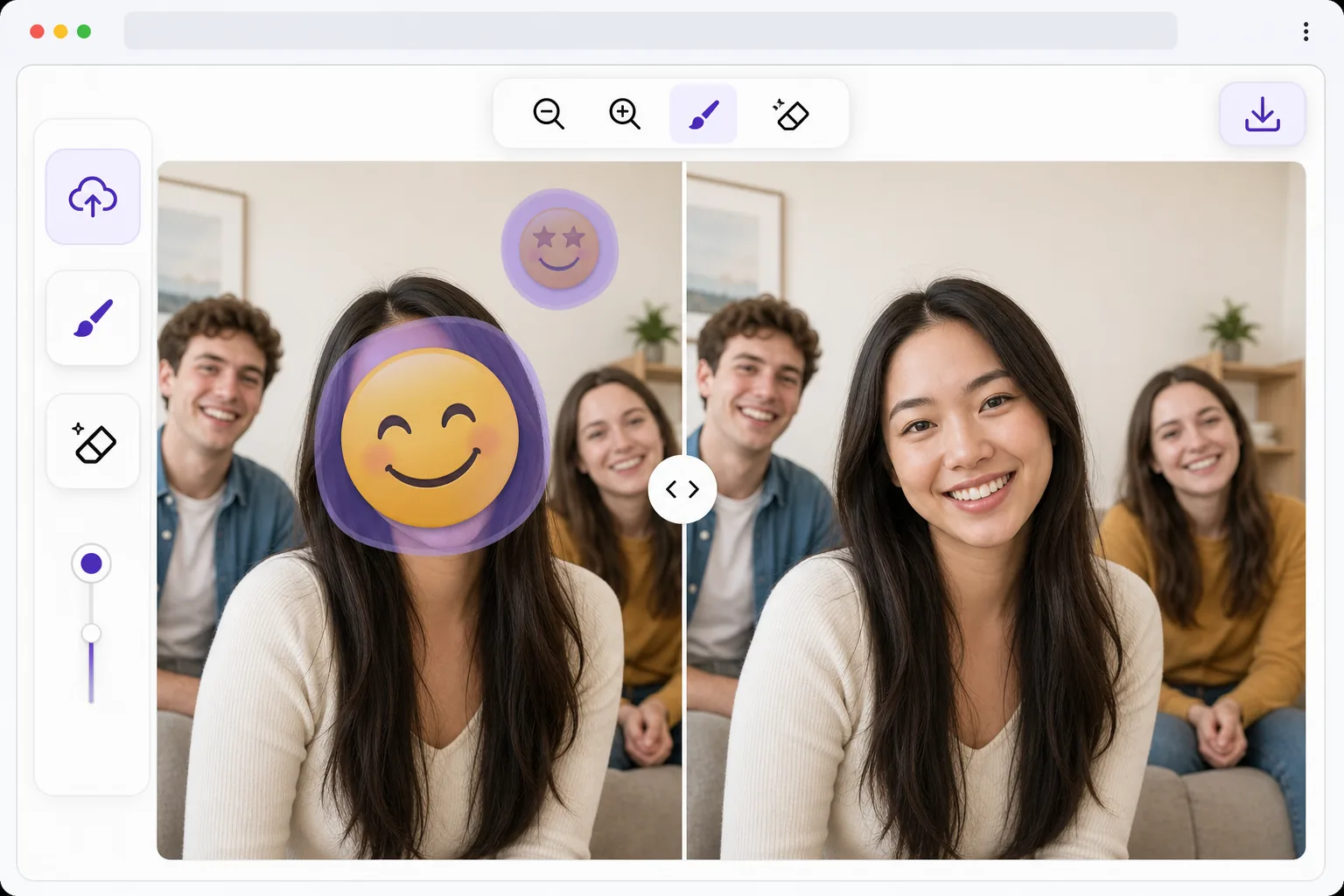
Por que a remoção de emojis requer IA
Para remover um emoji de uma foto, abra o Magic Eraser na web, no iOS ou no Android, envie a imagem, pinte sobre o emoji ou autocolante com o brush e toque em Erase. A AI analisa a pele, o cabelo e o fundo ao redor e reconstrói o que estava por trás em segundos. É gratuito, sem necessidade de criar conta, e funciona em capturas de ecrã e imagens guardadas das redes sociais. Como o emoji está integrado nos pixels de uma foto partilhada — não há nenhuma camada para desativar — o resultado é uma reconstrução por AI que se mistura naturalmente, e não os pixels originais exatos. Emojis e adesivos são comumente colocados sobre rostos para privacidade, sobre marcas d'água para compartilhamento ou como elementos decorativos nas redes sociais. Ao contrário das sobreposições simples que ficam em uma camada separada, as fotos compartilhadas têm o emoji incorporado aos dados de pixel – não há nenhuma camada oculta para desativar. Removê-los exige que a IA entenda o que deveria estar por trás do emoji com base em pistas de contexto: tom de pele de áreas visíveis, direção do cabelo, padrões de fundo e estrutura facial. O modelo de pintura interna de Magic Eraser gera reconstruções plausíveis que combinam perfeitamente com a imagem circundante. O resultado não são os pixels originais reais (esses são destruídos), mas uma reconstrução sintetizada por IA que parece convincentemente natural.
Before you start
Remova um emoji em três etapas
Start with carregue a foto. The result preview above and tips below use this guide's existing content; no separate before-and-after proof is assumed.
- 1
Carregue a foto
Abra Magic Eraser na web, iOS ou Android. Carregue a foto com o emoji ou adesivo que deseja remover. A ferramenta funciona com capturas de tela, imagens salvas em mídias sociais e fotos de aplicativos de mensagens – qualquer formato, qualquer resolução.
- 2
Pincele o emoji
Use a ferramenta pincel para pintar sobre o emoji ou adesivo. Ajuste o tamanho do pincel para cobrir todo o emoji com uma pequena margem nas bordas. Para um trabalho preciso em emojis pequenos, amplie e use um pincel menor. Você pode marcar vários emojis de uma vez antes de processá-los.
- 3
Deixe a IA reconstruir e exportar
A IA analisa o contexto circundante e reconstrói a área atrás do emoji. Para emojis de rosto, ele gera características faciais plausíveis que combinam com o tom de pele e o cabelo visíveis. Para emojis de fundo, ele estende texturas e padrões circundantes. Revise o resultado e exporte.
Melhor para
- Recuperando detalhes ocultos por emojis de privacidade colocados sobre rostos ou placas de veículos
- Limpando capturas de tela de mídias sociais onde adesivos cobrem conteúdo importante
- Remover adesivos decorativos de fotos antes de imprimir ou usar profissionalmente
- Restaurar fotos de grupo em que o rosto de uma pessoa estava coberto por um emoji
- Limpando fotos de aplicativos de mensagens que possuem sobreposições de emoji incorporadas
Dicas para melhores resultados
Cubra todo o emoji mais alguns pixels de margem – isso dá à IA mais contexto para combinar a reconstrução perfeitamente. Para emojis faciais que cobrem um rosto inteiro, os resultados funcionam melhor quando algum contexto facial é visível (testa, queixo, orelhas) para orientar a reconstrução. Se o emoji cobrir um fundo simples (céu, parede, tecido), os resultados serão quase perfeitos porque o padrão é previsível. Para fundos ou rostos complexos, a IA produz reconstruções plausíveis – mas não idênticas. Processe um emoji por vez para obter resultados mais precisos em edições críticas.
Perguntas frequentes
- A IA pode realmente recuperar o rosto por trás de um emoji?
- A IA não recupera o rosto original – esses pixels desapareceram. Em vez disso, gera um rosto plausível com base no contexto visível (tom de pele, cabelo, proporções faciais de áreas visíveis). O resultado parece natural, mas é uma reconstrução de IA, não o original real.
- Funciona com adesivos animados?
- Para quadros estáticos de vídeos ou capturas de tela de adesivos animados, sim. Carregue a captura de tela e passe sobre o adesivo. Para quadros de vídeo, processe cada quadro individualmente ou use o processamento em lote para obter resultados consistentes entre quadros.
- A remoção de emojis é gratuita?
- Sim. Recursos de remoção de objetos, incluindo remoção de emojis, estão disponíveis no nível gratuito com limites de uso diários. Premium remove limites para uso pesado.
- Como remover um emoji de uma foto no Android ou no iPhone?
- Abra o Magic Eraser em qualquer navegador móvel ou na app de iOS ou Android, carregue a imagem da sua galeria ou de uma captura de ecrã guardada e use o gesto de pinça para ampliar o emoji. Pinte sobre ele com o dedo e toque em Erase. Ampliar ajuda a cobrir um emoji pequeno com precisão, sem pintar por cima do rosto ou do fundo à volta dele. O resultado é igual ao da versão desktop e fica guardado diretamente nas suas fotos.
- Posso remover vários emojis ou autocolantes de uma mesma imagem de uma só vez?
- Sim. Pinte sobre todos os emojis e autocolantes que quer eliminar antes de tocar em Erase, e a AI reconstrói cada área coberta numa única passagem. Para uma edição mais delicada — por exemplo, um emoji sobre um rosto que quer que fique natural — costuma ficar mais limpo fazê-los um de cada vez e rever cada um, enquanto autocolantes decorativos num fundo simples podem ser todos removidos em conjunto.