
Remove the Emoji Hiding One Face in Your Group Photo
Aprenda como Remover emoji de foto de grupo com Magic Eraser. Guia simples passo a passo com ferramenta de IA gratuita. Funciona na web, iOS e Android.
Last updated
Experimentar agora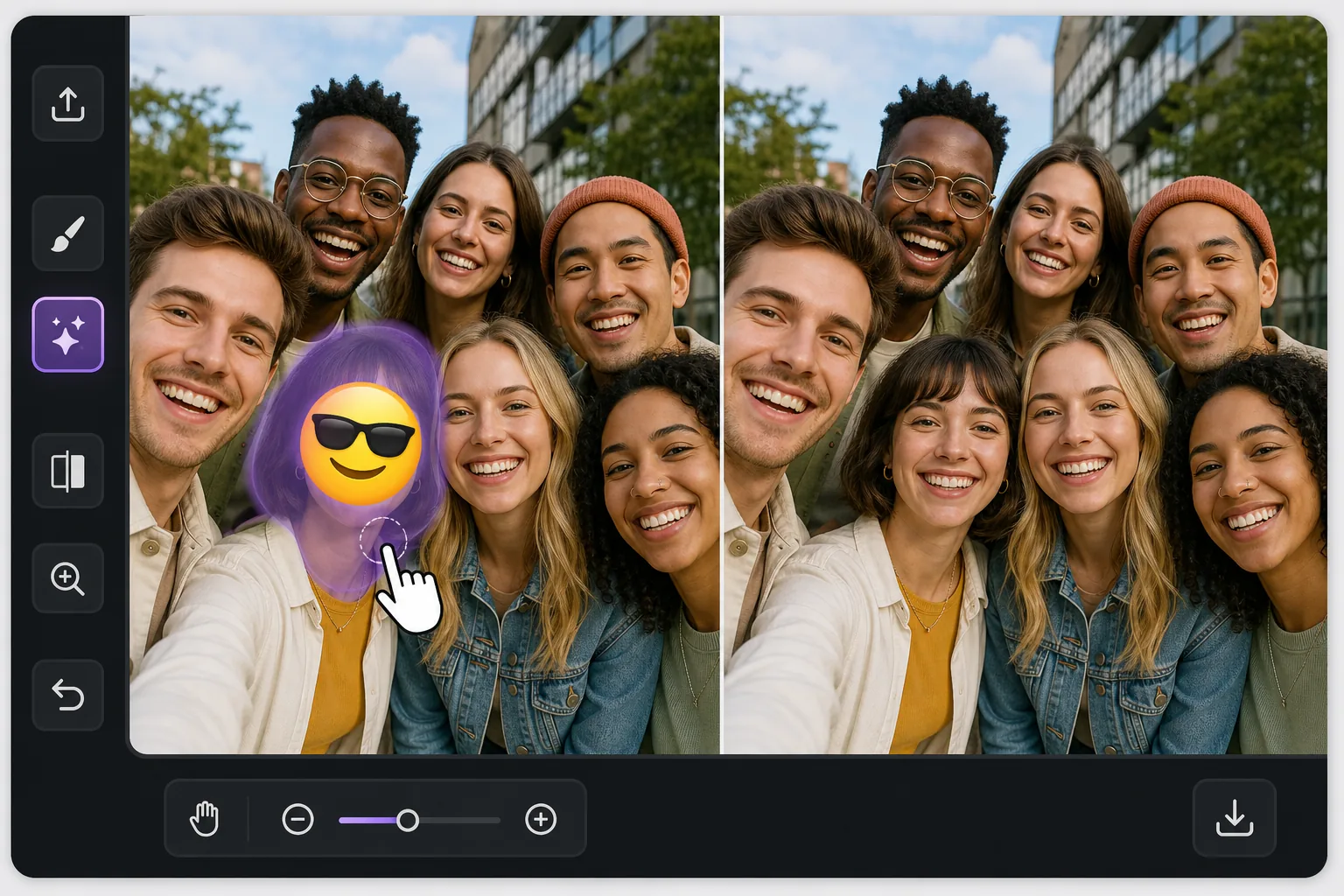
One face covered, everyone else fine com Magic Eraser
In a busy group photo, an emoji over a single person is awkward in a specific way: the rest of the shot is perfect, so the one covered face stands out even more. Magic Eraser is built for exactly this kind of pinpoint fix. You brush only the emoji sitting on that one person, and the AI inpaints the small area it covered — matching the surrounding skin tone, hair edges, and the shoulder of the person tucked in next to them. Be clear about what happens here: the AI does not recover the real hidden face. It synthesizes a plausible reconstruction of that region based on the rest of the image. In a tight group shot where the covered head is small and partly framed by neighbors, that often reads as natural at a glance. Magic Eraser works free on web, iOS, and Android with no watermark, so you can fix the group photo on whatever device the picture lives on.
Before you start
Instruções passo a passo
Start with carregue a foto. The result preview above and tips below use this guide's existing content; no separate before-and-after proof is assumed.
- 1
Carregue a foto
Abra o Magic Eraser na web, iOS ou Android. Arraste e solte sua foto JPEG, PNG, HEIC ou WebP. Sem necessidade de conta.
- 2
Selecione a ferramenta e a área
Escolha a ferramenta adequada e marque a área a processar. A IA analisa e aplica as alterações automaticamente em segundos.
- 3
Baixe o resultado
Visualize o resultado e baixe a foto editada. Exporte em PNG ou JPEG de alta qualidade.
Ideal para
- A friend stamped a laughing or sunglasses emoji on one person in a shared group selfie
- A privacy sticker was placed over a single face but you now have permission to show them
- A meme reply covered one person's face and you want the clean original group shot back
- Restoring a reunion or team photo where one head got hidden behind a reaction emoji
- Reposting a group picture and needing the one covered face to blend in with everyone else
Dicas para melhores resultados
The reconstruction is most convincing when the covered head is small relative to the group and partly bordered by neighbors — the AI has nearby skin, hair, and lighting to imitate. If the emoji covers a large front-and-center face, expect a softer, more invented result and consider cropping instead. Brush a touch beyond the emoji's edge so no colored fringe survives, but stop short of the people on either side. Match expectations honestly: this rebuilds the region plausibly, it does not restore the true expression or identity of the person who was hidden. For shared photos, get that person's okay before reposting a reconstructed version of their face.
Perguntas frequentes
- A função Remover emoji de foto de grupo é gratuita?
- Sim, o Magic Eraser permite Remover emoji de foto de grupo gratuitamente com limites diários. Faça upgrade para o Pro para processamento ilimitado e exportações em alta resolução.
- Quanto tempo leva para Remover emoji de foto de grupo?
- Apenas alguns segundos. A IA do Magic Eraser processa fotos rapidamente — a maioria dos resultados fica disponível imediatamente.
- Posso usar no celular?
- Sim, o Magic Eraser funciona no iOS, Android e em todos os navegadores. Você pode alternar entre dispositivos livremente.
- A qualidade da imagem é afetada?
- Não, o Magic Eraser preserva a qualidade original da foto. A IA processa de forma inteligente para manter detalhes e nitidez.