
Magic Eraser vs Pixlr: Qual Editor Web É Melhor para Resultados Mais Rápidos?
O Pixlr oferece aos usuários um ambiente de edição clássico baseado em navegador, com camadas e efeitos. O Magic Eraser foca em limpeza, aprimoramento e trabalho de fundo com IA em primeiro lugar, para usuários que querem resultados refinados sem uma interface de edição completa.
Last updated
Experimente o Magic Eraser grátisComparison rows are editorial summaries from the latest page review, not a guarantee of current pricing, limits, watermark policy, batch support, speed, or platform availability.
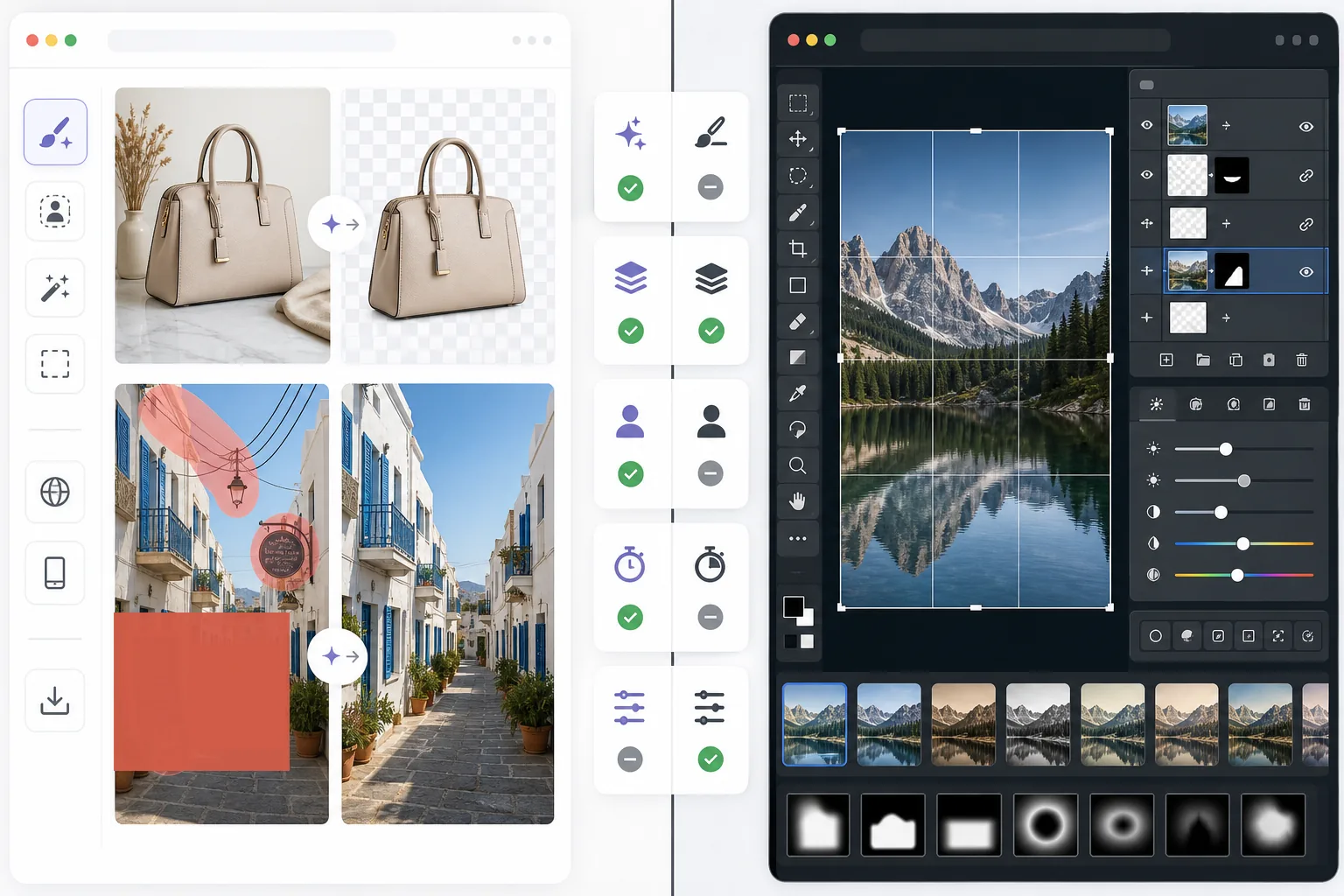
Visão geral
O Magic Eraser ajuda os usuários a corrigir problemas práticos de imagem rapidamente com IA: remover objetos indesejados, apagar texto, limpar fundos, realçar detalhes e preencher áreas faltantes.
O Pixlr oferece uma experiência de edição mais tradicional baseada em navegador, com camadas, filtros e ferramentas manuais. É flexível, mas geralmente mais lento para tarefas repetitivas de limpeza.
Comparação de Recursos
O Magic Eraser ajuda os usuários a corrigir problemas práticos de imagem rapidamente com IA: remover objetos indesejados, apagar texto, limpar fundos, realçar detalhes e preencher áreas faltantes.
O Pixlr oferece uma experiência de edição mais tradicional baseada em navegador, com camadas, filtros e ferramentas manuais. É flexível, mas geralmente mais lento para tarefas repetitivas de limpeza.
| Feature | Magic Eraser | Pixlr |
|---|---|---|
| Remoção de objetos | Sim — pincel de IA | Limitada |
| Remoção de fundo | Sim | Sim |
| Aprimoramento de imagem | Sim | Básico |
| Edição baseada em camadas | Não | Sim |
| Preenchimento generativo | Sim | Limitado |
| Fácil para iniciantes | Sim | Moderado |
| Melhor para | Limpeza rápida e edições com IA | Edição geral no navegador |
| Plataforma | Web + mobile | Web + mobile |
Feature rows summarize visible product positioning and should be rechecked against official product pages before purchase, migration, or compliance decisions.
- Last content review June 21, 2026
- Pixlr source: official product site (https://pixlr.com/)
- Magic Eraser source: https://magiceraser.live/pt/product/magic-eraser
- Pricing, feature availability, platform support, and limits can change; recheck official sources before relying on a buying decision.
Comparação de Preços
| Plan | Magic Eraser | Pixlr |
|---|---|---|
| Plano gratuito | Grátis — edições limitadas | Grátis — básico + anúncios |
| Mensal | $9.99/mo | $7.99/mo (Plus) |
| Anual | $4.99/mo (cobrado anualmente) | $4.90/mo (Plus, cobrado anualmente) |
Preços referentes a May 2026. Verifique cada provedor para conferir as tarifas atuais.
Pricing rows are snapshots from review time. Free tiers, subscriptions, trials, export limits, and regional availability can change without notice.
- Last content review June 21, 2026
- Pixlr source: official product site (https://pixlr.com/)
- Magic Eraser source: https://magiceraser.live/pt/product/magic-eraser
- Pricing, feature availability, platform support, and limits can change; recheck official sources before relying on a buying decision.
Por Que Escolher o Magic Eraser
Menos tempo nos controles de edição
O Magic Eraser reduz a necessidade de gerenciar barras de ferramentas, camadas e efeitos manuais quando o objetivo principal é simplesmente limpar e melhorar uma foto rapidamente.
Mais útil para fluxos de trabalho repetíveis
Quando você edita fotos de produtos, imagens para redes sociais, anúncios ou materiais de criadores todos os dias, o fluxo de trabalho de IA mais restrito, porém mais forte, do Magic Eraser costuma economizar mais tempo do que um editor de uso geral.
Melhor para limpeza de fundo e distrações
O Magic Eraser é especialmente forte quando o problema é desordem, texto, fios ou um ambiente que distrai e que precisa desaparecer de forma natural.
Menor custo de treinamento
As equipes conseguem se integrar mais rápido com o Magic Eraser porque ele exige menos conhecimento de edição do que um editor clássico de navegador com um conjunto mais amplo de ferramentas manuais.
Ferramentas
Perguntas Frequentes
O Magic Eraser é mais fácil de usar do que o Pixlr?
+
Sim, para trabalhos focados em limpeza. O Pixlr oferece mais flexibilidade de edição tradicional, mas o Magic Eraser é mais fácil para usuários que precisam principalmente de remoção de objetos e edições de fundo com IA.
O Pixlr tem camadas?
+
Sim. O Pixlr inclui um ambiente de edição mais clássico baseado em camadas. O Magic Eraser é mais focado em resultados rápidos assistidos por IA do que em edição manual de camadas.
Qual ferramenta é melhor para profissionais de marketing e vendedores?
+
O Magic Eraser costuma ser a melhor escolha porque cuida da limpeza, do aprimoramento e da preparação de imagens prontas para apresentação de forma mais rápida.
Posso remover texto de imagens com o Magic Eraser?
+
Sim. O Magic Eraser pode remover texto, rótulos, placas e outras distrações enquanto reconstrói o fundo de forma natural.
Qual editor funciona melhor em mobile e desktop juntos?
+
O Magic Eraser oferece um fluxo de trabalho de IA mais consistente entre web e mobile, o que torna a troca de dispositivos mais fácil para tarefas práticas de edição.
Precisa de um editor web mais rápido para limpeza de imagens do mundo real?
Experimente o Magic Eraser grátis e use IA para remover distrações, melhorar a nitidez e finalizar edições refinadas com menos etapas.
Experimente o Magic Eraser grátisCasos de uso relacionados
Veja como profissionais utilizam essas ferramentas em fluxos de trabalho reais.
Fotos de anúncios cheias de pertences pessoais, carros estacionados ou material de obra afastam compradores. O Magic Eraser usa IA para limpar suas fotos de imóveis instantaneamente — sem precisar de Photoshop.
Fundos bagunçados e fotos de produto descuidadas custam vendas todos os dias. O Magic Eraser ajuda você a criar imagens de produto profissionais em segundos — sem precisar saber Photoshop. Faça upload, apague distrações e anuncie com confiança.
Estranhos estragando suas fotos de viagem? Fundos bagunçados arruinando seus selfies? Pare de perder horas no Photoshop. O Magic Eraser remove distrações, limpa suas fotos e adapta para qualquer formato — tudo em um toque.
Guias relacionados
Explore mais guias e conteúdo editorial relacionado a este fluxo de trabalho.
Aprenda a usar o Magic Eraser para remover objetos, pessoas, texto e distrações de fotos com resultados de IA mais limpos.
Aprenda a remover pessoas de fotos usando IA em segundos. Guia para fotos de viagem, imóveis e produtos.
Guia passo a passo para remover marcas d'água das suas fotos com IA. Quando é apropriado, técnicas e dicas.
Outras comparações
Veja como o Magic Eraser se compara a outras ferramentas de edição de fotos.
Dois poderosos editores de fotos com IA e pontos fortes diferentes. O Magic Eraser oferece um conjunto mais amplo de ferramentas de IA generativa, enquanto o Photoroom se destaca na fotografia de produtos para e-commerce e processamento em lote.
Testamos e comparamos as melhores ferramentas de edição de fotos com IA para que você não precise fazer isso. Da remoção de objetos à substituição de fundo, veja qual editor entrega os melhores resultados.
O Adobe Photoshop é poderoso, mas a maioria das pessoas usa apenas uma fração de seus recursos. O Magic Eraser oferece as ferramentas de limpeza de fotos que você realmente precisa — remoção de objetos, remoção de fundo, aprimoramento com AI e preenchimento generativo — em uma interface mais simples que funciona na web e no celular, sem exigir assinatura para começar.
O remove.bg é excelente em uma coisa: remover fundos. O Magic Eraser faz isso igualmente bem, além de remover objetos indesejados, melhorar a qualidade da imagem, preencher áreas faltantes com IA e cuidar de todo o seu fluxo de edição de fotos — tudo em um só lugar.
Tried to remove an object or background and hit a Pro paywall in Canva, Adobe Express/Photoshop, or Fotor? Magic Eraser does the same job — object removal, background removal, watermark cleanup, and enhancement — for free. No subscription, and no watermark stamped on your download.
Compare Magic Eraser com magic-eraser.io. Veja recursos, preços e facilidade de uso lado a lado. Descubra por que Magic Eraser é a melhor escolha para edição de fotos com IA.