
Como remover o fundo de fotos de produtos: o guia completo
Aprenda a remover fundos de fotos de produtos para Amazon, Shopify, Etsy e sua propria loja.

Product Marketing
Revisado por Magic Eraser Editorial ·
Índice
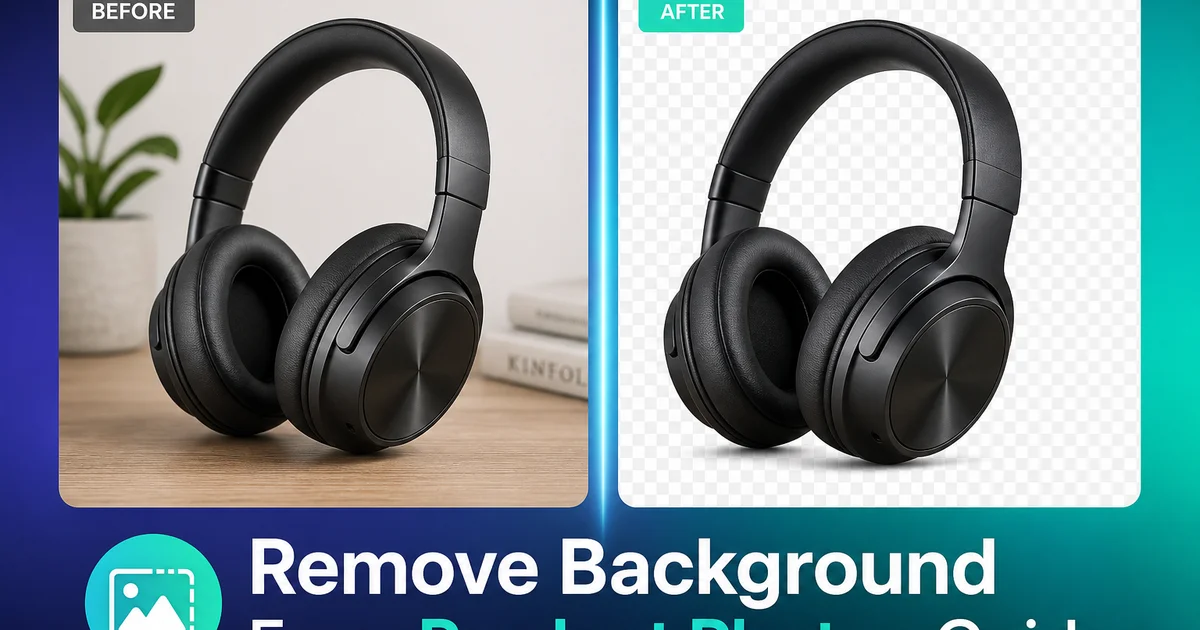
Uma foto de produto limpa em fundo branco e o padrao universal do e-commerce. A Amazon exige. A Shopify recomenda. O Google Shopping penaliza anuncios sem ela. Pesquisas do Baymard Institute mostram que a qualidade da imagem do produto e um dos principais fatores que influenciam as decisoes de compra online, e a poluicao visual no fundo e o problema de qualidade de imagem mais comum. Ela distrai do produto, faz as miniaturas parecerem pouco profissionais e reduz as taxas de cliques nos resultados de busca e nas paginas de categoria.
Remover o fundo de uma foto de produto exigia, no passado, proficiencia em Photoshop e de 15-30 minutes de mascaramento cuidadoso com a ferramenta caneta por imagem. Terceirizar para um servico de recorte custava de $0.50 a $3.00 por imagem, com prazos de entrega de 24-48 hours. Para um vendedor com 200 SKUs, isso representa $100-$600 e dois dias antes que qualquer anuncio entre no ar.
A remocao de fundo por IA comprimiu esse fluxo de trabalho para segundos por imagem, a um custo marginal proximo de zero. Mas remover o fundo e apenas o primeiro passo. A limpeza de bordas, o tratamento de sombras, a precisao de cores em diferentes fundos e as necessidades de exportacao especificas de cada plataforma determinam se a imagem final realmente converte. Este guia cobre o processo completo, da foto bruta do produto a imagem de anuncio pronta para o marketplace.
- A remocao de fundo por IA processa uma foto de produto em segundos, substituindo horas de mascaramento manual.
- Bordas complexas — cabelo, pelos, renda, materiais translucidos, vime — sao tratadas automaticamente, com preservacao de detalhes.
- Fundos totalmente brancos atendem aos requisitos de imagem da Amazon, eBay, Google Shopping e Walmart Marketplace.
- A exportacao em PNG transparente permite posicionamento flexivel sobre qualquer fundo, seja para web, redes sociais ou impressao.
- A limpeza de bordas com o Magic Eraser elimina fragmentos de sombra dispersos e reflexos de superficie que a remocao inicial deixa passar.
- A exportacao especifica de cada plataforma garante as dimensoes, o tamanho de arquivo e a cor de fundo corretos para cada marketplace.
- O processamento em lote da conta de catalogos inteiros — de 200 to 500 SKUs — em horas, em vez de dias.
Por que a remocao de fundo e importante para a conversao
As imagens de produto cumprem uma funcao especifica no e-commerce: elas substituem a experiencia fisica de examinar um produto em uma loja. O comprador nao pode pegar seu produto, vira-lo, sentir o material ou comparar o tamanho com a propria mao. A foto precisa transmitir tudo isso, e um fundo poluido interfere ativamente nessa comunicacao. Quando uma caneca de cafe esta sobre uma bancada de cozinha cercada de outros objetos, o cerebro do espectador processa a cena inteira. Quando a mesma caneca esta sobre um fundo branco limpo, o cerebro processa apenas a caneca. Seu formato, cor, tamanho, textura e qualidade.
A pesquisa de UX para e-commerce do Baymard Institute sempre constatou que a qualidade da imagem do produto impacta diretamente a confianca de compra. Os compradores interpretam a qualidade do fundo como um sinal da qualidade do produto e do profissionalismo do vendedor. Um anuncio com um produto limpo e bem iluminado sobre fundo branco transmite que o vendedor e estabelecido e confiavel. Um anuncio com um produto sobre um lencol amassado transmite o oposto — mesmo que o produto seja identico.
Os algoritmos dos marketplaces reforcam isso. O algoritmo de busca A9 da Amazon leva a qualidade da imagem em conta no ranking dos anuncios. Anuncios com fundo totalmente branco que atendem aos padroes de imagem da Amazon rankeiam melhor do que aqueles com imagens fora das normas. O Google Shopping suprime anuncios de produtos com imagens principais poluidas ou que nao sejam brancas. A justificativa de negocio para fundos limpos nao e estetica — ela esta diretamente ligada a visibilidade e a receita.
- Fundos limpos permitem que os compradores foquem inteiramente no produto, aumentando a confianca de compra.
- A qualidade da imagem sinaliza o profissionalismo do vendedor e a qualidade do produto para os compradores.
- Tanto o algoritmo A9 da Amazon quanto o Google Shopping levam a conformidade da imagem em conta na visibilidade do anuncio.
- Imagens fora das normas podem resultar na supressao do anuncio nos principais marketplaces.
Como funciona a remocao de fundo por IA
A remocao de fundo por IA usa modelos de aprendizado profundo treinados em milhoes de imagens de produtos para distinguir os objetos em primeiro plano de seu entorno. O modelo identifica o contorno do produto. Incluindo bordas complexas como cordas trancadas, tecido de trico, correntes de joias e vidro translucido — e o separa do fundo com precisao subpixel.
O Background Eraser realiza essa separacao em segundos. Envie a foto do produto e a IA produz um recorte limpo, com o fundo removido. Para produtos com bordas simples e bem definidas. Uma capa de celular, um livro de capa dura, uma tigela de ceramica — o resultado e utilizavel de imediato. Para produtos com bordas complexas — um apanhador de sonhos com penas, um cesto de vime, uma peca de renda — a IA preserva detalhes finos que um editor humano usando a ferramenta caneta levaria 30 minutos para tracar.
A chave para bons resultados comeca na etapa de fotografia. Fotografe os produtos sobre uma superficie que contraste com a cor e a textura do produto. Produtos claros ficam melhores fotografados sobre superficies de tom medio a escuro. Produtos escuros precisam de superficies claras. Evite superficies estampadas que confundem a deteccao de bordas. Use iluminacao uniforme e difusa para minimizar sombras duras, que podem deixar fragmentos de sombra apos a remocao e exigir limpeza extra.
Limpeza de bordas e tratamento de sombras
A remocao de fundo por IA chega a 95% do caminho em uma unica passada. Os 5% restantes sao artefatos de borda. Finos halos da cor do fundo original ao longo do contorno do produto, fragmentos de sombra onde uma sombra dura foi parcialmente removida e fiapos de reflexo de superficies brilhantes que a IA interpretou como parte do fundo.
O Magic Eraser lida com esses casos de borda de forma eficiente. Aplique zoom de 100% e inspecione o contorno do produto. Pincele sobre qualquer halo visivel — a IA o substitui por uma borda limpa e natural que se mescla a superficie do produto. Para fragmentos de sombra na base do produto, pincele-os para conseguir uma separacao completamente limpa. Se o produto tinha uma sombra natural que voce quer manter (uma sombra de contato adiciona profundidade e evita que o produto pareca estar flutuando), use um toque leve para preserva-la enquanto remove apenas os fragmentos indesejados.
Produtos translucidos — garrafas de vidro, tecidos transparentes, plastico fosco — exigem a maior atencao. A IA pode remover o fundo visivel atraves das areas translucidas ou pode deixar fragmentos de fundo dentro do contorno do produto. Uma passada rapida com o Magic Eraser limpa esses casos. O AI Enhance pode entao restaurar o efeito de nitidez e transparencia para que o vidro pareca vidro e o tecido transparente pareca de fato translucido.
- Inspecione as bordas em zoom de 100% apos a remocao do fundo para detectar halos e fragmentos de sombra.
- O Magic Eraser limpa finos halos da cor do fundo original ao longo dos contornos do produto.
- Preserve as sombras de contato naturais para evitar o aspecto de 'produto flutuante' — remova apenas os fragmentos que distraem.
- Produtos translucidos (vidro, tecidos transparentes) podem precisar de limpeza adicional para o fundo visivel atraves do material.
Requisitos de exportacao especificos da plataforma
Cada marketplace tem suas proprias especificacoes de imagem. Enviar imagens fora das normas resulta em supressao do anuncio, ranking de busca mais baixo ou rejeicao total. A Amazon exige um fundo totalmente branco (#FFFFFF) para a imagem principal do produto, com no minimo 1000 pixels no lado mais comprido (1600+ recomendado para o zoom), em formato JPEG ou PNG. O produto deve preencher 85% do quadro. A Etsy permite qualquer fundo para a imagem principal, mas recomenda um visual limpo e sem poluicao, com no minimo 2000 pixels no lado mais curto.
As lojas Shopify tem a maior flexibilidade, ja que voce controla a plataforma, mas as boas praticas ainda se aplicam. Imagens quadradas de 2048 x 2048 pixels garantem exibicao consistente nas paginas de colecao, paginas de produto e visualizacoes em dispositivos moveis. Fundos brancos ou transparentes funcionam universalmente, embora muitas lojas Shopify usem uma cor de fundo consistente com a marca. Cinza claro, bege suave ou um tom especifico da marca — para se diferenciar dos concorrentes do marketplace.
Fluxo de exportacao: apos a remocao do fundo e a limpeza de bordas, salve um arquivo mestre em PNG com transparencia. A partir desse mestre, gere as exportacoes especificas de cada plataforma. JPEG com preenchimento branco para a Amazon, PNG cortado em quadrado para a Shopify e a proporcao correta para a Etsy. Ter um mestre transparente significa que voce nunca precisa reeditar o recorte do produto. Voce simplesmente altera o fundo e o tamanho da tela para cada destino.
- Amazon: fundo totalmente branco (#FFFFFF), no minimo 1000 px (1600+ recomendado), produto preenchendo 85% do quadro.
- Etsy: no minimo 2000 px no lado mais curto, fundo limpo recomendado, qualquer formato aceito.
- Shopify: quadrado de 2048 x 2048 px recomendado, PNG ou JPEG, fundo flexivel.
- Salve um arquivo mestre em PNG transparente e gere a partir dele as exportacoes especificas de cada plataforma.
Processamento em lote para grandes catalogos
Remover fundos de um punhado de imagens de produtos e simples. O desafio aumenta de escala quando voce tem um catalogo de centenas ou milhares de SKUs. Cada um precisando de uma imagem principal limpa, multiplas tomadas de angulo e, possivelmente, composicoes de estilo de vida sobre diferentes fundos.
O processamento em lote segue o mesmo fluxo de trabalho, em maior escala. Organize as fotos por categoria de produto, ja que produtos semelhantes (todo o vestuario, toda a eletronica, todos os artigos para o lar) tendem a ter complexidade de borda semelhante e se beneficiam da mesma abordagem de processamento. Passe todas as imagens pelo Background Eraser primeiro, produzindo um conjunto completo de recortes transparentes. Depois, inspecione em lote para a limpeza de bordas, tratando apenas as imagens que precisam — frequentemente 10-20% de um catalogo bem fotografado. Por fim, exporte em lote para as especificacoes de cada plataforma.
Para a manutencao continua do catalogo, estabeleca um pipeline de fotos: o novo produto chega, e fotografado, o fundo e removido e a imagem e limpa, e as exportacoes sao geradas para cada canal de venda. Quando esse pipeline funciona sem percalcos, os novos produtos vao da abertura da caixa ao anuncio no ar no mesmo dia. A IA cuida da edicao trabalhosa que costumava criar um gargalo de varios dias entre a fotografia e a criacao do anuncio.
How to do it
- 1
Photograph your product on a contrasting surface
Place the product on a surface that contrasts with its color — light products on dark surfaces and vice versa. This gives the AI a clear edge to detect during background removal. Use even lighting to minimize shadows that complicate separation.
- 2
Upload and remove the background
Open the image in Background Eraser. The AI automatically detects the product boundary and removes everything behind it, producing a transparent or pure white background. For products with complex edges — hair, fur, lace, translucent materials — the tool preserves fine detail that manual masking would miss.
- 3
Clean up any remaining edge artifacts
Inspect the edges of the isolated product at 100% zoom. If any background fragments remain — a sliver of shadow, a reflection from the surface — brush them away with Magic Eraser. The AI blends the correction seamlessly with the product edge.
- 4
Choose your final background
For marketplace listings that require pure white (Amazon, eBay, Google Shopping), export with a white background. For your own website or social media, place the product on a branded color, gradient, or lifestyle scene that matches your visual identity.
- 5
Optimize and export for each platform
Save at each platform's required dimensions and file size. Amazon requires at least 1000 px on the longest side with pure white (#FFFFFF) background. Shopify recommends square images at 2048 x 2048 px. Export as PNG for transparency support or JPEG for white backgrounds.
Fontes
- Amazon Product Image Requirements — Amazon Seller Central
- Product Photography Best Practices for E-Commerce — Shopify
- The Impact of Product Images on Conversion Rates — Baymard Institute