
Como Corrigir Fotos Superexpostas com AI — Magic Eraser
Recupere realces estourados e corrija fotos superexpostas usando ferramentas de AI. Aprenda a restaurar detalhes em céus desbotados, tons de pele e cenas claras sem perder cor e contraste naturais.
SEO & Growth
Revisado por Magic Eraser Editorial ·
Índice
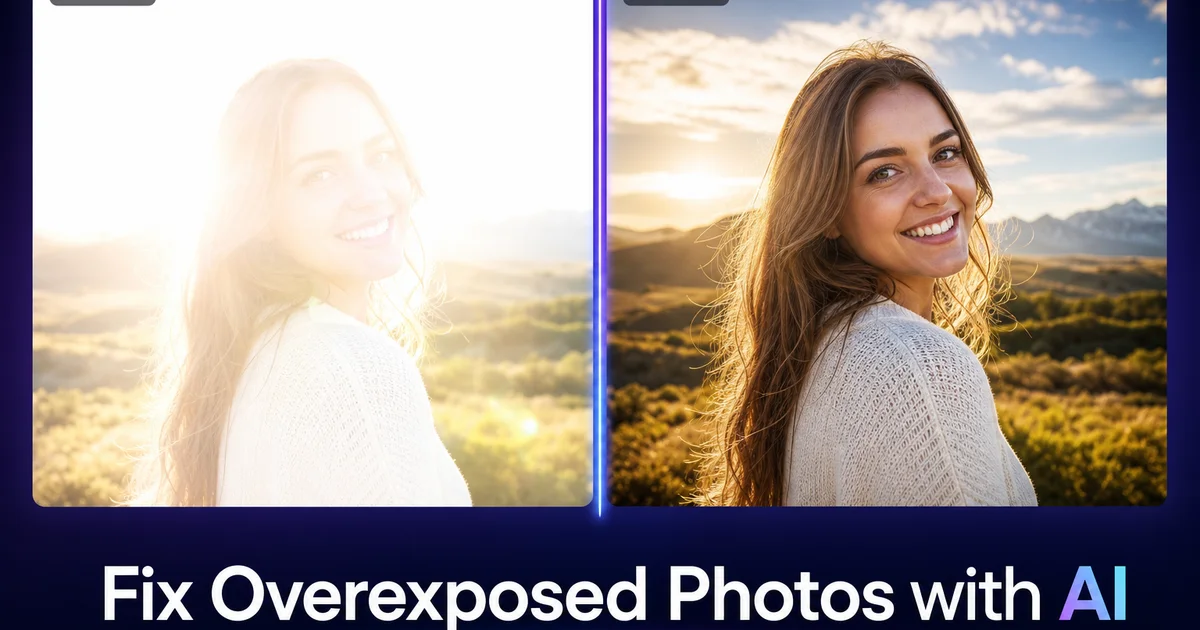
A superexposição acontece com todo fotógrafo. Uma cena de praia onde a areia branca confundiu o medidor da câmera. Um retrato onde a contraluz da janela estourou o ombro e o cabelo do sujeito. Uma paisagem onde o céu se transformou em um retângulo branco sem características enquanto o primeiro plano foi exposto corretamente. Estas não são fotos ruins — são fotos com um problema de exposição recuperável. As ferramentas de AI agora podem salvar imagens que seriam inutilizáveis há apenas alguns anos.
O principal desafio da superexposição é que as câmeras digitais cortam os realces de forma destrutiva. Quando um pixel atinge o brilho máximo (255 em uma imagem de 8 bits), toda a informação de cor e detalhe se perde. O pixel é branco puro, e nenhum escurecimento tradicional pode reconstruir o que estava lá. Reduzir o controle de exposição em uma área cortada apenas transforma branco em cinza uniforme, sem textura, sem gradiente e sem variação de cor.
O AI boost muda essa equação inferindo o que deveria estar na área estourada com base no contexto ao redor. Se o céu está cortado mas o horizonte tem um gradiente azul, a AI estende esse gradiente para cima. Se a pele está desbotada mas as áreas adjacentes mostram tom natural, a AI reconstrói textura de pele correspondente. Esta reconstrução contextual é fundamentalmente diferente da recuperação tradicional de realces e produz resultados que eram impossíveis apenas com ferramentas manuais.
- A recuperação de realces por AI reconstrói detalhes em áreas cortadas onde ferramentas tradicionais só produzem cinza uniforme.
- A inferência contextual restaura gradientes de céu, texturas de tecido e tons de pele com base nas informações de pixels ao redor.
- Cores superexpostas são re-saturadas de forma inteligente — azuis, verdes e tons quentes desbotados retornam à vibrância natural.
- Pontos quentes de reflexos especulares em metal, vidro e água podem ser corrigidos individualmente sem afetar o resto da imagem.
- O processo de correção preserva o brilho geral e o clima da cena original enquanto recupera detalhes perdidos.
Entendendo a superexposição e o que pode ser recuperado
A superexposição existe em um espectro de leve a severa. Entender onde sua imagem se encaixa nesse espectro determina qual recuperação é possível. A superexposição leve — onde o histograma está deslocado para a direita mas os realces não estão completamente cortados — é a mais fácil de corrigir. Os dados de pixel ainda contêm variação de cor e tom, apenas não o suficiente. O AI Enhance amplifica as diferenças sutis que existem e produz um resultado bem exposto com detalhes completos.
A superexposição moderada envolve corte parcial, onde algumas áreas de realce atingiram o brilho máximo mas outras retêm detalhes marginais. Isso é comum em cenas de alto contraste: um primeiro plano corretamente exposto com um céu parcialmente estourado, ou um rosto bem iluminado com realces cortados na testa e na ponte do nariz. A AI recovery funciona bem aqui porque as áreas intactas fornecem fortes pistas contextuais para reconstruir as regiões cortadas.
A superexposição severa — grandes áreas de branco puro abrangendo porções importantes do quadro — é a mais difícil de recuperar. Quando um céu inteiro está cortado do horizonte ao topo do quadro, ou quando um sujeito atingido por flash não tem variação tonal em todo o rosto, a AI tem contexto limitado para trabalhar. Mesmo nesses casos, as ferramentas de AI podem gerar reconstruções plausíveis, mas os resultados são sintéticos em vez de recuperados. A AI está adivinhando o que deveria estar lá com base no tipo de cena, não recuperando dados perdidos reais.
- Superexposição leve com histograma deslocado à direita é totalmente recuperável — os dados de pixel ainda contêm detalhes de cor e tom utilizáveis.
- Superexposição moderada com corte parcial se recupera bem porque as áreas intactas ao redor fornecem contexto para reconstrução.
- Superexposição severa com grandes áreas de branco puro requer síntese de AI em vez de recuperação, produzindo detalhes plausíveis mas não originais.
- Fotografar em RAW preserva de 2 a 3 pontos adicionais de dados de realce em comparação com JPEG, dando às ferramentas de AI significativamente mais informações para trabalhar.
Recuperando céus estourados e fundos claros
Céus estourados são o problema de superexposição mais comum na fotografia. A faixa dinâmica entre um céu ensolarado e um primeiro plano sombreado excede o que a maioria dos sensores de câmera pode capturar em uma única exposição. A câmera ou expõe para o chão (estourando o céu) ou para o céu (subexpondo o chão). A maioria dos fotógrafos e câmeras de celular padronizam a exposição para o sujeito, o que significa que o céu fica branco.
O AI Enhance recupera detalhes do céu lendo o gradiente de cores no horizonte. Onde o céu encontra a paisagem, geralmente há uma faixa estreita de tons azuis ou quentes que sobreviveu à superexposição. A AI extrapola esse gradiente para cima através da área cortada, reconstruindo um céu de aparência natural com saturação de cor adequada e suavização de brilho. Textura de nuvens, se bordas de nuvens estiverem visíveis. O resultado não é um céu de substituição. É uma reconstrução baseada nas condições reais de luz da cena.
Para céus severamente estourados onde nenhum gradiente sobrevive, a AI usa análise de cena para inferir as condições de céu adequadas. Uma cena de praia recebe um céu azul quente. Uma paisagem de montanha recebe um azul mais profundo com a névoa adequada. Um horizonte urbano recebe um céu consistente com o ângulo de iluminação visível nos edifícios. Esses céus inferidos parecem naturais porque a AI os combina com as características gerais da cena. São reconstruções, não recuperações dos dados originais.
- Céus estourados são o problema de superexposição mais comum porque a medição focada no primeiro plano sacrifica a exposição do céu em cenas de alto contraste.
- O gradiente do horizonte — uma faixa sobrevivente de tons azuis ou quentes — dá à AI contexto suficiente para reconstruir um céu natural.
- Céus reconstruídos mantêm saturação de cor adequada, suavização de brilho e características atmosféricas compatíveis com a cena.
- Mesmo céus severamente estourados sem gradiente sobrevivente podem ser substituídos por condições de céu adequadas à cena, inferidas a partir da iluminação geral.
Corrigindo tons de pele superexpostos e retratos
Retratos superexpostos apresentam um desafio de recuperação diferente das paisagens. A pele é o elemento mais examinado em qualquer retrato, e os espectadores percebem imediatamente quando os tons de pele parecem não naturais. A pele estourada parece plana e cerosa, perdendo as variações sutis de cor — leve vermelhidão nas bochechas, tons mais quentes ao redor dos olhos, tons mais frios em áreas de sombra — que fazem um rosto parecer tridimensional e vivo.
O AI Enhance recupera essas variações tonais analisando as áreas de pele que estão corretamente expostas e estendendo esses padrões de cor para as regiões estouradas. Se as bochechas têm calor natural, a AI transporta esse calor para a área adjacente da testa que estava cortada. Se a linha do maxilar mostra gradiente de sombra natural, a AI usa essa direção de gradiente para adicionar dimensionalidade ao queixo e pescoço planos e superexpostos. O resultado é um rosto que parece devidamente exposto, em vez de um que foi obviamente corrigido.
A superexposição por flash é uma variante comum onde a fonte de luz estava muito próxima ou muito potente, criando um centro brilhante com suavização nas bordas. A AI correction lida bem com a superexposição por flash porque as bordas corretamente expostas fornecem um contexto forte. A testa pode estar cortada mas as têmporas não. A ponte do nariz pode estar branca mas as bochechas retêm detalhes. A AI usa essas áreas ao redor para reconstruir suavemente o centro superexposto, produzindo um resultado que parece que o flash foi devidamente difundido.
- A pele requer recuperação de variações sutis de cor — vermelhidão nas bochechas, calor nos olhos, frescor nas sombras — não apenas redução geral do brilho.
- A AI estende padrões de cor de pele corretamente expostos para áreas estouradas, mantendo a aparência tridimensional natural.
- A superexposição por flash se recupera especialmente bem porque as bordas corretamente expostas fornecem forte informação contextual para o centro cortado.
- O objetivo da recuperação de retratos é uma pele de aparência natural, não apenas exposição tecnicamente correta — a recuperação excessiva parece pior do que uma superexposição leve.
Prevenindo a superexposição e quando usar a AI correction
A melhor correção para superexposição é evitá-la em primeiro lugar. Alguns hábitos simples de fotografia reduzem bastante a necessidade de pós-processamento. Verificar o histograma após a primeira foto é o hábito mais eficaz. Se os realces estiverem cortados (o gráfico está pressionado contra a borda direita), reduza a exposição em um ponto e refaça a foto. Em câmeras de celular, tocar em uma área clara da tela força a câmera a expor para os realces em vez das sombras.
Fotografar em formato RAW em vez de JPEG preserva de 2 a 3 pontos extras de dados de realce que a compressão JPEG descarta. Esses dados extras são invisíveis no visor, mas dão às ferramentas de AI muito mais informações para recuperar quando os realces são forçados. A maioria dos celulares modernos agora oferece fotografia RAW através do modo profissional ou aplicativos de câmera de terceiros. A diferença no tamanho do arquivo vale a pena para qualquer foto onde a iluminação é desafiadora.
Dito isso, a AI correction é a solução prática para as fotos que você já tirou. Fotos de casamento, instantâneos de viagem, memórias de infância e trabalhos de clientes não podem ser refeitos. Para essas imagens, o AI boost não é um improviso. É o único caminho viável para recuperar detalhes que de outra forma estariam perdidos para sempre. A tecnologia agora é boa o suficiente para que muitos fotógrafos experientes fotografem propositalmente um pouco mais claros (protegendo as sombras) e confiem na AI para recuperar os realces, invertendo a abordagem tradicional de expor à direita.
- Verificar o histograma após a primeira foto e reduzir a exposição quando os realces cortam evita a maioria dos problemas de superexposição.
- O formato RAW preserva de 2 a 3 pontos extras de dados de realce que o JPEG descarta, dando às ferramentas de AI muito mais margem de recuperação.
- Câmeras de celular oferecem bloqueio de exposição ao tocar em áreas claras — um hábito rápido que protege os realces em iluminação desafiadora.
- Para fotos insubstituíveis já tiradas — casamentos, viagens, memórias — o AI enhancement é o único caminho viável de recuperação e produz resultados profissionais.
How to do it
- 1
Assess the severity of overexposure using the histogram
Open the overexposed photo and check if highlights are clipped — areas of pure white with zero detail. Mild overexposure where the histogram is shifted right but not clipped is fully recoverable. Severe clipping where large areas are pure white (255,255,255) means some detail is permanently lost. AI can still reconstruct plausible texture, but not the original data.
- 2
Apply AI Enhance to recover blown-out highlights
Run the image through AI Enhance, which analyzes the surrounding tonal context to pull detail back from bright areas. The AI reconstructs sky gradients, fabric texture, skin tone detail, and surface patterns that were washed out by overexposure, even when the original pixel data was clipped.
- 3
Use AI Filter to restore color depth and saturation
Overexposed images lose color saturation along with tonal detail. Apply an AI Filter that restores vibrant, natural color to the recovered areas. The filter intelligently re-saturates washed-out blues in skies, greens in foliage, and warm tones in skin without oversaturating areas that were properly exposed.
- 4
Spot-correct remaining hot spots with Magic Eraser
After global correction, check for small areas that are still blown out. Specular highlights on metal, glass reflections, or direct light sources can remain. Use Magic Eraser to remove or reduce these hot spots by brushing over them and letting the AI reconstruct the surface detail from surrounding context.
- 5
Compare before and after to verify natural results
Toggle between the original and edited versions to ensure the correction looks natural. Overcorrecting overexposure can produce flat, muddy images. The goal is a balanced exposure where highlights retain detail, midtones appear natural, and the image maintains the brightness and mood of the original scene.