
Como Editar Fotos de Shows e Música: Fluxo de Trabalho com AI para Fotografia de Eventos ao Vivo
Aprenda a editar fotos de shows e música ao vivo com AI. Corrija distorções de cor da iluminação de palco, reduza ruído de ISO alto, remova elementos indesejados. Crie imagens vibrantes que capturam a energia das apresentações ao vivo.

Product Marketing
Revisado por Magic Eraser Editorial ·
Índice
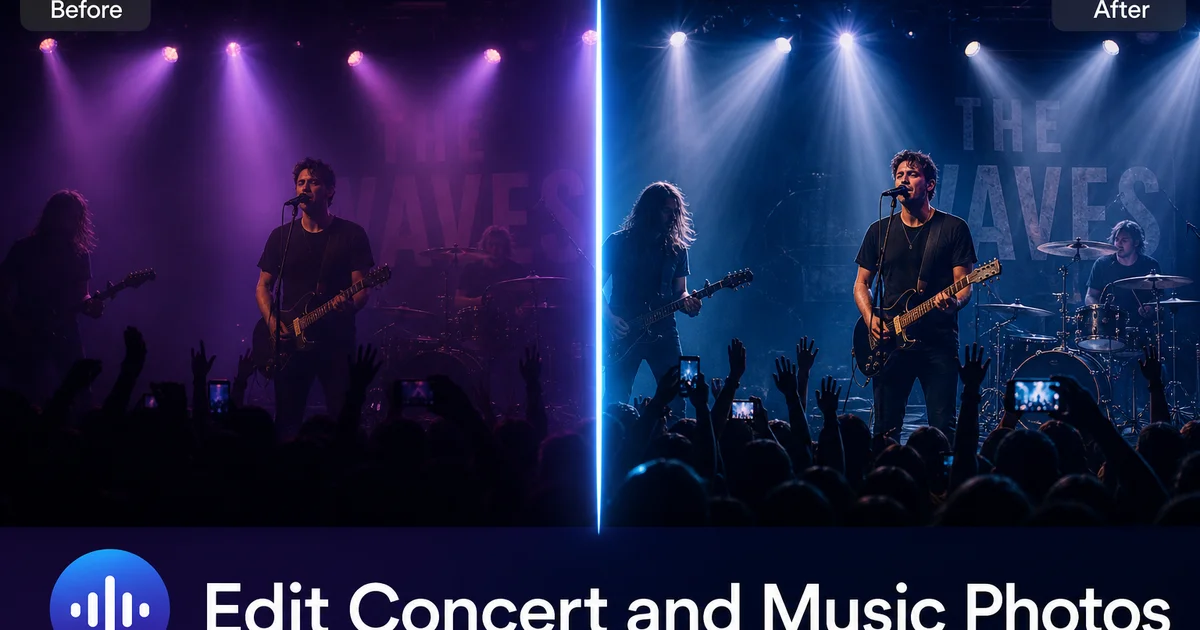
A fotografia de shows é um dos gêneros mais tecnicamente exigentes. Você está fotografando na quase escuridão, sob luzes de palco coloridas que mudam rapidamente, com sujeitos que nunca param de se mover, de uma posição fixa em meio à multidão ou no fosso do fotógrafo. As imagens resultantes geralmente apresentam distorções extremas de cor causadas pelos washes de LED, realces estourados pelos holofotes, ruído intenso de configurações ISO altas e elementos indesejados. Suportes de microfone, mãos da multidão, placas de saída de emergência — todos competindo com o performer pela atenção do espectador.
Apesar desses desafios, as fotos de shows carregam uma energia emocional que outros gêneros raramente igualam. Uma imagem de música ao vivo bem editada pode transportar o espectador para dentro do local, transmitir a intensidade da apresentação. Tornar-se icônica para o artista, o fã ou o fotógrafo. A diferença entre uma foto de show medíocre e uma excelente está quase sempre na edição, não na captura.
As ferramentas de edição de fotos com AI encurtaram enormemente esse processo de edição. O que antes exigia de 10 a 15 minutos por imagem no Lightroom e Photoshop — redução de ruído, correção de cor, balanceamento de exposição e remoção de elementos — agora pode ser feito em menos de dois minutos por foto. Este guia apresenta um fluxo de trabalho completo de edição com AI para fotografia de música ao vivo, desde a triagem inicial até a exportação final.
- A correção de exposição com AI normaliza o contraste extremo entre performers iluminados por holofotes e fundos completamente escuros, sem achatar a cena.
- A correção de distorção de cor remove os tons de pele não naturais causados pelos washes de palco LED vermelhos, azuis, roxos e verdes.
- A redução de ruído com AI recupera detalhes perdidos devido a configurações ISO altas em locais escuros, preservando a nitidez das bordas em rostos e instrumentos.
- A remoção de objetos elimina suportes de microfone, mãos da multidão, placas de saída e equipamentos de palco que poluem o enquadramento.
- O processamento em lote permite que fotógrafos de shows editem de 200 a 400 imagens de uma única apresentação em uma fração do tempo tradicional.
- A graduação de cor consistente em todo o conjunto de um show cria uma narrativa visual coesa para entrega em portfólio ou editorial.
Os desafios únicos da iluminação de shows
A iluminação de palco é projetada para criar atmosfera para o público, não para produzir condições fotografáveis. Os rigs de LED modernos alternam entre cores em milissegundos, o que significa que quadros consecutivos de uma sequência podem ter temperaturas de cor completamente diferentes. Um performer iluminado por um holofote âmbar quente em um quadro pode estar banhado em azul profundo no seguinte. Essa alternância rápida torna os balanços de branco tradicionais inúteis — não existe uma configuração correta única para o show inteiro.
A faixa de intensidade agrava o problema. Um holofote de perseguição no vocalista principal pode ser de 10 a 12 pontos mais brilhante que o baterista no fundo do palco. Os sensores das câmeras não conseguem capturar ambos sem estourar os realces ou esmagar as sombras. A maioria dos fotógrafos de shows expõe para o rosto do performer e aceita que o fundo ficará escuro. Mesmo essa abordagem produz imagens com pontos quentes estourados onde holofotes atingem roupas brancas, instrumentos cromados ou grades de microfone.
O AI Enhance aborda ambos os problemas ao mesmo tempo. Ele analisa o quadro para identificar o performer como o sujeito principal, corrige a temperatura de cor com base nos valores esperados de tom de pele e vestuário. Em seguida, mapeia a faixa tonal para preservar detalhes tanto no holofote quanto nas sombras. O resultado é uma imagem onde o performer parece iluminado naturalmente, mesmo que a captura original fosse dominada por um wash de LED de cor única.
- Os rigs de palco LED alternam cores mais rápido que a taxa de disparo das câmeras, criando balanço de branco inconsistente entre quadros consecutivos.
- A faixa dinâmica entre o performer iluminado e o fundo escuro pode exceder 10 a 12 pontos.
- O AI Enhance corrige distorções de cor enquanto preserva a qualidade atmosférica da iluminação de palco.
- A normalização do tom de pele remove cores não naturais sem fazer a imagem parecer ter sido tirada em um estúdio.
Redução de ruído sem perder detalhes
O ruído é o companheiro constante da fotografia de shows. Mesmo com lentes rápidas (f/1.4 a f/2.8), a maioria das fotos de shows é feita em ISO 3200 a ISO 12800 para manter velocidades de obturador suficientemente altas para congelar o movimento do performer. Nessas configurações, toda câmera — de smartphones a mirrorless full-frame — produz ruído de luminância e crominância visível que degrada os detalhes finos.
Os algoritmos tradicionais de redução de ruído funcionam desfocando a imagem no nível do pixel. Reduzem o grão, mas também suavizam a textura do cabelo, a trama do tecido, as cordas dos instrumentos e as feições faciais. O resultado é uma imagem que parece lisa, mas plastificada. A redução de ruído com AI adota uma abordagem fundamentalmente diferente: identifica padrões de ruído no nível do sensor e os remove enquanto mantém — e às vezes realça — o detalhe real do sujeito subjacente.
Na prática, isso significa que você pode fotografar em ISO 6400 ou superior e ainda produzir imagens com textura de pele limpa, detalhes visíveis de cordas de guitarra, texto legível em tambores e grades de microfone nítidas. A AI preserva o contraste de borda que faz uma foto parecer nítida enquanto remove a variação aleatória de luminância que a faz parecer granulada. Uma única passada do AI Enhance recupera qualidade suficiente para publicação na web e redes sociais. Uma segunda passada pode levar a imagem a uma qualidade moderada para impressão.
- Fotografar shows em ISO 3200-12800 produz ruído intenso de luminância e crominância em qualquer sistema de câmera.
- A redução de ruído com AI remove o grão enquanto preserva a nitidez das bordas em rostos, instrumentos e textura de roupas.
- Uma única passada do AI Enhance recupera qualidade suficiente para publicação na web e redes sociais.
Removendo distrações de quadros de eventos ao vivo
Os locais de shows são inerentemente cheios de elementos. Suportes de microfone, monitores de palco, feixes de cabos, fita adesiva no chão do palco, ferragens de bateria, pedaleiras de guitarra — membros da equipe de palco vestidos de preto — tudo compete por espaço no enquadramento. Da plateia, a multidão adiciona suas próprias distrações: celulares levantados, mãos acenando, cabeças bloqueando a visão e seguranças circulando pelo fosso.
O Magic Eraser lida com essas remoções com particular eficácia em cenários de shows porque o conteúdo ao redor — fundo escuro do palco, textura da multidão, névoa do ambiente — é relativamente uniforme e fácil para a AI reconstruir. Pintar sobre um suporte de microfone na frente do rosto do performer leva segundos. A AI preenche a área com a iluminação de palco e o fundo que estariam visíveis atrás dele. Da mesma forma, remover uma placa de saída brilhante ao fundo, um monitor de palco visível aos pés do performer ou uma mão perdida da multidão entrando na parte inferior do quadro limpa a composição sem alterar a atmosfera do show.
Para entrega à imprensa e editorial, quadros limpos são esperados. As publicações querem imagens onde o performer é o sujeito claro, sem elementos visuais concorrentes. Para uso em portfólio, imagens limpas mostram sua capacidade de entregar um trabalho refinado. E para redes sociais, fotos de shows sem poluição visual sempre superam snapshots ocupados e não editados em métricas de engajamento, porque o olhar do espectador vai diretamente para o performer e a energia do momento.
- Suportes de microfone, monitores de palco, feixes de cabos e equipamentos de palco poluem até mesmo fotos de shows bem compostas.
- Fundos de palco escuros e uniformes tornam a reconstrução com AI particularmente precisa para remoção de elementos.
- Publicações editoriais esperam quadros limpos e focados inteiramente no performer.
- Fotos de shows sem poluição visual superam as não editadas nas redes sociais porque o olhar do espectador é guiado até o sujeito.
Graduação de cor para clima e coesão
Após as correções técnicas — exposição, ruído e remoção de elementos — o passo criativo é a graduação de cor. Fotos de shows carregam clima, e o tratamento de cor deve reforçar o caráter emocional da apresentação. Um show de rock de alta energia pode pedir tons quentes e vibrantes com pretos profundos. Uma apresentação acústica intimista pode funcionar melhor com tons mais frios e suaves e sombras levantadas. Um festival de música eletrônica pode se beneficiar de néons vívidos e saturados que realçam a iluminação LED.
O AI Enhance apoia esse passo criativo ao fornecer um ponto de partida corrigido com cor natural. A partir daí, você pode aplicar uma segunda passada com uma intenção criativa específica: aumentar o calor, incrementar o contraste ou deslocar o tom geral para azul ou âmbar. A vantagem sobre a graduação manual é a consistência: o AI Enhance aplica a mesma lógica tonal a todas as imagens do conjunto. Uma sequência de 20 fotos da mesma música mantém coerência visual, mesmo que as capturas originais tivessem iluminações de palco radicalmente diferentes.
Para exibições em portfólio e submissões editoriais, essa coesão é fundamental. Um conjunto de imagens de show que oscila entre quente e frio, claro e escuro, saturado e suave parece pouco profissional, independentemente da qualidade individual de cada imagem. Processar em lote todo o conjunto do show através do mesmo fluxo de AI Enhancement e, em seguida, aplicar uma graduação criativa consistente produz um conjunto refinado que conta a história da apresentação do início ao fim.
- Combine a graduação de cor com o clima da apresentação: quente e vibrante para rock, frio e suave para acústico, néons vívidos para eletrônico.
- O AI Enhance fornece um ponto de partida neutro corrigido a partir do qual é possível direcionar o tom criativo em qualquer direção.
- A graduação consistente em todo o conjunto de um show cria a coesão visual que clientes editoriais e avaliadores de portfólio esperam.
- O processamento em lote com configurações criativas idênticas elimina os saltos tonais entre quadros fotografados sob diferentes iluminações de palco.
Fluxo de trabalho para processamento em lote de um show completo
Uma sessão típica de fotografia de show produz de 300 a 800 quadros em um set de 60 a 90 minutos. Editar um por um em softwares tradicionais poderia levar um dia inteiro. Um fluxo de trabalho com AI reduz isso para algumas horas, produzindo resultados tão bons ou melhores que edições manuais.
Comece com uma seleção rigorosa: mantenha apenas os quadros com composição forte e momentos decisivos, com variedade de sujeitos (close-ups, planos abertos, reações da multidão, detalhes de instrumentos). Uma boa seleção reduz 500 quadros para 80 a 120 escolhidos. Em seguida, processe em lote todas as seleções através do AI Enhance para correção de exposição e cor. Terceiro, revise o conjunto melhorado e use o Magic Eraser em quaisquer quadros que precisem de limpeza direcionada: remoção de suporte de microfone, eliminação de placa de saída ou correção de distrações da multidão. Finalmente, aplique uma graduação criativa consistente em todo o conjunto.
Este fluxo de trabalho de quatro etapas — seleção, enhancement em lote, limpeza direcionada, graduação criativa — processa uma sessão completa de show em menos de três horas, incluindo o tempo de revisão e seleção de imagens. Compare isso com as 8 a 12 horas que um fluxo de trabalho tradicional do Lightroom ao Photoshop exigiria para o mesmo número de seleções. A economia de tempo permite que você entregue mais rápido para publicações, publique nas redes sociais enquanto o show ainda está sendo comentado e aceite mais trabalhos fotográficos sem um acúmulo de edição.
- Selecione agressivamente de 500+ quadros para 80 a 120 escolhidos com base em composição e momento.
- Processe em lote todas as seleções com AI Enhance para exposição, cor e correção de ruído em uma única passada.
- Use o Magic Eraser para limpeza direcionada em quadros que precisam de remoção de elementos.
- Aplique uma graduação criativa consistente em todo o conjunto para coesão de portfólio e editorial.
- Tempo total do fluxo de trabalho: menos de três horas para um show completo, contra 8 a 12 horas com edição manual tradicional.
How to do it
- 1
Import and review your concert shots
Transfer all photos from your camera or phone and do an initial cull. Keep shots with strong composition and emotional energy even if they have technical issues. AI editing can fix exposure and noise, but it cannot add a missing moment. Discard only frames that are completely out of focus or have severe motion blur on the subject's face.
- 2
Correct exposure and white balance
Run each selected image through AI Enhance to normalize exposure. Concert lighting creates extreme contrast between spotlit performers and dark backgrounds. AI Enhance lifts shadow detail, tames blown-out highlights from stage spotlights, and corrects the color casts created by red, blue, and purple LED stage washes so skin tones look natural.
- 3
Reduce noise and sharpen details
High ISO settings in dark venues produce visible grain. AI Enhance reduces luminance and color noise while keeping edge detail on faces, instruments, and clothing. A single pass often recovers enough clarity to make the image suitable for web, social media, and even moderate print sizes.
- 4
Remove distracting elements from the frame
Use Magic Eraser to brush over mic stands blocking the performer's face, stray hands from the crowd reaching into the frame, exit signs glowing in the background, and equipment cases visible on stage. The AI fills these areas with the surrounding setting — stage backdrop, crowd, or lighting — keeping the scene's atmosphere.
- 5
Fine-tune mood and atmosphere
After technical corrections, apply a second AI Enhance pass focused on creative intent. Decide whether you want a warm, golden concert feel or a cool, moody blue tone and let the AI push the existing lighting in that direction. This adds cohesion across a set of images from the same show.
Fontes
- Concert Photography: The Definitive Guide — Adorama
- Live Music Photography Best Practices — Digital Photo Mentor
- How Stage Lighting Affects Photography — B&H Photo