
Como Criar um Efeito de Incrustação Zogan com AI: A Arte Japonesa de Incrustação em Metal
Aprenda a criar efeitos impressionantes de zogan (incrustação japonesa em metal) em fotos usando AI. Tutorial passo a passo abordando padrões de incrustação em ouro, prata e cobre em superfícies de metal, madeira e cerâmica.

Product Marketing
Revisado por Magic Eraser Editorial ·
Índice
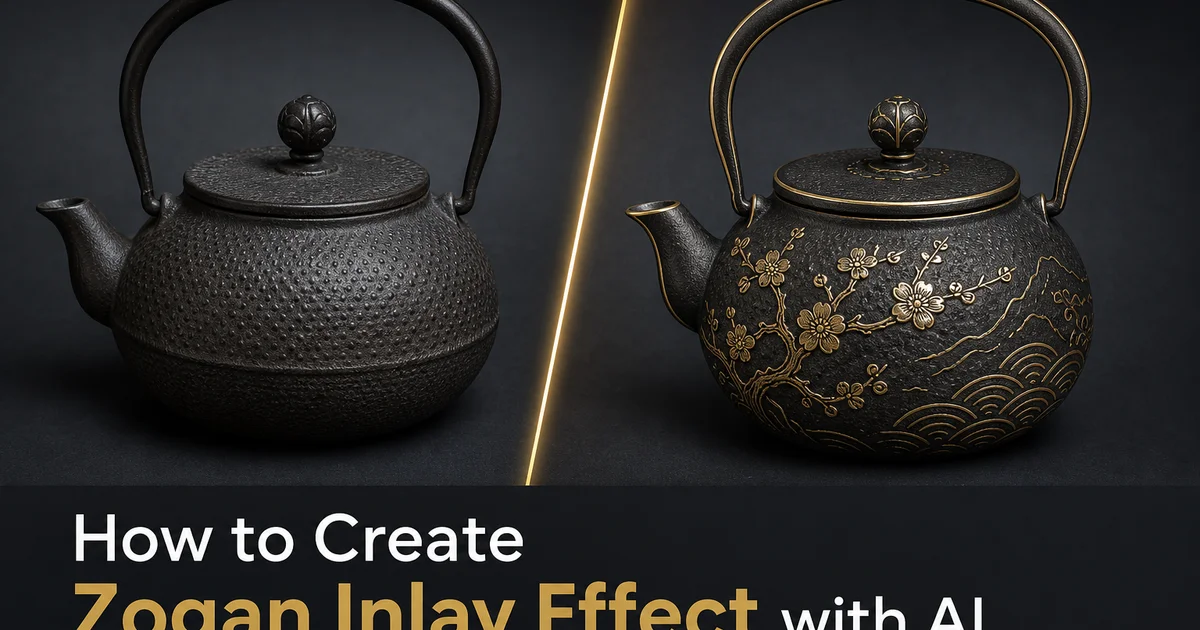
Zogan é a arte japonesa de incrustação em metal. Incorporar fios ou lâminas de metal em um material base para criar padrões decorativos. A técnica é praticada no Japão há mais de mil anos, atingindo um refinamento extraordinário durante o período Edo, quando espadeiros e metalúrgicos criavam desenhos intricados em guardas de espada (tsuba), acessórios de armaduras e objetos decorativos. Fios de ouro e prata martelados em canais esculpidos em ferro ou aço produziam desenhos de precisão e beleza notáveis, desde padrões geométricos ousados até delicados arabescos florais e cenas narrativas inteiramente executadas em linhas de metal incrustado.
A assinatura visual do zogan é inconfundível: linhas brilhantes de metal. Ouro, prata ou cobre — inseridos em um material base mais escuro, seguindo padrões que variam de bordas geométricas simples a composições pictóricas complexas. O contraste entre a incrustação brilhante e o fundo escuro cria uma qualidade gráfica que é ao mesmo tempo delicada e ousada. Diferentemente da pintura de superfície ou galvanoplastia, o metal incrustado fica nivelado ou ligeiramente saliente em relação à superfície ao redor, criando variações dimensionais sutis que captam a luz de forma diferente dependendo do ângulo de visão. Essa profundidade física confere ao trabalho de zogan uma qualidade tátil visível até mesmo em fotografias.
As ferramentas de edição de fotos com AI agora podem simular a estética do zogan analisando a geometria da superfície de uma imagem e aplicando padrões de incrustação metálica que seguem a forma tridimensional dos objetos na fotografia. A AI posiciona padrões de linhas de ouro, prata ou cobre ao longo de contornos naturais e bordas estruturais, com fronteiras decorativas e interação correta com a iluminação, mostrando a incrustação captando luz como o metal real faria. Este tutorial aborda o processo completo de transformar fotografias comuns em imagens que evocam a beleza refinada da incrustação tradicional japonesa em metal.
- Aplique padrões de incrustação em ouro, prata ou cobre que acompanham a geometria tridimensional da superfície dos objetos em suas fotos.
- A análise de superfície por AI posiciona linhas de incrustação ao longo de contornos naturais e bordas estruturais para uma aparência de metalurgia fisicamente plausível.
- Escolha entre estilos de padrão geométrico, floral e caligráfico enraizados nas convenções decorativas tradicionais japonesas.
- Controles de proeminência ajustáveis permitem que você vá de um sutil acento decorativo a uma declaração grática ousada.
- Funciona em superfícies de metal, madeira, cerâmica e arquitetura onde contornos visíveis guiam um posicionamento convincente da incrustação.
Compreendendo as técnicas de zogan e suas características visuais
O zogan tradicional abrange várias técnicas distintas, cada uma produzindo um resultado visual diferente. O hon-zogan, ou incrustação verdadeira, envolve esculpir canais no metal base e martelar fios ou lâminas de metal nesses canais de modo que a incrustação fique nivelada com a superfície. O resultado é liso ao toque, com o desenho da incrustação aparecendo como um padrão plano de metal contrastante dentro do material base. Esta técnica produz o visual mais limpo e gráfico. Linhas nítidas de ouro ou prata contra um fundo de ferro ou aço, sem variação dimensional entre a incrustação e a superfície ao redor.
O hira-zogan, ou incrustação plana, é semelhante ao hon-zogan, mas utiliza lâminas de metal mais largas em vez de fios para preencher áreas maiores. Enquanto o hon-zogan cria desenhos lineares em metal, o hira-zogan pode preencher áreas substanciais da superfície com lâminas de ouro, prata ou cobre, criando contrastes ousados entre grandes campos de diferentes metais. O efeito visual é mais dramático e menos linear. Imagine uma pétala de crisântemo em ouro renderizada como uma forma sólida preenchida em vez de um contorno. O hira-zogan era comumente usado para acentos decorativos ousados em armaduras e grandes trabalhos arquitetônicos em metal, onde o desenho precisava ser lido claramente à distância.
O AI Filter imita essas diferentes técnicas através de suas opções de configuração de padrão. Padrões baseados em linhas produzem a aparência de incrustação de fio hon-zogan. Linhas finas e precisas de metal seguindo os contornos dos objetos na fotografia. Padrões preenchidos simulam o hira-zogan aplicando áreas metálicas sólidas delimitadas por canais visíveis. A distinção é esteticamente importante: padrões do tipo fio criam uma qualidade refinada e caligráfica, adequada para assuntos elegantes. Padrões preenchidos produzem um efeito mais ousado e decorativo, que funciona bem para impacto visual dramático em composições maiores.
- Hon-zogan (incrustação verdadeira) martela fio em canais esculpidos para padrões de linhas nítidas e niveladas de metal contrastante contra a base.
- Hira-zogan (incrustação plana) preenche áreas maiores com lâmina de metal para contrastes sólidos e ousados que se leem claramente à distância.
- Padrões de AI baseados em linhas simulam incrustação de fio com linhas metálicas finas e precisas seguindo contornos de objetos e bordas estruturais.
- Padrões de AI preenchidos simulam incrustação de lâmina com áreas metálicas sólidas para maior impacto decorativo em composições maiores.
Selecionando imagens de origem para efeitos de zogan convincentes
O efeito zogan depende de superfícies identificáveis e contornos claros que os padrões de incrustação possam seguir. Objetos de metal são a escolha mais natural porque o zogan real é uma técnica de metalurgia. Aplicar linhas de incrustação em ouro a uma fotografia de uma chaleira de ferro, um vaso de bronze ou uma ferramenta de aço cria um resultado imediatamente plausível. A AI mapeia o padrão de incrustação na geometria da superfície do objeto, segue suas linhas estruturais e renderiza o metal de incrustação com características de iluminação que correspondem à luz existente na fotografia. O resultado parece que o objeto foi realmente fabricado com decoração incrustada.
Além do metal, a estética zogan se traduz bem para outros materiais duros. Superfícies de madeira — móveis, instrumentos musicais, elementos arquitetônicos — têm uma conexão histórica com o trabalho de incrustação (a incrustação em madeira existe em muitas tradições artesanais) e fornecem texturas de superfície claras e padrões de veios com os quais a incrustação por AI pode interagir. Superfícies de cerâmica e olaria funcionam bem quando têm forma visível e esmaltação contra as quais a incrustação metálica pode contrastar. Até superfícies de pedra como mármore ou granito podem suportar padrões convincentes de incrustação metálica, principalmente desenhos geométricos que seguem veios naturais ou juntas estruturais.
Assuntos macios ou orgânicos requerem uma interpretação mais criativa. Retratos podem funcionar se a incrustação for aplicada a acessórios, texturas de roupas ou elementos de fundo, em vez da pele. Padrões de linhas douradas seguindo os contornos da gola de um casaco, decorando um chapéu ou emoldurando a composição ao longo de elementos arquitetônicos de fundo. Fotografias de paisagens se beneficiam do tratamento zogan em estruturas feitas pelo homem dentro da cena. Edifícios, pontes, cercas — onde a incrustação segue linhas estruturais que fazem sentido visual. O princípio fundamental é que os padrões de incrustação precisam de bordas e contornos para seguir. Eles não podem flutuar de forma convincente em superfícies lisas e sem características.
- Objetos de metal produzem os resultados mais naturais, já que o zogan é inerentemente uma técnica de metalurgia com características de material correspondentes.
- Superfícies de madeira, cerâmica e pedra suportam padrões de incrustação convincentes graças à textura visível e características estruturais que a AI pode seguir.
- Retratos funcionam quando a incrustação é aplicada seletivamente a acessórios, roupas e elementos de fundo, em vez da pele.
- Padrões de incrustação precisam de contornos e bordas identificáveis — eles não podem flutuar de forma convincente em superfícies lisas e sem características.
Configurando o estilo do padrão e a aparência metálica
A escolha do metal de incrustação muda fundamentalmente o caráter do efeito. A incrustação em ouro sobre um fundo escuro produz a estética clássica do zogan — quente, rica e luxuosa. Esta é a combinação historicamente mais autêntica e aquela que a maioria dos espectadores associará à metalurgia japonesa. As linhas douradas têm um calor visual que as faz parecer pertencer à superfície, em vez de serem aplicadas sobre ela, e a renderização por AI captura a refletividade específica do fio de ouro. Mais brilhante ao longo da borda superior, onde capta luz direta, ligeiramente sombreada ao longo da borda inferior, onde encontra o canal.
A incrustação em prata cria um visual mais frio e moderno. Contra fundos de ferro ou aço escuros, as linhas de prata são lidas como precisas e elegantes, em vez de quentes e ornamentadas. A prata é especialmente eficaz para padrões geométricos. Linhas retas, desenhos angulares e motivos geométricos repetitivos — onde o tom mais frio complementa a precisão matemática do padrão. Para fotografias com uma estética moderna ou minimalista, a incrustação em prata adiciona interesse decorativo sem a ornamentação histórica associada ao ouro. A prata também funciona bem contra superfícies de madeira escura, onde o metal brilhante cria forte contraste contra os tons quentes da madeira.
A complexidade do padrão deve corresponder ao conteúdo da imagem e ao contexto de visualização pretendido. Padrões densos e intricados com trabalho de linhas finas exigem imagens de alta resolução e grandes tamanhos de exibição para serem lidos claramente. Eles são impressionantes em impressão no tamanho pôster, mas podem se tornar um borrão indistinto em uma tela de celular. Padrões mais simples, com menos linhas e mais ousadas, mantêm seu impacto visual em todos os tamanhos de exibição, desde impressões em resolução total até miniaturas de redes sociais. Para uso na web, opte pela simplicidade. Para impressão, toda a complexidade dos padrões tradicionais de zogan pode ser apreciada na distância de visualização que a impressão permite.
- Incrustação em ouro produz a estética clássica, quente e luxuosa do zogan, mais associada à metalurgia tradicional japonesa.
- Incrustação em prata cria um visual mais frio e contemporâneo que complementa padrões geométricos e composições minimalistas.
- Padrões densos e intrincados exigem alta resolução e grandes tamanhos de exibição — podem se tornar indistintos em tamanhos de visualização pequenos.
- Padrões de linhas mais simples e ousados mantêm o impacto visual em todos os contextos de exibição, da impressão às telas de dispositivos móveis.
Otimizando e exportando imagens com estilo zogan
O trabalho de linhas finas que define a incrustação zogan exige atenção cuidadosa à qualidade de exportação. Linhas metálicas finas com apenas alguns pixels de largura são muito sensíveis a artefatos de compressão. A compressão JPEG em configurações de qualidade padrão pode borrar uma nítida linha dourada de um pixel em um borrão amarelo que perde todo o caráter metálico. A exportação em PNG preserva cada pixel da renderização da incrustação exatamente como a AI a gerou, mantendo a nitidez das bordas e o brilho metálico dos centros das linhas que fazem a incrustação ser lida como metal real, em vez de uma linha pintada.
Para exibição na web, onde os tamanhos de arquivo PNG podem ser proibitivos, o formato WebP com qualidade 85 ou superior oferece um compromisso razoável. As linhas de incrustação mostrarão um leve amolecimento em comparação com PNG. O caráter metálico e a integridade geral do padrão permanecem intactos nessas configurações de qualidade. Abaixo da qualidade 80, a degradação se torna perceptível. As bordas das linhas amolecem, os realces metálicos diminuem e a distinção entre linhas finas de incrustação começa a se fundir. Teste exportações no seu nível de qualidade escolhido nas dimensões reais de exibição para verificar se o detalhe da incrustação sobrevive à compressão antes de se comprometer com um formato e configuração de qualidade específicos.
Aplicações de impressão mostram os efeitos zogan no seu melhor, pois a distância de visualização e a resolução de impressão permitem que os detalhes finos se resolvam claramente. Exporte com um mínimo de 300 DPI no tamanho de impressão pretendido. Considere 600 DPI para peças onde o trabalho de linhas de incrustação é especialmente fino. Escolha um processo de impressão que lide bem com o acabamento metálico. Impressões jato de tinta de alta qualidade em papel lustro ou metálico podem realmente realçar a qualidade metálica das linhas de ouro e prata renderizadas, adicionando um brilho físico que complementa o material simulado. Papel fosco, por outro lado, pode achatar um pouco o caráter metálico.
- A exportação em PNG preserva o detalhe fino das linhas de incrustação e o brilho metálico — obrigatório para saída com qualidade de impressão.
- WebP com qualidade 85+ oferece compressão web aceitável; abaixo de 80, as linhas de incrustação amolecem e o caráter metálico degrada visivelmente.
- Imprima em 300-600 DPI em papel lustro ou metálico para realçar o brilho físico das linhas de incrustação em ouro e prata renderizadas.
- Teste a compressão nas dimensões reais de exibição para verificar se os padrões finos de incrustação sobrevivem ao formato e às configurações de qualidade escolhidos.
How to do it
- 1
Choose a photo with defined surfaces and visible contours
Select an image with objects that have clear surface areas and visible edges or contours where inlay lines would naturally occur. Metal objects, wooden surfaces, ceramic pieces, and architectural elements work well. The AI needs identifiable surface boundaries to place the inlay patterns convincingly. Flat, featureless surfaces produce less strong results because there are no natural lines for the inlay to follow.
- 2
Select the inlay pattern style and metal type
Configure the zogan effect by choosing an inlay pattern: geometric lines, floral motifs, or calligraphic designs that follow traditional Japanese decorative conventions. Select the inlay metal look: gold for the warm, rich look of traditional hon-zogan, silver for cooler contrast against dark grounds, or copper for a warmer rustic quality. The pattern style and metal choice together establish the aesthetic character of the finished effect.
- 3
Apply the inlay effect with surface-aware placement
Run the AI filter to apply the zogan pattern to your image. The tool analyzes surface geometry, light direction, and material traits to place the inlay design in a way that follows the three-dimensional form of objects in the photo. Inlay lines wrap around curved surfaces, follow structural edges, and interact with lighting to show realistic highlights and shadows on the metal wire or sheet elements, creating a physically plausible look.
- 4
Adjust inlay prominence and surface contrast
Fine-tune the visual weight of the inlay against the base surface. Increase prominence for a bold decorative effect where the metal inlay patterns dominate the visual composition. Decrease it for a subtle accent where the inlay adds refined detail without overwhelming the underlying image. Adjust the contrast between the inlay metal and the surrounding surface to control how greatly the gold, silver, or copper lines stand out.
- 5
Export the finished zogan-styled image
Save the final image in PNG format to preserve the fine detail of the inlay lines and the metallic quality of the simulated wire or sheet elements. The thin lines and small-scale patterns characteristic of zogan work are especially sensitive to JPEG compression, which can blur fine details into the surrounding surface. For print applications, export at 300 DPI minimum to ensure the delicate inlay patterns render clearly at the intended display size.
Fontes
- Zogan: Japanese Metal Inlay Techniques — The Metropolitan Museum of Art
- Traditional Japanese Metalworking: Inlay and Overlay Methods — Japan Society
- Digital Simulation of Material Surface Effects — ACM SIGGRAPH