
Como Criar um Efeito Polaroid Vintage com AI — Magic Eraser
Aprenda a transformar fotos digitais em imagens Polaroid e de filme instantâneo de aparência autêntica usando filtros de AI. Guia passo a passo abordando ciência das cores, foco suave, enquadramento e efeitos de envelhecimento específicos de cada época.

Product Marketing
Revisado por Magic Eraser Editorial ·
Índice
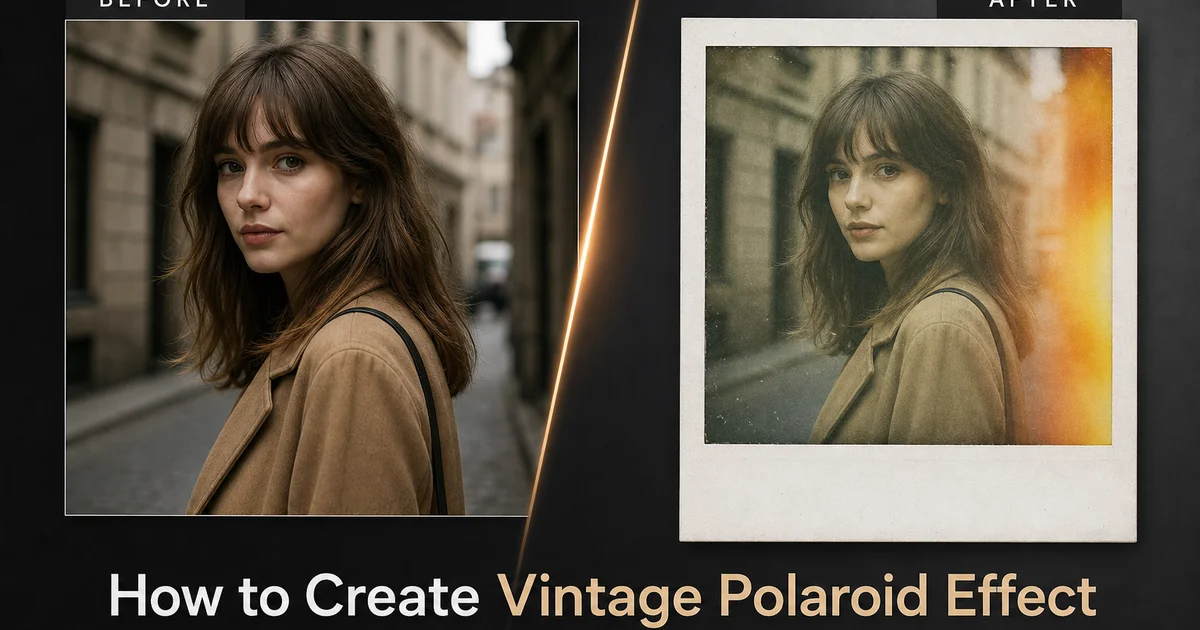
A estética Polaroid sobreviveu a todas as ondas da fotografia digital porque desencadeia uma resposta emocional específica que a perfeição das câmeras modernas não consegue replicar. Os deslocamentos de cor quentes, o foco suave das lentes de plástico, a faixa dinâmica comprimida. O formato tangível da impressão com borda branca sinaliza realismo, impermanência e um momento capturado sem pensar demais. O Instagram foi construído sobre essa percepção. Seu logotipo original era uma câmera Polaroid e seus primeiros filtros imitavam o filme instantâneo — e a estética continua sendo um dos efeitos fotográficos mais solicitados em todas as plataformas sociais e ferramentas de edição uma década e meia depois.
Criar um efeito Polaroid convincente é mais difícil do que aplicar um filtro quente e chamá-lo de vintage. O filme instantâneo real tem uma ciência de cor específica enraizada no processo de dye diffusion transfer, onde camadas de corante ciano, magenta e amarelo se desenvolvem simultaneamente dentro da impressão enquanto ela é ejetada da câmera. Esse processo produz deslocamentos de cor característicos. Meios-tons quentes, sombras frias, realces comprimidos — que diferem da resposta cromática de qualquer filme convencional ou sensor digital. Simplesmente aquecer uma imagem ou reduzir sua saturação produz um visual vintage genérico que não se lê como Polaroid para quem já segurou uma impressão instantânea real.
Filtros com tecnologia AI podem analisar a estrutura tonal de uma fotografia digital e aplicar as mudanças de cor específicas, suavidade óptica, padrões de granulação e características de exibição que fazem uma imagem parecer ter sido tirada em filme instantâneo real. Este guia percorre o processo completo de criação de um efeito Polaroid autêntico usando AI Filter, AI Enhance e ajuste cuidadoso de parâmetros. Desde a mudança inicial da paleta de cores até a simulação de suavidade óptica e a exibição final emoldurada com efeitos de envelhecimento adequados à época.
- A assinatura de cor Polaroid vem do processo de dye diffusion transfer: meios-tons âmbar quentes, sombras verde-azuladas e transição suave de realces que não podem ser replicados com um simples filtro quente.
- O AI Filter aplica divisões de cor triplas calibradas para o conteúdo da imagem, aplicando deslocamentos mais fortes a assuntos gráficos e deslocamentos mais leves a retratos onde a precisão do tom de pele é importante.
- A suavidade radial ponderada centralmente imita as características ópticas das lentes de plástico das câmeras instantâneas de forma mais convincente do que o desfoque gaussiano uniforme.
- A moldura de borda branca com margem inferior mais larga é o elemento mais imediatamente reconhecível do formato Polaroid e serve como espaço de respiro visual em feeds de mídia social.
- Ajuste específico de época — vinheta mais pesada para a SX-70 dos anos 1970, mais granulação para a 600-series dos anos 1980, efeitos mais sutis para a Instax moderna — separa filtros vintage genéricos da simulação direcionada de filme instantâneo.
A ciência das cores por trás do filme instantâneo real
Entender por que as fotos Polaroid têm a aparência que têm requer uma breve incursão na química. O filme instantâneo usa um processo de dye diffusion transfer em seu núcleo, diferente do filme fotográfico convencional. No filme convencional, cristais de haleto de prata são expostos à luz e depois revelados quimicamente em um quarto escuro. No filme instantâneo, todo o processo de revelação acontece dentro da própria impressão. Uma cápsula de reagente químico rompe quando a impressão sai da câmera, espalhando o líquido revelador entre a camada negativa e a camada receptora de imagem. As camadas de corante ciano, magenta e amarelo se desenvolvem simultaneamente, migrando do negativo para o positivo à medida que a reação química prossegue. O tempo e a temperatura dessa reação determinam o equilíbrio final de cores.
Esse processo de autodesenvolvimento é inerentemente menos preciso do que a revelação em quarto escuro, e é isso que dá à Polaroid sua aparência característica. Os corantes não atingem a saturação total de forma uniforme. Os tons quentes (vermelho, laranja, amarelo) geralmente se desenvolvem mais rápido e mais completamente do que os tons frios (azul, verde), produzindo a dominante quente que define a paleta Polaroid. As regiões de realce da imagem, onde mais luz atingiu a camada negativa, recebem a maior migração de corante e tendem a comprimir. Áreas brilhantes aparecem cremosas e suaves em vez de nítidas e brancas. As regiões de sombra recebem menos migração de corante e geralmente retêm um leve tom de cor do desenvolvimento incompleto, frequentemente mudando para azul-esverdeado ou verde. Essa divisão tripla — meios-tons quentes, realces cremosos comprimidos, sombras com deslocamento azul-esverdeado — é a impressão digital de cor que os filtros de AI devem replicar para produzir um resultado convincente.
A temperatura durante a revelação afeta ainda mais o equilíbrio de cores. As impressões Polaroid reveladas em condições quentes (acima de 24 graus Celsius) tendem a resultados mais quentes e saturados porque a reação química prossegue mais rápida e completamente. Impressões reveladas em condições frias aparecem mais frias, menos saturadas e às vezes exibem faixas de cor irregulares onde o reagente não se espalhou uniformemente. O visual Polaroid mais nostálgico — a estética quente, sonhadora e levemente desbotada — é na verdade o resultado de condições ideais de revelação. Os filtros de AI geralmente visam esse visual de revelação quente porque é a versão mais emocionalmente ressonante e comercialmente solicitada da estética do filme instantâneo.
- O filme instantâneo usa dye diffusion transfer, onde as camadas ciano, magenta e amarelo se desenvolvem simultaneamente dentro da impressão após a ejeção da câmera.
- Os tons quentes se desenvolvem mais rápido e mais completamente do que os tons frios, produzindo a dominante de meios-tons quentes que define a paleta de cores Polaroid.
- Os realces comprimem para tons suaves e cremosos em vez de cortar para branco puro porque a migração pesada de corante em áreas brilhantes satura antes de atingir a densidade total.
- As regiões de sombra mudam para azul-esverdeado ou verde devido ao desenvolvimento incompleto do corante, criando a característica divisão tripla de cor de meios-tons quentes, realces cremosos e sombras frias.
Simulando a óptica das câmeras instantâneas com AI
A qualidade óptica das câmeras Polaroid variava enormemente em sua linha de produtos, mas as câmeras mais associadas à estética do filme instantâneo — a SX-70, a OneStep, a 600-series — todas usavam conjuntos de lentes de plástico bastante simples que produziam um caráter de imagem distinto. O centro do quadro era razoavelmente nítido, resolvendo detalhes suficientes para reconhecimento facial e texto legível a curta distância. Mas a nitidez caía significativamente em direção às bordas e cantos, criando um efeito natural semelhante a vinheta onde a periferia da imagem parecia mais suave e ligeiramente mais escura que o centro. Esse comportamento óptico direciona o olhar do espectador para o centro do quadro e contribui para a sensação íntima e focada das fotos Polaroid.
O AI Enhance pode simular esse perfil óptico de ponderação central com mais precisão do que filtros de desfoque simples porque entende o conteúdo da imagem e pode aplicar a suavidade de uma forma que respeita os limites do assunto. Um desfoque radial uniforme trata cada pixel a uma determinada distância do centro de forma idêntica, mas a suavidade real da lente interage com bordas de contraste. Limites de alto contraste retêm mais nitidez aparente do que áreas de baixo contraste, mesmo à mesma distância do centro. A simulação baseada em AI pode replicar essa queda de suavidade dependente de contraste, produzindo resultados que parecem ópticos em vez de processados. A diferença é sutil, mas perceptível: um desfoque radial uniforme parece que um filtro foi aplicado. A suavidade consciente do conteúdo parece que a imagem foi capturada através de uma lente específica.
A profundidade de campo é outra característica óptica que varia conforme o modelo de câmera e a distância. As câmeras Polaroid com lentes de foco fixo tinham profundidade de campo bastante ampla em distâncias normais de disparo, significando que tanto o assunto quanto o fundo estavam aproximadamente em foco. Mas nenhum dos dois era extremamente nítido pelos padrões digitais modernos. Essa suavidade geral em toda a faixa de profundidade é diferente do foco seletivo de uma foto em modo retrato onde o assunto é nítido e o fundo é fortemente desfocado. Para uma simulação Polaroid convincente, toda a imagem deve ser ligeiramente suave em vez de ter uma separação nítida assunto-fundo desfocado. Esta última se lê como um efeito de fotografia computacional moderna, em vez de uma característica óptica vintage.
- As lentes das câmeras Polaroid produziam nitidez ponderada centralmente com queda significativa em direção a bordas e cantos, direcionando naturalmente o olhar do espectador para o centro do quadro.
- A simulação de suavidade baseada em AI respeita as bordas de contraste na imagem, produzindo resultados que parecem ópticos em vez de processados em comparação com o desfoque radial uniforme.
- As câmeras instantâneas de foco fixo produziam suavidade geral em toda a faixa de profundidade, em vez de separação seletiva assunto-fundo.
- A suavidade deve ser aplicada uniformemente em toda a profundidade — assunto nítido com fundo fortemente desfocado é uma assinatura da fotografia computacional moderna, não uma característica óptica vintage.
Enquadramento, bordas e a apresentação física da impressão
A borda branca é indiscutivelmente o elemento mais icônico do formato Polaroid, mais imediatamente distinto do que qualquer deslocamento de cor ou característica óptica. As proporções da borda são específicas e consistentes: margens estreitas iguais (cerca de 8 milímetros em impressões reais) nos lados superior, esquerdo e direito, com uma margem substancialmente mais larga (cerca de 20 milímetros) na parte inferior. Essa margem inferior servia originalmente a um propósito funcional — abrigava a cápsula de reagente químico e a aba usada para separar os primeiros tipos de filme em pacote — mas tornou-se uma característica estética definidora que formatos subsequentes de filme instantâneo, incluindo Fujifilm Instax, replicaram deliberadamente. Quando as pessoas pensam em uma Polaroid, elas imaginam a imagem flutuando nessa moldura branca assimétrica.
A proporção de aspecto dentro da borda é quase quadrada, mas não exatamente 1:1. As clássicas impressões Polaroid SX-70 e 600-series têm uma área de imagem de cerca de 79 por 79 milímetros, tornando-as verdadeiros quadrados. Polaroid Spectra e a moderna Instax Wide usam um formato retangular mais largo. Instax Mini usa um formato retangular mais alto com orientação retrato. Para o visual Polaroid mais universalmente reconhecido, o formato quadrado com a margem inferior larga é a escolha mais forte. As sobreposições de moldura do AI Filter devem corresponder precisamente a essas proporções. Simulações Polaroid amadoras frequentemente falham ao usar margens iguais em todos os quatro lados ou ao usar uma área de imagem retangular dentro da borda, nenhuma das quais se lê como autêntica.
Imperfeições físicas adicionam realismo à simulação. Impressões Polaroid reais adquirem impressões digitais na superfície brilhante, desenvolvem um leve amarelamento da borda branca ao longo do tempo e às vezes mostram uma ligeira curvatura nos cantos devido a mudanças de umidade. A superfície da imagem pode desenvolver um fino craquelê (uma rede de pequenas rachaduras) na camada de emulsão após anos de envelhecimento. O AI Filter pode sobrepor versões sutis desses artefatos de envelhecimento — um leve tom quente na borda, textura superficial suave e suavização dos cantos — sem fazer a imagem parecer danificada. O objetivo é pátina, não deterioração: o espectador deve sentir que esta é uma impressão que foi manuseada e estimada, não uma que foi deixada em um porão úmido.
- A borda Polaroid tem proporções específicas: margens estreitas iguais no topo, esquerda e direita com uma margem inferior mais larga que originalmente abrigava a cápsula de revelação química.
- As clássicas impressões Polaroid usam uma área de imagem perfeitamente quadrada — cortes retangulares ou margens iguais em todos os lados quebram o formato autêntico.
- Artefatos de envelhecimento físico como amarelamento da borda, impressões digitais na superfície e curvatura dos cantos adicionam autenticidade quando aplicados sutilmente como pátina em vez de deterioração.
- A borda branca serve uma função prática nas mídias sociais ao adicionar espaço de respiro visual que separa a imagem do conteúdo circundante em feeds lotados.
Ajuste específico de época para diferentes gerações de filme instantâneo
Nem todo filme Polaroid tinha a mesma aparência. A estética evoluiu ao longo de cinco décadas de química do filme instantâneo. Espectadores experientes podem datar uma impressão Polaroid apenas por suas características de cor. O filme SX-70 Time-Zero dos anos 1970 produzia os resultados mais saturados e quentes com vinheta pesada nos cantos e um eixo de cor distinto de ciano para laranja. Essas impressões são as mais frequentemente associadas a artistas como Andy Warhol e Walker Evans, que usaram extensivamente a SX-70. As cores parecem pictóricas — ricas, quentes, ligeiramente irreais — porque a química do corante do filme SX-70 priorizava a vivacidade da cor sobre a precisão. Para replicar esta época, aumente o calor e a saturação do AI Filter, adicione vinheta forte nos cantos e enfatize o eixo de cor azul-esverdeado para âmbar.
Os anos 1980 e 1990 trouxeram o filme 600-series com tempos de revelação mais rápidos e características de cor melhoradas, mas diferentes. Essas impressões são mais frias e mais neutras que o estoque SX-70, com melhores detalhes de sombra, mas compressão de realce menos dramática. Elas também mostram mais granulação visível. Os aglomerados de corante individuais são maiores e mais aparentes do que em estoques de filme anteriores. Esta é a era dos instantâneos familiares casuais, festas de aniversário e fotos de férias que a maioria das pessoas com menos de 50 anos associa à palavra Polaroid. Para replicar esta época, use um deslocamento de cor mais moderado com menos calor, adicione granulação ou ruído visível e reduza a vinheta em comparação com o visual dos anos 1970.
O filme instantâneo moderno da Polaroid Originals e Fujifilm Instax representa a iteração atual do formato. Esses filmes têm renderização de cor mais consistente, menos variação química entre impressões e deslocamentos de cor menos extremos do que os estoques vintage. Eles ainda têm o calor e a suavidade característicos em comparação com fotos digitais, mas a lacuna diminuiu. O visual moderno do filme instantâneo é popular entre o público mais jovem que cresceu com Instax em festas e eventos. As cores são quentes, mas não fortemente deslocadas, a nitidez é suave, mas não pastosa, e a granulação é fina em vez de grossa. Para replicar este visual, aplique versões sutis de todas as características Polaroid: calor suave, leve suavidade, vinheta mínima e granulação fina.
- Filme SX-70 Time-Zero anos 1970: saturado, quente, vinheta pesada, eixo de cor pictórico ciano-laranja — a era Warhol e Evans.
- Filme 600-series anos 1980-1990: mais frio, mais neutro, granulação visível, compressão de realce moderada — a era dos instantâneos familiares.
- Polaroid Originals e Instax modernas: calor sutil, renderização consistente, granulação fina — a estética atual de festas e eventos.
- Combinar uma época específica requer ajuste coordenado de calor, saturação, vinheta, granulação e compressão de realce, em vez de uma única alteração de controle deslizante.
How to do it
- 1
Select a photo with strong subject focus and simple composition
Polaroid photos work best with a clear subject and minimal background complexity because the original format was a small square print viewed at arm's length. Choose images with a single dominant subject. A portrait, a food plate, a building facade, a pet — rather than busy landscapes with many small elements. The vintage effect will reduce fine detail and shift colors. Photos that rely on intricate textures or subtle tonal gradations will lose their defining qualities. Strong compositions with clear shapes and good contrast between subject and background translate most convincingly into the Polaroid aesthetic.
- 2
Apply the AI Filter Polaroid preset to establish the base color palette
Use AI Filter to apply the Polaroid-style color change that shifts the tonal response of the image to mimic the dye diffusion transfer process used in real instant film. The filter warms the midtones toward amber-yellow, pushes shadows toward greenish teal, and compresses the highlights so they roll off softly rather than clipping to pure white. This three-way color split — warm midtones, cool shadows, compressed highlights — is the signature of SX-70 and 600-series Polaroid film and is immediately recognizable to viewers. The AI analyzes the image content to calibrate the intensity, applying stronger shifts to photos that benefit from heavy stylization and lighter shifts to portraits where skin tone accuracy matters.
- 3
Use AI Enhance to add the characteristic soft focus and reduced sharpness of plastic instant camera lenses
Real Polaroid cameras used simple plastic lens elements that produced a distinctive softness. Sharp enough in the center of the frame to identify faces and objects but falling off noticeably toward the edges and corners. AI Enhance can simulate this optical behavior by applying a radial softness gradient that keeps the center of the image fairly crisp while gently blurring the periphery. This differs from a simple Gaussian blur applied uniformly across the entire frame, which looks artificial. The center-weighted softness mimics the actual optical traits of budget instant cameras and is one of the details that separates a convincing Polaroid simulation from a generic vintage filter.
- 4
Add the white border frame and slight image rotation for authentic presentation
The iconic Polaroid display is a white-bordered square print with a wider bottom margin where the chemical developing pod originally sat. AI Filter includes frame overlay options that add this border at the correct proportions. Equal narrow margins on the top, left, and right, with a wider strip at the bottom. For social media posts, adding a slight one-to-three-degree rotation to the framed image, as if the print was casually dropped on a table, enhances the casual instant-photo feel. The white border also serves a practical social media function by adding visual breathing room around the image in crowded feeds.
- 5
Fine-tune the aging effects with light leaks, vignetting, and grain to match a specific era
Different decades of Polaroid film had distinct traits. 1970s SX-70 prints had warm, saturated colors with heavy vignetting at the corners. 1980s 600-series film was cooler and sharper with less vignetting but more grain. 1990s Spectra film was wider format with more neutral color rendering. Use AI Filter adjustments to dial in the specific era you want to reference: heavier vignetting and warmer tones for a 1970s feel, more grain and cooler tones for the 1980s, or subtler effects for a modern Instax-inspired look. Light leak overlays — bright warm streaks along one edge — simulate the light sensitivity that caused partial exposure along the edges of real instant prints when the camera back did not seal perfectly.
Fontes
- The Instant Film Revival: Why Polaroid and Instax Are Thriving in the Digital Age — The Verge
- Color Science of Instant Film: Dye Diffusion Transfer Process — Society for Imaging Science and Technology
- Nostalgia Marketing: How Retro Aesthetics Drive Engagement on Social Media — Harvard Business Review