
Como criar efeito de bordado Bargello com IA — Magic Eraser
Tutorial para criar efeito de bordado Bargello em fotos com IA. Transforme suas fotos em obras de arte com Magic Eraser.
SEO & Growth
Revisado por Magic Eraser Editorial ·
Índice
- Compreendendo a estrutura do padrao Bargello para uma selecao eficaz de imagem fonte
- Configurando a geometria do flame stitch e as variantes de padrao
- Projetando a paleta de cores para resultados Bargello autenticos
- Textura da tela, renderizacao do ponto e realismo dimensional
- Aplicacoes criativas e formatos de saida para imagens transformadas em Bargello
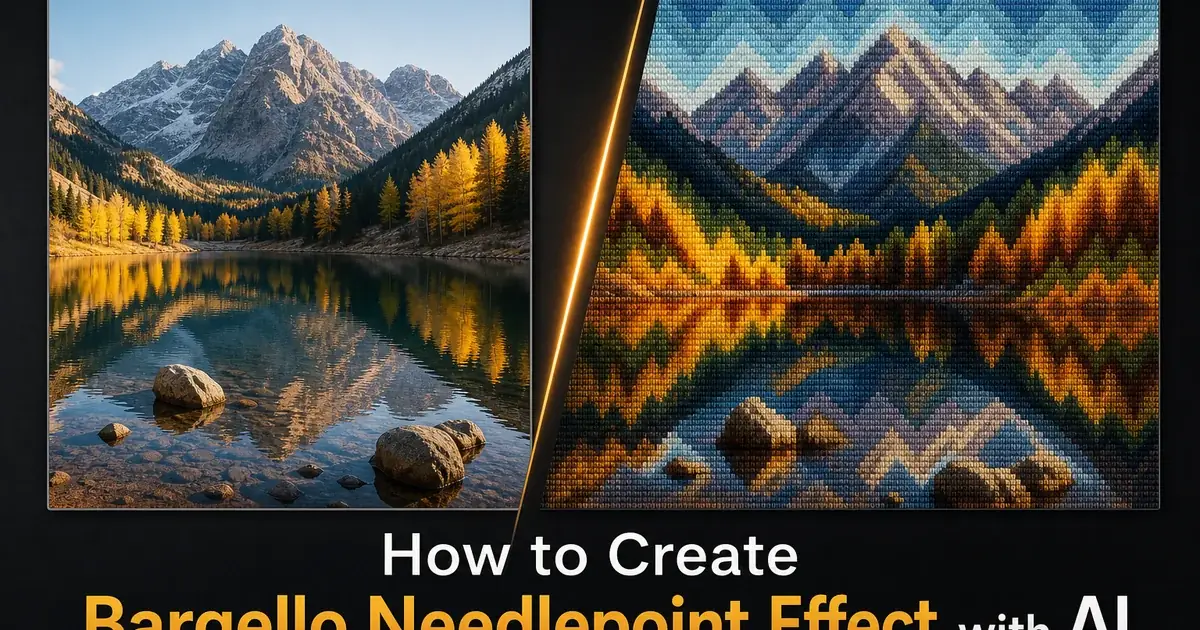
O Bargello — tambem chamado de trabalho florentino, flame stitch ou ponto hungaro — e' uma das formas mais impressionantes de bordado em tela, definida por seus padroes ritmicos em ziguezague que criam a ilusao de optica de ondas ondulantes, chamas ou cordilheiras por meio de graduacoes de cor cuidadosamente escalonadas. Originario da Italia renascentista e nomeado a partir das cadeiras do Palacio Bargello, em Florenca, que exibem alguns dos exemplares mais antigos preservados, esta tecnica utiliza pontos retos e longos trabalhados em progressoes escalonadas sobre a tela para construir padroes ao mesmo tempo geometricos e organicos. A regularidade matematica do escalonamento dos pontos, combinada com a graduacao tonal da paleta de fios, produz efeitos que parecem Op Art seculos antes desse movimento existir, tornando o Bargello uma das tradicoes de bordado mais naturalmente adequadas a reinterpretacao digital por meio da transferencia de estilo com IA.
O que torna o Bargello especialmente forte como efeito fotografico com IA e' a forma como a tecnica traduz informacoes tonais em uma grade estruturada de degraus de cor. Cada padrao Bargello e', em sua essencia, um mapeamento de valor — claro para escuro — em uma estrutura geometrica repetida, que e' exatamente o que os algoritmos de transferencia de estilo neural fazem de melhor. A IA pode analisar os gradientes tonais em uma fotografia fonte e redistribuir esses valores pela grade em ziguezague de picos de um diagrama Bargello, atribuindo cada nivel tonal a uma altura especifica de degrau no padrao de chamas. O resultado preserva a composicao chave de luz e sombra da imagem original, reinterpretando-a completamente na linguagem do bordado em tela: pontos individuais na tela, cores limitadas a paleta escalonada de uma familia de fios e formas definidas pela geometria angular do ziguezague em vez de curvas fotograficas suaves.
Este tutorial percorre o processo completo de transformar qualquer fotografia em um efeito Bargello convincente, desde a selecao de imagens fonte cuja estrutura tonal se ajusta bem a geometria do flame stitch ate o ajuste fino da textura da tela, definicao do ponto e paleta de cores para resultados autenticos. Quer voce queira criar arte de parede que celebre a heranca visual do bordado florentino, projetar padroes textileis personalizados inspirados em suas proprias fotografias ou gerar diagramas de bordado reais que artesaos possam executar com linha fisica, as ferramentas de IA lidam com a complexa traducao do tom fotografico continuo para os degraus discretos do bordado, mantendo a integridade composicional da sua imagem original.
- A transferencia de estilo com IA mapeia gradientes tonais fotograficos na grade em ziguezague escalonada do Bargello, convertendo transicoes de cor suaves nos caracteristicos picos e vales do flame stitch do bordado florentino.
- Os controles de paleta restringem a saida a familias de cores autenticas para fios de bordado. Cinco a sete matizes graduados do claro ao escuro — replicando as limitacoes materiais que dao ao Bargello real seu ritmo tonal distinto.
- Sobreposicoes de textura de tela simulam o tecido de malha aberta com bitola ajustavel, do fino petit point a tela ousada de grande escala, adicionando dimensionalidade tatil ao efeito.
- Multiplas variantes de Bargello sao suportadas, incluindo a classica simetria de quatro vias, o ponto hungaro, motivos de roma e o flame stitch de picos agudos associado a pecas do revival de meados do seculo.
- Opcoes de exportacao incluem arquivos de alta resolucao para impressao com detalhe de ponto visivel, formatos para midias sociais que preservam a textura do bordado mesmo em miniatura e diagramas com grade e mapeamento de cores de linha para uso artesanal real.
Compreendendo a estrutura do padrao Bargello para uma selecao eficaz de imagem fonte
A unidade fundamental do design Bargello e' o ponto escalonado. Um ponto reto vertical que cobre um numero fixo de fios de tela, colocado uma ou mais posicoes de malha acima ou abaixo do vizinho para criar o caracteristico ziguezague ascendente e descendente. A altura do degrau determina o angulo dos picos do ziguezague: degraus pequenos de uma ou duas posicoes de malha produzem ondas suaves e ondulantes. Degraus grandes de quatro ou mais posicoes criam chamas dramaticas de picos agudos. Compreender essa estrutura ajuda a selecionar imagens fonte cujos elementos composicionais se alinham com a geometria que a IA impora. Imagens com fortes faixas horizontais de cor — pores do sol, horizontes oceanicos, formacoes geologicas em camadas — mapeiam-se naturalmente nas faixas horizontais em ziguezague do Bargello, porque a informacao tonal ja flui na direcao em que o padrao e' lido.
A graduacao de cor no Bargello e' igualmente importante a estrutura geometrica. Imagens fonte com transicoes tonais suaves produzem os resultados mais convincentes. Os diagramas tradicionais de Bargello especificam cores exatas de fio para cada degrau no padrao, usando frequentemente cinco a sete matizes dentro de uma unica familia de tons. Imagine uma coluna de linha que vai do azul ceu claro, passando pelo cobalto medio, ate o azul marinho profundo, com cada matiz ocupando um degrau na progressao em ziguezague. Quando a IA encontra uma fotografia com um gradiente suave — um ceu que transita do horizonte brilhante ao zenite profundo, uma sombra caindo gradualmente sobre uma parede — ela mapeia esses tons continuos em degraus de cor discretos que imitam as mudancas de cor fio por fio do bordado real. Imagens com saltos de contraste abruptos produzem efeitos Bargello onde a graduacao escalonada parece forcada em vez de natural.
A escala composicional e' importante porque os padroes Bargello tem um ritmo de repeticao intrinseco que funciona melhor quando as formas principais na imagem fonte correspondem aproximadamente a unidade de repeticao do padrao. Uma paisagem onde o ceu ocupa o terc-o superior, as montanhas o centro e o primeiro plano o terc-o inferior oferece a IA tres amplas zonas tonais para mapear na estrutura em ziguezague, produzindo um resultado onde o padrao e' lido tanto como um design Bargello abstrato quanto como uma paisagem distinta. Imagens muito carregadas com dezenas de pequenos elementos competindo por atencao tendem a produzir traducoes Bargello confusas, onde o padrao de chamas luta com a composicao fonte em vez de realca-la. As melhores imagens fonte para conversao Bargello tem composicoes claras e simples com forte direcionalidade tonal.
- A altura do degrau controla o angulo do ziguezague — degraus pequenos de uma a duas posicoes de malha criam ondas suaves, enquanto degraus de quatro ou mais produzem padroes de chama dramaticos de picos agudos.
- Imagens fonte com gradientes tonais suaves mapeiam-se mais naturalmente nos degraus de cor discretos do Bargello, evitando a aparencia forcada que saltos de contraste abruptos produzem.
- Faixas de cor horizontais em paisagens, pores do sol e formacoes geologicas alinham-se com a estrutura horizontal em ziguezague do Bargello para as traducoes de padrao mais legiveis.
- Composicoes simples com tres ou quatro amplas zonas tonais produzem as conversoes Bargello mais claras, onde o padrao de chamas e a imagem fonte se reforcam mutuamente em vez de competir.
Configurando a geometria do flame stitch e as variantes de padrao
O classico flame stitch Bargello usa uma unica linha em ziguezague repetida em linhas paralelas, cada linha deslocada e colorida um tom mais claro ou mais escuro que a vizinha para criar a ilusao de picos e vales tridimensionais ondulando sobre a tela. A IA reproduz isso estabelecendo um caminho base em ziguezague — definido pela largura do pico, altura do degrau e distancia de repeticao horizontal — e entao duplicando-o verticalmente com a graduacao tonal aplicada. A largura do pico controla quantos pontos aparecem em cada subida e descida antes que a direcao se inverta: picos estreitos de seis a oito pontos criam padroes de chama compactos e energeticos. Picos largos de vinte ou mais pontos produzem formas de onda amplas e suaves. Experimentar a largura do pico e' o ajuste unico de maior impacto para mudar o caracter do efeito Bargello.
Alem do flame stitch basico, diversas variantes de padrao produzem efeitos visuais distintamente diferentes a partir da mesma imagem fonte. O Bargello de quatro vias espelha o padrao em ziguezague nos eixos horizontal e vertical, criando um design de medalhao que se irradia do centro para fora. Particularmente eficaz para imagens em formato quadrado e retratos onde o rosto ocupa naturalmente o centro composicional. O ponto hungaro usa pontos de comprimento variavel dentro de cada degrau em ziguezague em vez de pontos de comprimento uniforme, criando uma textura superficial mais complexa com espacos negativos em forma de diamante entre grupos de pontos. O motivo de roma ou cravo usa caminhos em ziguezague curvos em vez de picos em linha reta, produzindo formas arredondadas que se adequam melhor a sujeitos organicos como flores, frutas e paisagens do que a geometria angular do flame stitch padrao.
O comprimento do ponto e' um controle separado da altura do degrau e afeta grandemente a densidade visual do efeito Bargello. Os pontos Bargello tradicionais cobrem de dois a seis fios de tela em comprimento. Pontos mais curtos produzem uma superficie mais fina e detalhada, onde a malha da tela permanece parcialmente visivel entre as linhas de pontos, enquanto pontos mais longos cobrem mais tela e criam uma superficie mais lisa, semelhante a pintura. A IA imita isso ajustando a largura de cada elemento de ponto renderizado em relacao ao espacamento da grade. Para imagens fotograficas com detalhes finos que se deseja preservar, comprimentos de ponto mais curtos permitem que mais detalhes sobrevivam a traducao Bargello. Para aplicacoes abstratas ou altamente graficas onde o impacto ousado do padrao importa mais que o detalhe da fonte, pontos mais longos produzem os campos de cor saturados e continuos que caracterizam os designs Bargello mais dramaticos.
- A largura do pico e' o ajuste unico de maior impacto — picos estreitos de seis a oito pontos criam chamas compactas e energeticas, enquanto picos largos de vinte ou mais pontos produzem ondas amplas e suaves.
- O Bargello de quatro vias espelha o ziguezague em ambos os eixos para simetria radial de medalhao, ideal para formatos quadrados e retratos com sujeito centralizado.
- O ponto hungaro varia o comprimento dos pontos dentro de cada degrau em ziguezague, criando espacos negativos em diamante e textura superficial mais complexa que o flame stitch uniforme.
- Comprimentos de ponto mais curtos preservam mais detalhes da imagem fonte na traducao Bargello, enquanto pontos mais longos criam os campos de cor ousados e saturados de designs dramaticos de cobertura total.
Projetando a paleta de cores para resultados Bargello autenticos
A paleta de cores e' o que da ao bordado Bargello sua assinatura visual distinta. A disciplina rigorosa de usar matizes graduados dentro de um numero limitado de familias de tons, progredindo metodicamente do claro ao escuro, produz os efeitos luminosos ondulantes que tornaram esta tecnica popular por mais de cinco seculos. O Bargello florentino tradicional usa frequentemente duas a quatro familias de cor, cada uma contendo cinco a sete matizes graduados, para uma paleta total de dez a vinte e oito cores distintas. O editor de paleta da IA permite definir essas familias e seus degraus de graduacao, e entao mapeia os valores tonais da sua fotografia fonte para essa paleta restrita. A restricao em si e' o motor criativo: ao forcar o tom fotografico continuo em degraus de cor discretos de fio, a IA produz as caracteristicas faixas e escalonamentos que sao lidos como bordado em vez de fotografia filtrada.
Escolher entre abordagens de paleta tradicionais e modernas muda grandemente o caracter do efeito Bargello. As paletas tradicionais usam familias de cores analogas — azuis e azul-esverdeados, vermelhos e laranjas, dourados e marrons — com transicoes suaves entre familias adjacentes onde a extremidade quente de uma familia encontra a extremidade fria da seguinte. Essas paletas produzem os efeitos harmoniosos de tons de joia vistos em pecas historicas de Bargello dos seculos XVII e XVIII. As paletas modernas quebram essas regras propositalmente, usando familias de cores complementares ou split-complementares com maior contraste entre degraus adjacentes e mudancas de matiz mais dramaticas entre as familias. Uma paleta moderna pode ir do verde-marinho profundo ao chartreuse brilhante ate o rosa intenso, produzindo efeitos que sao lidos como Bargello na estrutura mas como design grafico moderno na sensibilidade cromatica.
A interacao entre paleta e geometria do padrao determina o impacto visual final do efeito Bargello. Um ziguezague de degrau alto (picos agudos) com uma paleta estreitamente graduada produz resultados sutis e sofisticados, onde a geometria do padrao domina e as mudancas de cor sao suaves. A mesma geometria de picos agudos com uma paleta de alto contraste produz efeitos dramaticos, quase psicodelicos, onde tanto o padrao quanto a cor competem por atencao. Por outro lado, geometria de ondas suaves com paleta estreitamente graduada produz superficies calmas e meditativas. Ondas suaves com alto contraste criam uma qualidade grafica ousada. Testar duas ou tres opcoes de paleta contra a geometria do padrao escolhida antes de prosseguir com a exportacao final e' a maneira mais eficiente de encontrar a combinacao que melhor serve sua intencao criativa e os pontos fortes composicionais da sua imagem fonte.
- As paletas tradicionais de Bargello usam duas a quatro familias de cores analogas, cada uma com cinco a sete matizes graduados, produzindo as harmonias de tons de joia das pecas florentinas historicas.
- As paletas contemporaneas quebram as regras de cor tradicionais com familias de cores complementares e contraste dramatico entre degraus adjacentes para impacto grafico moderno.
- Paleta e geometria interagem — picos agudos com graduacao suave parecem sofisticados, enquanto picos agudos com alto contraste criam efeitos dramaticos quase psicodelicos.
- Testar duas a tres opcoes de paleta contra a geometria do padrao escolhida antes da exportacao final e' o caminho mais eficiente para o resultado visual mais forte.
Textura da tela, renderizacao do ponto e realismo dimensional
A diferenca entre um efeito Bargello convincente e um filtro generico em ziguezague reside quase inteiramente na renderizacao das qualidades fisicas texteis: a malha visivel da tela, a textura dimensional dos pontos de fio e a forma como a luz interage com a superficie da fibra. A sobreposicao de textura da tela imita o tecido de malha aberta que serve como fundamento estrutural para todo o bordado em tela, com fios horizontais e verticais que se cruzam criando a grade de orificios por onde a agulha passa. Ajustar a bitola da tela muda a escala visual dessa grade: uma malha de alta bitola de 18 ou 22 pontos mostra orificios finos e bem espacados, adequados para trabalhos detalhados de petit point. Uma malha de baixa bitola de 7 ou 10 pontos mostra orificios grandes e claramente visiveis que dao ao efeito um caracter textil ousado. A tela deve ser sutilmente visivel nos lacos entre as linhas de pontos e nas bordas do design, exatamente como no bordado real.
A renderizacao de pontos individuais adiciona o detalhe em nivel de fio que torna o efeito tridimensional em vez de plano. Os pontos Bargello reais sao feitos de la, seda ou algodao que tem uma leve torcao visivel a curta distancia, criando cristas paralelas que capturam a luz ao longo de seu comprimento e produzem um brilho direcional caracteristico. A IA imita essa textura de fibra renderizando cada ponto com sutis estriacoes longitudinais e um leve realce ao longo da borda superior, onde a luz incidiria sobre uma superficie de fio elevada. Os pontos nao devem ser perfeitamente uniformes. O Bargello real bordado a mao tem ligeiras variacoes de tensao que fazem com que pontos individuais sejam fracionalmente mais largos ou mais estreitos, levemente inclinados ou marginalmente diferentes em cobertura. Essas microimperfeicoes sao o que distingue uma simulacao artesanal de um padrao mecanico e dao ao efeito calor e realismo.
A interacao de sombras e realces entre pontos adjacentes cria a qualidade dimensional que faz o Bargello parecer uma superficie textil fisica em vez de uma imagem plana. Onde uma linha de pontos sobrepoe a borda da linha adjacente, aparece uma linha de sombra estreita na transicao. Onde o ziguezague muda de direcao em um pico ou vale, os pontos se comprimem ou se alargam ligeiramente, criando mudancas de densidade visiveis. A malha da tela aparece mais visivelmente em areas onde a cobertura dos pontos e' mais fina, principalmente nos pontos de virada do ziguezague onde os verdadeiros bordadores precisam gerenciar cuidadosamente a tensao da linha. Todos esses detalhes fisicos sao simulados pelo motor de renderizacao de textura. Ajustar sua intensidade de sutil a pronunciado controla se o efeito final e' lido como uma suave impressao de bordado ou como uma fotografia hiper-realista em close-up de um textil realmente costurado.
- O ajuste de bitola da tela escala a grade visivel — bitola alta de 18 ou 22 pontos para detalhes finos, bitola baixa de 7 ou 10 pontos para caracter textil ousado com orificios de malha claramente visiveis.
- A renderizacao dos pontos simula a torcao do fio, o brilho direcional e as leves variacoes de tensao que distinguem a simulacao artesanal da repeticao mecanica de padrao.
- Linhas de sombra entre linhas de pontos adjacentes e mudancas de densidade nos pontos de virada do ziguezague criam a qualidade dimensional de uma superficie textil fisica.
- Os controles de intensidade de textura permitem ajustar o efeito de uma suave impressao de bordado a um close-up textil hiper-realista, dependendo da distancia de visualizacao e da intencao criativa.
Aplicacoes criativas e formatos de saida para imagens transformadas em Bargello
Fotografias transformadas em Bargello servem a uma ampla gama de aplicacoes criativas e comerciais que vao muito alem da simples filtragem fotografica. No design de interiores e decoracao, efeitos Bargello aplicados a fotografias de paisagens ou composicoes abstratas produzem arte de parede que combina o calor e a sugestao tatil do artesanato textil com o impacto composicional da fotografia. Particularmente eficaz quando impresso em suporte de tela que adiciona textura de tecido real a superficie de bordado simulada. Essas pecas atendem ao crescente mercado de decoracao inspirada em artesanato, que valoriza a estetica textil tradicional sem exigir os meses de bordado a mao que o trabalho Bargello original demandaria. A saida da IA em 300 DPI fornece detalhes suficientes para impressoes de ate tamanho poster, onde a textura dos pontos individuais permanece visivel e contribui para a experiencia visual.
Para designers texteis e de superficie, imagens transformadas em Bargello servem como ponto de partida para o desenvolvimento de padroes repetidos. A estrutura de repeticao horizontal intrinseca da geometria flame stitch significa que a saida da IA se repete naturalmente na direcao horizontal. Com uma selecao cuidadosa da imagem fonte e configuracao da largura do pico, a repeticao vertical tambem pode ser alcancada. Esses padroes Bargello repetidos podem ser aplicados a estamparia de tecidos, design de papeis de parede, papel de presente e outras aplicacoes de superficie onde a estetica artesanal do bordado agrega valor percebido e interesse visual. Designers podem usar a IA para prototipar rapidamente dezenas de variacoes de padrao a partir de uma unica imagem fonte, ajustando largura do pico, altura do degrau, paleta de cores e bitola da tela, para entao selecionar as opcoes mais fortes para desenvolvimento produtivo. Um fluxo de trabalho que levaria semanas de diagramacao manual e' comprimido em minutos de exploracao assistida por IA.
Talvez a aplicacao mais direta seja a geracao de diagramas de bordado reais que artesaos podem usar como padroes para o verdadeiro Bargello. Exportando com a sobreposicao de grade ativada e gerando uma chave de cores que mapeia cada degrau da paleta da IA para numeros de cor especificos de marcas de linha — DMC, Appleton, Paternayan ou outras grandes marcas de fios — a saida da IA se torna um padrao artesanal funcional que traduz uma fotografia pessoal em um design Bargello viavel para bordado. Isso preenche a lacuna entre a criatividade digital e a fabricacao fisica, permitindo que alguem transforme uma fotografia favorita de ferias, um retrato de familia ou uma cena natural em um projeto de bordado com contagens de pontos, quantidades de fio e especificacoes de cor precisamente calculadas. A IA lida com a complexa traducao matematica do tom fotografico continuo para o posicionamento discreto de pontos em grade que, de outra forma, exigiria habilidades especializadas de design de diagramas.
- A arte de parede impressa em suporte de tela combina textura de bordado simulada com sensacao real de tecido, atendendo ao mercado de decoracao inspirada em artesanato sem meses de bordado a mao.
- Designers de padroes de superficie usam a saida IA do Bargello como ponto de partida para repeticoes em estamparia de tecidos, papeis de parede e papel de presente com valor estetico artesanal.
- A prototipagem rapida de dezenas de variacoes de padrao a partir de uma unica imagem fonte comprime semanas de diagramacao manual em minutos de exploracao assistida por IA.
- A exportacao com grade e mapeamento de cores de linha gera padroes artesanais funcionais que traduzem fotografias pessoais em designs Bargello viaveis para bordado com quantidades de fio calculadas.
How to do it
- 1
Select a source photo with strong tonal gradients suitable for flame stitch interpretation
Choose an image that features smooth color transitions and clear tonal contrast. Landscapes with graduated skies, architectural facades with repeating vertical elements, or portraits with dramatic lighting all translate well into Bargello patterns. The flame stitch motif relies on stepped zigzag progressions of color. Source images with natural gradients give the AI meaningful tonal information to map onto the characteristic peaked wave structure. Avoid images with very fine detail or uniform flat color, as these leave the Bargello algorithm without enough tonal variation to produce the rhythmic color stepping that defines the style.
- 2
Apply the Bargello flame stitch pattern using AI style transfer settings
Use the AI style controls to map your source image onto a Bargello grid structure, selecting the flame stitch variant that best suits your composition. The classic four-way pattern for symmetrical subjects, the Hungarian point for elongated vertical compositions, or the pomegranate motif for organic rounded forms. Adjust the stitch step height to control the amplitude of the zigzag peaks and the color graduation depth to determine how many tonal steps appear between the lightest and darkest values. Higher step counts produce smoother flame curves while lower counts create the bold, graphic zigzag associated with mid-century Bargello revival pieces.
- 3
Refine the color palette to match traditional or contemporary Bargello yarn palettes
Traditional Bargello uses families of closely related hues stepping from light to dark. Five to seven shades of a single color family such as teal progressing from near-white to deep ocean, or flame tones moving from pale gold through orange to deep crimson. Use the palette editor to constrain the AI output to authentic yarn-weight color ranges, or select a modern palette with higher contrast jumps between adjacent steps for a modern interpretation. The palette discipline is what separates convincing Bargello from generic zigzag patterns. Real needlepoint is limited to the colors available in wool and silk thread, and honoring that constraint produces more authentic results.
- 4
Adjust canvas texture and stitch definition for realistic needlework appearance
Enable the canvas texture overlay to simulate the woven mesh ground fabric visible between and beneath stitches in real Bargello work. Control the canvas gauge — the number of mesh intersections per inch — to match the scale of your output: petit point gauges of 18 or 22 count produce fine, detailed effects suited to close viewing. 10-count or 7-count canvas produces bold graphic effects better suited to large prints and wall art. Increase stitch definition to make individual yarn strands visible with their characteristic slight twist and light-catching sheen. This adds the tactile dimensionality that distinguishes needlework effects from flat graphic zigzag patterns.
- 5
Export the Bargello effect image for print, digital display, or craft reference use
Save your finished Bargello change at the resolution right for its intended use. For wall art and home decor printing, export at 300 DPI with the canvas texture at full detail so the needlework character is visible at close viewing distance. For social media and digital sharing, reduce to screen resolution but maintain the stitch texture to preserve the handcraft look at thumbnail scale. For crafters who want to use the AI output as an actual needlework pattern reference, export with the grid overlay enabled and a color key that maps each AI palette step to specific thread brand and color numbers for DMC, Appleton, or Paternayan yarn ranges.
Fontes
- Bargello: Florentine Canvas Work — Victoria and Albert Museum — Victoria and Albert Museum
- The History and Techniques of Bargello Needlepoint — The Spruce Crafts
- AI Style Transfer: Neural Approaches to Artistic Rendering — arXiv — Gatys, Ecker, and Bethge