
Como adicionar efeito de neve às fotos com IA — Magic Eraser
Adicione efeitos realistas de neve e inverno a qualquer foto com geração por IA. Guia passo a passo sobre flocos caindo, acúmulo nas superfícies, gradação de cor de inverno e coerência atmosférica.

Product Marketing
Revisado por Magic Eraser Editorial ·
Índice
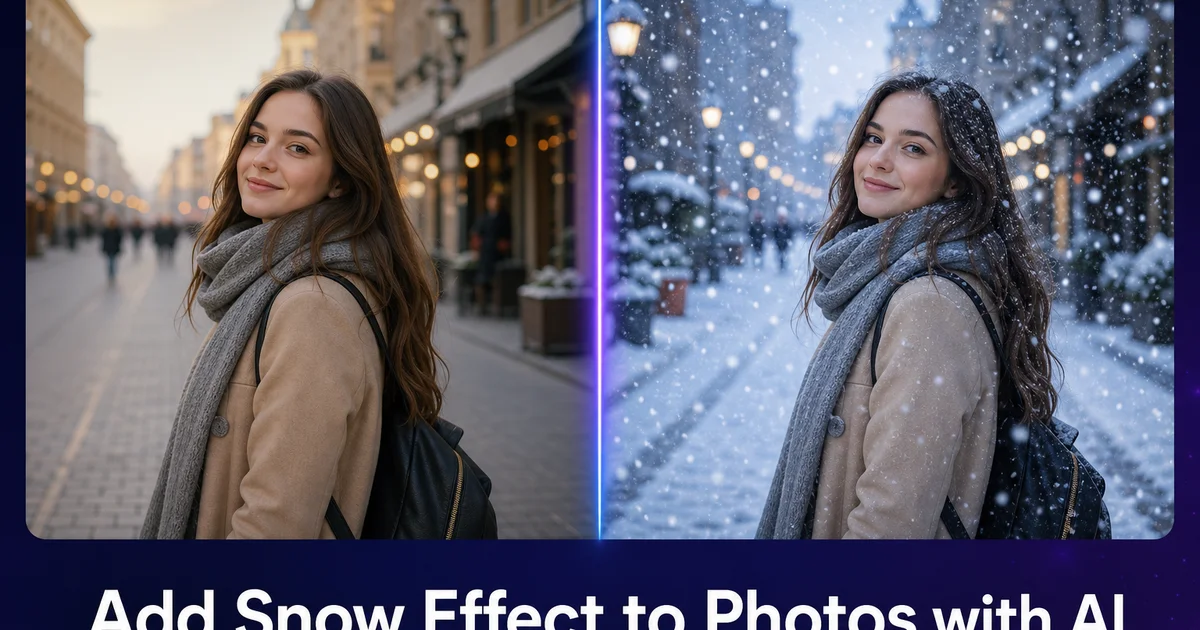
A neve transforma qualquer cena em algo mágico. Uma rua familiar vira um país das maravilhas do inverno, um telhado comum vira um cartão de Natal e uma árvore desfolhada vira uma escultura de galhos coroados de branco. Mas capturar uma nevasca genuína em fotografia é notavelmente difícil. As tempestades de neve são imprevisíveis e muitas vezes vêm acompanhadas de pouca luz, ventos fortes e um frio desconfortável que desestimula sessões de fotos prolongadas. A breve janela entre a neve fresca e o momento em que o tráfego a transforma em lama cinzenta pode durar apenas algumas horas. E muitos fotógrafos simplesmente não vivem em climas onde nevadas fotogênicas ocorrem com regularidade. O resultado é que a maioria das pessoas tem muitas fotos de lugares e momentos que adoraria ver sob a neve, mas o tempo nunca colaborou.
Os efeitos meteorológicos por IA resolvem isso gerando neve fisicamente plausível dentro de fotos existentes. Diferentemente dos simples filtros de sobreposição que colam um padrão genérico de flocos sobre a imagem inteira sem considerar a profundidade ou a geometria da cena, a geração de neve por IA compreende a estrutura tridimensional da cena. Ela posiciona os flocos que caem no tamanho correto conforme a profundidade estimada, adiciona acúmulo nas superfícies onde a neve se depositaria fisicamente e ajusta a névoa de atmosfera que acompanha uma nevasca real. Desloca a temperatura de cor para os tons cinza-azulados frios característicos da luz invernal nublada. A diferença entre um efeito de neve gerado por IA e um filtro de sobreposição básico é imediatamente perceptível. O resultado da IA parece uma foto tirada durante uma nevasca real, enquanto a sobreposição parece uma foto com adesivos por cima.
Este guia cobre todo o processo de adicionar neve realista às fotos com AI Filter, AI Create e AI Enhance. Da seleção das fotos de origem certas à aplicação de neve caindo, acúmulo nas superfícies, ajustes de atmosfera e verificações finais de realismo. As técnicas se aplicam a fotos pessoais às quais você quer dar um ar de inverno, materiais de marketing sazonal, cartões de felicitações de Natal e conteúdo para redes sociais. Qualquer projeto criativo em que uma cena nevada seria mais impactante do que a foto original com tempo limpo.
- A geração de neve por IA respeita a profundidade da cena — os flocos em primeiro plano são maiores e borrados pelo movimento, os do plano intermediário mais nítidos e os de fundo, pontos minúsculos.
- O acúmulo em telhados, galhos e parapeitos é tão importante quanto os flocos que caem para criar uma cena de inverno convincente.
- O deslocamento da temperatura de cor para tons cinza-azulados frios e a redução da saturação unificam a cena original com os elementos de neve adicionados.
- Uma neve fisicamente coerente evita o acúmulo flutuante, respeita as direções das sombras e mantém a variação de brilho entre as áreas iluminadas e as sombreadas.
- As melhores fotos de origem têm luz nublada ou fria e superfícies horizontais onde a neve se assenta naturalmente — evite cenas de verão luminosas com folhagem verde.
A física da neve realista: o que torna a geração por IA convincente
A neve realista nas fotos segue regras físicas específicas que os espectadores compreendem de forma intuitiva, mesmo sem conseguir articulá-las. Os flocos que caem são objetos tridimensionais que interagem com a luz, o vento e a profundidade. Não são pontos brancos chapados espalhados ao acaso pelo quadro. Perto da câmera, os flocos individuais aparecem como formas distintas com simetria de seis pontas. Seu movimento cria rastros alongados nas fotos por causa do tempo de exposição. À média distância, os flocos surgem como pequenos pontos brancos mais nítidos que os do primeiro plano, porque seu movimento aparente sobre o sensor é mais lento. Ao fundo, a nevasca cria uma névoa esbranquiçada geral que reduz o contraste e a nitidez dos objetos distantes. Esse efeito de atmosfera é tão importante quanto os flocos individuais para tornar a cena de inverno crível.
O acúmulo de neve segue princípios gravitacionais e aerodinâmicos que a IA precisa reproduzir. A neve se assenta nas superfícies voltadas para cima. O topo dos telhados, a face superior dos galhos, o topo dos postes das cercas, os capôs e tetos dos carros. Ela não adere às superfícies verticais, exceto em nevascas muito intensas e úmidas. O vento cria montes contra os obstáculos a barlavento e deixa o lado a sotavento bastante limpo. A profundidade do acúmulo deve ser coerente em superfícies semelhantes a alturas semelhantes. Se um telhado tem sete centímetros de neve, os telhados vizinhos à mesma altura devem ter quantidades parecidas, a menos que estejam abrigados ou expostos a condições de vento diferentes. São essas regras de coerência que a IA aplica ao gerar o acúmulo nas superfícies.
As propriedades ópticas da própria neve precisam estar corretas para que o efeito seja crível. A neve fresca é um dos materiais naturais mais reflexivos, com um albedo de 80 a 90 por cento. Reflete a maior parte da luz que a atinge, e é por isso que as cenas nevadas são tão brilhantes mesmo em dias nublados. Mas, nas fotos, a neve não é de um branco puro. Sob luz direta, a neve aparece de um branco intenso com sutis sombras azuis. Sob céus nublados, a neve assume um tom cinza-azulado que combina com a cor da luz difusa do céu. Ao pôr do sol, a neve fica rosa e laranja. A IA ajusta a cor da neve para combinar com as condições de iluminação de cada foto, evitando o erro comum de amador de adicionar neve de um branco puro a uma cena com luz quente ou colorida.
- Os flocos que caem mostram tamanho e desfoque de movimento dependentes da profundidade — rastros grandes no primeiro plano, pontos nítidos no plano intermediário e névoa de atmosfera ao fundo.
- O acúmulo segue a gravidade — a neve se assenta nas superfícies voltadas para cima e não adere às verticais, exceto em condições intensas e úmidas.
- Os padrões dos montes refletem a direção do vento, com acúmulo contra os obstáculos a barlavento e áreas limpas a sotavento.
- A cor da neve combina com a iluminação da cena — cinza-azulado sob céus nublados, branco intenso sob luz direta e tons quentes ao amanhecer ou ao pôr do sol.
Escolher a foto de origem certa para os efeitos de neve
A foto de origem determina oitenta por cento de quão convincente será o efeito de neve final. Escolher a imagem de partida certa é mais importante do que qualquer técnica de edição. A foto de origem ideal tem luz nublada ou plana. A luz suave e difusa que acompanha uma nevasca real produz uma iluminação uniforme, sem sombras direcionais marcadas. Uma foto tirada em um dia de outono nublado é um excelente ponto de partida, porque a qualidade da luz já combina com as condições de inverno, as árvores podem estar desfolhadas ou quase. O chão pode estar marrom ou cinza em vez de verde vivo. Fotos tiradas em dias de neblina também funcionam bem, porque a névoa de atmosfera é semelhante à visibilidade reduzida durante uma nevasca.
Evite fotos com elementos visuais que contradigam fortemente o clima de inverno. Gramados de verde intenso, flores desabrochadas, pessoas de short e camiseta, piscinas. Sombras de verão marcadas são difíceis de conciliar com a neve mesmo após uma gradação de cor agressiva. Você pode escurecer a folhagem verde e deslocar sua cor para o marrom com o AI Filter. Mas os formatos das folhas em si continuam parecendo vegetação de verão exuberante, em vez dos galhos desfolhados ou das agulhas esparsas típicas das cenas de inverno. As árvores perenes — pinheiros, abetos, cedros — são a exceção, porque mantêm as agulhas o ano todo e ficam naturais com neve acumulada nos galhos.
A arquitetura e as cenas urbanas são sobretudo bons candidatos para os efeitos de neve, porque os edifícios parecem iguais em qualquer estação e oferecem abundantes superfícies horizontais para o acúmulo. Uma foto de uma rua charmosa com lojas, de uma igreja com torre ou de um bairro de casas vira, no mesmo instante, uma cena de cartão de Natal com a adição de neve nos telhados, nas tampas dos postes e nos parapeitos das janelas. As bordas duras dos elementos arquitetônicos também facilitam que a IA determine onde estão as superfícies e aplique o acúmulo com precisão. O limite entre um telhado escuro e o céu é inequívoco, enquanto o limite entre um arbusto difuso e o ar atrás dele é muito mais difícil de detectar com exatidão.
- A luz nublada ou plana combina com as condições reais de nevasca — evite as sombras direcionais marcadas e a luz de céu azul que contradizem o clima de inverno.
- Fotos de outono com árvores desfolhadas e chão marrom são excelentes pontos de partida, porque só a neve precisa ser adicionada, não uma troca completa de estação.
- Folhagem verde, roupas de verão e piscinas criam contradições irreconciliáveis — as árvores perenes são a exceção, já que mantêm as agulhas o ano todo.
- A arquitetura oferece bordas duras e superfícies horizontais claras que tornam precisa a colocação da neve e inequívocos os padrões de acúmulo.
Sobrepor a intensidade da nevasca para profundidade e atmosfera
Uma nevasca convincente tem profundidade — não é uma sobreposição plana, mas um campo de partículas tridimensional que se estende da câmera ao horizonte. A IA gera essa profundidade automaticamente variando o tamanho, a nitidez e o brilho dos flocos. E também a densidade, com base na distância estimada até a câmera. Mas é você quem controla a intensidade geral da nevasca. Essa escolha afeta enormemente a atmosfera e o realismo do resultado. Uma nevasca leve — alguns flocos esparsos descendo preguiçosamente — adiciona um toque de inverno suave e romântico, que funciona para fundos de retrato, marketing de fim de ano e uma temática sazonal discreta. Os flocos são esparsos o bastante para se enxergar claramente através deles, e o acúmulo nas superfícies é mínimo. Uma leve geada em vez de um manto espesso.
Uma nevasca média cria o clássico efeito de país das maravilhas do inverno. Uma neve constante e regular, com densidade suficiente para ter destaque visual, mas não tão espessa a ponto de obscurecer a cena. Essa intensidade é a mais versátil e a mais comum na fotografia de inverno profissional. Os flocos são densos o bastante para criar um efeito de atmosfera coeso, e o acúmulo nas superfícies é considerável. Cerca de cinco centímetros nas superfícies planas, tampas visíveis nos postes das cercas e nos galhos. A névoa de atmosfera reduz moderadamente o contraste do fundo, criando uma sensação de profundidade sem esconder os elementos distantes. A nevasca média funciona para praticamente qualquer aplicação — cartões de felicitações, redes sociais, materiais de marketing e aprimoramento de fotos pessoais.
Uma nevasca intensa se aproxima das condições de blizzard — cortinas espessas de neve que reduzem muito a visibilidade, acúmulo abundante em todas as superfícies. Uma forte névoa de atmosfera que transforma o fundo em uma bruma branca. Essa intensidade cria imagens dramáticas e atmosféricas, que funcionam para projetos artísticos e narrativa de atmosfera, mas é extrema demais para a maioria dos usos de marketing e pessoais. Na neve intensa, os elementos em primeiro plano continuam visíveis, mas o plano intermediário fica suave e o fundo desaparece por completo. A IA precisa lidar com isso corretamente, aumentando a névoa de atmosfera proporcionalmente à densidade dos flocos. Flocos densos com um fundo perfeitamente nítido é fisicamente impossível e parece falso no mesmo instante.
- Uma nevasca leve adiciona uma atmosfera de inverno romântica e suave, com flocos esparsos e acúmulo mínimo — ideal para fundos de retrato e uma temática sazonal discreta.
- A intensidade média cria o clássico país das maravilhas do inverno, com neve constante e visível e cerca de cinco centímetros de acúmulo — a escolha mais versátil para qualquer aplicação.
- Uma nevasca intensa produz condições de blizzard dramáticas, com visibilidade reduzida e acúmulo abundante — poderosa para o trabalho artístico, mas extrema demais para a maioria dos usos comerciais.
- A névoa de atmosfera precisa aumentar proporcionalmente à densidade dos flocos — flocos densos com fundos nítidos é fisicamente impossível e quebra a ilusão.
Gradação de cor para a atmosfera de inverno
Adicionar flocos e acúmulo é só metade da criação de uma cena de inverno convincente. A outra metade consiste em ajustar a cor e a atmosfera gerais da foto para que combinem com a aparência real do inverno. As cenas de inverno reais têm uma paleta de cores distinta que difere de qualquer outra estação. A fonte de luz dominante durante uma nevasca é um céu nublado, que produz luz difusa com uma temperatura de cor entre 6500 K e 7500 K. Muito mais fria (mais azul) que os 5500 K da luz do dia limpa ou os tons quentes da hora dourada. Essa luz fria permeia a cena inteira, deslocando todas as cores para o azul e reduzindo os tons quentes que caracterizam as fotos de verão e outono.
A cor das sombras nas cenas nevadas é sobretudo distinta e importante para o realismo. A neve reflete a luz do céu nas áreas de sombra e, como o céu é azul mesmo quando nublado, as sombras sobre a neve têm um tom azul pronunciado, bem diferente das sombras neutras ou quentes de outros contextos. Esse efeito de sombra azul é uma das pistas visuais mais fortes de que uma imagem é uma cena de inverno genuína. O AI Filter pode deslocar seletivamente os tons das sombras para o azul, mantendo as altas-luzes e os meios-tons mais próximos do neutro, reproduzindo essa característica sem deixar a imagem inteira monotonamente azul. O equilíbrio entre sombras frias e meios-tons neutros cria o agradável contraste de cor que os fotógrafos de inverno profissionais buscam.
A redução de saturação é o ajuste de cor final que unifica a cena. O manto de neve elimina a variedade de cores do solo. Grama, flores, folhas caídas e terra nua ficam todos escondidos sob uma superfície branca uniforme. A luz nublada reduz a vivacidade das cores restantes. Um celeiro vermelho que parece saturado e vívido sob o sol de verão parece esmaecido e levemente azulado sob o céu nublado de inverno. Reduzir a saturação geral da foto em dez a vinte por cento imita essa dessaturação natural. Seja seletivo no que dessatura. Reduza as cores do ambiente mais do que os tons de pele se houver pessoas, e mantenha as decorações de Natal e as luzes coloridas em uma saturação mais alta para criar pontos focais visuais na paleta de inverno dessaturada.
- A luz nublada de inverno vai de 6500 K a 7500 K — muito mais fria que a luz do dia de verão — exigindo um deslocamento da temperatura de cor para o azul a fim de manter a coerência.
- A neve reflete a luz azul do céu nas sombras, criando os distintos tons de sombra azuis que são uma das pistas visuais mais fortes de uma cena de inverno genuína.
- Uma redução geral de saturação de dez a vinte por cento imita a paleta de cores esmaecida causada pelo manto de neve e pela iluminação nublada.
- A saturação seletiva preserva os tons de pele e as decorações de Natal enquanto dessatura os elementos do ambiente, para um equilíbrio de cor de inverno de aparência natural.
Marketing sazonal e aplicações de fim de ano dos efeitos de neve
Os efeitos de neve têm aplicações comerciais imediatas para empresas que precisam de imagens de marketing sazonal. As lojas de varejo que divulgam promoções de fim de ano podem transformar suas fotos de vitrine existentes em cenas de inverno sem esperar por uma nevasca real. Ou sem morar em um clima onde neva. A mesma foto de vitrine usada nas promoções de outono vira um cartão de Natal com a adição de neve no toldo, flocos no ar e uma gradação de cor fria. Os corretores de imóveis podem mostrar os imóveis em sua melhor versão de inverno. Uma casa com as linhas do telhado cobertas de neve e um quintal levemente coberto de geada transmite um aconchegante charme de fim de ano que as fotos de venda de verão não conseguem igualar.
As empresas de viagens e hospitalidade se beneficiam sobretudo dos efeitos de neve. Uma estação de esqui que fotografa suas instalações durante as obras de verão pode mostrar de antemão a experiência da temporada de inverno antes da primeira nevasca. Uma pousada de montanha pode mostrar a mesma vista de seu deck em várias estações, incluindo uma cena de inverno nevada que pode ser difícil de fotografar em condições reais de blizzard, quando não há hóspedes e a visibilidade é ruim. O marketing de destinos de fim de ano — mercados de Natal, festivais de inverno, eventos sazonais — pode preparar os materiais promocionais com meses de antecedência usando fotos do local com neve aplicada por IA, garantindo que as campanhas sejam lançadas no prazo, independentemente da colaboração do tempo.
A criação de conteúdo para redes sociais é talvez a aplicação de maior volume. Criadores de conteúdo, influenciadores e marcas que publicam conteúdo sazonal precisam de imagens de inverno em um cronograma que o tempo nem sempre respeita. Uma blogueira de moda que fotografa looks de inverno em uma cidade onde raramente neva pode adicionar uma atmosfera de inverno convincente a cada foto ao ar livre. Um blogueiro de gastronomia pode dar um ar de inverno às fotos do terraço de um restaurante de outono para o conteúdo de dezembro. A chave para o uso comercial é manter o realismo. Os espectadores que detectam neve falsa associam a artificialidade à marca, enquanto os efeitos de neve convincentes criam associações emocionais positivas com a estação do inverno que se transferem para os produtos ou serviços divulgados.
- As lojas de varejo podem transformar fotos de vitrine existentes em cenas de fim de ano sem esperar por uma nevasca real nem morar em um clima nevado.
- As empresas de viagens e hospitalidade podem mostrar de antemão as experiências de inverno e preparar o marketing sazonal com meses de antecedência em relação à real colaboração do tempo.
- Os criadores de redes sociais usam os efeitos de neve para produzir conteúdo sazonal no prazo, independentemente das condições meteorológicas locais.
- Manter o realismo nos efeitos de neve comerciais é crucial — a artificialidade detectada cria associações de marca negativas, enquanto os efeitos convincentes transmitem emoções de inverno positivas.
How to do it
- 1
Choose a photo with a scene and lighting suitable for winter weather
Not every photograph is a good candidate for added snow. The best starting images have overcast or cool-toned lighting that is consistent with winter weather. Bright blue skies and warm golden-hour light will clash with snow because those conditions rarely accompany snowfall in reality. Scenes with horizontal surfaces where snow would naturally accumulate. Rooftops, tree branches, sidewalks, fences, car hoods, and windowsills — provide anchor points that make the snow look grounded in the setting. Outdoor scenes work best, but indoor scenes photographed through windows can also work if the view outside is suitable. Avoid scenes with green foliage that is clearly summer vegetation, as the contrast between lush greenery and snow breaks the illusion right away.
- 2
Apply AI Filter snow overlay to add falling snowflakes
Upload your photo to AI Filter and select the snow or winter weather effect. The AI generates a particle field of snowflakes that respects the depth of your scene. Snowflakes in the foreground are larger and slightly blurred from motion, snowflakes in the middle ground are smaller and sharper, and snowflakes in the far background are tiny points. The particle distribution avoids placing snowflakes in areas that would be physically shielded from falling snow, such as under overhangs or beneath dense tree canopies. Adjust the snowfall intensity from light flurries to heavy snowfall depending on the mood you want. Light flurries add a gentle winter touch while heavy snow creates a dramatic blizzard atmosphere.
- 3
Add snow accumulation on surfaces using AI generation
Falling snowflakes alone do not create a convincing winter scene — real snow also accumulates on surfaces. Use AI Create or generative fill to add snow buildup on the horizontal and near-horizontal surfaces in your scene. The AI understands how snow accumulates physically: it piles on flat surfaces, clings to the tops of curved surfaces while sliding off steep sides, drifts against vertical barriers like walls and fences. Caps fence posts and railing tops with rounded mounds. The accumulation should be consistent with the snowfall intensity. Light flurries produce only a light dusting on surfaces, while heavy snow creates thick blankets. The AI matches the snow color and brightness to the scene lighting, avoiding the common mistake of snow that is pure white in a scene with warm or dim lighting.
- 4
Adjust the color temperature and atmosphere for winter consistency
Real winter scenes have distinct color traits that differ from other seasons. Overcast skies during snowfall produce soft, diffused light with a blue-gray color temperature. Shadows in snow are distinctly blue rather than the warm brown or neutral gray of other seasons. The overall scene saturation drops because snow cover reduces the variety of visible colors and overcast light suppresses color vibrancy. Use AI Filter to shift your photo's color temperature cooler, reduce saturation slightly. Add a subtle blue tint to shadow areas. These adjustments unify the original scene elements with the added snow, creating a consistent winter atmosphere rather than snow that appears pasted onto a summer photo.
- 5
Review the final result for physical consistency and realism
Examine the completed snow scene for elements that break the illusion. Snow should not appear to float in mid-air except as falling snowflakes. Any surface accumulation must rest on a physical surface. Shadows cast by objects should be visible on the snow surface, not hidden beneath it. If people are present, they should not have snow accumulating on their heads and shoulders if they appear to be in motion. Stationary figures and objects should show appropriate accumulation. Check that the snow brightness is consistent across the scene. Snow in shadow areas should be darker than snow in direct light. Finally, verify that the falling snowflakes are consistent in direction, suggesting a single wind direction rather than flakes randomly scattered with no pattern.
Fontes
- Physics-Based Rendering of Snow and Ice in Computer Graphics — ACM Digital Library
- Weather Effects Synthesis in Images Using Deep Learning — arXiv
- Visual Perception of Snow: How Humans Judge Realism in Winter Scenes — Journal of Vision